
1. Sarrera
This manual provides essential information for setting up, operating, and maintaining your Samsung UN65NU8000FXZA Flat 65" 4K UHD 8 Series Smart LED TV. The NU8000 series offers advanced smart features with voice control, stunning HDR Plus depth, and a wide color spectrum for a high-quality 4K viewesperientzia.
2. Konfigurazioa
2.1. Zer dago kutxan
- Samsung UN65NU8000FXZA 65-Inch TV
- Urrutiko agintea (2 AAA bateria behar ditu)
- Telebista
- Elikatze-kablea
- Erabiltzailearen eskuliburua (dokumentu hau)
2.2. Stand Assembly and Placement
Carefully place the TV screen-down on a soft, flat surface. Attach the included stand to the designated slots on the bottom of the TV using the provided screws. Ensure the stand is securely fastened. Alternatively, the TV supports VESA wall mounting (600 x 1100 mm) for wall installation. The TV features cable management grooves on the rear to route cables along the back and through the stand, keeping them organized and out of sight.

Figure 1: Samsung UN65NU8000FXZA 65-Inch TV with its central stand.
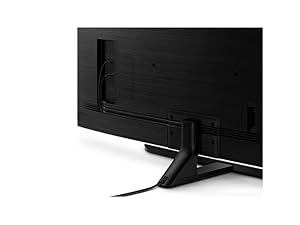
Figure 2: Cable management system on the TV's rear and stand for a tidy setup.
2.3. Gailuak konektatzea
Connect your external devices (e.g., cable box, Blu-ray player, gaming console) to the TV's HDMI ports. This model features 4 HDMI ports and 2 USB 2.0 ports. All inputs connect directly into the side of the TV. Ensure all connections are secure.
3. Telebistaren funtzionamendua
3.1. Oinarrizko Funtzionamendua
Use the provided remote control to power on/off the TV, adjust volume, change channels, and navigate the Smart TV interface. The remote uses Bluetooth technology for enhanced control.
3.2. Irudiaren kalitatearen ezaugarriak
The Samsung UN65NU8000FXZA TV is equipped with several technologies to enhance your viewesperientzia:
- HDR Plus: Delivers high dynamic range content as intended by the director, providing a wider range of contrast and color.
- Ultra Slim Array: Dynamically fine-tunes black levels and white brightness for sensational contrast.
- Kristal dinamikoaren kolorea: Expands the color palette with millions of shades beyond standard HDTVs, resulting in richer and more vibrant images.
- Mugimendu-abiadura 240: Ensures smooth, crisp action even in fast-moving scenes, reducing motion blur.
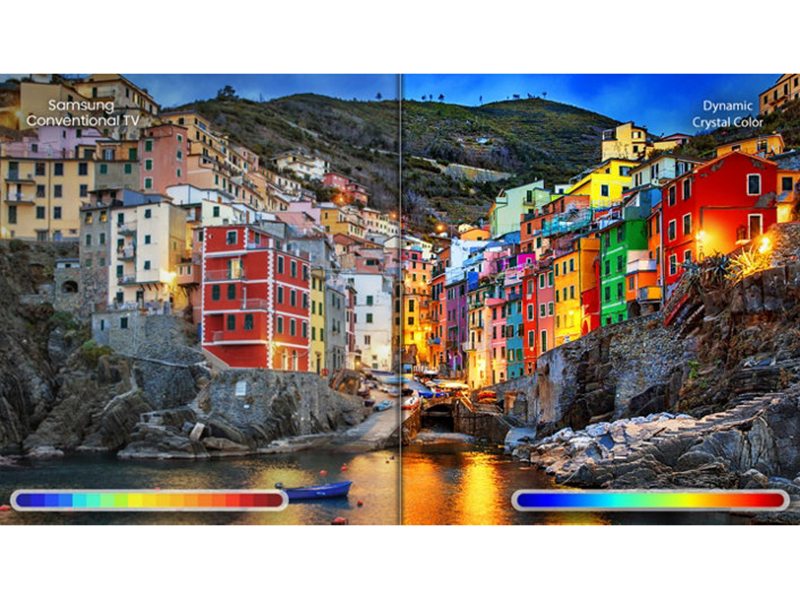
Figure 3: The TV's display showcasing a wide and dynamic range of colors.
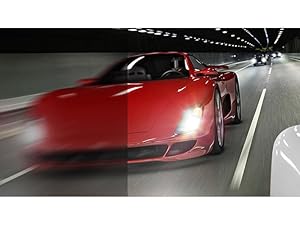
4. irudia: Adibample of fluid motion on the screen, enhanced by Motion Rate 240.
3.3. Smart Features (Tizen OS & Bixby Voice)
The TV runs on the Tizen operating system, offering a well-organized and easy-to-navigate smart platform. It includes Bixby Voice, allowing you to control TV settings, search for content, and play/pause videos using voice commands. The Universal Guide helps you find streaming and live TV shows easily.
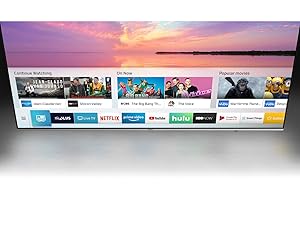
Figure 5: The Universal Guide interface for easy content discovery.
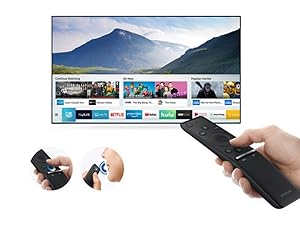
Figure 6: The Samsung One Remote, designed for simplified control of your TV and connected devices.
3.4. Jokoen Ezaugarriak
The TV offers a very low input lag, making it responsive for gaming across 1080p, 4K, and HDR signals. It supports 120Hz input for a smooth gaming experience on compatible PCs. The Game Motion Plus menu includes features like LED Clear Motion for blur reduction without adding significant input lag.
1. bideoa: Berrikuspen zehatzaview of the Samsung NU8000 4K UHD Smart LED TV, covering design, picture quality, motion, smart features, and inputs. This video provides an in-depth look at the TV's performance and features, including its suitability for gaming and various viewinguruneak.
4. Mantentzea
Telebistaren iraupena eta errendimendu optimoa bermatzeko, jarraitu mantentze-jarraibide hauek:
- Pantaila garbitzea: Garbitu pantaila astiro-astiro mikrofibrazko zapi leun eta lehor batekin. Orban egoskorrak izanez gero, garbitu apur bat.ampGarbitu oihala urarekin edo pantailarako segurua den garbiketa-soluzio batekin (ez ihinztatu zuzenean pantailan).
- Markoa garbitzea: Erabili zapi leun eta lehor bat telebistaren markoa garbitzeko.
- Aireztapena: Ziurtatu telebistaren inguruan behar bezalako aireztapena dagoela gehiegi berotzea saihesteko. Ez blokeatu aireztapen-irekidurak.
- Potentzia: Deskonektatu telebista korronte-entxufetik tximista-ekaitzetan edo denbora luzez zaindu gabe utziko denean.
5. Arazoak
Telebistarekin arazoak badituzu, saiatu arazoak konpontzeko oinarrizko urrats hauekin:
- Potentziarik gabe: Check if the power cable is securely connected to both the TV and the wall outlet. Try plugging another device into the same outlet to confirm it has power.
- Irudi/soinurik ez: Egiaztatu sarrera-iturri zuzena hautatuta dagoela. Egiaztatu telebistaren eta kanpoko gailuen arteko kable-konexio guztiak.
- Urrunekoa ez dabil: Ensure the batteries are correctly inserted and not depleted. Point the remote directly at the TV.
- Irudiaren kalitate eskasa: Adjust picture settings (brightness, contrast, sharpness, color). Ensure your content source is high quality (e.g., 4K content for 4K resolution).
- Ezaugarri adimendunak ez dute funtzionatzen: Check your Wi-Fi connection. Restart the TV and your router.
For more detailed troubleshooting or persistent issues, refer to the full electronic manual available on the Samsung support webgunearekin edo jarri harremanetan Samsung bezeroarentzako arreta-zerbitzuarekin.
6. Zehaztapenak
| Ezaugarri | Deskribapena |
|---|---|
| Pantailaren tamaina | 64.5 hazbete (65 hazbeteko klasea) |
| Marka | Samsung |
| Modelo zenbakia | UN65NU8000FXZA |
| Bistaratzeko Teknologia | LED (Edge LED Backlight) |
| Ebazpena | 4K UHD (3840 x 2160) |
| Freskatze tasa | 240 Hz (Mugimendu-abiadura 240) |
| Ezaugarri Berezia | Pantaila Laua |
| Dakarten osagaiak | Urrutiko agintea, euskarria, telebista |
| Konektibitate Teknologia | HDMI, Wi-Fi, Bluetooth |
| HDMI portuak guztira | 4 |
| USB portuak guztira | 2 (USB 2.0) |
| Aspektu-erlazioa | 16:9 |
| Produktuaren neurriak (euskarriarekin) | 13.8" L x 56.9" W x 35.8" H |
| Elementuaren pisua (euskarriarekin) | 58.2 kilo |
| Maximum Display Brightness | 550 nit |
| HDR formatua onartzen da | HDR10 |
| Sistema eragilea | Tizen |
| Kontrol-metodoa | Voice (Bixby) |
| Audio irteera modua | Estereoa |
| Hizlariaren deskribapena | 15 W x 2 (RMS) |
| Bozgorailuaren irteera-potentzia maximoa | 40 Watt |
| Energia-kontsumoa | 75 Watt |
| VESA muntaketa estandarra | 600 x 1100 mm |
| Kolorea | Slate Black + Eclipse Silver |
7. Bermea eta Laguntza
7.1. Berme mugatua
This Samsung TV comes with a 1 urteko berme mugatua. Please refer to the warranty card included with your product or visit the official Samsung webgunea baldintza eta baldintza osoetarako.
7.2. Bezeroarentzako arreta
For further assistance, technical support, or service requests, please contact Samsung Customer Support. You can find contact information on the official Samsung webgunean edo telebistarekin batera emandako dokumentazioan.