
Sarrera
This manual provides detailed instructions for the installation, operation, and maintenance of your GoHawk TJ4-Q Motorcycle Speakers and Amplifier Audio Sound System. Please read this manual thoroughly before using the product to ensure proper function and longevity.
Kutxan dagoena
Egiaztatu osagai guztiak paketean daudela:
- 4 x bozgorailuak
- 1 x Ampbiziagoa
- 1 x kable bidezko kontrola
- 4 x Muntaketa Clamps
- 1 x DC korronte kablea
- 2 x External Antennas (Bluetooth and FM)
- 1 x AUX kablea
- 1 x Erabiltzailearen eskuliburua
- Mounting Screws and Fuse

Image: All components included in the GoHawk TJ4-Q system package.
Produktuaren Ezaugarriak
The GoHawk TJ4-Q system offers a range of features designed for outdoor audio:
- 4-Inch Full-Range Speakers: Four high-power speakers for clear audio.
- 1000W Ampbiziagoa: 4 kanal amplifier for robust sound output.
- Bluetooth 5.0 konexioa: Haririk gabeko audio erreprodukzioa gailu bateragarrietatik.
- Audio-sarrera anitz: 3.5mm AUX input, USB port, and SD card slot for MP3 files.
- FM irratia: FM irrati sintonizatzaile integratua.
- Hari bidezko kontrola: External wired control for easy access to functions.
- Weatherproof Speakers: IP56 waterproof design for speakers (amplifier is not waterproof).
- Eraikuntza iraunkorra: Speakers built with high-quality ABS material, amplifier with aluminum housing for heat dissipation.
- Muntaketa erregulagarria: Supports 7/8"–1-1/4" bar sizes, compatible with Ape Hanger and crash bars.

Irudia: Gainetikview of the system's main functionalities.
Instalazioa
Follow these steps for proper installation of your GoHawk TJ4-Q system:
- Bozgorailuak muntatzea:
- Attach the larger bracket to the speaker with the loop facing outwards using the smaller screws.
- Secure the other side of the mounting bracket.
- Use the longer screws to fasten the bracket through the back, ensuring the screws face outwards.
- Place the rubber strips inside the clamps to prevent scratching and ensure a secure fit.
- Mount the speakers onto your motorcycle's handlebars, crash bars, or ATV/UTV roll cage. The clamps support bar sizes from 7/8" to 1-1/4".

Image: Speaker mounting hardware assembly.

Image: Speaker with 360-degree adjustable mounting bracket.
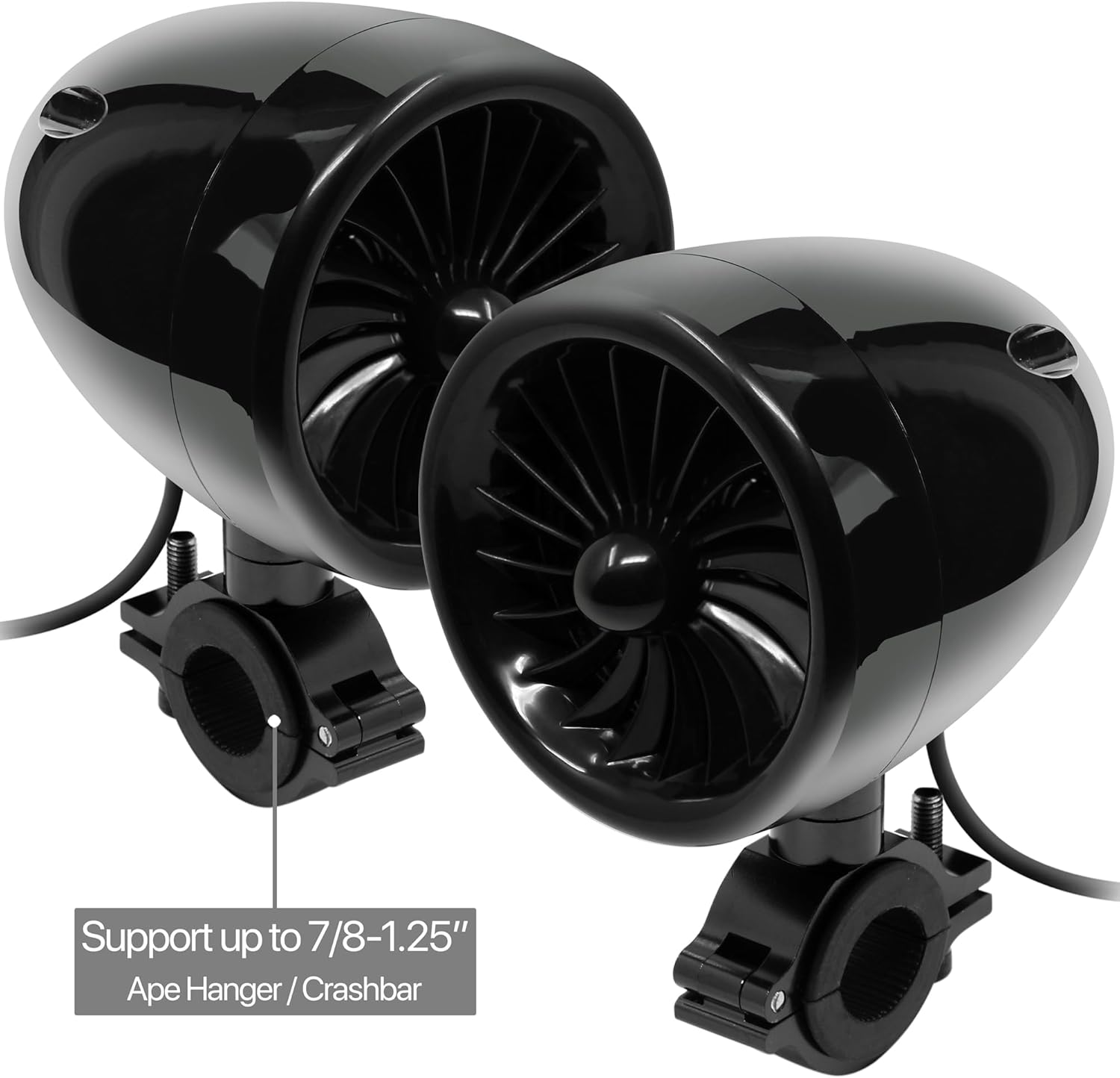
Image: Speakers mounted on a handlebar, compatible with various bar sizes.
- Muntatzea Ampbiziagoa: Ziurtatu amplifier in a dry, protected location. The amplifier is not waterproof.
- Antenak konektatzea: Attach the Bluetooth and FM radio antennas to their respective ports on the ampbiziagoa.
Bideoa: Kutxa ireki eta gehiagoview of the GoHawk TJ4-Q system components, demonstrating how to assemble the mounting brackets and connect the speakers to the amplifier. This video provides a visual guide for initial setup and installation steps.
Konfigurazioa
Proper wiring is crucial for optimal performance:
- Potentzia-konexioa: Connect the DC power cord to the amplifier's DC10-16V input. Connect the red wire to the positive (+) terminal of your 12V power source (e.g., vehicle battery) and the black wire to the negative (-) terminal.
- Bozgorailuaren konexioa: Plug each speaker's cable into the corresponding R-SP (Right Speaker) and L-SP (Left Speaker) RCA ports on the amplifier. Ensure correct left and right channel connections.
- Wired Control Connection: Plug the wired control cable into the 'RE' port on the ampbiziagoa.
- AUX sarrera (aukerakoa): If using an external audio device via AUX, connect the 3.5mm AUX cable to the AUX port on the amplifier and to your device.

Image: Front panel of the amplifier with input ports and display.

Image: Rear panel of the amplifier with speaker outputs and power connections.
Funtzionamendu-argibideak
Use the wired control to manage your audio experience:
- Piztu/Itzali: Press and hold the power button on the wired control.
- Modu aukeraketa: Short press the power button to cycle through modes: Bluetooth, FM Radio, Auxiliary Input, USB, and SD Card.
- Bolumen kontrola: Erabili '+' eta '-' botoiak bolumena doitzeko.
- Pista/Geltoki Nabigazioa: Use the 'Previous' and 'Next' buttons to change tracks in Bluetooth/USB/SD mode or change stations in FM mode.
- Erreproduzitu/Pausatu: Sakatu erreproduzitzeko/pausatu botoia multimedia-erreprodukzioa kontrolatzeko.
- Bluetooth bidezko lotura In Bluetooth mode, the system will automatically enter pairing mode. Bilatu 'GoHawk' on your device and connect. A voice prompt will confirm successful pairing.
- FM irratia: In FM mode, the system will automatically scan and save available stations.
- USB/SD erreprodukzioa: Insert a USB drive or SD card into the respective slot. The system will automatically detect and play MP3 files.
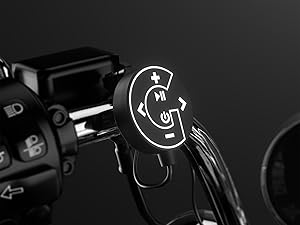
Image: Wired control unit for easy operation.
Mantentzea
To ensure the longevity and performance of your audio system:
- Garbiketa: Erabili biguna, damp cloth to clean the speakers and amplifier. Avoid harsh chemicals or abrasive cleaners.
- Eguraldiaren babesa: While the speakers are IP56 waterproof, the amplifier is not. Ensure the amplifier is installed in a location protected from direct water exposure.
- Kableen ikuskapena: Periodically check all cables and connections for wear, corrosion, or damage. Replace any damaged cables immediately.
- Fusiblearen ordezkapena: If the system loses power, check the inline fuse on the power cable. Replace it with a fuse of the same rating (an extra fuse is provided).

Image: GoHawk speaker demonstrating its waterproof design.
Arazoak konpontzea
Arazoak badituzu, jo ezazu honako arazo eta irtenbide ohikoenei:
- Potentziarik gabe:
- Egiaztatu konexio elektriko guztiak ondo finkatuta daudela ziurtatzeko.
- Egiaztatu ibilgailuaren bateriak nahikoa karga duela.
- Inspect the inline fuse on the power cable and replace if blown.
- Ez dago soinurik bozgorailuetatik:
- Ensure all speaker cables are securely connected to the ampbiziagoa.
- Check the volume level on both the wired control and your connected device.
- Confirm the correct input mode (Bluetooth, AUX, FM, USB/SD) is selected.
- Bluetooth parekatzearen arazoak:
- Ensure the system is in Bluetooth mode.
- Itzali eta piztu gailuaren Bluetooth-a, eta saiatu berriro parekatzen.
- Mugitu zure gailua hurbilago amplifier to ensure it's within the 100-meter range.
- Soinu distortsionatua:
- Reduce the volume on both the system and your connected device.
- Check speaker wires for any damage or loose connections.
- Ensure the power supply is stable (12V).
- FM irratiaren harrera eskasa:
- Ziurtatu FM antena behar bezala konektatuta eta luzatuta dagoela.
- Relocate the vehicle to an area with better signal reception.
Zehaztapenak
| Ezaugarri | Zehaztapena |
|---|---|
| Marka | GoHawk |
| Modelo zenbakia | TJ4-Q |
| Bozgorailuaren irteera-potentzia maximoa | 1000 Watt |
| Maiztasun Erantzuna | 20 KHz |
| Konektibitate Teknologia | Bluetootha |
| Bluetooth barrutia | 100 metro |
| Audio irteera modua | Estereoa |
| Muntatze Mota | Eskulekuaren muntaia |
| Itxituraren Materiala | Aluminum (Ampbiziagoa) |
| Hizlari mota | Kanpoan |
| Iragazgaitza da | True (Speakers Only) |
| Kontrol-metodoa | Push Button (Wired Control) |
| Bozgorailuaren tamaina | 4 hazbete |
| Sarrera boltage | 12 Volt |
| Audio-kanal kopurua | 4.0 |
| Inpedantzia | 4 ohmio |
| Seinaleen eta zarataren arteko erlazioa | 98 dB |
| Elementuaren pisua | 6 kilo |
| Gailu bateragarriak | MP3 erreproduzitzailea, telefonoa |
| Ibilgailu Motarekin bateragarria | ATV, Motorcycle, UTV |
Bermea
The GoHawk TJ4-Q system comes with a 1 urteko piezen berme mugatua. This warranty covers defects in materials and workmanship under normal use. Please retain your proof of purchase for warranty claims. For specific terms and conditions, refer to the warranty card included in your package or contact customer support.
Laguntza
For technical assistance, troubleshooting, or warranty inquiries, please contact GoHawk customer support:
- Webgunea: GoldenHawkUSA.com
- Ikusi zure produktuaren ontzian emandako harremanetarako informazioa.