
1. Sarrera
This manual provides essential information for the installation, operation, and maintenance of your XPG by ADATA SX8200 3D NAND NVMe Gen3x4 M.2 2280 Solid State Drive. Please read this manual thoroughly before proceeding with installation or use to ensure proper functionality and longevity of your device.
2. Segurtasun informazioa
- Beti maneiatu SSDa kontu handiz kalte fisikoak ekiditeko.
- Ziurtatu sistema itzalita eta energia-iturritik deskonektatuta dagoela instalatu aurretik.
- Discharge any static electricity from your body before handling the SSD to prevent damage to sensitive electronic components.
- Do not attempt to disassemble or modify the SSD. This will void the warranty.
3. Paketearen edukia
Egiaztatu zure paketeak elementu hauek dituela:
- XPG by ADATA SX8200 NVMe SSD (ASX8200NP-960GT-C)
- Hasierako gida azkarra (QSG)

Figure 1: XPG SX8200 NVMe SSD Retail Packaging
4. Produktua amaitu daview
The XPG SX8200 is an M.2 2280 form factor Solid State Drive utilizing 3D NAND technology and a PCIe Gen3x4 interface. It is designed for high-performance computing, offering fast read/write speeds and improved responsiveness for demanding applications.
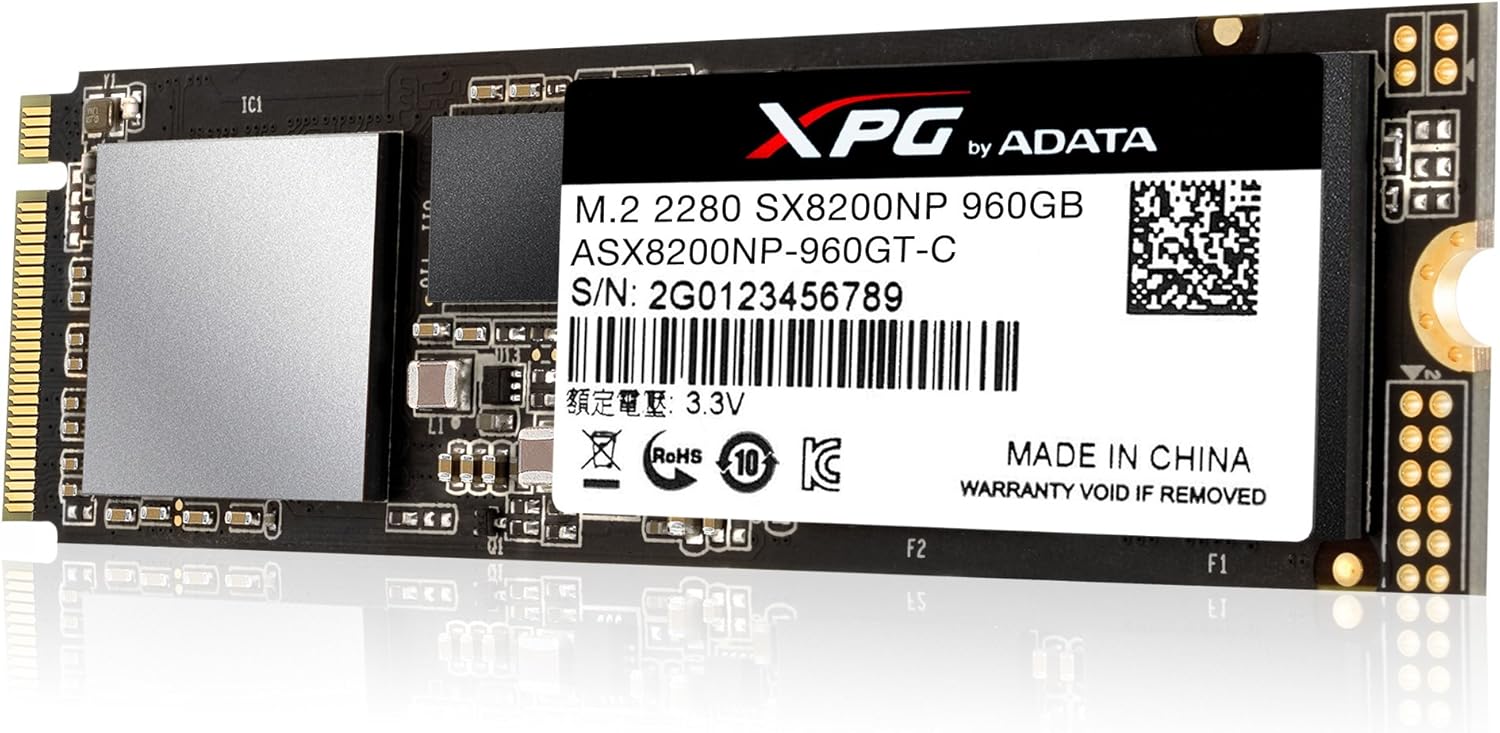
Figure 2: XPG SX8200 NVMe SSD (Top View with Label)

Figure 3: XPG SX8200 NVMe SSD (Top View without Label)
5. Konfigurazioa eta instalazioa
5.1 Sistemaren eskakizunak
- Motherboard with an available M.2 slot (Key M) that supports NVMe PCIe Gen3x4. Consult your motherboard's manual for M.2 slot specifications and compatibility.
- Operating System: Windows 10 (NVMe drivers are typically included), Windows 8.1, or Linux. For Windows 7, specific NVMe drivers may need to be integrated into the installation media.
5.2 Instalazio fisikoa
- Power off your computer and disconnect the power cable.
- Ireki zure ordenagailuaren kaxa.
- Bilatu eskuragarri dagoen M.2 zirrikitua zure plakan.
- Carefully insert the XPG SX8200 SSD into the M.2 slot at a 30-degree angle.
- Sakatu SSDa astiro-astiro plaka basearekin paraleloan egon arte.
- Secure the SSD with the screw provided with your motherboard or system.
- Itxi ordenagailuaren karkasa eta konektatu berriro elikatze-kablea.
5.3 Sistema eragilearen konfigurazioa
After physical installation, you may need to initialize and format the SSD before it can be used. For a fresh operating system installation, ensure your BIOS/UEFI settings are configured to recognize the NVMe drive as a boot device.
- Windows: Open Disk Management (right-click Start button > Disk Management). Locate the new SSD, initialize it (GPT partition style recommended for drives over 2TB, MBR for smaller drives or older systems), and then create a new simple volume.
- Cloning an Existing Drive: If you are migrating your operating system, use a reliable disk cloning software. Note that some older cloning software versions (e.g., Acronis True Image 2015) may not fully support M.2 NVMe drives. Consider using updated software or alternatives like EaseUS for a smoother process.
6. SSDaren funtzionamendua
The XPG SX8200 SSD is designed for high-speed data access and storage. Once installed and configured, it operates as a standard storage device within your system. For optimal performance, it is recommended to use the SSD as your primary boot drive for the operating system and frequently accessed applications.
- Errendimendua: Expect sequential read/write speeds up to 3200/1700 MB/s and 4K random speeds up to 310K/280K IOPS. Actual performance may vary based on system hardware, configuration, and workload.
- Erabilera: Ideal for intense gaming, rendering, overclocking, and other demanding applications that benefit from rapid data transfer.
7. Mantentzea
7.1 Firmware eguneraketak
Periodically check the official XPG/ADATA website for firmware updates. Firmware updates can improve performance, stability, and compatibility. Follow the instructions provided by XPG/ADATA carefully when performing firmware updates. Note that the ADATA SSD Toolbox may not always be updated to support the latest products immediately upon release.
7.2 Data Integrity and Protection
The SX8200 incorporates several technologies to ensure data integrity and longevity:
- SLC Caching: Enhances burst read/write performance.
- DRAM Cache Buffer: Improves random read/write performance.
- LDPC (Low-Density Parity Check) ECC: Detects and corrects data errors for improved data integrity.
- AES 256 biteko enkriptazioa: Provides robust data security.
- RAID Engine & Data Shaping: Further enhance data protection and extend SSD lifespan.
7.3 Beroaren kudeaketa
The SX8200 includes a built-in heatsink to help dissipate heat and maintain optimal operating temperatures, preventing thermal throttling under heavy loads.
8. Arazoak
- SSD ez da detektatu:
- Egiaztatu SSDa M.2 zirrikituan behar bezala sartuta dagoela.
- Check your motherboard's BIOS/UEFI settings to ensure the M.2 slot is enabled and configured for NVMe (PCIe mode). Some M.2 slots may share bandwidth with SATA ports; ensure there are no conflicts.
- Ensure your operating system has the necessary NVMe drivers.
- Performance Lower Than Expected:
- Confirm the M.2 slot is operating at PCIe Gen3x4 speed. Older motherboards or specific M.2 slots might operate at lower speeds (e.g., PCIe Gen2 or x2 lanes).
- Ensure your system's hardware and configuration meet the requirements for optimal NVMe performance.
- Check for background processes or other storage devices that might be impacting performance.
- Cloning Issues:
- Use up-to-date disk cloning software that explicitly supports M.2 NVMe drives.
- Ensure the target drive (SX8200) is initialized and formatted correctly before cloning.
- Firmwarearen eguneratze-erroreak:
- If you encounter issues with the ADATA SSD Toolbox for firmware updates, visit the official XPG/ADATA support website for alternative methods or direct assistance.
9. Zehaztapenak
| Ezaugarri | Zehaztapena |
|---|---|
| Ereduaren izena | XPG SX8200 |
| Modelo zenbakia | ASX8200NP-960GT-C |
| Biltegiratze Digitalaren Ahalmena | 960 GB |
| Forma-faktorea | M.2 2280 |
| NAND Flasha | 2nd Generation 64-layer 3D NAND |
| Interfazea | PCIe Gen3x4 |
| Irakurketa abiadura sekuentziala | Gehienez 3200 MB/s |
| Idazketa-abiadura sekuentziala | Gehienez 1700 MB/s |
| 4K Random Read Speed | 310K IOPS arte |
| 4K Random Write Speed | 280K IOPS arte |
| MTBF (Hutsen arteko batez besteko denbora) | 2,000,000 ordu |
| Elementuaren pisua | 0.02 kilogramo |
| Gailu bateragarriak | Mahaigaina |
| Fabrikatzailea | ADATA |
10. Bermearen informazioa
The XPG by ADATA SX8200 NVMe SSD (ASX8200NP-960GT-C) is backed by a 5 urteko bermea. Please retain your proof of purchase for warranty claims. The warranty covers defects in materials and workmanship under normal use. Any physical damage, unauthorized modification, or improper installation may void the warranty.
11. Laguntza
For further assistance, technical support, or warranty inquiries, please visit the official XPG or ADATA webgunea. The webGuneak normalean maiz egiten diren galderak, gidarien deskargak, firmware eguneraketak eta bezeroarentzako arreta-zerbitzuaren harremanetarako informazioa eskaintzen ditu.
XPG Official Webgunea: https://www.xpg.com/
ADATA Official Webgunea: https://www.adata.com/