
1. Produktua amaitu daview
The Maxwest Nitro 5N is an Android 7.0 smartphone designed for reliable communication and multimedia use. It features a 5-inch display, a Quad Core processor, and dual SIM capability, making it suitable for various global GSM networks.

1.1. irudia: Aurrealdea eta atzealdea view of the Maxwest Nitro 5N smartphone, showcasing its sleek black design and display.
2. Zer dago kutxan
Upon opening your Maxwest Nitro 5N package, please ensure all the following items are present:
- Maxwest Nitro 5N Smartphone
- Bateria (2000 mAh)
- Kargagailu egokitzailea
- USB kablea
- Protective Case Cover
3. Hasierako konfigurazioa
3.1. SIM txartela(k) eta bateria sartzea
- Itzali: Ensure your Maxwest Nitro 5N is powered off before proceeding.
- Kendu atzeko estalkia: Kontu handiz kendu telefonoaren atzeko estalkia.
- Txertatu SIM txartela(k): Locate the SIM card slots. This device supports dual SIM cards. Insert your GSM SIM card(s) into the designated slots with the gold contacts facing down. Ensure they are securely seated.
- Sartu bateria: Place the 2000 mAh battery into its compartment, aligning the gold contacts on the battery with those in the phone.
- Atzeko estalkia ordezkatu: Carefully reattach the back cover until it clicks into place.
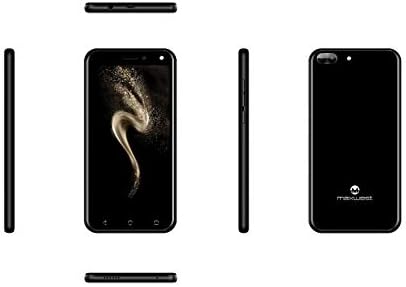
3.1 irudia: Albokoa views of the Maxwest Nitro 5N, illustrating the location of buttons and ports for SIM/battery access.
3.2. Piztea eta hasierako konfigurazioa
- Piztu: Press and hold the Power button (usually on the side) until the Maxwest logo appears.
- Hizkuntza hautaketa: Jarraitu pantailan agertzen diren argibideei nahiago duzun hizkuntza hautatzeko.
- Wi-Fi konexioa: Connect to a Wi-Fi network to complete the setup process and download necessary updates.
- Google kontua: Hasi saioa zure Google kontuarekin edo sortu berri bat. Hau ezinbestekoa da Google Play Store eta beste Google zerbitzu batzuk atzitzeko.
- Data eta ordua: Ezarri data eta ordu zuzena, edo utzi sareari automatikoki ezartzen.
- Segurtasuna: Configure screen lock options such as PIN, pattern, or password for device security.
Ohar garrantzitsua: This device is designed to work with GSM carriers such as AT&T, T-Mobile, and Metro PCS. It will NOT work with CDMA carriers like Verizon, Sprint, or Boost Mobile.
4. Operating Your Maxwest Nitro 5N
4.1. Oinarrizko nabigazioa
- Ukipen-pantaila: Interact with the device by tapping, swiping, pinching, and spreading on the 5-inch LCD display.
- Hasierako pantaila: Zure aplikazio eta widgeten gune nagusia. Irristatu ezkerrera edo eskuinera pantaila gehigarrietara sartzeko.
- Jakinarazpen panela: Irristatu hatza pantailaren goialdetik behera jakinarazpenak eta ezarpen azkarrak atzitzeko.
- Nabigazio botoiak: Use the on-screen navigation buttons (Back, Home, Recent Apps) at the bottom of the display.
4.2. Deiak egitea eta mezuak bidaltzea
- Telefono aplikazioa: Tap the Phone icon to access the dialer, call logs, and contacts.
- Mezuen aplikazioa: Tap the Messages icon to send and receive SMS/MMS messages.
4.3. Kameraren erabilera
Your Nitro 5N is equipped with 5MP front and rear cameras.
- Ireki kamera: Sakatu Kameraren ikonoa hasierako pantailan edo aplikazioen tiraderan.
- Kamera aldatu: Sakatu kameraren etengailuaren ikonoa aurreko eta atzeko kameren artean txandakatzeko.
- Atera argazkia/bideoa: Sakatu obturadorearen botoia argazki bat ateratzeko edo bideo grabaketa hasteko/gelditzeko.
4.4. Screen Pinning Feature
Screen Pinning allows you to lock your phone to a single application, preventing others from accessing other apps or settings. This is useful when sharing your phone temporarily.
- Enable Screen Pinning: Joan zaitez Settings > Security > Screen pinning eta piztu ezazu.
- Pin an App: Open the app you wish to pin. Tap the Recent Apps button (square icon). Swipe up on the app's preview and tap the pin icon.
- Unpin an App: To unpin, simultaneously press and hold the Back and Recent Apps buttons. You may need to enter your PIN/pattern/password if required by your security settings.
5. Mantentzea eta Zainketa
5.1. Bateria zaintzea
- Kargatzen: Use only the provided charger and USB cable. Avoid overcharging by disconnecting the charger once the battery is full.
- Tenperatura: Avoid exposing the phone to extreme temperatures, as this can degrade battery life.
- Biltegiratzea: If storing the phone for an extended period, ensure the battery is partially charged (around 50%).
5.2. Zure gailua garbitzea
- Pantaila: Erabili zapi leun eta lihorik gabekoa, apur bat lehortuaampened with water or a screen cleaner, to gently wipe the display.
- Gorputza: Use a soft, dry cloth to clean the phone's body. Avoid harsh chemicals or abrasive materials.
5.3. Software eguneraketak
Aldian-aldian egiaztatu sistemaren eguneraketak errendimendu eta segurtasun optimoa bermatzeko. Joan honera Ezarpenak > Telefonoari buruz > Sistemaren eguneraketak eskuragarri dauden eguneraketak egiaztatu eta instalatzeko.
6. Ohiko arazoak konpontzea
| Arazoa | Irtenbide posiblea |
|---|---|
| Telefonoa ez da pizten. | Ensure the battery is correctly inserted and charged. Connect the charger and try again. |
| Ez dago sareko seinalerik. | Verify SIM card insertion. Check if you are within network coverage. Ensure your carrier is GSM compatible (e.g., AT&T, T-Mobile). Restart the phone. |
| Aplikazioak motel doaz edo huts egiten dute. | Itxi atzeko planoan dauden aplikazioak. Garbitu aplikazioen cachea (Ezarpenak > Aplikazioak > [Aplikazioaren izena] > Biltegiratzea > Garbitu cachea). Restart the phone. Ensure sufficient storage space. |
| Bateria azkar agortzen da. | Reduce screen brightness. Disable Wi-Fi, Bluetooth, and GPS when not in use. Close unnecessary background apps. Check battery usage in settings to identify power-hungry apps. |
| Ezin da wifira konektatu. | Ziurtatu Wi-Fia gaituta dagoela. Berrabiarazi bideratzailea eta telefonoa. Ahaztu sarea eta konektatu berriro. |
7. Produktuaren zehaztapenak
| Ezaugarri | Xehetasuna |
|---|---|
| Ereduaren izena | Nitro 5N |
| Sistema eragilea | Android 7.0 |
| Prozesadorea | Quad Core 1.2 GHz (1.2GHz Cortex A9 Processor) |
| RAM | 1 GB |
| Barne Biltegiratzea | 8 GB (approximately 5.6 GB user available) |
| Bistaratzea | 5.0 inch LCD, 480 x 854 pixels, 2.5D TP |
| Atzeko kamera | 5 MP |
| Aurrealdeko kamera | 5 MP |
| Bateria Edukiera | 2000 mAh litio ioi |
| Sarearen bateragarritasuna | 3G H+ 850/1900/2100 MHz, 2G: 850/900/1800/1900 MHz (GSM Carriers only) |
| Konektibitatea | USB, Cellular, GPS, Wi-Fi, Bluetooth (Wireless) |
| Audio Jack | 3.5 mm |
| Neurriak (L x W x H) | 5.73 x 2.83 x 0.38 hazbete |
| Pisua | 5.4 ontza (153 gramo) |
| Kolorea | Beltza |
8. Bermearen informazioa
The Maxwest Nitro 5N comes with a one-year parts and labor warranty from the date of purchase. This warranty covers manufacturing defects and workmanship under normal use. It does not cover damage caused by misuse, accidents, unauthorized repairs, or normal wear and tear.
Mesedez, gorde zure erosketa-froga berme-erreklamazioetarako.
9. Bezeroarentzako arreta
For technical assistance, troubleshooting beyond this manual, or warranty inquiries, please contact Maxwest customer support. Refer to the contact information provided with your product packaging or visit the official Maxwest webwebgunea laguntza-xehetasun eguneratuenak lortzeko.
When contacting support, please have your product model (Nitro 5N) and proof of purchase readily available.