
1. Sarrera
This manual provides comprehensive instructions for the installation, operation, and maintenance of your BlueBird A1390 Automatic Irrigation Tap Programmer. This device is designed to automate your garden watering schedule, ensuring efficient and consistent irrigation. Please read this manual thoroughly before using the product to ensure correct operation and to prevent damage.
2. Segurtasun informazioa
- Do not immerse the unit in water. The unit is designed to be weather-resistant, but not submersible.
- Erabili 1.5 V-ko AA pila alkalinoak soilik. Ez nahastu pila zaharrak eta berriak, edo pila mota desberdinak.
- Kendu bateriak unitatea denbora luzez erabiliko ez bada, isuriak saihesteko.
- Mantendu haurren eskura.
- Ez saiatu unitatea zeuk desmuntatzen edo konpontzen. Jarri harremanetan langile kualifikatuekin zerbitzua jasotzeko.
- Ziurtatu konexio guztiak ondo finkatuta daudela ihesak saihesteko.
3. Paketearen edukia
Mesedez, egiaztatu paketea elementu hauek dituen:
- 1x BlueBird A1390 Automatic Irrigation Tap Programmer
- 1x Erabiltzailearen eskuliburua (dokumentu hau)
Note: 2 AA 1.5V batteries are required for operation and are not included in the package.
4. Produktua amaitu daview
The BlueBird A1390 features two main rotary dials for setting irrigation frequency and duration, along with a battery indicator and an ON/OFF switch.
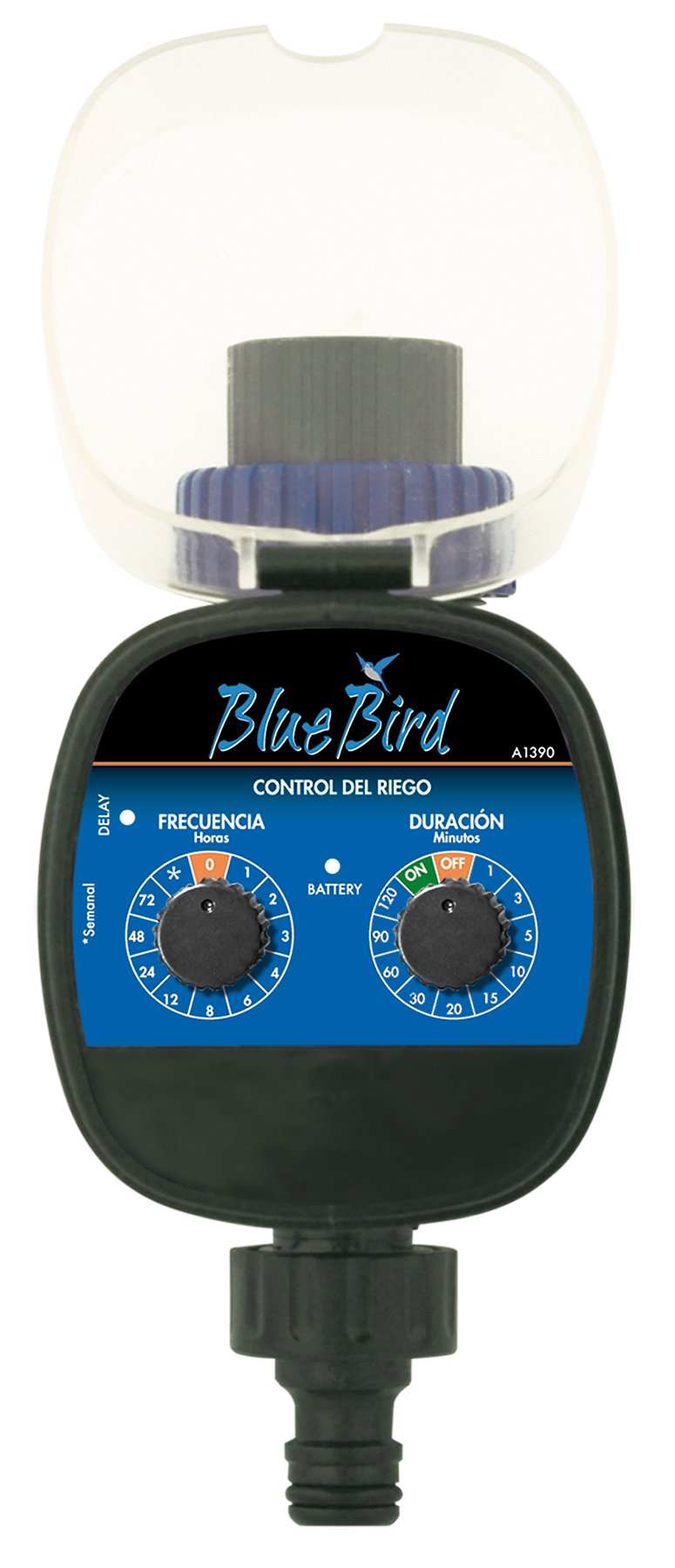
1. irudia: Aurrealdea view of the BlueBird A1390 Irrigation Programmer. The left dial controls irrigation frequency, and the right dial controls irrigation duration. A battery indicator light is located between the dials.
Osagaiak:
- Frequency Dial (Frecuencia): Sets how often the irrigation occurs. Options include 0 (off), 1, 2, 3, 4, 6, 8, 12, 24, 48, 72 hours, and a '*' setting for manual or weekly operation.
- Duration Dial (Duración): Sets how long each irrigation cycle lasts. Options include 0 (off), 1, 3, 5, 10, 15, 20, 30, 60, 90, 120 minutes.
- ON / OFF etengailua: Located on the Duration Dial, allows for manual override or turning the unit off.
- Bateria adierazlea: A light that indicates battery status.
- Bateriaren konpartimendua: Located at the rear of the unit (not visible in Figure 1).
- Uraren sarrera/irteera: Standard tap and hose connections.
5. Konfigurazioa
5.1 Bateriaren instalazioa
- Bilatu bateriaren konpartimentuaren estalkia unitatearen atzealdean.
- Remove the cover by twisting or sliding it open.
- Insert two (2) new 1.5V AA alkaline batteries, ensuring correct polarity (+/-).
- Jarri bateriaren konpartimentuaren estalkia ondo itxita urarekiko erresistentzia mantentzeko.
5.2 Connecting to the Tap
- Ensure your outdoor tap is turned off.
- Screw the BlueBird A1390 programmer onto your tap. Hand-tighten only to prevent damage.
- Connect your garden hose or irrigation system to the outlet of the programmer. Ensure a tight connection to prevent leaks.
- Slowly turn on your outdoor tap. Check for any leaks at the connections.
6. Funtzionamendu-argibideak
The BlueBird A1390 is designed for simple, intuitive programming using its two rotary dials.
6.1 Setting Irrigation Frequency
- Biratu Maiztasun markatzailea (left dial) to your desired irrigation interval.
- Hauek dira erabilgarri dauden ezarpenak:
- 0: No irrigation (off).
- 1, 2, 3, 4, 6, 8, 12, 24, 48, 72: Irrigation every X hours.
- *: This setting typically indicates a manual mode or a weekly cycle, depending on the specific model's internal logic. Refer to the example below for common usage.
6.2 Setting Irrigation Duration
- Biratu Duration Dial (right dial) to your desired watering time per cycle.
- Hauek dira erabilgarri dauden ezarpenak:
- DESaktibatuta: No irrigation.
- ON: Continuous irrigation (use with caution).
- 1, 3, 5, 10, 15, 20, 30, 60, 90, 120: Irrigation for X minutes.
6.3 Adibample Programazioa
To water every 6 hours for 10 minutes:
- Ezarri Maiztasun markatzailea to 6 (orduak).
- Ezarri Duration Dial to 10 (minutuak).
The programmer will automatically begin the cycle based on these settings. The first cycle will typically start shortly after programming, or after a short delay.
6.4 Eskuzko piztea/itzaltzea
To manually turn on the water, rotate the Duration Dial to the ON position. To stop manual watering, rotate the dial back to OFF or a timed setting.
7. Mantentzea
7.1 Bateria ordezkatzea
When the battery indicator light dims or the unit stops functioning, it's time to replace the batteries. Follow the steps in Section 5.1 for battery installation.
7.2 Garbiketa
Clean the exterior of the programmer with a damp cloth. Do not use abrasive cleaners or solvents. Ensure no water enters the battery compartment or internal electronics.
7.3 Neguko biltegiratzea
Before the first frost, disconnect the programmer from the tap and hose. Remove the batteries. Store the unit indoors in a dry, frost-free location to prevent damage from freezing water.
8. Arazoak
| Arazoa | Kausa posiblea | Irtenbidea |
|---|---|---|
| Unit does not turn on/display. | Bateriak hilda edo gaizki instalatuta. | Ordeztu bateriak, polaritate zuzena ziurtatuz. |
| Ura ez da isurtzen. | Tap is off; programmer set to '0' or 'OFF'; low water pressure; clogged filter. | Ensure tap is fully open. Check frequency/duration settings. Verify water pressure. Clean any filters. |
| Unit leaks at connections. | Loose connections; missing or damaged washer. | Tighten connections. Check and replace washers if necessary. |
| Irrigation schedule is incorrect. | Incorrect frequency or duration settings. | Re-check and adjust the Frequency and Duration Dials according to your desired schedule. |
9. Zehaztapenak
- Eredua: A1390
- Marka: BlueBird
- Fabrikatzailea: Altadex
- Energia iturria: 2 x AA 1.5V-ko pila alkalinoak (ez dira barne hartzen)
- Ureztatze maiztasuna: 0, 1, 2, 3, 4, 6, 8, 12, 24, 48, 72 hours, or '*' (manual/weekly)
- Ureztatze Iraupena: OFF, ON, 1, 3, 5, 10, 15, 20, 30, 60, 90, 120 minutes
- Produktuaren neurriak: 19.4 x 10.6 x 10 cm gutxi gorabehera
- Produktuaren pisua: Gutxi gorabehera 280 g
- GTIN (UPC): 8426375113909
10. Bermea eta Laguntza
This product is covered by a standard manufacturer's warranty. For specific warranty details, please refer to the documentation provided at the time of purchase or contact your retailer. For technical support or inquiries, please contact the seller or manufacturer directly.