
1. Sarrera
This manual provides essential information for the safe and efficient use of your ZTE Trek 2 HD K88 Tablet. The ZTE Trek 2 HD K88 is an 8-inch tablet featuring an HD display, an Octa-core processor, 2GB RAM, 16GB internal storage (expandable), and a 4600mAh battery. It operates on Android 6.0 Marshmallow and supports Wi-Fi and 4G-LTE connectivity.
Please read this manual thoroughly before operating your device to ensure proper functionality and to understand its features.

1.1. irudia: Atzealdea view of the ZTE Trek 2 HD K88 Tablet, showing the AT&T logo and product labels.
2. Konfigurazioa
2.1. Bateria kargatzea
Before first use, fully charge the tablet's battery. Connect the included power adapter to the tablet's charging port and then to a power outlet. The battery indicator on the screen will show charging status.
- Use only the power adapter provided with your device.
- A full charge can take several hours.
2.2. Piztu/Itzaltzea
- Pizteko: Press and hold the Power button until the ZTE logo appears.
- Itzaltzeko: Sakatu eta eutsi pizteko botoia energia aukeren menua agertu arte, eta ondoren hautatu "Itzali".
2.3. Hasierako konfigurazioa
Upon first power-on, follow the on-screen prompts to configure basic settings:
- Aukeratu nahi duzun hizkuntza.
- Konektatu Wi-Fi sare batera.
- Hasi saioa zure Google kontuarekin edo sortu berri bat.
- Review eta baldintzak eta zehaztapenak onartu.
2.4. MicroSD txartel bat sartzea (aukerakoa)
The tablet supports expandable memory up to 128GB via a microSD card. Locate the microSD card slot, typically on the side of the device. Carefully insert the card with the gold contacts facing down until it clicks into place.

2.1 irudia: Albokoa view of the ZTE Trek 2 HD K88 Tablet, illustrating its thin design. The microSD slot is typically located on one of the side edges.
3. Funtzionamendu-argibideak
3.1. Oinarrizko nabigazioa
The ZTE Trek 2 HD K88 features a responsive touchscreen. Use the following gestures:
- Sakatu: Elementu bat hautatzeko edo aplikazio bat irekitzeko.
- Eduki sakatuta: Testuinguru-menuetara sartzeko edo elementuak mugitzeko.
- Pasatu hatza: Pantailetan edo zerrendetan zehar mugitzeko.
- Pixka bat: To zoom in or out on content like photos or web orrialdeak.
3.2. Hasierako pantaila eta aplikazioak
The home screen displays your favorite apps, widgets, and notifications. Swipe left or right to access additional home screens. Tap the "Apps" icon to view instalatutako aplikazio guztiak.

3.1. irudia: Aurrealdea view of the ZTE Trek 2 HD K88 Tablet with the display active, showing the Android home screen with various application icons.
3.3. Wi-Fira konektatzen
- Joan zaitez Ezarpenak > Wi-Fi.
- Wi-Fia aktibatu/desaktibatu On.
- Hautatu nahi duzun sarea zerrendatik.
- Eskatzen bazaizu, idatzi pasahitza eta, ondoren, sakatu Konektatu.
3.4. Kamera erabiliz
The tablet is equipped with 5 MP front and rear cameras. Open the Camera app to capture photos and videos.
- Sakatu obturadorearen botoia argazkia ateratzeko.
- Aldatu aurreko eta atzeko kameren artean kameraren txandakatze-ikonoa erabiliz.
- Explore various modes and settings within the camera app.
3.5. Audio Ezaugarriak
The ZTE Trek 2 HD K88 features Dolby Audio powered dual front-facing speakers for an enhanced audio experience. Adjust volume using the physical volume buttons on the side of the tablet or through the on-screen volume controls.
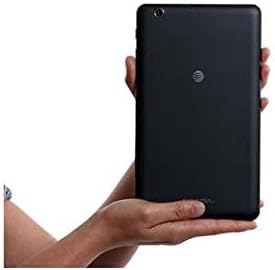
Image 3.2: The ZTE Trek 2 HD K88 Tablet held horizontally in two hands, demonstrating its comfortable and portable 8-inch form factor.
4. Mantentzea
4.1. Gailua garbitzea
To clean your tablet, use a soft, lint-free cloth. For stubborn marks, slightly dampen the cloth with water. Avoid using harsh chemicals, abrasive cleaners, or aerosol sprays, as these can damage the screen and finish.
4.2. Software eguneraketak
Periodically check for software updates to ensure your tablet has the latest features and security patches. Go to Ezarpenak > Tabletari buruz > Sistemaren eguneraketak.
4.3. Biltegiratze kudeaketa
Kudeatu aldizka tabletaren biltegiratzea errendimendu optimoa mantentzeko. Ezabatu beharrezkoak ez diren gauzak filek, desinstalatu erabiltzen ez diren aplikazioak eta mugitu euskarri handiak files to a microSD card or cloud storage. Go to Ezarpenak > Biltegiratzea eta USBa to view biltegiratze erabilera.
4.4. Bateria zaintzea
Bateriaren iraupena luzatzeko:
- Saihestu muturreko tenperaturak.
- Ez utzi bateria maiz erabat agortzen.
- Deskonektatu kargagailua bateria beteta dagoenean.
- Adjust screen brightness and disable unused features like Wi-Fi or Bluetooth when not needed.
5. Arazoak
5.1. Arazo arruntak eta irtenbideak
| Gaia | Irtenbidea |
|---|---|
| Tableta ez da pizten | Ziurtatu bateria kargatuta dagoela. Berrabiarazteko, sakatu eta eutsi pizteko botoia gutxienez 10-15 segundoz. |
| Wi-Fi konexio arazoak | Restart the tablet and your Wi-Fi router. Forget the network in Wi-Fi settings and reconnect. |
| Aplikazioak huts egiten edo blokeatzen | Close and reopen the app. Clear the app's cache (Settings > Apps > [App Name] > Storage > Clear cache). Restart the tablet. |
| Errendimendu motela | Close unused apps. Clear cache. Free up storage space. Restart the tablet. |
5.2. Fabrika berrezarri
If issues persist, a factory reset may resolve them. This will erase all data on your tablet, so back up important information first. Go to Ezarpenak > Babeskopia eta berrezarri > Fabrikako datuak berrezarri.
6. Zehaztapenak
| Ezaugarri | Xehetasuna |
|---|---|
| Marka | ZTE |
| Ereduaren izena | K88 |
| Sistema eragilea | Android 6.0 Marshmallow |
| Pantailaren tamaina | 8 hazbete |
| Bistaratzeko ebazpena | 1280 x 800 (HD) |
| Prozesadorea | Qualcomm Snapdragon 617 zortzi nukleokoa (1.5 GHz) |
| RAM Memoria | 2 GB |
| Biltegiratze Ahalmena | 16 GB (microSD bidez 128 GB arte zabaldu daiteke) |
| Atzeko kamera | 5 MP |
| Aurrealdeko kamera | 5 MP |
| Bateria Edukiera | 4600 mAh (up to 10 hours average life) |
| Konektibitatea | Wi-Fi (802.11n), 4G-LTE (AT&T) |
| Audioa | Dolby Audio, Dual Front-Facing Speakers |
| Pisua | 1.3 kilo |
| Osagarriak barne | Potentzia-egokigailua |
7. Bermea eta Laguntza
7.1. Bermearen informazioa
This ZTE Trek 2 HD K88 Tablet comes with a 90-day limited warranty. Please refer to your purchase documentation for specific terms and conditions regarding warranty claims.
7.2. Bezeroarentzako arreta
For further assistance, technical support, or warranty inquiries, please contact the retailer or ZTE customer service. You may also visit the official ZTE support webmaiz egiten diren galderen eta baliabide gehigarrien gunea.