
1. Sarrera
Eskerrik asko erosketagatik.asing the Homtime D2qi Bluetooth Speaker with Wireless Charging and Alarm Clock. This device is designed to provide a versatile audio experience with convenient features for your daily life. Please read this manual carefully before use to ensure proper operation and to maximize the product's lifespan.
2. Segurtasun informazioa
- Ez jarri gailua muturreko tenperatura, hezetasun edo eguzki-argitara.
- Mantendu uretatik eta beste likidoetatik urrun.
- Ez desmuntatu edo konpontzen saiatu gailua zeuk. Mantendu konponketa guztiak langile kualifikatuen esku.
- Use only the provided or recommended power adapter.
- Saihestu gailua kolpe gogorrak erortzea edo jasaten.
3. Paketearen edukia
Mesedez, egiaztatu paketea elementu hauek dituen:
- Homtime D2qi Bluetooth Speaker
- Elikatze-moldagailua
- Erabiltzailearen eskuliburua
4. Produktua amaitu daview
The Homtime D2qi combines a high-quality Bluetooth speaker with a digital alarm clock and a convenient wireless charging pad. It features intuitive controls for easy operation.

4.1. irudia: Aurrealdea view of the Homtime D2qi speaker with a smartphone placed on its top surface for wireless charging.

Figure 4.2: The Homtime D2qi speaker positioned on a book, showcasing its compact design and the digital clock display.

Figure 4.3: The Homtime D2qi speaker in a home setting, demonstrating wireless charging functionality.
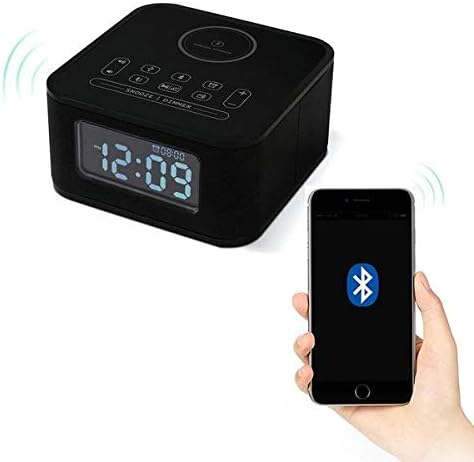
Figure 4.4: The Homtime D2qi speaker connected via Bluetooth to a smartphone.
5. Konfigurazioa
5.1 Energia-konexioa
- Connect the provided power adapter to the DC input port on the back of the Homtime D2qi.
- Entxufatu korronte-egokigailua hormako entxufe estandar batera.
- Pantaila piztuko da, gailua piztuta dagoela adieraziz.
5.2 Hasierako orduaren ezarpena
Lehen aldiz piztean edo itzaltzearen ondorentage, you may need to set the time. Refer to the 'Operating Instructions' section for detailed steps on setting the clock.
6. Funtzionamendu-argibideak
6.1 Bluetooth konexioa
- Sakatu Bluetooth botoia on the top panel to enter Bluetooth pairing mode. The Bluetooth indicator will flash.
- Zure telefonoan edo audio gailuan, gaitu Bluetooth eta bilatu eskuragarri dauden gailuak.
- Select "Homtime D2qi" from the list.
- Once connected, the Bluetooth indicator will stop flashing and remain solid. You can now play audio through the speaker.
6.2 Haririk gabeko kargatzea
- Place your Qi-compatible smartphone centrally on the wireless charging pad located on the top surface of the speaker.
- Ensure the phone is properly aligned with the charging coil.
- The charging indicator on your phone will show that charging has begun.
6.3 Alarma-erlojuaren funtzioa
- Sakatu Alarma botoia alarma ezarpen moduan sartzeko.
- Erabili +/- botoiak ordua eta minutua doitzeko.
- Sakatu Alarma botoia berriro ezarpen bakoitza berresteko.
- Alarma aktibatzeko/desaktibatzeko, sakatu Alarma botoia briefly when not in setting mode.
- To snooze, press the Errepikatzeko/Erregulatzeko botoia alarmak jotzen duenean.
6.4 Irrati-funtzioa
- Sakatu Modu botoia FM irrati modura aldatzeko.
- Eduki sakatuta Erreproduzitu/Pausatu botoia to auto-scan and save available stations.
- Erabili Aurreko/Hurrengo botoiak to navigate through saved stations.
6.5 Call Answering
When connected via Bluetooth, the speaker can be used for hands-free calls.
- Sarrerako dei bati erantzuteko, sakatu Erreproduzitu/Pausatu botoia.
- Dei bat amaitzeko, sakatu Erreproduzitu/Pausatu botoia berriz.
7. Mantentzea
- Garbitu gailua zapi leun eta lehor batekin. Ez erabili garbitzaile edo disolbatzaile urratzailerik.
- Keep the charging pad free of dust and debris to ensure efficient wireless charging.
- Gorde gailua leku fresko eta lehor batean denbora luzez erabiltzen ez duzunean.
8. Arazoak
| Arazoa | Kausa posiblea | Irtenbidea |
|---|---|---|
| Botererik ez | Korronte-egokitzailea ez dago konektatuta edo entxufea akastuna da. | Ensure power adapter is securely plugged into the device and a working wall outlet. |
| Bozgorailutik soinurik ez | Bluetooth not connected; volume too low; incorrect mode. | Ensure Bluetooth is paired. Increase volume on both the speaker and your device. Check if the speaker is in the correct mode (Bluetooth/Radio). |
| Haririk gabeko kargatzeak ez du funtzionatzen | Phone not Qi-compatible; phone not aligned; phone case too thick. | Verify phone supports Qi wireless charging. Realign phone on the charging pad. Remove thick phone cases. |
| Buttons difficult to locate in the dark | Buttons are flush with the surface. | Familiarize yourself with button layout during daylight. Use the dimmer function to adjust display brightness. |
| Bluetooth disconnects automatically | Power saving feature; device out of range. | Reconnect Bluetooth manually. Keep devices within Bluetooth range (approx. 10 meters). |
9. Zehaztapenak
| Ezaugarri | Xehetasuna |
|---|---|
| Marka | Etxeko ordua |
| Modelo zenbakia | D2qi |
| Kolorea | Beltza |
| Hizlari mota | Bluetooth bozgorailuak |
| Konektibitatea | Haririk gabekoa |
| Gailu bateragarriak | Smartphoneak |
| Irteera Potentzia | 5 - 10 watt |
| Produktuaren pisua | 0.5 kg |
| Paketearen neurriak | 19.6 x 18.8 x 14.8 cm |
| Hardware interfazea | Audio/Video Port |
10. Bermea eta Laguntza
Homtime products are manufactured to the highest quality standards. For warranty information and customer support, please refer to the warranty card included in your package or visit the official Homtime webgunea. Gorde erosketa-agiria erosketaren frogagiri gisa.