
TRONIC SMV9809
TRONIC 3-in-1 Detector SMV9809 User Manual
Model: SMV9809
1. Sarrera
Thank you for choosing the TRONIC 3-in-1 Detector, Model SMV9809. This device is designed to detect wood, metal, and live electrical voltage behind walls, ceilings, and floors. Please read this manual thoroughly before using the device to ensure safe and effective operation. Keep this manual for future reference.
2. Segurtasun-argibideak
OHARRA: Segurtasun-jarraibide hauek ez betetzeak deskarga elektrikoak, suteak edo lesio larriak eragin ditzake.
- Beti pentsatu hormen atzean hari elektriko biziak daudela. Kontu handiz ibili.
- Do not rely solely on the detector to locate live wires. Always turn off power to the area before drilling or cutting.
- The device is designed for indoor use only. Avoid exposure to moisture or extreme temperatures.
- Do not open or modify the device. Repairs should only be performed by qualified personnel.
- Mantendu gailua haurren eskura.
- Garbitu gailua zapi lehor eta leun batekin. Ez erabili garbitzaile edo disolbatzaile urratzailerik.
3. Produktua amaitu daview
The TRONIC SMV9809 detector features an LCD display and intuitive controls for easy operation.
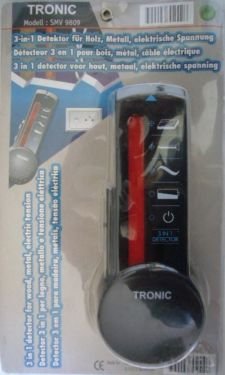
1. irudia: Aurrealdea view of the TRONIC 3-in-1 Detector SMV9809, showing the LCD screen and control buttons.
3.1 Osagaiak
- LCD pantaila: Shows detection mode, signal strength, and battery status.
- Modu botoia: Switches between Wood, Metal, and AC Voltage detekzio moduak.
- Eskaneatu botoia: Eskaneatze prozesua abiarazten du.
- Sentsorearen eremua: Located on the back of the device, this area must be placed flat against the surface for accurate detection.
- Bateriaren konpartimendua: Located on the back, for battery installation.
4. Konfigurazioa
4.1 Bateriaren instalazioa
The TRONIC SMV9809 requires a 9V battery (not included).
- Ireki bateriaren konpartimentuaren estalkia gailuaren atzealdean.
- Sartu 9V-ko bateria berri bat, polaritate zuzena (+/-) ziurtatuz.
- Itxi bateriaren konpartimenduaren estalkia ondo.
Note: Replace the battery when the low battery indicator appears on the LCD display.
5. Funtzionamendu-argibideak
5.1 Eragiketa aholku orokorrak
- Ensure the surface is dry and free of dust.
- Hold the device flat against the surface. Do not tilt or lift it during scanning.
- Move the device slowly and steadily across the surface.
- Mark the detected areas with a pencil.
5.2 Wood Detection Mode
This mode is used to locate wood studs behind drywall or other common wall materials.
- Sakatu Modu botoia until the "WOOD" indicator appears on the LCD.
- Place the device flat against the wall where you want to start scanning.
- Eduki sakatuta Eskaneatu botoia. Wait for calibration (a beep may sound).
- Slowly slide the device horizontally across the surface.
- The signal strength indicator on the LCD will increase as you approach a wood stud. A distinct sound and full bar indication will signal the center of the stud.
5.3 Metal Detection Mode
This mode detects ferrous and non-ferrous metals, such as pipes, rebar, or conduit.
- Sakatu Modu botoia until the "METAL" indicator appears on the LCD.
- Place the device flat against the wall.
- Eduki sakatuta Eskaneatu botoia.
- Slowly slide the device horizontally.
- The signal strength will increase as you approach metal. A continuous tone and full bar indication will signal the presence of metal.
5.4 AC Voltage Detection Mode
CAUTION: This mode detects live, unshielded AC wires. Always confirm power is off before working.
- Sakatu Modu botoia until the "AC" indicator appears on the LCD.
- Place the device flat against the wall.
- Eduki sakatuta Eskaneatu botoia.
- Slowly slide the device horizontally.
- The signal strength will increase, and an audible alarm will sound when live AC voltage is detected. The "AC" symbol will flash on the display.
6. Mantentzea
- Garbiketa: Wipe the device with a dry, soft cloth. Do not use liquids or chemical cleaners.
- Biltegiratzea: Store the device in a dry, dust-free environment at room temperature. Remove the battery if the device will not be used for an extended period.
- Bateria ordezkatzea: Replace the 9V battery when the low battery indicator is displayed.
7. Arazoak
| Arazoa | Kausa posiblea | Irtenbidea |
|---|---|---|
| Gailua ez da pizten. | Bateria hilda edo gaizki instalatuta. | Check battery polarity; replace battery. |
| Irakurketa okerrak. | Device not calibrated correctly; surface too wet/uneven; interference. | Ensure proper calibration (press and hold scan button on clear area); ensure dry, flat surface; avoid scanning near strong electromagnetic fields. |
| No detection in AC mode. | Wires are shielded or too deep; power is off. | Ensure power is on for the circuit; AC detection depth is limited. |
8. Zehaztapenak
- Eredua: SMV9809
- Detektatzeko moduak: Wood, Metal, AC Voltage
- Energia iturria: 9V-ko bateria (ez dago barne)
- Pantaila: LCDa
- Materiala: Plastikoa
- Nazioarteko Babesteko Balorazioa: IP66 (Dust tight and protected against powerful jets of water)
- Luzera erregulagarria: Bai
9. Bermea eta Laguntza
TRONIC products are manufactured to high-quality standards. For warranty information or technical support, please refer to the documentation provided with your purchase or contact your retailer. Keep your proof of purchase for any warranty claims.
Ask a question about this manual
Ask about setup, troubleshooting, compatibility, parts, safety, or missing instructions. Manuals+ will review the question and use this page’s manual context to help answer it.