
Sarrera
Thank you for choosing the Calypso K5769/2 Analogue Digital Quartz Watch. This manual provides detailed instructions for setting up, operating, and maintaining your watch to ensure optimal performance and longevity. Please read this manual thoroughly before using your watch.
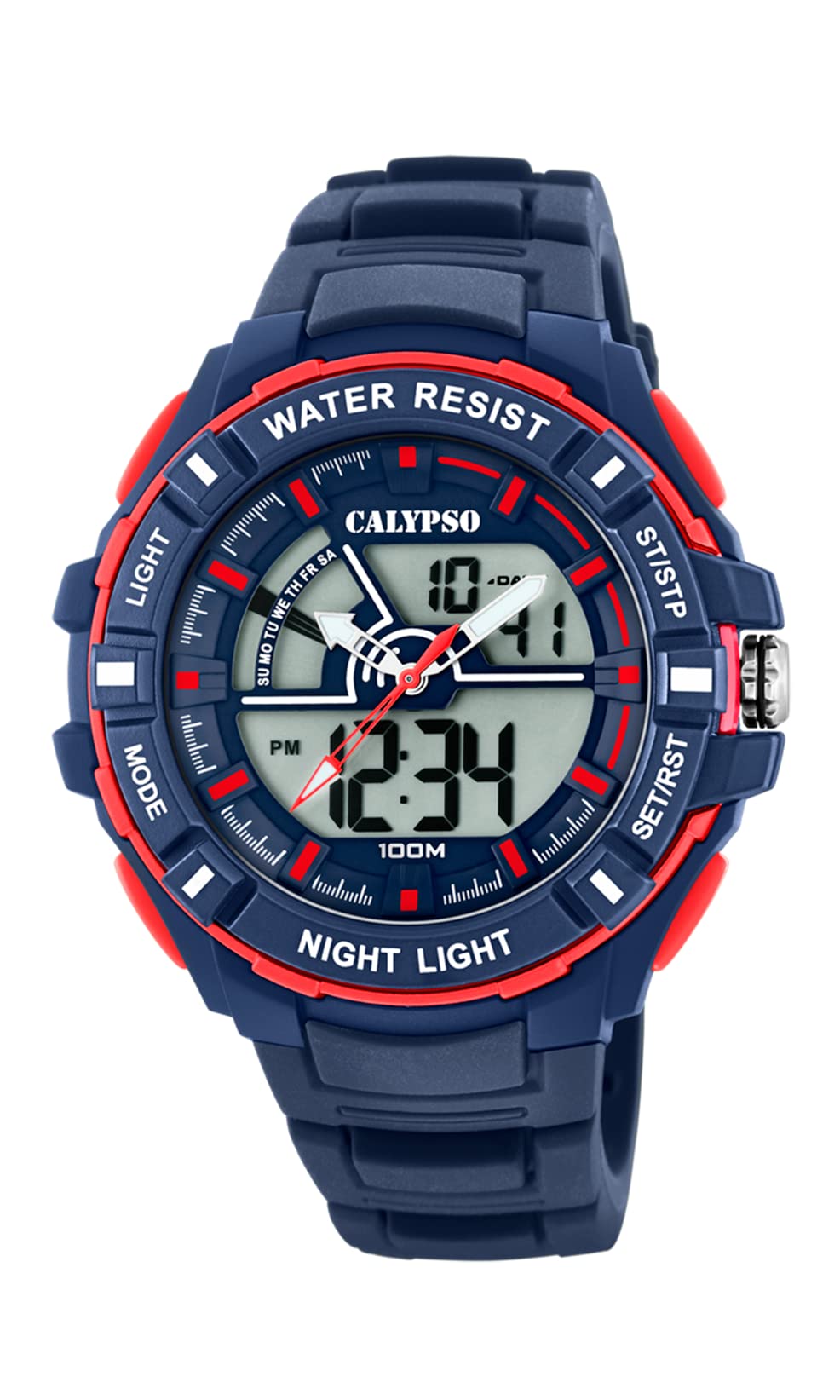
Irudia: Aurrealdea view of the Calypso K5769/2 Analogue Digital Quartz Watch, showcasing its blue plastic case and silicone strap.
Konfigurazioa
Hasierako ordua eta data ezartzea
Your Calypso K5769/2 watch features both analogue and digital displays. Both need to be set for accurate timekeeping.
- Ordu digitalaren ezarpena:
- Sakatu MODUA botoia behin eta berriz sakatu ordua ezartzeko modua bistaratu arte (normalean digitu keinukariek adierazten dute).
- Erabili EGOKITU button to select the digit you wish to change (hours, minutes, seconds).
- Erabili EZARTU or HASI/GELDITU botoia balioa handitzeko.
- Behin ezarrita, sakatu MODUA berriro ezarpen modutik irteteko.
- Analogue Time Setting:
- Pull the crown (the small knob on the side of the watch case) out to the first or second position (refer to specific watch model for exact crown positions).
- Biratu koroa orduko eta minutuko orratzak ordu zuzenean doitzeko.
- Sakatu koroa berriro denboraren ezarpena ziurtatzeko.
- Data ezarpena:
- In digital time setting mode, after setting the time, continue using the EGOKITU button to navigate to the date (month, day, year) settings.
- Doitu balioak erabiliz EZARTU or HASI/GELDITU botoia.
- Exit by pressing MODUA.

Irudia: Albokoa view of the Calypso K5769/2 watch, highlighting the control buttons and the crown used for adjustments.
Funtzionamendu-argibideak
Your watch is equipped with several functions accessible via the control buttons.
Modu hautaketa
Sakatu MODUA botoia eskuragarri dauden funtzioen artean aldatzeko:
- Time Display (Analogue & Digital)
- Alarma
- Kronometroa
- Ordu-zona bikoitza
- Data bistaratzea
Alarma Funtzioa
- Sakatu MODUA until the Alarm mode is displayed.
- Sakatu EGOKITU orduko edo minutuko digituak hautatzeko.
- Erabili EZARTU or HASI/GELDITU nahi duzun alarma-ordua ezartzeko.
- Sakatu MODUA berresteko eta irteteko.
- To activate/deactivate the alarm, press a specific button (often EGOKITU or EZARTU) while in Alarm mode. An alarm icon will appear when active.
Kronometroaren funtzioa
- Sakatu MODUA until the Stopwatch mode is displayed (usually showing 00:00:00).
- Sakatu HASI/GELDITU kronometrajea hasteko.
- Sakatu HASI/GELDITU berriro denbora pausatzeko/berrabiarazteko.
- Sakatu Berrezarri (often the EGOKITU button) to clear the stopwatch to zero.
Ordu-zona bikoitza
This feature allows you to display a second time zone simultaneously.
- Sakatu MODUA until the Dual Time Zone mode is displayed.
- Erabili EGOKITU eta EZARTU or HASI/GELDITU nahi duzun bigarren ordu-zona ezartzeko.
- Sakatu MODUA berresteko eta irteteko.
Argiztapen funtzioa
Argi gutxiko baldintzetan pantaila digitala argiztatzeko, sakatu botoia ARGIA button (usually located on the top left of the watch case).
Mantentzea
Water Resistance (10 ATM / 100 Metres)
Your Calypso K5769/2 watch is water resistant up to 10 ATM (100 meters). This means it is suitable for swimming, snorkeling, and showering. However, it is ez suitable for high-impact water sports or diving. Do not operate buttons or the crown while the watch is wet or submerged, as this can compromise the water resistance.
Garbiketa
Erlojua garbitzeko, garbitu astiro-astiro zapi leun batekin,amp oihal. Saihestu produktu kimiko gogorrak, disolbatzaileak edo garbitzaile urratzaileak erabiltzea, hauek kaxa eta uhalaren materialak kaltetu baitezakete.
Bateria ordezkatzea
The watch is powered by a Quartz (battery) movement. When the display becomes dim or the watch stops functioning, the battery may need replacement. Battery replacement should be performed by a qualified watch technician to ensure proper sealing and maintain water resistance.
Arazoak konpontzea
| Arazoa | Kausa posiblea | Irtenbidea |
|---|---|---|
| Watch not displaying time/functions. | Bateria baxua edo hilda. | Ordeztu bateria (zerbitzu profesionala gomendatzen da). |
| Analogue hands not moving. | Crown pulled out; battery issue. | Push crown back in; if still not working, replace battery. |
| Digital display is dim or flickering. | Bateria baxua. | Ordeztu bateria. |
| Ura erlojuaren barruan. | Buttons operated underwater; seal compromised. | Eraman berehala erloju-konponketa zerbitzu profesional batera. Ez saiatu zuk zeuk lehortzen. |
| Incorrect time/date displayed. | Settings were not saved or incorrectly set. | Refer to the "Initial Time and Date Setting" section and re-set the watch. |
Zehaztapenak
| Modelo zenbakia: | K5769/2 |
| Marka: | Kalipsoa |
| Bistaratzeko mota: | Analogue-Digital |
| Mugimendu mota: | Quartz (Battery) |
| Uraren erresistentzia: | 10 ATM (100 Metres) |
| Kasuaren materiala: | Polycarbonate (Plastic) |
| Uhalaren materiala: | Plastikoa (silikona) |
| Kasuaren diametroa: | 53 milimetro |
| Kasuen lodiera: | 19 milimetro |
| Bandaren zabalera: | 26 milimetro |
| Ezaugarri gehigarriak: | Alarm, Dual Time Zone, Light Up, Stopwatch |
| Elementuaren pisua: | 65 gramo |
Bermearen informazioa
Calypso watches typically come with a manufacturer's warranty covering defects in materials and workmanship for a specified period from the date of purchase. This warranty usually does not cover damage resulting from improper handling, accidents, unauthorized repairs, or normal wear and tear (e.g., battery, strap, crystal). Please retain your proof of purchase for warranty claims. For specific warranty terms and conditions, refer to the warranty card included with your watch or contact Calypso customer support.
Bezeroarentzako Arreta
If you encounter any issues or have questions regarding your Calypso K5769/2 watch that are not addressed in this manual, please contact Calypso customer support. You can typically find contact information on the official Calypso webgunean edo zure produktuaren ontzian.
- Lineako laguntza: Visit the official Calypso Watches webMaiz egiten diren galderen eta laguntza-harremanetarako datuen gunea.
- Zerbitzu Zentroak: For repairs or battery replacement, locate an authorized Calypso service center.