
1. Sarrera
The Canon PowerShot G5 X is a compact digital camera featuring a 1.0-inch, 20.2 Megapixel High-Sensitivity CMOS sensor and a built-in 2.36 million dot electronic viewfinder. This camera is designed for advanced photographers seeking high-quality stills and video with comprehensive control. It includes Wi-Fi and NFC capabilities for easy sharing and remote operation.
Ezaugarri nagusiak hauek dira:
- 1.0-inch, 20.2 Megapixel High-Sensitivity CMOS sensor.
- Canon DIGIC 6 Image Processor for enhanced image quality and fast operation.
- Built-in 2.36 million dot electronic viewbilatzailea.
- Multi-angle capacitive 3.0-inch touch panel LCD with 1.04 million dots.
- Full HD 1080p video recording at 60p/30p/24p.
- Integrated Wi-Fi and NFC for wireless connectivity.
2. Zer dago kutxan
Verify that all items are present before initial use:
- Canon PowerShot G5 X Camera Body
- Bateria paketea
- Bateria kargagailua
- Lepoko uhala

Figure 2.1: Included items with the Canon PowerShot G5 X camera.
3. Hasierako konfigurazioa
3.1 Bateria kargatzea
- Sartu bateria bateria kargagailuan.
- Kargagailua entxufe batera konektatu. Kargatzeko adierazlearen argia piztuko da.
- Once charging is complete, the indicator light will change or turn off. Remove the battery.
3.2 Bateria eta memoria txartela sartzea
- Ireki kameraren beheko aldean dagoen bateriaren/txartelaren konpartimentuaren estalkia.
- Insert the charged battery into the compartment, ensuring correct orientation.
- Insert a compatible SD, SDHC, or SDXC memory card into the card slot until it clicks into place.
- Itxi konpartimenduaren estalkia ongi.
3.3 Kamera piztea
Sakatu ON/OFF button located on the top of the camera to power it on. The lens will extend, and the LCD screen will activate.

3.1. irudia: Aurrealdea view of the Canon PowerShot G5 X.
4. Kameraren funtzionamendua
4.1 Oinarrizko argazkiak ateratzeko moduak
Kameraren goialdean dagoen modu-markagailuak hainbat argazki-modu hautatzeko aukera ematen du:
- Modu automatikoa: For automatic settings.
- P (AE programa): Camera sets aperture and shutter speed, but allows other adjustments.
- Av (Aperture Priority AE): Zuk diafragma ezartzen duzu, kamerak obturazio-abiadura ezartzen du.
- Tv (Shutter Priority AE): Zuk ezartzen duzu obturazio-abiadura, kamerak ezartzen du diafragma.
- M (Eskuzkoa): Irekidura eta obturazio-abiadura biak kontrolatzen dituzu.
- Custom Modes (C1/C2): Save and recall your preferred settings.
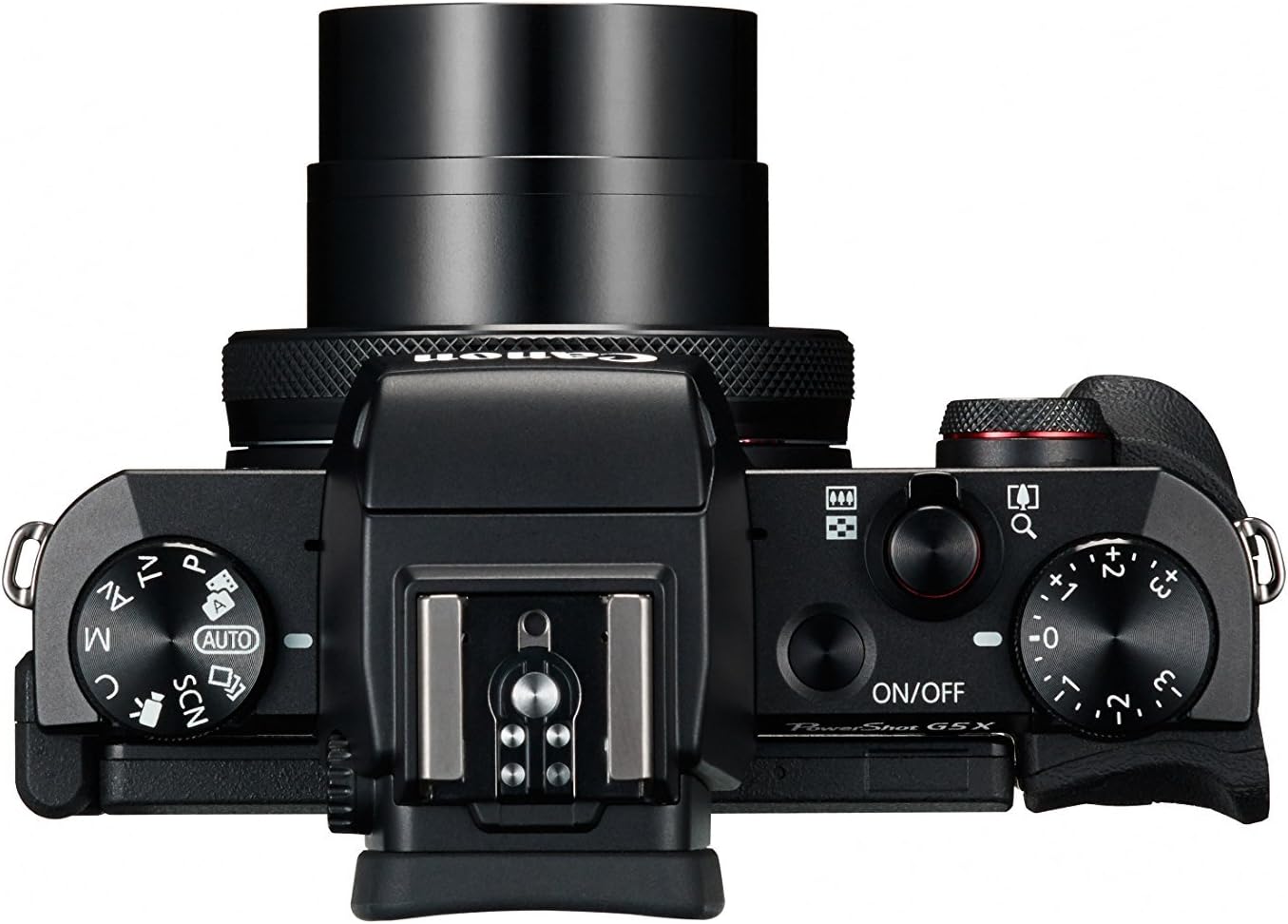
Figure 4.1: Top controls of the Canon PowerShot G5 X.
4.2 Erabili Viewbilatzailea eta LCD pantaila
Kamerak bi elementu elektroniko ditu viewfinder (EVF) and a multi-angle touch panel LCD. You can switch between them or use the EVF for composing shots in bright conditions. The LCD screen can be articulated for various shooting angles and touch operations.

Figure 4.2: Canon PowerShot G5 X with articulated LCD screen.

4.3. Irudia: Atzealdea view of the Canon PowerShot G5 X.
4.3 Bideoak grabatzea
To record video, set the mode dial to the movie mode icon. Press the dedicated movie button to start and stop recording. The camera supports 1080p Full HD video at various frame rates (60p/30p/24p).
4.4 Wi-Fi eta NFC konexioa
The camera's built-in Wi-Fi and NFC functions allow for wireless transfer of images and videos to compatible smart devices or computers. Refer to the camera's menu for detailed instructions on setting up these connections.
5. Mantentzea eta Zainketa
5.1 Kamera garbitzea
- Lentea: Use a lens brush or blower to remove dust, then gently wipe with a microfiber lens cloth. Avoid touching the lens surface directly.
- LCD pantaila: Wipe gently with a soft, dry cloth. For stubborn smudges, use a screen cleaner specifically designed for electronics.
- Kameraren gorputza: Garbitu zapi leun eta lehor batekin. Ez erabili disolbatzaile organikorik edo garbiketa-agente indartsurik.
5.2 Biltegiratzea
Erabiltzen ez duzunean, gorde kamera leku fresko eta lehor batean, eguzki-argitik eta muturreko tenperaturetatik babestuta. Kendu bateria kamera denbora luzez erabiliko ez baduzu.
6. Arazoak
This section addresses common issues you might encounter with your Canon PowerShot G5 X camera.
| Arazoa | Balizko Kausa / Irtenbidea |
|---|---|
| Kamera ez da pizten. | Battery is depleted. Charge the battery. Ensure battery is inserted correctly. |
| Irudiak lausoak dira. | Lens is dirty. Clean the lens. Shutter speed is too slow. Increase shutter speed or use image stabilization. Camera shake. Hold the camera steady or use a tripod. |
| Ezin da Wi-Fi/NFCra konektatu. | Ensure Wi-Fi/NFC is enabled in camera settings. Check device compatibility and network settings. Refer to the camera's connectivity guide in the menu. |
| Memoria txartelaren errorea. | Memoria txartela beteta dago. Ezabatu beharrezkoak ez direnak files or replace card. Card is corrupted. Format the card (this will erase all data). Card is incompatible. Use a supported SD, SDHC, or SDXC card. |
| Flasha ez da pizten. | Flash is set to OFF. Change flash mode to Auto or On. Subject is too far. Check flash range. |
7. Zehaztapenak
| Ezaugarri | Xehetasuna |
|---|---|
| Sentsore mota | 1.0-inch High-Sensitivity CMOS |
| Ebazpen finko eraginkorra | 20.2 MP |
| Irudi prozesadorea | DIGIK 6 |
| Zoom optikoa | 4.2x |
| Lentearen irekiera | f/1.8-2.8 |
| Focal Length (35mm equivalent) | 24-100mm |
| Irudi Egonkortzea | Digitala |
| Viewaurkitzailea | Built-in Electronic Viewfinder (2.36 million dots) |
| LCD pantaila | 3.0-inch Multi-angle Capacitive Touch Panel (1.04 million dots) |
| Bideo Ebazpena | 1080p Full HD (60p/30p/24p) |
| Konektibitatea | Wi-Fi, NFC, HDMI, USB |
| Biltegiratze euskarria | SD, SDHC, SDXC Memory Cards |
| Elementuaren pisua | 1.8 kilo |
| Modelo zenbakia | 0510C001 |
| UPC | 748926548632 |
8. Bermea eta Laguntza
8.1 Bermearen informazioa
This Canon PowerShot G5 X camera comes with a 90-day limited warranty from the date of purchase. This warranty covers manufacturing defects under normal use. Please retain your proof of purchase for warranty claims.
8.2 Bezeroarentzako laguntza
For technical assistance, service, or further inquiries, please refer to the official Canon support webwebgunera edo jarri harremanetan bezeroarentzako arreta-zerbitzuarekin. Harremanetarako informazioa normalean fabrikatzailearen webgunean aurki daiteke. webgunea.