
Sarrera
The Teesa Hypercare T300 rotary shaver (model TSA0520) is designed for efficient and comfortable facial hair removal. Its three flexible blades adapt to facial contours, and the integrated pop-up trimmer allows for precise styling of sideburns and moustaches. This manual provides essential information for safe operation, maintenance, and optimal performance of your device.
Segurtasun Informazioa
Please read these safety instructions carefully before using the appliance and keep them for future reference.
- Tresna hau etxeko erabilerarako soilik da.
- Do not immerse the shaver in water or other liquids. Keep it dry.
- Ez erabili gailua korronte-kablea edo entxufea hondatuta badago.
- Always disconnect the shaver from the power supply before cleaning.
- Mantendu aparatua haurren eskura.
- Use only the power cable supplied with the device.
- Do not use the shaver if the shaving heads are damaged, as this may cause injury.
Paketearen edukia
Mesedez, egiaztatu paketearen edukia. Elementuren bat falta bada edo hondatuta badago, jarri harremanetan zure saltzailearekin.
- Teesa Hypercare T300 Rotary Shaver
- Elikatze-kablea
- Babes-txapela
- Garbiketa eskuila
- Olio lubrifikatzailea
- Argibide eskuliburua
Produktua amaituview
Familiarize yourself with the components of your Teesa Hypercare T300 Rotary Shaver.
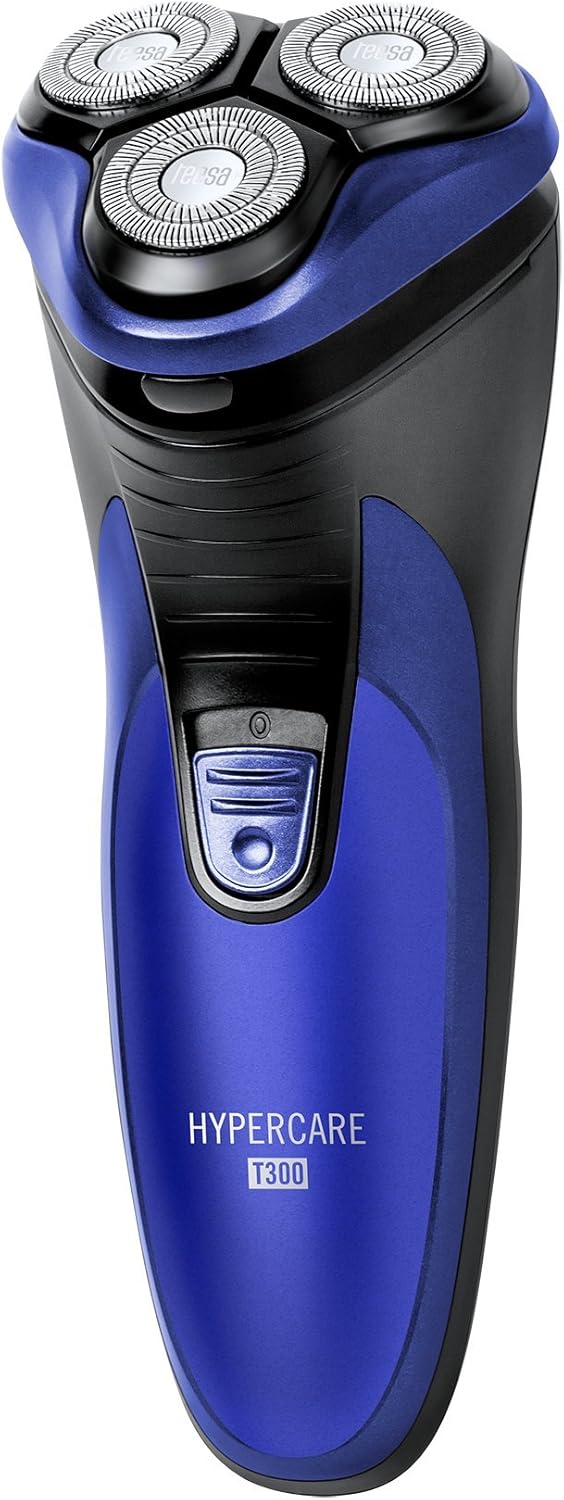


Konfigurazioa
Bizarra kargatzen
- Ziurtatu bizarra itzalita dagoela kargatu aurretik.
- Connect the power cable to the charging port on the shaver.
- Plug the other end of the power cable into a standard electrical outlet (220-240V; 50/60Hz).
- Kargatzeko adierazlearen argia piztuko da, bizarra-makina kargatzen ari dela adieraziz.

A full charge takes approximately 8 hours and provides up to 45 minutes of cordless operation. Do not leave the shaver connected to the charger for extended periods after it is fully charged.
Funtzionamendua
Bizarra egitea
- Ziurtatu bizarra egiteko makina guztiz kargatuta dagoela.
- Sakatu pizteko botoia bizarra pizteko.
- Eutsi bizarra zure azalarekiko angelu zuzen batean.
- Move the shaver in small, circular motions over your face and neck. For optimal results, shave against the direction of hair growth.
- The flexible shaving heads will adapt to the contours of your face for a close shave.
- Bizarra moztu ondoren, sakatu pizteko botoia bizarra itzaltzeko.
Pop-Up ebakitzailea erabiltzea
- Piztu bizarra.
- Locate the pop-up trimmer release button on the side of the shaver.
- Slide the release button upwards to extend the pop-up trimmer.

- Use the trimmer to precisely shape sideburns, moustaches, or beard lines.
- After use, push the trimmer back down until it clicks into its closed position.
Mantentzea
Bizarra garbitzea
Garbiketa erregularrak errendimendu eta higiene optimoa bermatzen du.
- Itzali bizarra egiteko makina eta deskonektatu korronte-iturritik.
- Press the release button on the front of the shaver to open the shaving head unit.
- Use the provided cleaning brush to remove any accumulated hair clippings from the shaving heads and the hair chamber.
- For a more thorough cleaning, you may rinse the shaving heads under running water. Ensure the main body of the shaver does not get wet.
- Allow all parts to air dry completely before reassembling the shaving head unit.
- Periodically apply a small drop of the provided lubricating oil to the shaving foils and cutters to maintain smooth operation and prolong blade life.
- Always replace the protective cap over the shaving heads after each use to prevent damage.
Arazoak konpontzea
If you encounter any issues with your shaver, refer to the following common problems and solutions:
- Bizarra ez da pizten:
- Ziurtatu bizarra egiteko makina guztiz kargatuta dagoela.
- Sakatu irmo pizteko botoia.
- Bizarra mozteko errendimendu eskasa:
- The blades may be clogged with hair. Clean the shaver thoroughly as described in the Maintenance section.
- Ensure the shaver is fully charged. Performance may decrease with low battery.
- Blades may be dull. Consider replacing the shaving heads after extended use (replacement parts sold separately).
- Bizarra kargatzen ez da:
- Check that the power cable is securely connected to both the shaver and the electrical outlet.
- Egiaztatu entxufe elektrikoak behar bezala funtzionatzen duela.
- Ensure the charging indicator light illuminates when connected.
Konponbide hauek saiatu ondoren arazoa konpontzen ez bada, jarri harremanetan bezeroarentzako arreta-zerbitzuarekin.
Zehaztapenak
| Ezaugarri | Zehaztapena |
|---|---|
| Modelo zenbakia | TSA0520 |
| Boterea | 3 W |
| Errotazio Abiadura | 6000 RPM |
| Exekutatu Denbora | Gehienez 45 minutu |
| Kargatzeko Denbora | Gehienez 8 ordu |
| Bateria | 2.4 V; 2/3 AA 600 mAh x2 (Rechargeable) |
| Elikatze Hornidura | 220 – 240 V; 50/60 Hz |
| Pisua | 165 g |
| Neurriak (L x W x H) | 58.2 x 46.8 x 150.9 mm |
| Pala Materiala | Altzairu aleazioa |
| Pala kopurua | 3 (Rotary Type) |
| Ezaugarri Berezia | Diseinu Ergonomikoa |
Bermea eta Laguntza
For warranty information, technical assistance, or to inquire about replacement parts, please refer to the documentation included with your purchase or visit the official Teesa webgunea. Gorde erosketaren egiaztagiria bermearen erreklamazioetarako.
