
Segurtasun-argibide garrantzitsuak
Please read these instructions carefully before operating the unit. Keep this manual for future reference.
- Ez blokeatu aireztapen-zulorik.
- Ez instalatu bero-iturriren ondoan.
- Babestu korronte-kablea ibiltzeko edo atximur ez dadin.
- Erabili soilik fabrikatzaileak zehaztutako eranskinak/osagarriak.
- Deskonektatu aparatu hau tximista-ekaitzetan edo denbora luzez erabiltzen ez duzunean.
- Jarri zerbitzu-zerbitzu guztiak zerbitzu-pertsonal kualifikatuari.
- OHARRA: Suaren edo deskarga elektrikoaren arriskua murrizteko, ez jarri aparatu hau euri edo hezetasunera.
Produktua amaituview
The Victrola VS-120 is a versatile microsystem offering multiple audio playback options. It includes Bluetooth connectivity, a CD player, USB playback, an Aux-in port, and an FM radio.
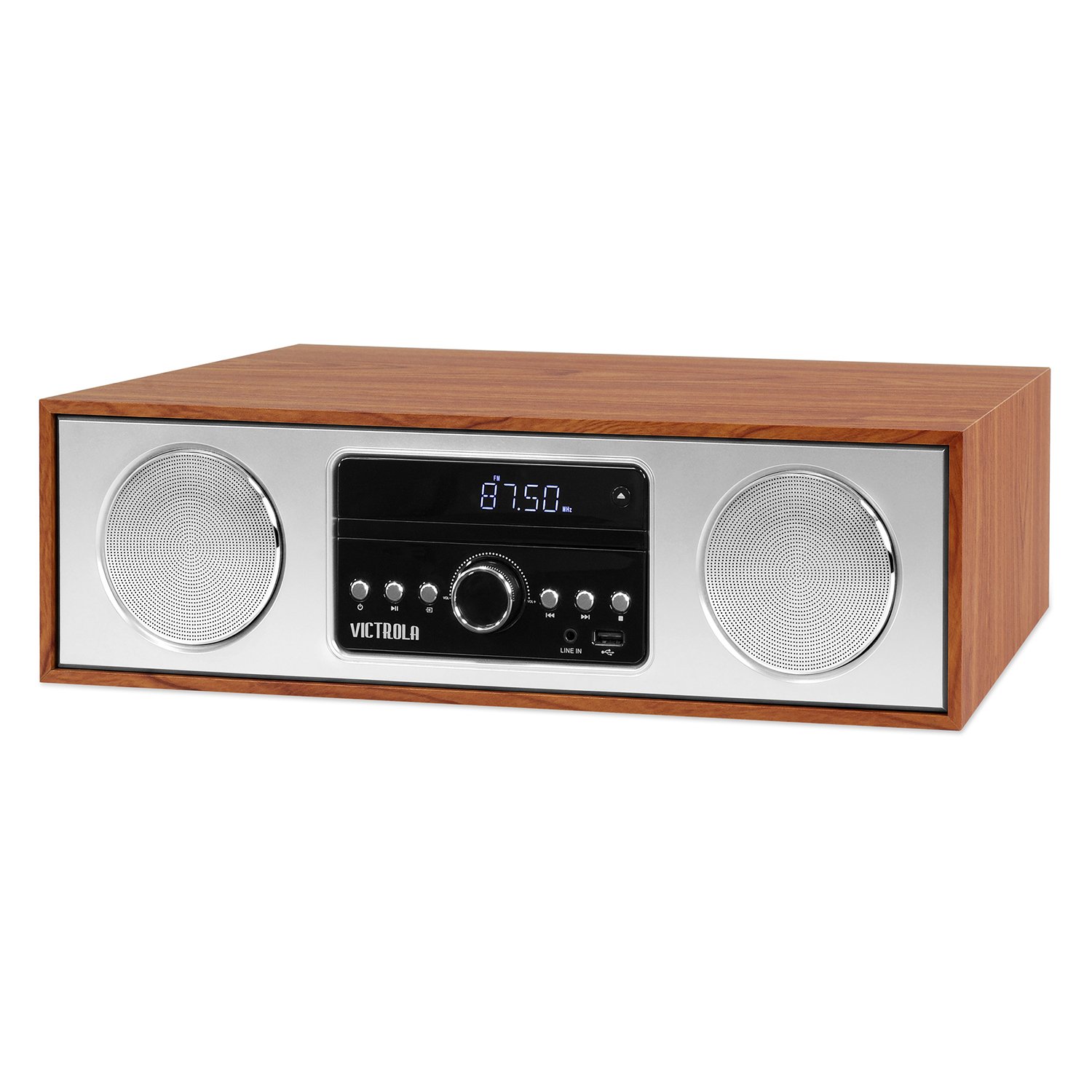
Aurrealdea view of the Victrola VS-120 Bluetooth Microsystem, showing the speaker, display, and control panel.

The Victrola VS-120 microsystem with its CD tray open, revealing a disc, and the included remote control positioned in the foreground.
Konfigurazio Gida
Despaketatzea
Carefully remove the unit from its packaging. Ensure all accessories are present:
- Victrola VS-120 Microsystem
- Urruneko Kontrola
- Elikatze-moldagailua
- Erabiltzailearen eskuliburua (dokumentu hau)
Potentzia-konexioa
- Insert the small end of the power adapter into the DC IN jack on the rear of the unit.
- Entxufatu korronte-egokitzailearen beste muturra hormako entxufe estandar batera (100-240V AC, 50/60Hz).
- The unit will enter standby mode, and the LED clock display will illuminate.
Antenna Connection (FM Radio)
For optimal FM radio reception, extend the FM wire antenna fully. Adjust its position for the best signal.
Funtzionamendu-argibideak
Piztu/Itzali
Sakatu BOTEREA button on the unit or remote control to turn the system on or off (standby mode).
Modu hautaketa
Sakatu MODUA button on the unit or remote control repeatedly to cycle through available functions: Bluetootha, CD, USBa, AUX, eta FM Irratia.
Bluetooth funtzionamendua
- Hautatu Bluetootha mode. The display will show "BT" and flash, indicating pairing mode.
- On your Bluetooth-enabled device (smartphone, tablet, etc.), enable Bluetooth and search for "Victrola VS-120".
- Select "Victrola VS-120" to pair. Once connected, the "BT" indicator will stop flashing and a confirmation tone will sound.
- You can now stream audio from your device to the microsystem.
- Use your device or the microsystem's controls (PLAY/PAUSE, NEXT, PREVIOUS) to manage playback.
CD erreprodukzioa
- Hautatu CD modua.
- Sakatu IREKI/ITXI CDaren erretilua irekitzeko botoia.
- Place a CD (audio CD or MP3 CD) with the label side facing up into the tray.
- Sakatu IREKI/ITXI again to close the tray. The unit will read the disc and begin playback automatically.
- Erabili JOLASTU/PAUSTU, HURRENGOA, eta AURREKOA erreprodukzioa kontrolatzeko botoiak.
USB erreprodukzioa
- Insert a USB flash drive (FAT32 format, containing MP3 files) USB atakan.
- Hautatu USBa mode. The unit will automatically detect and begin playing MP3 files diskotik.
- Erabili JOLASTU/PAUSTU, HURRENGOA, eta AURREKOA erreprodukzioa kontrolatzeko botoiak.
FM Irratiaren funtzionamendua
- Hautatu FM Irratia modua.
- Eduki sakatuta TUNE +/- botoiak automatikoki hurrengo irrati eskuragarria bilatzeko.
- Sakatu TUNE +/- buttons briefly to manually adjust the frequency in small increments.
- To save a station as a preset, press the MEM botoia, gero erabili AURREZ EZARRI +/- aurrezarritako zenbaki bat hautatzeko, eta sakatu MEM berriro baieztatzeko.
- Aurrez ezarritako irrati bat berreskuratzeko, erabili AURREZ EZARRI +/- botoiak.
Aux-in konexioa
- Konektatu kanpoko audio gailu bat (adibidez, MP3 erreproduzitzailea, telefono adimenduna) AUX konektore bat 3.5 mm-ko audio kable bat erabiliz (ez dago barne).
- Hautatu AUX modua.
- Kontrolatu erreprodukzioa eta bolumena kanpoko gailutik.
Urruneko Kontrol Funtzioak
The included remote control provides full functionality. Ensure batteries are correctly inserted. Key functions include:
- POTENTZIA: Turn unit on/off.
- JARRAIBIDEAK: Aukeratu audio iturria.
- VOL +/-: Egokitu bolumena.
- PLAY/PAUSE, NEXT, PREVIOUS: Control playback for CD, USB, and Bluetooth.
- TUNE +/-: Tune FM radio stations.
- MEM: Store FM presets.
- PRESET +/-: Select FM presets.
- EQ: Cycle through equalizer settings (Flat, Rock, Pop, Jazz, Classic).
- ERLOIA: Ezarri erlojua.
- DIMMER: Doitu pantailaren distira.
EQ ezarpenak doitzea
Sakatu EQ button on the remote control to cycle through preset equalizer modes: Flat, Rock, Pop, Jazz, and Classic. Select the mode that best suits your audio preference.
Erlojua ezartzea
Erlojua ezartzeko, sakatu ERLOIA button on the remote control. Use the TUNE +/- buttons to adjust the hour and minute, and press ERLOIA berriro ezarpen bakoitza berresteko.
Mantentzea
Unitatea garbitzea
To clean the exterior of the unit, use a soft, dry cloth. Do not use abrasive cleaners, waxes, or solvents as these may damage the surface. Ensure the unit is unplugged before cleaning.
CD erreproduzitzailearen zaintza
Handle CDs by their edges. Keep them clean and free of scratches. If a CD is dirty, wipe it gently with a soft, lint-free cloth from the center outwards. Do not use solvents or abrasive cleaners on CDs.
Arazoak konpontzea
| Arazoa | Kausa posiblea | Irtenbidea |
|---|---|---|
| Botererik ez | Kable elektrikoa ez dago konektatuta; Entxufea ez dago aktibo. | Ziurtatu kablea ondo konektatuta dagoela; Saiatu beste entxufe batekin. |
| Soinurik ez | Bolumena baxuegia; Modu okerra hautatuta; Kanpoko gailua ez dabil erreproduzitzen. | Increase volume; Select correct mode (BT, CD, USB, AUX, FM); Ensure external device is playing and its volume is up. |
| CDa ez da erreproduzitzen | CDa gaizki sartuta dago; CDa zikin edo urratuta dago; Diskoaren formatua ez da onartzen. | Insert CD with label side up; Clean or replace CD; Ensure it's an audio CD or MP3 CD. |
| Bluetooth parekatzeak huts egin du | Unit not in pairing mode; Device too far; Device already paired to another unit. | Ensure unit is in BT mode and "BT" is flashing; Move device closer; Disconnect from other devices. |
| FM harrera eskasa | Antena ez dago luzatuta edo behar bezala kokatuta. | Fully extend and reposition the FM wire antenna. |
| Urruneko kontrola ez dabil | Bateriak hilda edo gaizki sartuta; Urrutiko agintearen eta unitatearen arteko oztopoa. | Replace batteries; Ensure correct polarity; Remove obstructions; Point remote directly at the unit's sensor. |
Zehaztapenak
- Marka: Victrola
- Eredua: VS-120
- Konektibitatea: Bluetooth, USB, Laguntzailea (3.5 mm)
- Audio iturriak: CD Player, USB Player, FM Radio, Bluetooth, Aux-in
- Irteera potentzia: 30 Watt
- Onartutako audio formatuak: CD, MP3
- Neurriak (L x W x H): 15.97 x 4.69 x 10.83 hazbete (40.56 x 11.91 x 27.51 cm)
- Pisua: 10.76 libra (4.88 kg)
- Potentzia sarrera: AC 100-240V, 50/60Hz
- Kolorea: Astigarrak
Bermea eta Laguntza
Victrola products are designed with quality and performance in mind. For detailed warranty information, please refer to the warranty card included with your product or visit the official Victrola website. For technical support or customer service inquiries, please contact Victrola customer support through their official channels.
Webgunea: www.victrola.com