
1. Sarrera
This manual provides instructions for the safe and efficient operation of your Mksutary XF-608 and XF-508 series two-way radios. Please read this manual thoroughly before using the device and retain it for future reference.
2. Segurtasun informazioa
- Do not use the device in rain or wet conditions. The interphone is not waterproof.
- Use only specified batteries (3x AA batteries per unit, not included).
- Mantendu gailua muturreko tenperaturatik eta eguzki-argitik urrun.
- Ez saiatu gailua desmuntatzen edo aldatzen.
- Bota pilak behar bezala tokiko araudiaren arabera.
3. Paketearen edukia
Paketeak normalean barne hartzen ditu:
- 2 x Mksutary Two-Way Radios (XF-608/XF-508 series)
- 2 x Gerriko Klipak
- 1 x Erabiltzailearen eskuliburua (dokumentu hau)
- 1 x Adapter (if included in specific variation)
4. Produktua amaitu daview
Familiarize yourself with the components and controls of your two-way radio.

4.1. irudia: Labeled components of the Mksutary XF-638 Two-Way Radio. Key components include the Antenna, Talk Button (PTT), Power Button, Menu Button, Up/Down Buttons, and Call Button.
- Antena: Seinaleak transmititzeko eta jasotzeko.
- Talk Button (PTT): Sakatu eta eutsi zure ahotsa transmititzeko. Askatu entzuteko.
- Pizteko botoia (PIZTU/ITZITU): Luze sakatu irratia pizteko edo itzaltzeko.
- Menuko botoia: Accesses menu options and settings.
- Gora / Behera botoiak: Navigate menu options, adjust volume, or change channels.
- Call Button (MON): Sends a call tone to other radios on the same channel. Also used for monitoring.
- LCD pantaila: Kanal zenbakia, bateriaren egoera eta beste adierazle batzuk erakusten ditu.
- Bozgorailua/Mikrofonoa: Audio sarrera eta irteerarako.
5. Konfigurazioa
5.1 Bateriaren instalazioa
Each radio requires 3 AA batteries (not included). Ensure correct polarity when inserting batteries.
- Bilatu bateriaren konpartimentuaren estalkia irratiaren atzealdean.
- Irristatu edo askatu estalkia konpartimentua irekitzeko.
- Insert 3 AA batteries, matching the + and - symbols inside the compartment.
- Jarri berriro bateriaren konpartimentuaren estalkia, ondo sartuta dagoela ziurtatuz klik eginez.

5.1. irudia: Battery compartment and belt clip attachment. Insert 3 AA batteries into each unit.
5.2 Gerriko Klipa eranstea
Attach the provided belt clip to the back of the radio for convenient carrying.
- Align the belt clip with the designated slot on the back of the radio.
- Slide the clip down until it locks into place.
6. Funtzionamendu-argibideak
6.1 Piztu/Itzali
- Pizteko: Sakatu eta eutsi botoiari Pizteko botoia until the LCD screen illuminates.
- Itzaltzeko: Sakatu eta eutsi botoiari Pizteko botoia until the LCD screen turns off.
6.2 Bolumena doitzea
Erabili Up eta Behera buttons to adjust the listening volume when the radio is on and not in menu mode.
6.3 Kanalaren hautaketa
Your radio has 8 PMR446 channels. To communicate, all radios must be on the same channel and private code.
- Sakatu Menu botoia once. The channel number will flash on the LCD display.
- Erabili Up or Behera botoiak nahi duzun kanala hautatzeko (1-8).
- Sakatu Menu botoia again to confirm the channel selection, or wait a few seconds for it to set automatically.
6.4 Private Code (CTCSS/DCS) Selection
The radio supports 121 CTCSS/DCS private codes to reduce interference from other users on the same channel.
- Sakatu Menu botoia twice. The private code setting will flash.
- Erabili Up or Behera buttons to select the desired private code (0-121). Code 0 means no private code is active.
- Sakatu Menu botoia again to confirm, or wait for it to set automatically.
6.5 Igortzea eta jasotzea
To communicate, ensure all radios are on the same channel and private code.
- Transmititzeko: Eduki sakatuta Hitz egiteko botoia (PTT). Speak clearly into the microphone, holding the radio approximately 5-10 cm from your mouth.
- Jasotzeko: Askatu Hitz egiteko botoia (PTT). The radio will automatically receive incoming transmissions on the selected channel.

6.1. irudia: Demonstrating communication with the two-way radios. Users speak into the microphone and listen for responses.
6.6 Dei-tonua
Sakatu Call Button (MON) briefly to send an audible call tone to other radios on the same channel, alerting them to an incoming transmission.
6.7 Monitorearen funtzioa
Eduki sakatuta Call Button (MON) to temporarily disable the squelch and listen for weak signals on the current channel. Release the button to return to normal operation.
6.8 Hands-Free Communication (VOX)
The radio supports hands-free communication (VOX) which allows transmission without pressing the PTT button. This feature is useful when your hands are occupied.
- Sakatu Menu botoia multiple times until the VOX icon flashes on the display.
- Erabili Up or Behera buttons to select the VOX sensitivity level (e.g., 1-3, with 3 being most sensitive) or turn VOX off.
- Sakatu Menu botoia again to confirm, or wait for it to set automatically.
7. Mantentzea
- Garbiketa: Garbitu irratia leun batekin, damp oihal. Ez erabili produktu kimiko gogorrak edo garbitzaile urratzaileak.
- Biltegiratzea: Irratia denbora luzez gordetzen baduzu, kendu bateriak isuriak saihesteko. Gorde leku fresko eta lehor batean.
- Bateria zaintzea: Replace all 3 AA batteries at the same time. Do not mix old and new batteries or different types of batteries.
8. Arazoak
| Arazoa | Kausa posiblea | Irtenbidea |
|---|---|---|
| Irratia ez da pizten. | Pilak agortuta daude edo gaizki instalatuta daude. | Ordeztu bateriak beste batzuekin, polaritate zuzena ziurtatuz. |
| Ezin da beste irratiekin komunikatu. | Radios are on different channels or private codes. Out of range. | Ensure all radios are set to the same channel and private code. Move closer to the other radio. |
| Soinuaren kalitate eskasa edo estatikoa. | Seinale ahula, interferentziak edo bateria gutxi. | Move to an open area. Check battery level and replace if low. Adjust volume. |
| PTT button feels stuck or unresponsive. | Physical obstruction or internal issue. | Ensure no debris is around the button. If the issue persists, contact customer support. |
9. Zehaztapenak
- Eredua: XF-608, XF-508 (also referred to as XF-638 in some variations)
- Marka: Mksutary
- Kanalak: 8 PMR446 kanal
- Private Codes: 121 CTCSS / DCS
- Maiztasuna: PMR446
- Tartea: Up to 3 km (1.9 miles) in open field without obstacles
- Energia iturria: 3 x AA batteries (not included) per unit
- Neurriak: Gutxi gorabehera 160 x 55 x 28 mm (6.3 x 2.17 x 1.1 hazbete)
- Pisua: Approximately 84 g (0.18 lbs) per unit (without batteries)
- Pantaila: LCD atzeko argiarekin
- Ezaugarriak: Adjustable volume, automatic squelch, call tone, VOX (hands-free), battery status indicator.
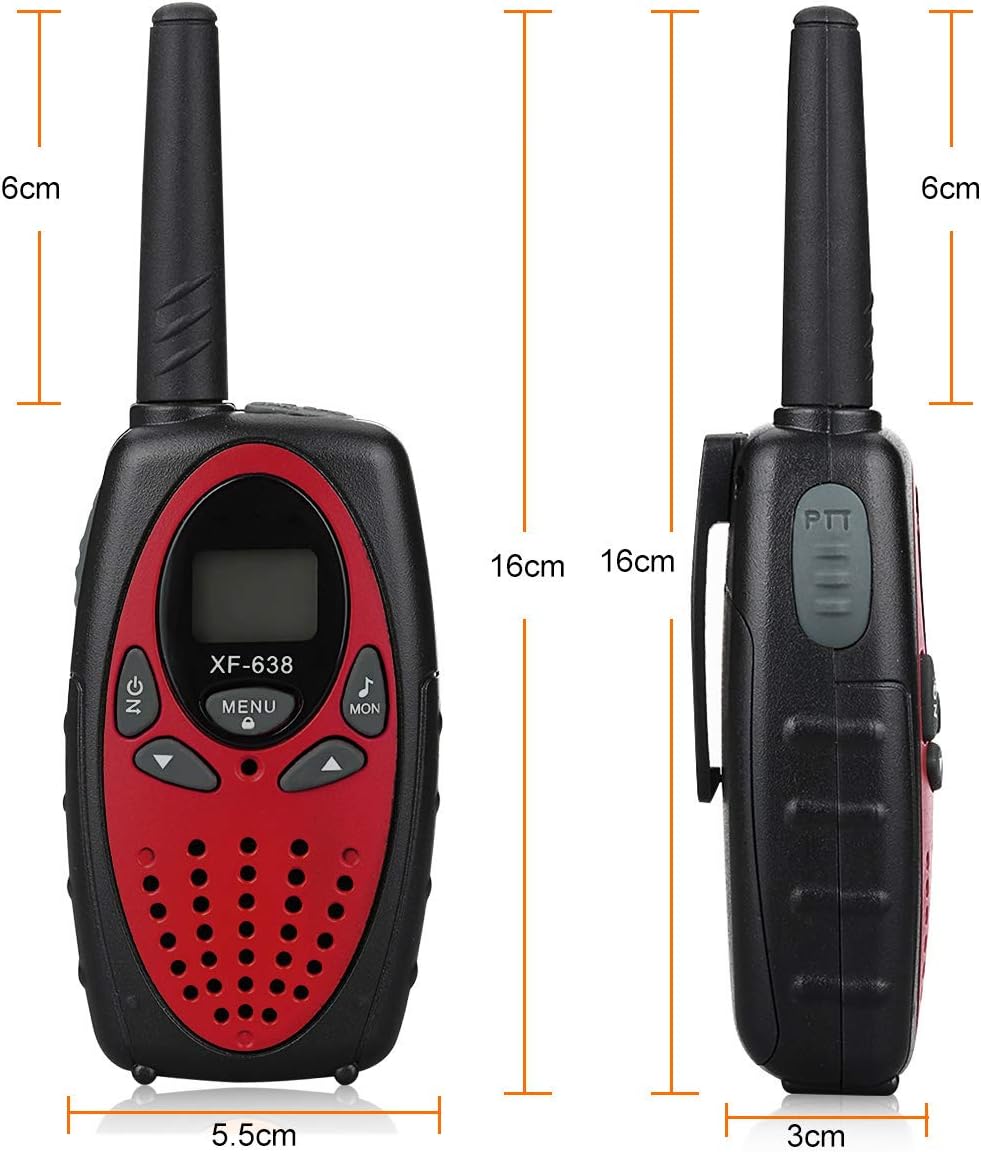
9.1. irudia: Physical dimensions of the Mksutary XF-638 Two-Way Radio.
10. Bermea eta Laguntza
Mksutary is committed to providing friendly customer service. For any concerns or issues not covered in this manual, please contact the retailer or manufacturer directly for assistance.
Mesedez, kontsultatu erosketa-dokumentazioa berme-baldintza zehatzak eta harremanetarako informazioa lortzeko.