
1. Sarrera
The Azpen Dockall D101 is a versatile device combining a Qi wireless charging dock station, a Bluetooth speaker, and a phone stand. It is designed to enhance your audio experience while conveniently charging your compatible smartphones and tablets.
2. Zer dago kutxan
- 1 x DockAll Slim D101
- 1 x DC korronte egokitzailea
- 1 x Erabiltzailearen eskuliburua

Image: Box contents including the DockAll D101 unit, DC power adapter, and user manual.
3. Produktua amaitu daview
The Dockall D101 features an innovative design that integrates multiple functionalities into one device for home and office use. Key components include:
- Qi haririk gabeko kargatze pad-a: Gailu bateragarrietarako.
- Bluetooth bozgorailua: For audio streaming.
- Adjustable Phone Stand: Provides an upright viewangelua.
- Kontrol-botoiak: For power, volume, and playback.
- MicroSD zirrikitua: Supports cards up to 64 GB.

Irudia: Aurrealdea view of the Azpen Dockall D101 with a smartphone placed on the charging pad, illustrating wireless charging capability.
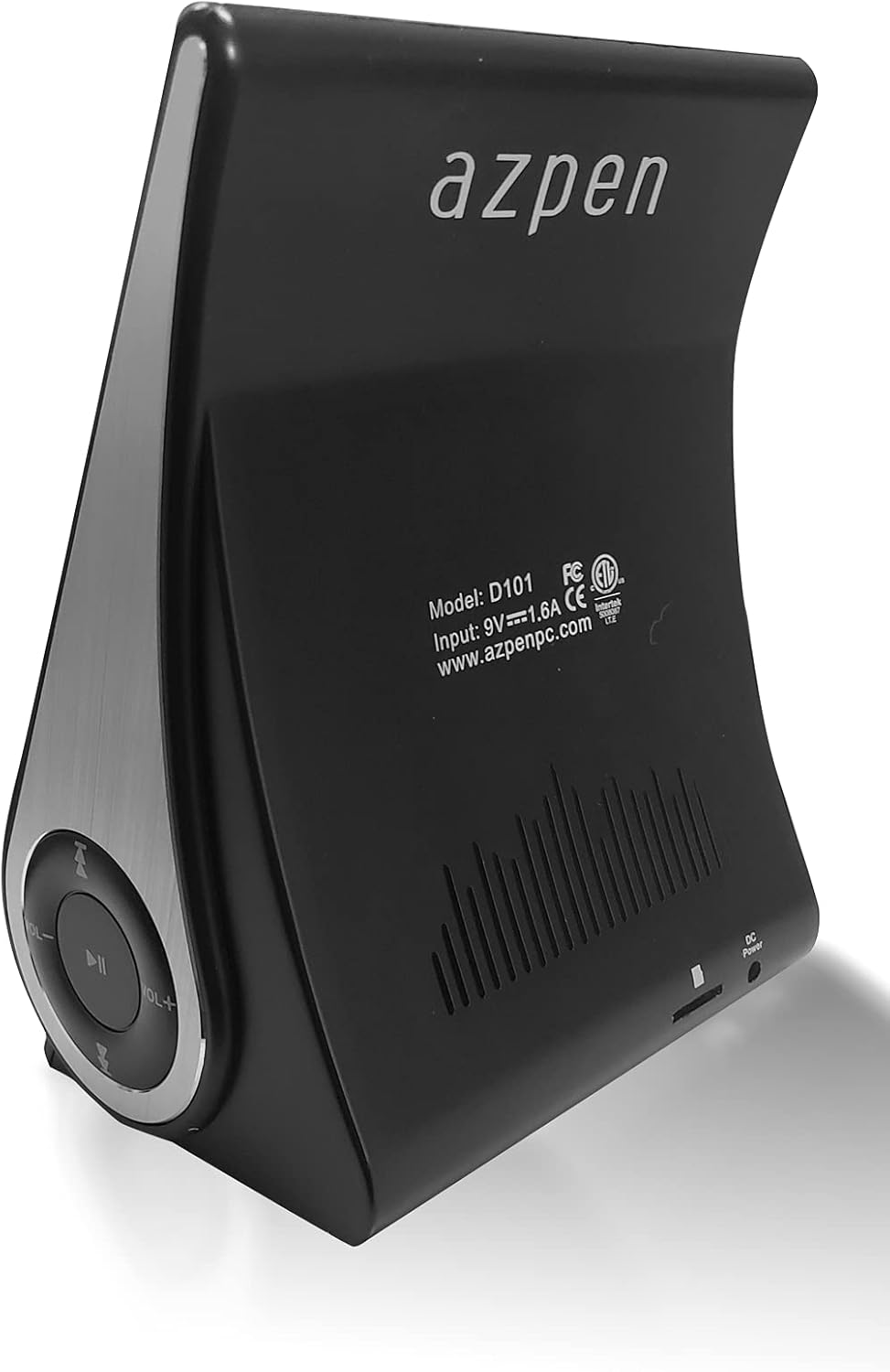
Irudia: Atzealdea view of the Azpen Dockall D101, displaying the model number (D101), input specifications, and regulatory certifications.

Irudia: Alboko profesionalafile of the Azpen Dockall D101, highlighting the circular control panel with volume, playback, and phone call buttons.
4. Konfigurazioa
- Potentzia-konexioa: Connect the provided DC Power Adapter to the "DC Power" port on the back of the Dockall D101. Plug the adapter into a standard wall outlet.
- Kokalekua: Place the Dockall D101 on a stable, flat surface.
- Adjust Phone Stand: Gently pull up the phone stand to your desired viewing angle. Ensure the stand is securely locked in place.
5. Funtzionamendu-argibideak
5.1 Piztu/Itzali
- To power on, press and hold the Power button (usually indicated by a circle with a vertical line) on the control panel until the device activates.
- To power off, press and hold the Power button again until the device shuts down.
5.2 Qi Wireless Charging
- Ensure the Dockall D101 is powered on.
- Place your Qi-compatible smartphone or tablet onto the charging pad on the adjustable stand.
- Adjust the position of your device until the solid blue light appears, indicating that wireless charging has begun.
- The Dockall D101 supports fast Qi wireless charging (10W).
- Note: Charging may not work through metal cases or excessively thick phone cases (e.g., OtterBox Defender).
5.3 Bluetooth Speaker Functionality
- Parekatzea:
- Power on the Dockall D101.
- Aktibatu Bluetooth-a zure telefonoan edo audio gailuan.
- Bilatu "Dockall D101" (or similar name) in your device's Bluetooth settings and select it to pair.
- Baieztapen-soinu batek parekatzea arrakastatsua dela adieraziko du.
- Audio erreprodukzioa:
- Use the control buttons on the Dockall D101 to play/pause, skip tracks (forward/backward), and adjust volume.
- You can also control playback directly from your paired device.
- Esku libreko deiak:
- When a call comes in, press the Phone button (usually indicated by a phone icon) to answer.
- Speak into the built-in microphone on the Dockall D101.
- Press the Phone button again to end the call.

Image: A smartphone positioned on the Dockall D101 stand, displaying a music player interface, highlighting the device's audio capabilities.
Bideoa: Amaiera batview of the Azpen DockAll Mini, demonstrating its features and functionality. While the video showcases a "Mini" model, the core operations for charging and Bluetooth are similar to the D101.
6. Mantentzea
- Garbiketa: Use a soft, dry cloth to clean the surface of the Dockall D101. Do not use liquid cleaners or aerosols.
- Biltegiratzea: Denbora luzez erabiltzen ez duzunean, gorde gailua leku fresko eta lehor batean, eguzki-argitik babestuta.
- Manipulazioa: Avoid dropping the device or exposing it to extreme temperatures or moisture.
7. Arazoak
| Arazoa | Irtenbide posiblea |
|---|---|
| Gailua ez da pizten. | Ensure the DC Power Adapter is securely connected to both the device and a working power outlet. |
| Haririk gabeko kargatzeak ez du funtzionatzen. |
|
| Bluetooth-a ez da konektatzen. |
|
| Soinu kalitate txarra. |
|
8. Zehaztapenak
- Ereduaren izena: D101
- Hizlari mota: Bluetooth bozgorailua
- Ezaugarri bereziak: Wireless Charger, Upright View Angle, Bluetooth Speaker, 3-in-1 Hub
- Gomendatutako erabilerak: Smartphone edo Tabletetarako
- Gailu bateragarriak: For iPhone 15/14/13/12/11, for Samsung Galaxy S24/S23/S22/S21/S20/S10
- Kolorea: Beltza
- Elementuaren pisua: 11.2 ontza
- Iragazgaitza da: GEZURRA
- Berme mota: Mugatua
- Elementu kopurua: 1
- Kontrol-metodoa: Ukitu
- Haririk gabeko komunikazio teknologia: Bluetootha
- Bozgorailuaren tamaina: 5 zentimetro
- Energia iturria: Bateriaren bidez
- Audio kontrolatzaile mota: Gidari dinamikoa
- UPC: 859592006828
- Fabrikatzailea: Azpen
- Produktuaren neurriak: 5.9 x 4.3 x 3.75 hazbete
- Bozgorailuaren irteera-potentzia maximoa: 5 Watt
- Konektibitate Teknologia: Bluetootha
- Audio irteera modua: Mono
- Muntatze mota: Kaia

Image: Diagram showing the dimensions of the Azpen Dockall D101, with measurements in centimeters.
9. Bermea eta Laguntza
The Azpen Dockall D101 comes with a Limited Warranty. For specific details regarding warranty coverage and to access customer support, please refer to the warranty information provided in the original packaging or visit the official Azpen webgunea.
For further assistance, you may also contact Azpen customer service directly.