
Sarrera
This manual provides essential instructions for the safe and effective use of your Andoer Portable 1080P Digital Camera D11773S. Please read this manual thoroughly before operating the device and retain it for future reference. This digital camera is designed for capturing high-resolution photos and videos, featuring a 48MP image sensor, 1080P video recording, 8X digital zoom, and a 2.7-inch LCD screen.
Segurtasun Informazioa
- Ez jarri kamera uretara edo hezetasunera.
- Saihestu kamera erortzea edo kolpe bortitzak jasatea.
- Mantendu kamera eremu magnetiko indartsuetatik urrun.
- Do not attempt to disassemble or modify the camera. Repairs should only be performed by qualified personnel.
- Use only the specified battery type and charging cable.
- Gorde kamera leku fresko eta lehor batean erabiltzen ez duzunean.
- Mantendu haur txikien eskura.
Paketearen edukia
Egiaztatu elementu guztiak paketean daudela:
- Andoer Portable Digital Camera (Model D11773S)
- Lithium Battery (3.7V 550mAh)
- C motako karga-kablea
- Eskumuturreko uhala
- Eraman poltsa
- Erabiltzailearen eskuliburua

Image: Contents of the camera package, showing the camera, battery, USB-C cable, wrist strap, carry bag, and user manual.
Kamera amaitu daview
Ezagutu zure kameraren osagai nagusiak.
Aurrealdea View

Irudia: Aurrealdea view of the Andoer D11773S camera. Key features visible include the digital lens, built-in flash, and the 2.7" TFT display and 48 Mega pixels indicators.
- Lentea: Irudiak eta bideoak ateratzen ditu.
- Flasha: Argiztapena ematen du argi gutxiko baldintzetan.
- Mikrofonoa: Bideoa grabatzen ari den bitartean audioa grabatzen du.
Atzekoa View

Irudia: Atzealdea view of the Andoer D11773S camera, displaying the 2.7-inch LCD screen and various control buttons for navigation and settings.
- LCD Screen (2.7 Inch): Zuzeneko pantailak view, menuak eta erreprodukzioa.
- Kontrol-botoiak: For menu navigation, mode selection, zoom, and playback.
- Hizlaria: Audioa erreproduzitzeko.
Aldea View eta Dimentsioak

Image: Diagram illustrating the dimensions of the Andoer D11773S camera: 9.2cm length, 6.1cm width, and 1.4cm thickness.
- USB Port (Type-C): Kargatzeko eta datuak transferitzeko.
- Memoria txartelaren zirrikitua: For inserting a Micro SD card.
- Bateriaren konpartimendua: Litiozko bateria kargagarria dauka.
Konfigurazioa
1. Bateria kargatzea
- Insert the provided lithium battery into the camera's battery compartment.
- Connect the camera to a power source (e.g., computer USB port or USB wall adapter) using the supplied Type-C charge cable.
- Kargatzeko adierazlearen argia piztuko da. Guztiz kargatuta dagoenean, argiaren kolorea alda daiteke edo itzali egin daiteke.
2. Memoria Txartela sartzea
The camera requires a Class-10 external Micro SD memory card (not included) with a maximum capacity of 128GB.
- Bilatu memoria txartelaren zirrikitua kameraren alboan.
- Insert the Micro SD card with the metal contacts facing the front of the camera until it clicks into place.
- To remove, gently press the card inward until it springs out.
Funtzionamendu-argibideak
Piztu/Itzali
- Pizteko, eduki sakatuta Pizteko botoia.
- Itzaltzeko, sakatu eta eutsi berriro pizteko botoia.
Argazkiak ateratzen
The camera supports picture resolutions up to 48MP.
- Piztu kamera.
- Markatu zure argazkia 2.7 hazbeteko LCD pantaila erabiliz.
- Press the Shutter button halfway to focus (if applicable), then fully press to capture the photo.

Image: Visual representation of the camera's capabilities, showing a 48MP photo example and a 1080P video example.
Bideoak grabatzea
The camera supports video resolution up to 1920x1080 (1080P).
- Switch the camera to video recording mode (refer to on-screen icons or mode button).
- Grabatu botoia sakatu grabatzen hasteko.
- Grabatu botoia sakatu berriro grabaketa gelditzeko.
Zoom funtzioa
Kamerak 8X zoom digitala du.
- Erabili zoom botoiak (askotan 'W' zabalerako eta 'T' teleobjektiborako markatuta) zoom maila doitzeko.
Flash ezarpenak
The built-in flash can be used in dark conditions.
- Access the flash settings through the camera's menu to select modes like Auto Flash, Fill-in Flash, Red-eye Reduction, or Flash Off.
Special Features: Anti-Shake, Face Detect, Smile Capture, Self-Timer
These features enhance your photography experience.
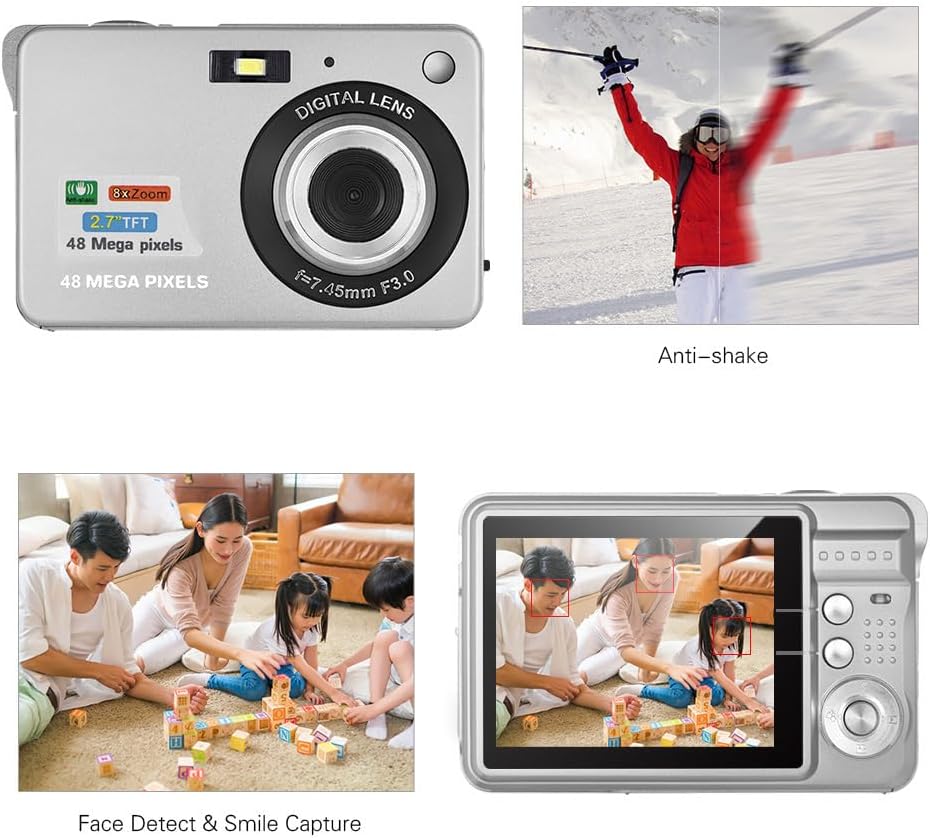
Image: Demonstrations of the camera's Anti-shake function (reducing blur from movement) and Face Detect & Smile Capture (identifying faces and automatically taking a photo when a smile is detected).
- Astinduen aurkakoa: Helps reduce blur caused by camera movement. This feature is typically enabled by default or can be toggled in settings.
- Face Detect & Smile Capture: The camera can detect faces and automatically capture a photo when a smile is detected. Enable these options in the camera's menu.
- Tenporizadorea: Set a delay (2, 5, or 10 seconds) before the photo is taken, allowing you to be in the shot.
Makro modua
For close-up photography of small objects.

Image: A close-up photograph of an ant, demonstrating the camera's Macro Mode capability for detailed shots of small subjects.
- Activate Macro Mode through the camera's menu or a dedicated button for close-up shots.
Erreprodukzio modua
- Sakatu erreprodukzio botoia berriro ikustekoview captured photos and videos on the LCD screen.
- Erabili nabigazio botoiak zure multimedia elementuetan zehar mugitzeko.
Ordenagailu batera konektatzea
You can transfer photos and videos to a computer using the supplied Type-C USB cable.
- Ziurtatu kamera piztuta dagoela.
- Connect one end of the Type-C USB cable to the camera's USB port and the other end to an available USB port on your computer.
- The camera should appear as a removable disk or media device on your computer.
- Open the camera's folder to access and transfer your files.
- Kablea deskonektatu aurretik, atera gailua ordenagailutik segurtasunez.
Mantentzea
- Garbiketa: Use a soft, dry cloth to clean the camera body. For the lens and LCD screen, use a specialized lens cleaning cloth and solution. Do not use abrasive cleaners.
- Biltegiratzea: When not in use for extended periods, remove the battery and store the camera in a cool, dry place, preferably in its carry bag.
- Bateria zaintzea: Recharge the battery periodically even if not in use to maintain its lifespan.
Arazoak konpontzea
| Arazoa | Irtenbide posiblea |
|---|---|
| Kamera ez da pizten. | Ziurtatu bateria guztiz kargatuta eta behar bezala sartuta dagoela. |
| Ezin dira argazkiak atera/bideoak grabatu. | Check if a memory card is inserted and has sufficient free space. Ensure the camera is in the correct mode. |
| Irudiak lausoak dira. | Ensure the lens is clean. Hold the camera steady during capture. Check lighting conditions and use flash if necessary. |
| Ordenagailuak ez du kamera ezagutzen. | Ensure the USB cable is securely connected. Try a different USB port or restart the computer. |
| Bateria azkar agortzen da. | Reduce LCD brightness. Limit flash usage. Ensure the camera is powered off when not in use. |
Zehaztapenak
| Ezaugarri | Xehetasuna |
|---|---|
| Irudi-sentsorea | CMOS sentsorea |
| Bistaratzea | 2.7 hazbeteko LCDa |
| File Formatua | JPEG (Photo), AVI (Video) |
| Irudiaren bereizmena | Gehienez 48M (8000x6000) |
| Bideo Ebazpena | 1920x1080 (1080P), 1280x720 |
| Zoom digitala | 8X |
| Esposizio-konpentsazioa | EV-3 to EV+3 |
| Auto-tenporizadorea | Desaktibatuta / 2 seg / 5 seg / 10 seg |
| Ezaugarri bereziak | Anti-Shake, Face Detect, Smile Capture |
| Elikatze Hornidura | 1 * Lithium battery (3.7V 550mAh) |
| Onartutako memoria txartela | Class-10 Micro SD, max. 128GB (not included) |
| Interfazea | C motako USB |
| Neurriak (L*W*H) | 9.2 * 6.1 * 1.4 cm / 3.6 * 2.4 * 0.5 inch |
| Pisua | 99g / 3.5oz |
| Onartutako Sistema | Windows XP, VISTA, WIN7, MAC |
Bermea eta Laguntza
This product comes with a standard manufacturer's warranty. Please refer to the warranty card included in your package for specific terms and conditions. For technical support, troubleshooting assistance, or further inquiries, please visit the official Andoer webwebgunera edo jarri harremanetan bezeroarentzako arreta-zerbitzuarekin. Gorde erosketa-agiria erosketaren frogagiri gisa berme-erreklamazioetarako.
Lineako laguntza: Visit the Andoer Store on Amazon