
1. Sarrera
This manual provides essential information for setting up, operating, maintaining, and troubleshooting your Acer Predator Orion 3000 (PO3-600) desktop computer. Please read this guide thoroughly to ensure proper use and to maximize your system's performance and longevity.
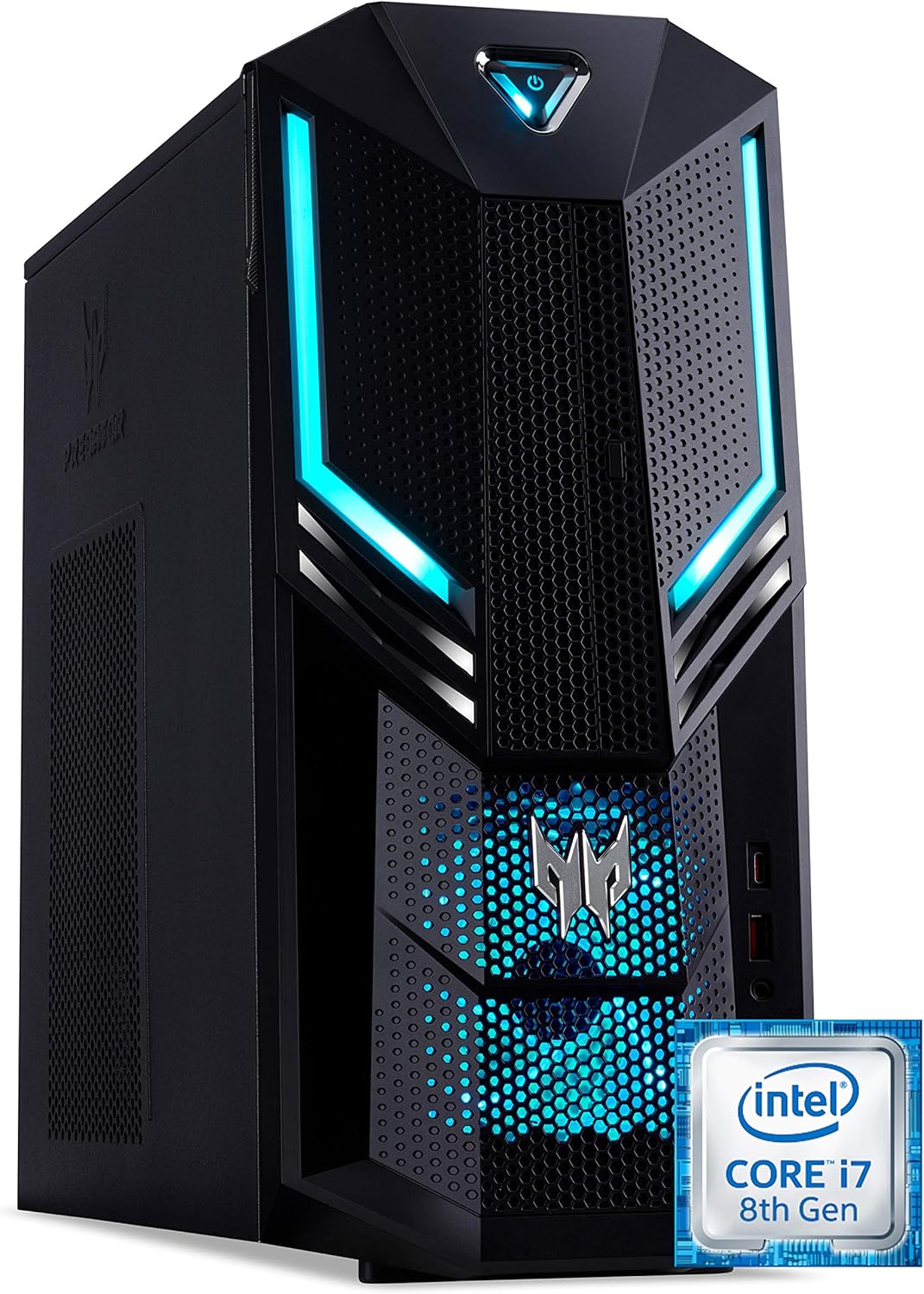
1.1. irudia: Aurre-eskuin view of the Acer Predator Orion 3000 desktop computer, showcasing its black chassis with blue LED accents and angular design.
2. Konfigurazioa
2.1 Paketatzea
Carefully remove all components from the packaging. Verify that all items listed in the 'Included Components' section of this manual are present. Retain the packaging for future transport or service needs.
2.2 Periferikoak konektatzea
- Monitorea: Connect your monitor to one of the available video output ports (HDMI, DVI, or DisplayPort) on the graphics card at the rear of the computer.
- Teklatua eta sagua: Connect the included Predator USB keyboard and mouse to any available USB ports. The system features both USB 2.0, USB 3.1, and USB 3.1 Type-C ports.
- Sarea: For a wired connection, connect an Ethernet cable from your router or modem to the LAN port on the rear of the computer. For wireless, ensure your Wi-Fi antenna (if external) is connected.
- Audioa: Connect speakers or headphones to the audio output jacks. The system supports Sound BlasterX Pro Gaming Sound Engine for enhanced audio.
- Potentzia: Konektatu elikatze-kablea ordenagailuaren atzealdeko elikatze-iturrira (PSU), eta ondoren, konektatu beste muturra lurrera konektatutako entxufe elektriko batera.
2.3 Hasierako piztea
Press the power button located on the top front of the computer. The system will boot up, and the blue LED accents will illuminate. Follow the on-screen instructions to complete the Windows 10 Home operating system setup, including language, region, and user account creation.
3. Zure ordenagailua erabiltzea
3.1 Energiaren kudeaketa
- Piztu: Sakatu pizteko botoia behin.
- Itzali: From Windows, click the Start button, then Power > Shut down.
- Berrabiarazi: From Windows, click the Start button, then Power > Restart.
- Lo egin: From Windows, click the Start button, then Power > Sleep.
3.2 Windows 10 Hasiera
Your Predator Orion 3000 comes pre-installed with Windows 10 Home. Familiarize yourself with the operating system's interface, settings, and features. Regular updates are recommended for security and performance.
3.3 Jokoen Ezaugarriak
The system is designed for gaming, featuring an Intel Core i7-8700 processor and NVIDIA GeForce GTX 1060 graphics. It is VR-ready, allowing for immersive virtual reality experiences. The integrated Sound BlasterX Pro Gaming Sound Engine provides high-quality audio for gaming and multimedia.

3.1. irudia: Acer Predator Orion 3000 desktop with gaming headphones, highlighting its gaming capabilities.
4. Mantentzea
4.1 Garbiketa
- Kanpoaldea: Erabili biguna, damp kanpoko gainazalak garbitzeko zapi bat. Saihestu garbitzaile urratzaileak.
- Oihalak: Regularly check and clean the air intake vents on the front and left side of the chassis to ensure proper airflow and prevent dust buildup. Use compressed air to gently clear dust.
- Barne osagaiak: For advanced cleaning of internal components, it is recommended to consult a professional or refer to detailed service guides.
4.2 Software eguneraketak
Keep your operating system, drivers (especially graphics drivers), and applications updated to ensure optimal performance, security, and compatibility.

4.1. irudia: Barnekoa view of the Acer Predator Orion 3000 desktop computer with the side panel removed, revealing the motherboard, CPU cooler, RAM slots, and storage drive bays. Regular cleaning of these areas is important for system health.
5. Arazoak
This section addresses common issues you might encounter. For more complex problems, refer to Acer's official support resources.
5.1 Potentziarik gabe
- Ziurtatu elikatze-kablea ondo konektatuta dagoela bai ordenagailura bai entxufe elektrikora.
- Egiaztatu entxufea funtzionatzen duela beste gailu bat konektatuz.
5.2 Ez dago pantailarik
- Check that the monitor is powered on and the video cable is securely connected to both the computer and the monitor.
- Ziurtatu sarrera-iturri zuzena hautatuta dagoela monitorearen bidez.
5.3 System is Slow or Unresponsive
- Itxi atzeko planoan exekutatzen ari diren beharrezkoak ez diren aplikazioak.
- Birus edo malwarerik dagoen egiaztatu antibirus software fidagarria erabiliz.
- Ensure sufficient free space on your primary drive (SSD).
- Berrabiarazi ordenagailua.
5.4 Excessive Fan Noise
- Ensure the computer's air vents are not obstructed and are free of dust.
- Verify the computer is in a well-ventilated area.
- Monitor CPU and GPU temperatures using system utilities. High temperatures can cause fans to run faster.
6. Zehaztapenak
Below are the key technical specifications for the Acer Predator Orion 3000 (PO3-600) desktop computer.
| Osagaia | Zehaztapena |
|---|---|
| Ereduaren izena | Acer Predator Orion 3000 (PO3-600) |
| Sistema eragilea | Windows 10 Home |
| Prozesadorea | Intel Core i7-8700 (6 Cores, 3.2 GHz base, up to 4.6 GHz burst) |
| Txartel grafikoa | NVIDIA GeForce GTX 1060 (6 GB GDDR5 VRAM) |
| RAM | 16 GB DDR4 (Max 16 GB) |
| Biltegiratzea | 128 GB SSD + 1 TB HDD |
| Unitate optikoa | DVD+R |
| Konektibitatea | Ethernet RJ-45, Wi-Fi (802.11ac) |
| Aurrealdeko Portuak | 1x USB 3.1, 1x USB 3.1 Type-C, Audio Jacks |
| Atzeko Portuak | 2x USB 3.1, 4x USB 2.0, 1x HDMI, 1x DVI, 3x DisplayPort, 5x Audio Jacks, LAN |
| Zabaltzeko Slots | 1x PCIe x16, 1x PCIe x1, 2x M.2 (1x SSD, 1x Wi-Fi) |
| Neurriak (H x W x D) | 35 x 16.3 x 34 cm |
| Pisua | 6 kg |
| Hoztea | Passive, via air intake |
| Included Peripherals | Predator USB Keyboard (blue), Predator USB Mouse (blue) |

6.1. irudia: Intel Core i7 8th Gen logo, indicating the processor type used in the system.
7. Bermea eta Laguntza
7.1 Fabrikatzailearen bermea
Your Acer Predator Orion 3000 (PO3-600) desktop computer is covered by a 2 urteko fabrikatzailearen bermea. This warranty covers defects in materials and workmanship under normal use. Please refer to the warranty documentation included with your product for full terms and conditions. Your statutory warranty rights remain unaffected.
7.2 Laguntza Teknikoa
For technical assistance, troubleshooting beyond this manual, or warranty claims, please contact Acer customer support. You can typically find contact information on the Acer official webgunea edo zure ordenagailuarekin batera emandako dokumentazioan.