
Fosmon C-10749US
Fosmon 24 Hour Programmable Digital Timer Outlet User Manual
Model: C-10749US
Sarrera
The Fosmon 24 Hour Programmable Digital Timer Outlet is designed to automate the on/off cycles of your electrical devices. This timer allows you to set a single daily program that repeats every 24 hours, providing convenience and energy savings. It features an easy-to-read LCD display and user-friendly buttons for simple operation. The compact design ensures it won't block adjacent outlets.
This product is ideal for controlling seasonal lights, lamps, heaters, portable fans, and aquarium equipment, helping you manage your energy consumption efficiently.
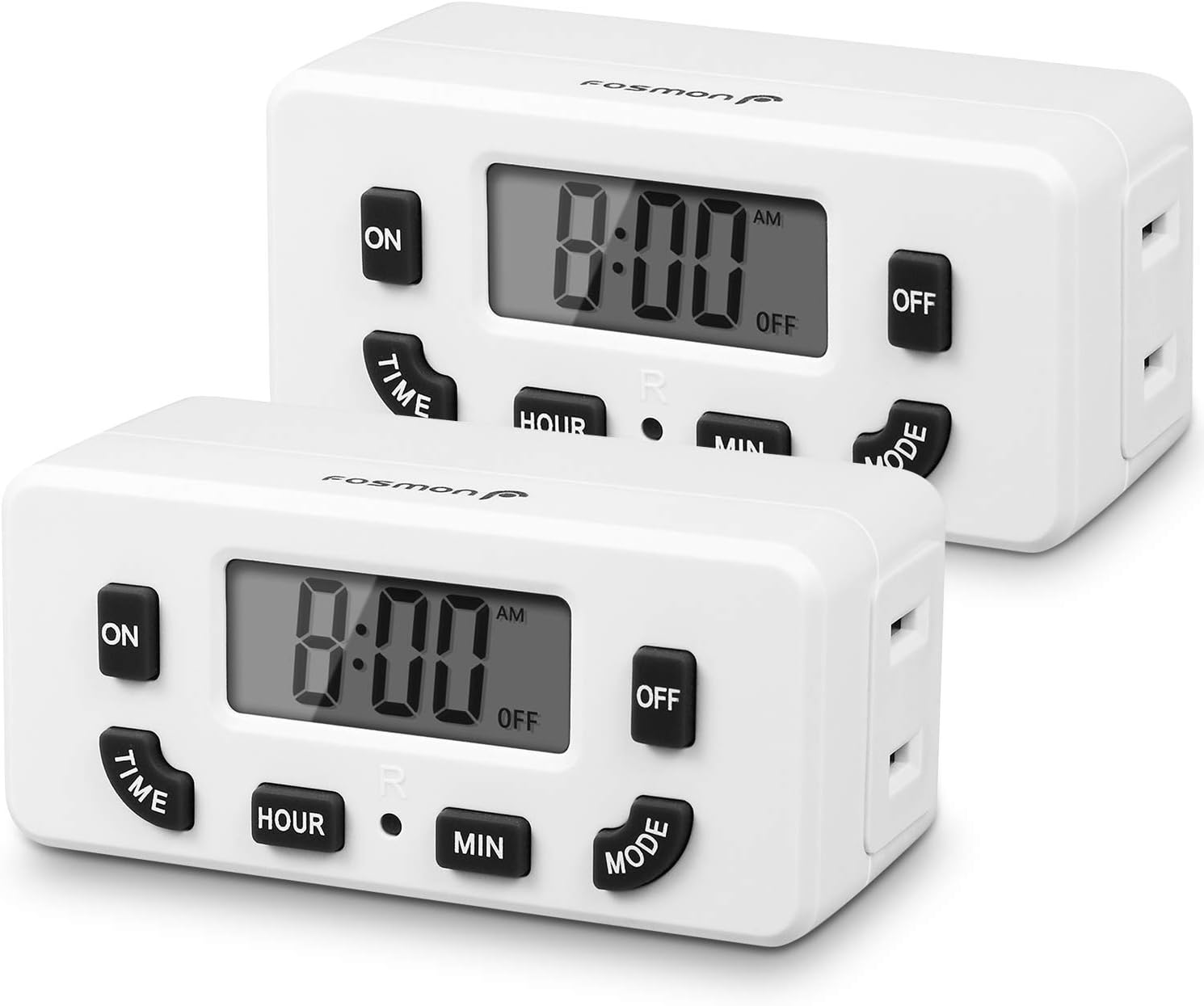
Image: Two Fosmon 24 Hour Programmable Digital Timer Outlets, showing their front panels with LCD displays and control buttons.
Segurtasun Informazioa
Produktu hau erabili aurretik, irakurri eta ulertu segurtasun-jarraibide guztiak. Jarraibide hauek ez jarraitzen badituzu, deskarga elektrikoak, sua edo lesio larriak gerta daitezke.
- Ez murgildu tenporizadorea uretan edo beste likido batean.
- Do not connect any appliance that exceeds the timer's maximum load rating (125V/15A, 1875W).
- Always ensure the timer is securely plugged into a grounded outlet. The polarized 2-prong outlet design helps reduce the risk of electrical shock.
- Ez desmuntatu edo konpontzen saiatu tenporizadorea. Mantendu mantentze-lan guztiak langile kualifikatuen esku.
- Mantendu haurren eskura.
- This timer is certified by ETL, FCC, and RoHS, ensuring it meets safety and environmental standards.

Irudia: Gertutik view of the back of the Fosmon Digital Timer Outlet, highlighting the ETL certification mark and electrical specifications (125VAC, 60Hz, 15A, 1875W).
Produktuaren Ezaugarriak
- 24 orduko programazioa: Set one ON/OFF program that repeats daily.
- Eskuz gainditzea: Easily switch the outlet ON or OFF manually using the MODE button.
- LCD pantaila: Large, easy-to-read digital display for clear time and program settings.
- Ordezko Bateria: Internal NiMH 1.2V battery maintains settings for over 100 hours during power outages edo deskonektatuta dagoenean.
- Espazio aurrezteko diseinua: Compact size allows for use in duplex outlets without blocking the second receptacle.
- Bateragarritasun zabala: Suitable for incandescent, CFL, and LED lights, as well as various appliances within specified wattage.
- Segurtasun Ziurtagiria: ETL, FCC, and RoHS certified for reliable and safe operation.
Konfigurazioa
1. Hasierako piztea
- Plug the Fosmon Digital Timer Outlet into a standard 125V AC wall outlet.
- The LCD display will light up, and the internal backup battery will begin charging.
2. Uneko ordua ezartzea
- Eduki sakatuta DENBORA botoia.
- Eusten bitartean DENBORA, sakatu ORDUA button to adjust the current hour. The time will cycle through AM/PM.
- Eusten bitartean DENBORA, sakatu MIN button to adjust the current minute.
- Askatu DENBORA botoia sakatu ordu zuzena ezarri ondoren.

Image: A hand interacting with the Fosmon Digital Timer Outlet, demonstrating its user-friendly design with large, easy-to-read buttons and display.
Funtzionamendu-argibideak
1. Programming ON/OFF Times (Daily Repeat)
This timer allows for one ON/OFF program setting that repeats every 24 hours.
- Ezarri pizteko ordua:
- Eduki sakatuta ON botoia.
- Eusten bitartean ON, sakatu ORDUA botoia nahi duzun pizteko ordua ezartzeko.
- Eusten bitartean ON, sakatu MIN botoia nahi duzun pizteko minutua ezartzeko.
- Askatu ON button. The ON time is now set.
- ITZALTZEKO ordua ezarri:
- Eduki sakatuta OFF botoia.
- Eusten bitartean OFF, sakatu ORDUA botoia nahi duzun itzaltze ordua ezartzeko.
- Eusten bitartean OFF, sakatu MIN botoia nahi duzun OFF minutua ezartzeko.
- Askatu OFF button. The OFF time is now set.
- Once both ON and OFF times are set, the timer will automatically begin its programmed cycle. The display will show "ON" when the outlet is active and "OFF" when it is inactive, according to your schedule.

Image: A visual guide illustrating the steps to set the ON and OFF times for the timer, indicating which buttons to press for hour and minute adjustments.
2. Manual ON/OFF Override
To manually turn the connected device ON or OFF, press the MODUA button. Each press will toggle the outlet's state between ON and OFF, overriding the current program until the next programmed event.

Image: The Fosmon Digital Timer Outlet positioned in a home environment, illustrating its role in automating devices and contributing to energy savings.
Mantentzea
- Garbiketa: Wipe the timer with a dry, soft cloth. Do not use abrasive cleaners or solvents.
- Bateria babeskopia: The internal NiMH battery is designed to retain settings for over 100 hours when the unit is unplugged or during a power outage. No user maintenance is required for this battery.
- Biltegiratzea: If storing the timer for an extended period, ensure it is unplugged and kept in a cool, dry place.
Arazoak konpontzea
| Arazoa | Kausa posiblea | Irtenbidea |
|---|---|---|
| Display is blank or numbers are missing. | No power to the unit, or internal battery is fully discharged. | Ensure the timer is securely plugged into a live outlet. Allow the unit to charge for a few hours to replenish the internal battery. If the issue persists, the unit may be faulty. |
| Programmed times are not activating the outlet. | Incorrect program setting, or manual override is active. | Review the ON/OFF programming steps carefully. Ensure the current time is set correctly. Press the MODUA button to ensure the timer is not in manual override mode. |
| Outlet is always ON or always OFF. | Program not set, or stuck in manual mode. | Verify that both ON and OFF times have been set. Press the MODUA button to cycle through modes and ensure it's in programmed mode. |
Zehaztapenak
- Modelo zenbakia: C-10749US
- Potentzia: 125V/15A korrontea, 60Hz
- Wattage: 1875 W (gehienez)
- Barne bateria: NiMH 1.2V (> 100 Hours backup)
- Programaren ezarpenak: 1 ON/OFF Program (Daily Repeat)
- Neurriak: 3.84 x 8.38 x 3.99 cm gutxi gorabehera
- Pisua: Gutxi gorabehera 204 g
- Ziurtagiriak: ETL, FCC, RoHS
- Saltoki mota: Single Polarized Outlet
Bermea eta Laguntza
Fosmon products come with a limited lifetime warranty. This warranty covers defects in materials and workmanship under normal use. For warranty claims or technical support, please contact Fosmon customer service.
Fosmon provides dedicated USA-based customer service to assist you with any questions or issues you may encounter.
For the most up-to-date contact information, please visit the official Fosmon webgunea edo kontsultatu zure produktuaren ontzia.