
Sarrera
This manual provides detailed instructions for the operation and maintenance of your BOBLOV BT-S3 Helmet Headset. The BT-S3 is designed for motorcycle communication, offering hands-free calling, music playback, FM radio, and intercom functionality for riders. Please read this manual thoroughly before using the device to ensure proper function and safety.
Paketearen edukia
Egiaztatu behean zerrendatutako elementu guztiak zure paketean sartuta daudela:
- 1 x BOBLOV BT-S3 Helmet Intercom Unit
- 1 x Stereo Headphones (with microphone)
- 1 x Mounting Clip & Screws
- 1 x bihurkin
- 1 x USB kargatzeko kablea
- 1 x Erabiltzailearen eskuliburua
- 1 x Velcro Pad (for mounting)
- 1 x Audio Line

1. irudia: All components included in the BOBLOV BT-S3 package.
Produktua amaituview
Control Buttons and Ports

2. irudia: BOBLOV BT-S3 control buttons and connection ports.
- Telefonoaren botoia: Used for answering/ending calls, redialing, and activating voice assistant.
- Bolumena + Botoia: Increases volume, navigates forward in music/FM.
- Bolumena - Botoia: Decreases volume, navigates backward in music/FM.
- Power/Intercom Button: Powers the device on/off, initiates/ends intercom, plays/pauses music, activates FM radio.
- Charger and Headset Socket: Multi-purpose port for charging and connecting the headset.
- Cable Input Interface: For connecting the headset cable.
Konfigurazioa
1. Gailua kargatzea
Before initial use, fully charge the BT-S3 unit. Connect the provided USB cable to the charging port on the device and to a standard USB power adapter (not included). The LED indicator will show charging status. A full charge typically takes approximately 2-3 hours.
2. Entzungailuak kaskoan instalatzea
The BT-S3 can be installed in various helmet types, including full-face, half-face, and open-face helmets.
- Attach the mounting clip to the side of your helmet using the provided screws and screwdriver, or use the adhesive Velcro pad for a tool-free installation. Ensure the clip is securely fastened.
- Slide the BT-S3 intercom unit onto the mounting clip until it clicks into place.
- Open the helmet's inner lining. Position the stereo headphones inside the helmet, ensuring they are aligned with your ears for optimal sound.
- Route the microphone to a position near your mouth, ensuring it is not obstructed.
- Connect the headset cable to the designated port on the BT-S3 unit.

3. irudia: Helmet mounting clip and unit attachment.
Funtzionamendu-argibideak
Piztu/Itzali
- Piztu: Eduki sakatuta Pizteko/Interfono botoia for approximately 3 seconds until you hear an audible prompt and the LED indicator lights up.
- Itzali: Eduki sakatuta Pizteko/Interfono botoia for approximately 3 seconds until you hear an audible prompt and the LED indicator turns off.
Bluetooth Pairing with Mobile Phone
- Ensure the BT-S3 is powered off.
- Eduki sakatuta Pizteko/Interfono botoia for approximately 5-7 seconds until the LED indicator flashes red and blue alternately, indicating pairing mode.
- Zure telefono mugikorrean, gaitu Bluetooth eta bilatu eskuragarri dauden gailuak.
- Select "BT-S3" from the list of devices. If prompted for a password, enter "0000".
- Behin parekatuta, LED adierazlea urdinez keinuka hasiko da poliki, eta baieztapen-tonu bat entzungo duzu.
Intercom funtzionaltasuna
The BT-S3 supports full-duplex wireless communication. It allows for 2 riders to intercom simultaneously, with a maximum talking range of 1000 meters. Up to 3 riders can be connected, but only two can actively communicate at any given time. If a third rider wishes to join, one of the active intercom participants must end their conversation.

4. irudia: Intercom connection scenarios.
- Pairing Intercom Units:
- Ensure both BT-S3 units are powered off.
- On both units, press and hold the Pizteko/Interfono botoia for approximately 5-7 seconds until the LED indicators flash red and blue alternately.
- Sakatu labur Pizteko/Interfono botoia on one of the units. The units will search and pair with each other.
- Once paired, the LED indicators will flash blue slowly, and you will hear a confirmation tone.
- Interfonoa abiaraztea: After pairing, a short press of the Pizteko/Interfono botoia on either unit will initiate an intercom conversation.
- Amaierako interfonoa: Sakatu labur bat Pizteko/Interfono botoia will end the intercom conversation.
Telefono-deiak
- Erantzun deia: When a call comes in, the device will automatically answer after a few rings (auto-receiving phone calls feature). Alternatively, short press the Telefonoaren botoia erantzuteko.
- Amaitu deia: Sakatu laburra Telefonoaren botoia to end an active call.
- Deia baztertu: Eduki sakatuta Telefonoaren botoia 2 segundoz sarrerako dei bat ukatzeko.
- Berriz markatu azken zenbakia: Sakatu bi aldiz Telefonoaren botoia markatutako azken zenbakia berriro markatzeko.
Musika erreproduzitzea
After pairing with your mobile phone, you can stream music to the BT-S3.
- Erreproduzitu/Pausatu: Sakatu laburra Pizteko/Interfono botoia musika erreproduzitzeko edo pausatzeko.
- Hurrengo ibilbidea: Sakatu laburra Bolumena + botoia.
- Aurreko pista: Sakatu laburra Bolumena - Botoia.
FM Irratia
The BT-S3 includes an FM radio function.
- Piztu/itzali FMa: Sakatu bi aldiz Pizteko/Interfono botoia to activate or deactivate FM radio.
- Eskaneatze estazioak: While FM is active, short press the Bolumena + or Bolumena - buttons to change stations.
GPS Voice Instructions
When paired with a smartphone running a GPS application, the BT-S3 can receive voice instructions directly to your headset.
Mantentzea
- Mantendu gailua lehor. Ez jarri tenperatura altuen eraginpean.
- Garbitu unitatea leun batekin, damp oihal. Saihestu produktu kimiko gogorrak edo garbitzaile urratzaileak erabiltzea.
- Kargatzen ez duzunean, ziurtatu kargatzeko atakaren estalkia ondo itxita dagoela urarekiko erresistentzia mantentzeko.
- Gorde gailua leku fresko eta lehor batean denbora luzez erabiltzen ez duzunean.
Arazoak konpontzea
| Arazoa | Kausa posiblea | Irtenbidea |
|---|---|---|
| Gailua ez da pizten. | Bateria baxua. | Kargatu gailua guztiz. |
| Ezin da telefonoarekin parekatu. | Gailua ez dago parekatze moduan; Bluetooth-a itzalita telefonoan. | Ensure BT-S3 is flashing red/blue. Enable Bluetooth on phone and search again. |
| Interfonoa ez da konektatzen. | Units not paired or out of range. | Re-pair intercom units. Ensure units are within 1000m range. |
| Poor audio quality / Wind noise. | Microphone placement; environmental factors. | Adjust microphone closer to mouth. The device features DSP cancellation for wind noise. |
| Bateriaren iraupena espero baino laburragoa. | Frequent use of high volume or intercom. | Battery life varies with usage. Ensure full charge before use. |
Zehaztapenak
- Eredua: BT-S3
- Konektibitatea: Haririk gabeko (Bluetooth)
- Interfono barrutia: Up to 1000 meters (between 2 riders)
- Lan-abiadura: Up to 100 Km/h
- Hitz egiteko denbora: Gehienez 8 ordu
- Egonean denbora: Gehienez 300 ordu
- Telefono-deiaren ordua: Gehienez 10 ordu
- Musika erreproduzitzeko denbora: Gehienez 6 ordu
- Uraren erresistentzia: Water-resistant (fully weather protection)
- Zarata baliogabetzea: Wind noise DSP cancellation
- Ezaugarriak: Auto-receiving phone calls, FM Radio, Stereo music (A2DP), GPS voice instructions
- Kaskoen bateragarritasuna: Fits all kinds of helmets (full/half/open face)
- Kontrol-metodoa: Ukitu botoiak
- Aurikularrak Jack: 3.5 mm Jack (for headset connection)
- UPC: 889251631535

5. irudia: Estimated battery performance for various functions.
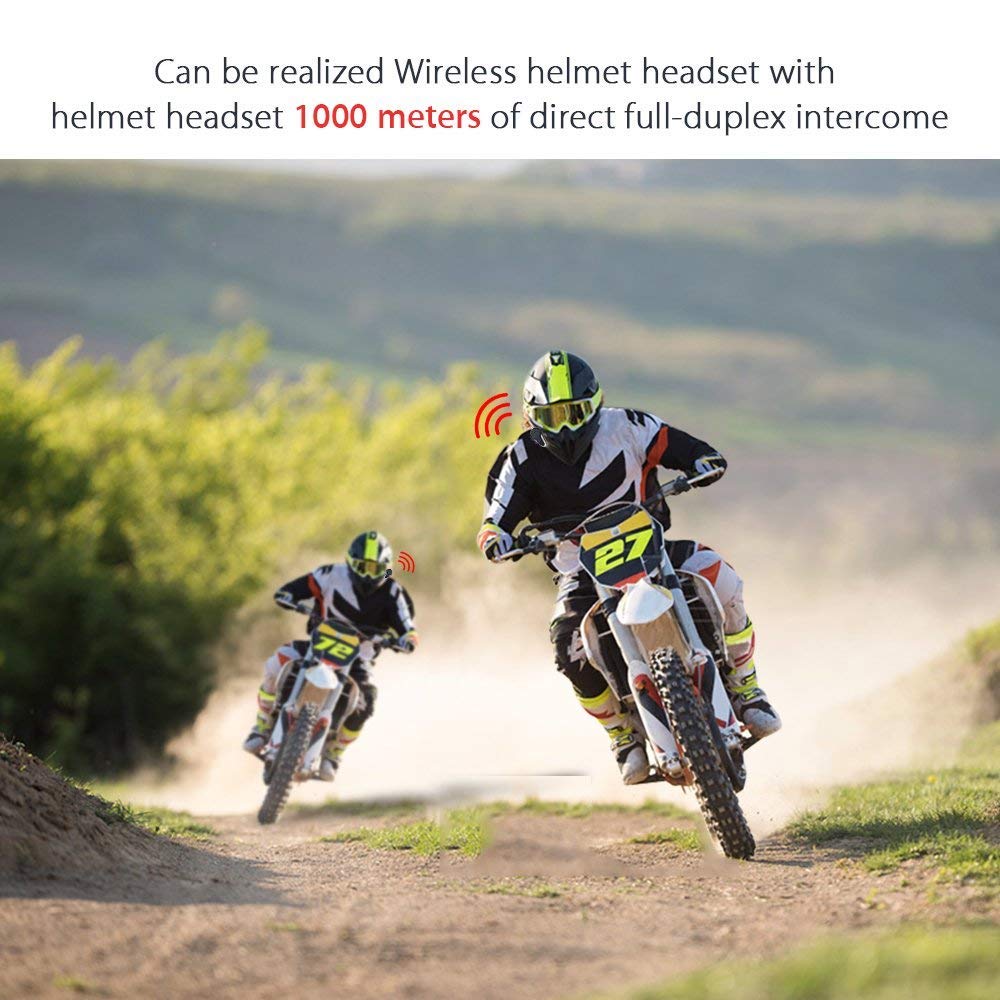
6. irudia: Wireless helmet headset with 1000 meters direct full-duplex intercom.

7. irudia: Versatile applications for the BT-S3 headset, including motorcycling and skiing.
Bermea eta Laguntza
Specific warranty information is not provided in the product details. For warranty claims, technical support, or further assistance, please contact your retailer or the manufacturer directly. Retain your proof of purchase for any warranty-related inquiries.
Manufacturer: BOBLOV