Sarrera
The VIZIO SB36512-F6 Home Theater Sound System delivers a premium audio experience with Dolby Atmos technology, creating immersive sound that moves all around you, including from above. This 5.1.2 channel system features unique upward-firing speakers, a wireless subwoofer, and rear surround sound speakers to provide crystal-clear audio and powerful bass. Designed for easy plug-and-play installation, it integrates seamlessly with your home entertainment setup, offering cinematic sound within minutes. Beyond movies, it supports music streaming via Chromecast built-in and works with Google Assistant for convenient voice control.
Kutxan dagoena
- VIZIO 36" 5.1.2 Channel Sound Bar
- Haririk gabeko subwoofer
- Rear Surround Sound Speakers (2)
- Urrutiko agintea (2 AAA pilekin)
- HDMI kablea
- Audio Digital Optikoko Kablea
- Power Cables (for Sound Bar and Subwoofer)
- Wall Mount Brackets (for Sound Bar)
Konfigurazioa
1. Kokapen
For optimal audio performance, position the sound bar centrally below your television. Place the wireless subwoofer in a convenient location, ideally near the front of the room. The two rear surround sound speakers should be positioned behind your main listening area, one on each side, to create an enveloping surround sound experience.
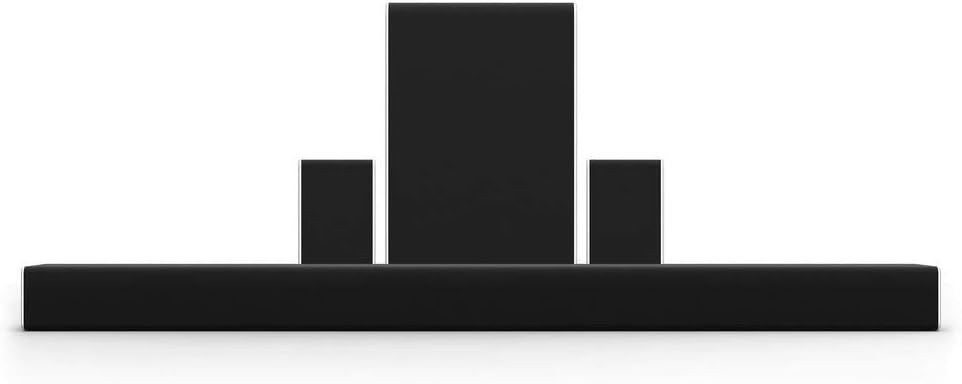
Figure 1: VIZIO 5.1.2 Sound System components, showing the sound bar, wireless subwoofer, and two satellite speakers.
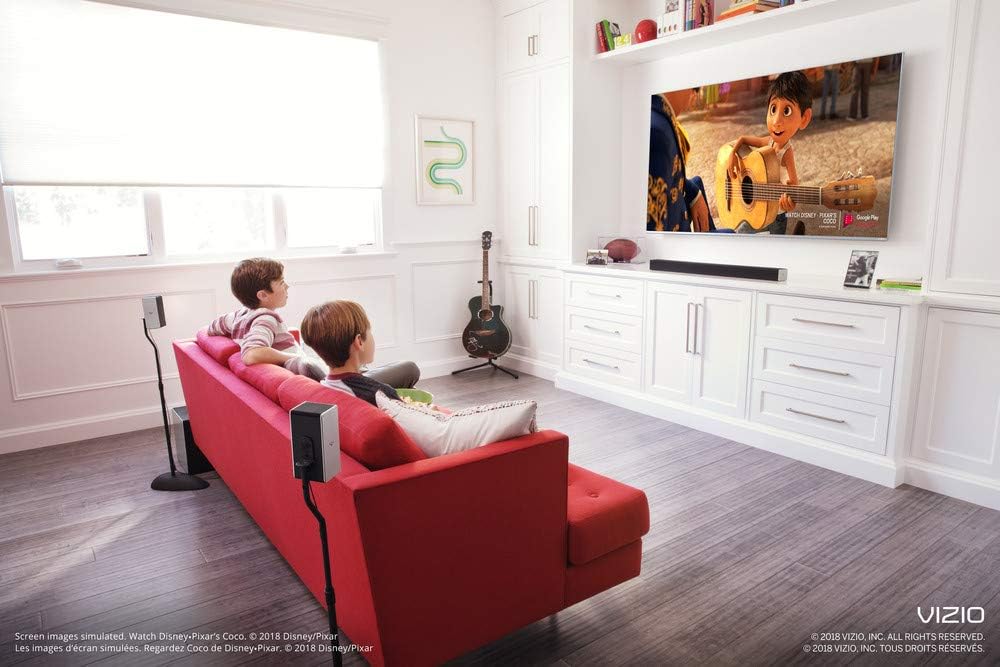
2. irudia: Adibample setup of the VIZIO sound bar system in a living room, demonstrating speaker placement for an immersive experience.
2. Konexioak
Connect the sound bar to your television using either the HDMI ARC port (recommended for best audio quality and control) or the Optical Digital Audio port. Ensure the HDMI cable is connected to the HDMI ARC port on both your TV and the sound bar. Plug the power cables into the sound bar and wireless subwoofer, then connect them to a power outlet. The rear surround speakers connect directly to the wireless subwoofer via the included speaker wires.
- HDMI ARC: Connect one end of the HDMI cable to the HDMI ARC port on your TV and the other end to the HDMI OUT (ARC) port on the sound bar. This allows for high-quality audio transmission and control of the sound bar volume using your TV remote.
- Audio digital optikoa: If your TV does not have an HDMI ARC port, connect the Optical Digital Audio cable from your TV's Optical OUT port to the Optical IN port on the sound bar.
- Potentzia: Connect the power cords to the sound bar and subwoofer, then plug them into a wall outlet.
- Atzeko bozgorailuak: Connect the left and right rear speakers to the corresponding ports on the wireless subwoofer.
Funtzionamendu-argibideak
1. Piztu/Itzali
Press the Power button on the sound bar or the remote control to turn the system on or off. If connected via HDMI ARC, the sound bar may automatically power on/off with your TV.
2. Sarrera hautapena
Use the Input button on the remote control to cycle through available audio sources (HDMI ARC, Optical, Bluetooth, Digital Coaxial, AUX).
3. Bolumenaren kontrola
Adjust the volume using the Volume Up/Down buttons on the remote control or the sound bar itself. If HDMI ARC is enabled, your TV remote may also control the sound bar volume.
4. Bluetooth parekatzea
To pair a Bluetooth device, press and hold the Bluetooth button on the sound bar or remote until the indicator lights flash. Select "VIZIO SB36512-F6" from your device's Bluetooth settings to connect.
5. Chromecast integratua
Stream music and audio content directly to your sound bar from any Chromecast-enabled app on your smartphone or tablet (e.g., Spotify, Pandora, iHeartRadio). Ensure your device and the sound bar are connected to the same Wi-Fi network.
6. VIZIO SmartCast Mobile App
Download the free VIZIO SmartCast Mobile App to your smartphone or tablet. This app allows you to control the sound bar, adjust settings, and manage audio playback from your mobile device.
7. Google Assistant Compatibility
The sound system works with Google Assistant-enabled devices (e.g., Google Home). Once set up, you can use voice commands to control playback, adjust volume, and more.
Mantentzea
To ensure the longevity and optimal performance of your VIZIO sound system, follow these maintenance guidelines:
- Garbiketa: Gently wipe the surfaces of the sound bar, subwoofer, and speakers with a soft, dry, lint-free cloth. Avoid using abrasive cleaners, waxes, or solvents.
- Aireztapena: Berotu gehiegi ez daitezen, ziurtatu osagai guztien inguruan aireztapen egokia dagoela. Ez blokeatu aireztapen-irekidurarik.
- Firmware eguneraketak: Periodically check for and install firmware updates via the VIZIO SmartCast Mobile App or VIZIO's official website. Updates can improve performance and add new features.
- Kableen kudeaketa: Kableak antolatuta eta tolesturarik edo gehiegizko tentsiorik gabe mantendu, kalteak saihesteko.
Arazoak konpontzea
If you encounter issues with your VIZIO sound system, refer to the following common troubleshooting steps:
- Potentziarik gabe:
- Ensure all power cables are securely connected to the sound bar, subwoofer, and wall outlets.
- Egiaztatu hormako entxufea funtzionatzen duela beste gailu bat konektatuz.
- Soinurik ez:
- Check that the correct input source is selected on the sound bar (e.g., HDMI ARC, Optical).
- Increase the volume on both the sound bar and your TV.
- If using Optical, ensure your TV's audio output is set to "PCM" or "Stereo" (not Bitstream or Dolby Digital if experiencing issues).
- HDMI ARC erabiltzen baduzu, ziurtatu ARC gaituta dagoela telebistaren audio ezarpenetan.
- Subwoofer/Surround Speakers Not Connecting:
- Ziurtatu subwooferra piztuta dagoela eta soinu-barraren irismenean dagoela.
- Manually re-pair the subwoofer by pressing the Pair button on the back of the subwoofer and then the Power button on the sound bar.
- Verify the rear speakers are correctly wired to the subwoofer.
- Bluetooth konexio-arazoak:
- Ziurtatu soinu-barra Bluetooth parekatze moduan dagoela.
- Forget the device on your smartphone/tablet and attempt to re-pair.
- Hurbildu gailua soinu-barrara.
Zehaztapenak
| Ezaugarri | Xehetasuna |
|---|---|
| Ereduaren izena | SB36512-F6 |
| Hizlari mota | Inguruko Soinua |
| Inguruko soinu-kanalaren konfigurazioa | 5.1.2 |
| Bozgorailuaren irteera-potentzia maximoa | 400 Watt |
| Produktuaren neurriak (soinu-barra) | 36" L x 3.19" W x 2.5" H |
| Elementuaren pisua | 5.6 kilo |
| Konektibitate Teknologia | Bluetooth, Wi-Fi, Optical, HDMI, Coaxial |
| Subwoofer Konektibitate Teknologia | Haririk gabekoa |
| Kontrol-metodoa | Voice (Google Assistant), Remote |
| Ezaugarri Berezia | Bass Boost, Stereo Pairing, Dolby Enabled, Chromecast built-in |
| Kolorea | Beltza |
| Fabrikatzailea | VIZIO |
| UPC | 845226017353 |
Bermea eta Laguntza
For detailed warranty information and technical support, please visit the official VIZIO support webwebgunera edo jarri harremanetan bezeroarentzako arreta-zerbitzura. Gorde erosketa-agiria berme-erreklamazioetarako.
Lineako laguntza: support.vizio.com
Telefono-laguntza: Refer to VIZIO's official webkontaktu zenbaki eguneratuenak lortzeko gunea.