
1. Sarrera
This manual provides comprehensive instructions for the UBay RC-057 replacement remote control. It is designed to operate various COBY TV models without the need for programming or pairing. Simply install batteries, and the remote is ready for use.
2. Konfigurazioa
2.1 Bateriaren instalazioa
To begin using your UBay RC-057 remote control, you must first install batteries.
- Kokatu bateriaren konpartimentuaren estalkia urrutiko agintearen atzealdean.
- Irristatu estalkia beherantz edo sakatu giltza irekitzeko.
- Sartu bi AAA pila alkalino berri, ziurtatu terminal positiboa (+) eta negatiboa (-) konpartimentuaren barruko markekin behar bezala lerrokatuta daudela.
- Jarri bateriaren konpartimentuaren estalkia berriro bere lekuan sartuz, ondo klik egin arte.
The remote control is now ready for immediate use with compatible COBY TV models. No additional programming or pairing steps are required.
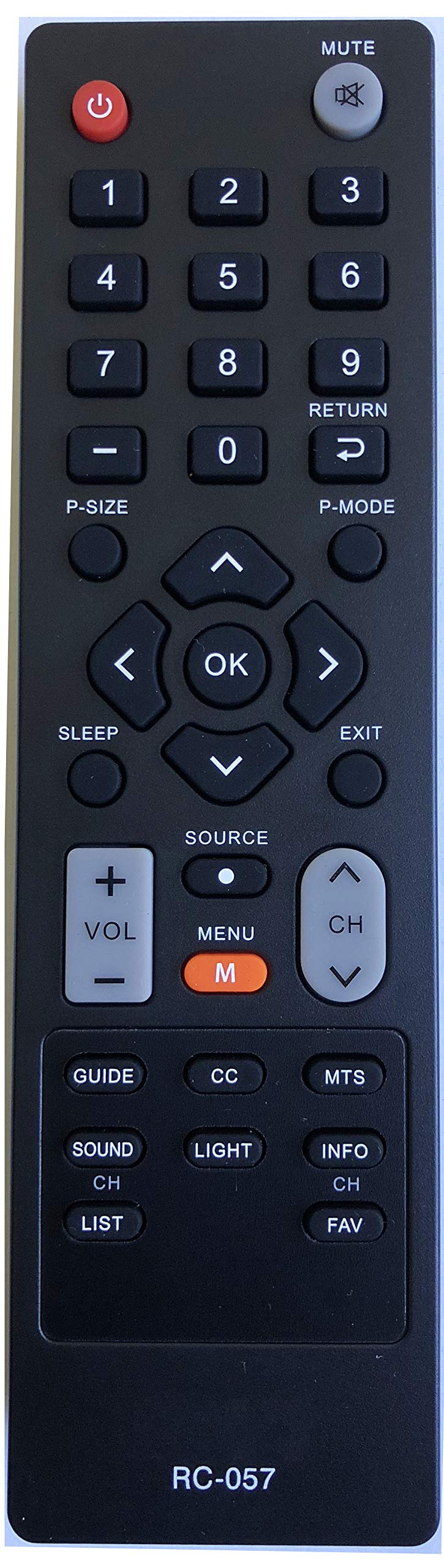
Irudia: Aurrealdea view of the UBay RC-057 remote control, showing all buttons and their labels. The remote is black with grey and red buttons.
3. Funtzionamendu-argibideak
This section details the functions of each button on the UBay RC-057 remote control.
- Boterea (): Turns the television on or off.
- MUTU (): Mutes or unmutes the television's audio output.
- Zenbaki-botoiak (0-9): Directly selects television channels.
- P-SIZE: Adjusts the picture size or aspect ratio of the display.
- ITZULI (): Aurreko egoerara itzultzen da viewed channel or navigates back in a menu.
- P-MODUA: Cycles through various preset picture modes (e.g., Standard, Dynamic, Movie).
- Nabigazio botoiak ( ): Navigates through menus, lists, and options.
- OK: Confirms selections or enters sub-menus.
- LO: Activates or adjusts the sleep timer function.
- EXIT: Uneko menua edo pantailan agertzen den irudia ixten du.
- ITURRIA: Selects the input source (e.g., HDMI, AV, Component, TV).
- VOL +/-: Telebistaren bolumena igo edo jaitsi egiten du.
- MENUA (M): Opens the main menu of the television.
- CH Up/Down ( ): Changes the television channel sequentially.
- GIDA: Displays the Electronic Program Guide (EPG).
- CC: Toggles Closed Captions on or off.
- MTS: Selects Multi-channel Television Sound options (e.g., Stereo, SAP).
- SOINUA: Accesses the television's audio settings.
- ARGIA: (Function varies by TV model) May adjust backlight or screen brightness.
- INFO: Displays information about the current channel or program.
- CH ZERRENDA: Displays a list of available channels.
- FAV: Accesses the list of favorite channels.
4. Mantentzea
4.1 Garbiketa
To maintain the remote control's performance and appearance:
- Garbitu urrutiko agintea zapi leun eta lehor batekin.
- Zikinkeria egoskorrentzat, arin dampGarbitu oihal bat urarekin edo garbiketa-soluzio leun batekin, eta gero lehortu berehala.
- Do not use abrasive cleaners, alcohol, or solvents, as these can damage the remote's surface or internal components.
4.2 Bateria ordezkatzea
Replace batteries when the remote control's response becomes sluggish or stops working. Always replace both batteries simultaneously with new AAA alkaline batteries. Do not mix old and new batteries or different types of batteries.
5. Arazoak
If you experience issues with your UBay RC-057 remote control, refer to the following common solutions:
- Urrunekoek ez dute erantzuten:
- Egiaztatu bateriak behar bezala sartuta daudela, polaritate zuzenarekin (+/-).
- Ordeztu bateriak berriekin.
- Ziurtatu urrutiko agintearen eta telebistaren infragorri sentsorearen artean oztoporik ez dagoela.
- Confirm the remote is pointed directly at the TV's sensor.
- Eremu mugatua:
- Ziurtatu bateriak freskoak direla.
- Reduce the distance between the remote and the TV.
- Remove any potential sources of infrared interference (e.g., strong lights, other electronic devices).
- Botoi espezifikoak ez dira funtzionatzen:
- Clean the remote control, especially around the unresponsive buttons, to remove any dirt or debris.
- If cleaning and battery replacement do not resolve the issue, the remote control may be faulty.
6. Zehaztapenak
| Marka | UBay |
| Ereduaren izena | RC-057 |
| Gailu bateragarriak | COBY Televisions (TFTV1925, LEDTV1926, TFTV2225, LEDTV1935, LEDTV2326, LEDTV3226, LEDTV5536, LEDVD1596, TFTV2425, TFTV4028, TFTV3229) |
| Konektibitate Teknologia | Infragorriak |
| Kontrolagailu mota | Botoien Kontrola |
| Bateria mota | 2 x AAA bateria alkalinoak (ez dira barne hartzen) |
| Gehienezko irismena | 10 metro |
| Ezaugarri Berezia | Diseinu Ergonomikoa |
7. Bermea eta Laguntza
Information regarding specific warranty terms or direct customer support for the UBay RC-057 remote control is not provided in this manual. Please refer to the retailer or manufacturer's website for any available warranty details or support contacts.