
Sarrera
Thank you for choosing the MIFA A3 Soundbox Bluetooth Portable Speaker. This manual provides essential information for the safe and efficient use of your device. Please read it thoroughly before operating the speaker and retain it for future reference.
Segurtasun Informazioa
- Ez jarri bozgorailua tenperatura altuen, eguzki-argiaren eraginpean edo hezetasun handiaren eraginpean.
- Saihestu bozgorailua kolpe gogorrak erortzea edo jasaten.
- Do not disassemble or attempt to repair the speaker yourself. Contact qualified service personnel.
- Keep the speaker away from water and liquids, despite its waterproof rating, to prevent damage to charging ports or internal components.
- Use only the specified charging cable and adapter.
Paketearen edukia
Mesedez, egiaztatu paketea elementu hauek dituen:
- MIFA A3 Bluetooth Portable Speaker
- USB kargatzeko kablea
- AUX Audio kablea
- Erabiltzailearen eskuliburua (dokumentu hau)
Produktua amaituview
The MIFA A3 speaker features intuitive touch controls and multiple connectivity options. Familiarize yourself with the speaker's layout:
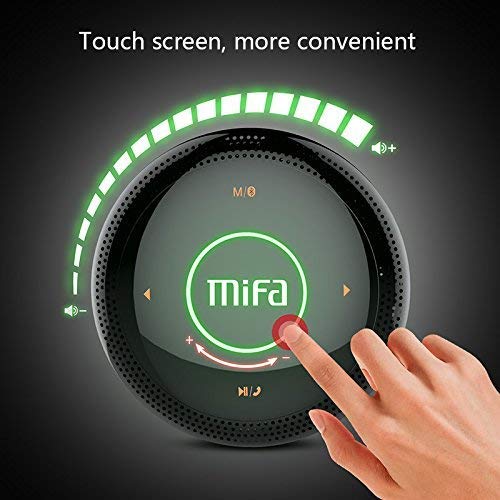
1. irudia: Goiena view of the MIFA A3 speaker, highlighting the touch-sensitive control panel. The panel displays volume indicators, play/pause, and track navigation buttons. A central 'Mifa' logo is also visible.
- Ukitu kontrol-panela: Located on the top surface for volume adjustment, playback control, and mode selection.
- Mikrofonoa: Esku libreko deiak egiteko.
- Kargatzeko ataka: Kargatzeko mikro USB ataka.
- AUX sarrera: 3.5 mm-ko audio-jacka kable bidezko konexiorako.
- Mikro SD txartelaren zirrikitua: Memoria txarteletik musika zuzenean erreproduzitzeko.
Konfigurazioa
1. Bozgorailua kargatzea
Lehenengo aldiz erabili aurretik, kargatu bozgorailua guztiz. Konektatu emandako USB kargatzeko kablea bozgorailuaren kargatzeko atakara eta beste muturra USB elikatze-egokitzaile batera (ez dago barne) edo ordenagailuaren USB atakara.
- Kargatzeko adierazlearen argia piztuko da kargatzen ari den bitartean.
- The indicator will turn off or change color once fully charged.
- A full charge provides approximately 8 hours of continuous playtime.
2. Piztu/Itzali
- Pizteko: Press and hold the Power button (usually integrated into the touch panel or a dedicated button) for 2-3 seconds until you hear an audible prompt or see an indicator light.
- Itzaltzeko: Press and hold the Power button again for 2-3 seconds.
Funtzionamendu-argibideak
1. Bluetooth parekatzea
- Ziurtatu bozgorailua piztuta dagoela eta Bluetooth parekatze moduan dagoela (argi urdin keinukari batek edo soinu-abisu batek adierazten du).
- Zure gailuan (telefono adimenduna, tableta, ordenagailua), gaitu Bluetooth eta bilatu eskuragarri dauden gailuak.
- Select "MIFA A3" from the list of devices.
- Once paired, the speaker will provide an audible confirmation, and the indicator light will become solid blue.
- The speaker will automatically connect to the last-paired device when powered on, if that device's Bluetooth is active and within range.
2. AUX konexioa
For devices without Bluetooth, use the provided 3.5mm AUX audio cable:
- Connect one end of the AUX cable to the speaker's AUX input port.
- Konektatu beste muturra audio gailuko entzungailuetara.
- Bozgorailua automatikoki aldatuko da AUX modura.
3. Mikro SD txartelaren erreprodukzioa
Insert a Micro SD card (up to 32GB, FAT32 format) with music files adierazitako zirrikituan. Bozgorailuak automatikoki detektatuko du txartela eta erreprodukzioa hasiko du.
4. Touch Control Operations
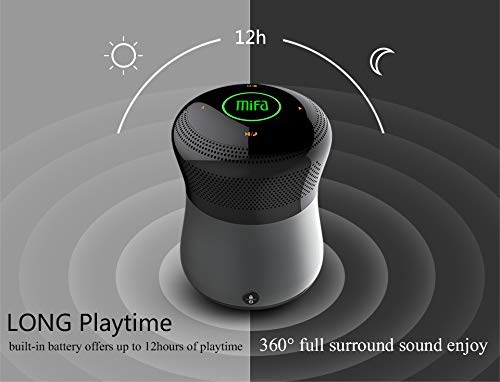
2. irudia: The MIFA A3 speaker shown with an overlay indicating "LONG Playtime" (up to 12 hours) and "360° full surround sound enjoy." This image emphasizes the speaker's battery life and audio dispersion.
- Bolumen kontrola: Slide your finger clockwise on the touch panel to increase volume, counter-clockwise to decrease.
- Erreproduzitu/Pausatu: Tap the central Play/Pause icon.
- Hurrengo ibilbidea: Tap the "Next" arrow icon.
- Aurreko pista: Tap the "Previous" arrow icon.
- Modu aldaketa: Tap the "M/O" icon to cycle between Bluetooth, AUX, and Micro SD card modes.
- Blokeatzeko botoia: Press the lock icon to prevent accidental touch inputs.
5. Call Handling (Bluetooth Mode)
- Erantzun deia: Tap the Play/Pause icon when a call comes in.
- Amaitu deia: Tap the Play/Pause icon again.
- Deia baztertu: Press and hold the Play/Pause icon for 2 seconds.
Mantentzea
- Garbitu bozgorailua zapi leun eta lehor batekin. Ez erabili garbitzaile edo disolbatzaile urratzailerik.
- Gorde bozgorailua leku fresko eta lehor batean denbora luzez erabiltzen ez duzunean.
- Charge the battery at least once every three months to maintain battery health.
Arazoak konpontzea
| Arazoa | Irtenbide posiblea |
|---|---|
| Bozgorailuak ez du pizten. | Ziurtatu bateria kargatuta dagoela. Konektatu energia-iturri batera eta saiatu berriro. |
| Ezin da Bluetooth bidez parekatu. |
|
| Soinurik ez. |
|
| Soinu kalitate txarra. |
|
Zehaztapenak
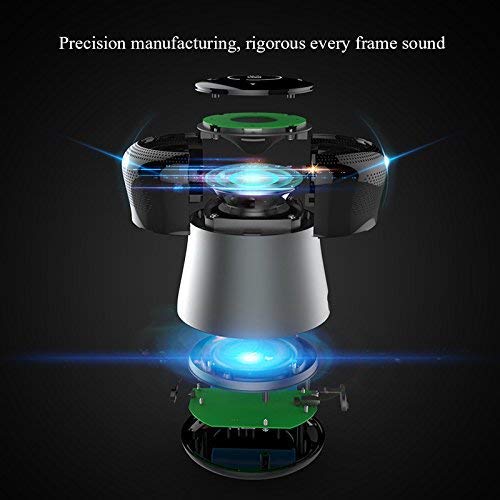
3. irudia: An exploded diagram of the MIFA A3 speaker, illustrating its internal components and structural design, emphasizing precision manufacturing.
| Eredua | MIFA A3 |
| Irteera Potentzia | 10W |
| Konektibitatea | Bluetooth 4.2, AUX, Micro SD Card |
| Bateria | 1800 mAh Li-ioi |
| Jolas-ordua | Gehienez 8 ordu (% 60 bolumenarekin) |
| Kargatzeko Denbora | 3-4 ordu gutxi gorabehera |
| Mikrofonoa | Esku libreko deiak egiteko integratua |
| Iragazgaitza | Yes (as per product specifications, but general caution advised for ports) |
| Kontrol-metodoa | Ukitu |
| Gailu bateragarriak | Ordenagailu eramangarria, ordenagailua, telefono adimenduna, tableta |
Bermea eta Laguntza
MIFA products are designed to provide reliable performance. For warranty information or technical support, please refer to the warranty card included with your purchase or visit the official MIFA webgunea. Gorde erosketaren egiaztagiria bermearen erreklamazioetarako.
For further assistance, you may contact MIFA customer support through their official channels.