
1. Sarrera
Eskerrik asko erosketagatik.asing the MIFA A30 Bluetooth Speaker. This manual provides essential information for setting up, operating, and maintaining your device. Please read it thoroughly before use to ensure optimal performance and longevity of your speaker.
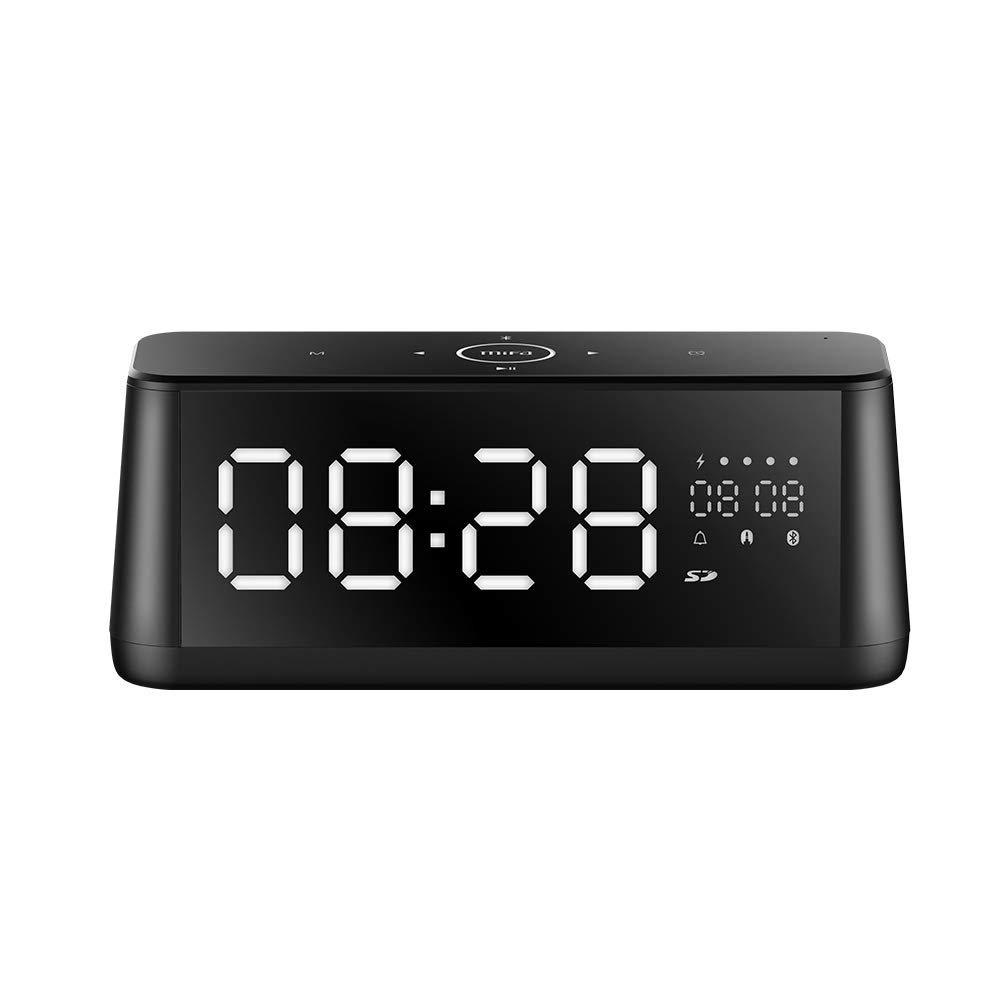
1.1. irudia: Aurrealdea view of the MIFA A30 Bluetooth Speaker, displaying the time on its large LED screen.
2. Segurtasun informazioa
- Ez jarri bozgorailua tenperatura altuen, eguzki-argiaren eraginpean edo hezetasun handiaren eraginpean.
- Saihestu bozgorailua kolpe gogorrak erortzea edo jasaten.
- Ez desmuntatu, konpondu edo aldatu gailua zuk zeuk. Jarri harremanetan baimendutako zerbitzu-langileekin konponketarik egiteko.
- Keep the speaker away from water and other liquids, despite its waterproof rating, to prevent damage to ports when open.
- Use only the specified charging cable and adapter.
- Garbitu bozgorailua zapi leun eta lehor batekin. Ez erabili garbitzaile urratzailerik.
3. Paketearen edukia
Mesedez, egiaztatu paketea elementu hauek dituen:
- MIFA A30 Bluetooth Speaker
- USB kargatzeko kablea
- 3.5 mm-ko audio kablea
- Erabiltzailearen eskuliburua (dokumentu hau)
4. Produktua amaitu daview
4.1. Osagaiak
The MIFA A30 speaker features a robust design with advanced audio components for high-quality sound reproduction.

4.1. irudia: Lehertua view illustrating the internal components of the MIFA A30, including two 15-watt drivers and two low-frequency passive radiators.
4.2. Control Panel and Ports
The speaker's top panel features capacitive touch controls, and the rear panel houses various connectivity ports.
4.2 irudia: Goitik behera view of the MIFA A30 control panel, indicating the functions of each touch button for mode, playback, volume, and clock adjustment.
- M (modua) botoia: Sakatu labur Bluetooth, TF txartela eta AUX moduen artean aldatzeko.
- Bluetooth kontrola: Long press to turn off Bluetooth, short press to turn on.
- Aurreko pistaren botoia: Sakatu labur aurreko pistara joateko.
- Play/Pause/Hands-Free Button: Sakatu labur musika erreproduzitzeko/pausatzeko. Sakatu labur deiak erantzuteko/amaitzeko. Sakatu luze deiak ukatzeko.
- Hurrengo pistaren botoia: Sakatu labur hurrengo pistara joateko.
- Erlojuaren botoia: Long press for clock adjustment.
- Bolumena igo: Biratu erlojuaren orratzen norantz bolumena handitzeko.
- Bolumena jaitsi: Biratu erlojuaren orratzen kontrako noranzkoan bolumena jaisteko.
- mic: Esku libreko deiak egiteko mikrofono integratua.
- LED pantaila: Shows time, date, battery level, and current mode.
5. Konfigurazioa
5.1. Bozgorailua kargatzea
Before first use, fully charge the speaker. Connect the provided USB charging cable to the speaker's charging port and the other end to a USB power adapter (not included) or a computer's USB port. The LED display will indicate charging status.
5.2. Piztu/Itzaltzea
- Pizteko: Press and hold the Play/Pause button until the LED display lights up.
- Itzaltzeko: Press and hold the Play/Pause button until the LED display turns off. The speaker will automatically screen out and power off to save battery after a period of inactivity.
6. Funtzionamendu-argibideak
6.1. Bluetooth parekatzea
- Ensure the speaker is powered on and in Bluetooth mode (indicated by the Bluetooth icon on the LED display). If not, short press the 'M' button to switch to Bluetooth mode.
- Zure telefonoan edo tabletan, gaitu Bluetootha eta bilatu eskuragarri dauden gailuak.
- Select "MIFA A30" from the list of devices.
- Once paired, the speaker will emit a confirmation sound, and the Bluetooth icon on the display will stop flashing.
- The speaker will automatically re-connect to the last paired device when powered on, if the device is within range.
6.2. Audio erreprodukzioa
- Erreproduzitu/Pausatu: Sakatu labur Erreproduzitu/Pausatu botoia.
- Hurrengo ibilbidea: Short press the Next Track button.
- Aurreko pista: Short press the Previous Track button.
- Bolumenaren doikuntza: Biratu bolumen-kontrola erlojuaren noranzkoan bolumena handitzeko, erlojuaren norantzan bolumena jaisteko.
6.3. Esku libreko deiak
Bluetooth bidez telefono adimendun batera konektatuta dagoenean:
- Erantzun deia: Sakatu labur Erreproduzitu/Pausatu botoia.
- Amaitu deia: Sakatu labur Erreproduzitu/Pausatu botoia dei batean zehar.
- Deia baztertu: Long press the Play/Pause button when a call comes in.
6.4. TF txartelaren erreprodukzioa
- Insert a Micro-SD (TF) card with supported audio files (FLAC/APE/MP3/WMA/WAV) into the TF card slot.
- Short press the 'M' button to switch to TF Card mode. The speaker will automatically begin playing music from the card.
6.5. AUX sarrera
- Connect one end of the 3.5mm audio cable to the speaker's AUX input port and the other end to the audio output of your device (e.g., MP3 player, computer).
- Short press the 'M' button to switch to AUX mode.
- Audioa orain bozgorailutik erreproduzituko da konektatutako gailutik.
6.6. Clock and Display Settings
- Erlojuaren doikuntza: Long press the Clock button to enter time setting mode. Use the Next/Previous buttons to adjust values and the Play/Pause button to confirm.
- Display Luminance: The LED display has 7 adjustable luminance levels. Refer to the full product documentation for specific adjustment steps, typically involving short presses of the Clock button or a combination with volume controls.
7. Mantentzea
- Garbiketa: Wipe the speaker's surface with a soft, dry, lint-free cloth. Do not use liquid or aerosol cleaners.
- Biltegiratzea: Denbora luzez erabiltzen ez baduzu, gorde bozgorailua leku fresko eta lehor batean, eguzki-argitik eta muturreko tenperaturetatik urrun.
- Bateria zaintzea: Bateriaren iraupena luzatzeko, saihestu bateria maiz erabat deskargatzea. Kargatu bozgorailua aldizka, erabiltzen ez bada ere.
8. Arazoak
| Arazoa | Kausa posiblea | Irtenbidea |
|---|---|---|
| Bozgorailuak ez du pizten. | Bateria baxua. | Kargatu bozgorailua gutxienez 2 orduz. |
| Soinurik ez. | Bolumena baxuegia; modu okerra; gailua ez dago konektatuta. | Increase speaker and device volume. Ensure correct mode (Bluetooth/AUX/TF Card). Re-pair Bluetooth device or check AUX cable connection. |
| Bluetooth parekatzeak huts egiten du. | Bozgorailua ez dago parekatze moduan; gailua urrunegi dago; interferentziak. | Ensure speaker is in Bluetooth mode. Move device closer to speaker. Turn off other Bluetooth devices. Try forgetting "MIFA A30" on your device and re-pairing. |
| TF Card not playing. | Modu okerra; ez da onartzen file format; card error. | Switch to TF Card mode. Ensure files are FLAC/APE/MP3/WMA/WAV. Reinsert TF card or try a different card. |
9. Zehaztapenak
| Ezaugarri | Xehetasuna |
|---|---|
| Ereduaren izena | A30 |
| Hizlari mota | Liburu-apalategia |
| Konektibitate Teknologia | Bluetooth 4.2, Auxiliary (3.5mm), Micro-SD (TF Card) |
| Audio irteera modua | Estereoa |
| Bozgorailuaren irteera-potentzia maximoa | 30 Watts (2 x 15W drivers) |
| Baxuen hobekuntza | Two low-frequency boosters |
| Bateria Edukiera | 4000 mAh |
| Jolas-ordua | Up to 10-12 hours (depending on volume and content) |
| Kontrol-metodoa | Ukipen-panel kapazitiboa |
| Bistaratzea | 7.2" x 2.8" Mirror LED Screen with 106 LEDs, 7-level adjustable luminance |
| Onartutako audio formatuak | FLAC/APE/MP3/WMA/WAV |
| Mikrofono integratua | Bai, esku libreko deietarako |
| Iragazgaitza | Yes (Note: Ensure ports are covered for water resistance) |
| Kolorea | Beltza |
| Muntatze Mota | Mahai gaineko muntaia |
10. Bermea eta Laguntza
The MIFA A30 Bluetooth Speaker typically comes with a 30-day warranty from the date of purchase, covering manufacturing defects. Please retain your proof of purchase for warranty claims.
For technical support, troubleshooting assistance beyond this manual, or warranty inquiries, please contact MIFA customer service through their official website or the retailer where the product was purchased. Provide your product model (A30) and purchase details when seeking support.