
1. Sarrera
This manual provides essential information for setting up, operating, maintaining, and troubleshooting your HP LaserJet 600 M603N M603 monochrome laser printer. Please read this manual thoroughly before using the printer to ensure proper operation and to prevent damage.
The HP LaserJet M603n is designed for high-volume monochrome printing in office environments, offering fast print speeds and professional-quality output.
2. Segurtasun informazioa
- Konektatu beti inprimagailua lurrera konektatutako entxufe batera.
- Ez blokeatu aireztapen baoak.
- Mantendu inprimagailua uretatik edo hezetasun gehiegizkoetatik urrun.
- Use only the specified power cord and toner cartridges.
- Avoid touching the fuser area, as it can be hot.
- Unplug the printer before cleaning or servicing.
3. Paketearen edukia
Egiaztatu elementu guztiak paketean daudela:
- HP LaserJet 600 M603N M603 Printer
- Toner Cartridge (CE390A compatible)
- Elikatze-kablea
- Network/USB Cable (where applicable)

1. irudia: Aurrealdea view of the HP LaserJet 600 M603N M603 printer, showing the control panel on the right side and the HP logo on the front panel.
4. Konfiguratzeko argibideak
4.1 Inprimagailua desegitea
- Kendu arretaz inprimagailua ontzitik.
- Remove all packing materials, tapes, and protective films from the printer's exterior and interior.
- Jarri inprimagailua gainazal egonkor eta lau batean, aireztapen egokia duena.
4.2 Potentzia konektatzea
- Konektatu elikatze-kablea inprimagailuaren elikatze-sarrerara.
- Entxufatu kablearen beste muturra lurrera konektatutako entxufe elektriko batera.
- Sakatu pizteko botoia inprimagailua pizteko.
4.3 Connecting to a Computer or Network
- USB konexioa: Connect one end of a USB 2.0 cable to the printer's USB port and the other end to your computer.
- Sare konexioa (Ethernet): Connect an Ethernet cable to the printer's Gigabit Ethernet port and the other end to your network router or switch.
4.4 Toner kartutxoa instalatzea
- Ireki inprimagailuaren aurreko sarbide-atea.
- Atera toner kartutxo berria paketetik eta astindu astiro tonerra banatzeko.
- Insert the toner cartridge into the designated slot until it clicks into place.
- Itxi aurreko sarbide-atea.
4.5 Papera kargatzea
- Pull out the paper tray (Tray 2 is standard).
- Doitu paper-gidak paper-tamaina zuzenera.
- Kargatu paper pila erretiluan, ziurtatuz laua dagoela eta gehienezko betetze-marraren azpitik dagoela.
- Sartu paper-erretilua berriro inprimagailuan.
- Confirm paper type and size on the printer's control panel if prompted.
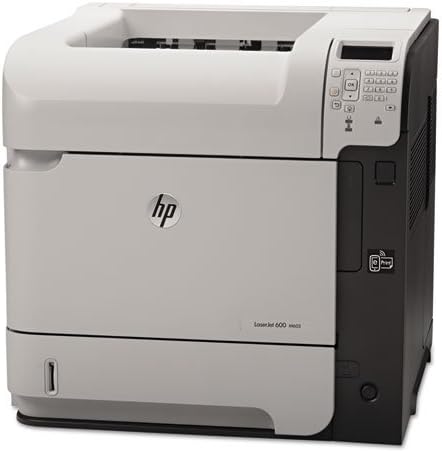
2. irudia: Angelua view of the HP LaserJet 600 M603N M603 printer, highlighting its compact design and connectivity ports on the side.
5. Funtzionamendu-argibideak
5.1 Oinarrizko inprimaketa
- Ziurtatu inprimagailua piztuta dagoela eta ordenagailura edo sarera konektatuta dagoela.
- Ireki inprimatu nahi duzun dokumentua ordenagailuan.
- Hautatu Inprimatu aplikazioaren menutik (adibidez, File > Inprimatu).
- Choose the "HP LaserJet 600 M603N" from the list of available printers.
- Adjust print settings (e.g., number of copies, paper source) as needed.
- Egin klik Inprimatu.
5.2 Printer Control Panel
The control panel on the printer allows you to monitor printer status, configure settings, and perform various tasks. Refer to the on-screen menus for navigation and options such as:
- Viewing printer status and error messages.
- Configuring network settings.
- Managing paper trays.
- Accessing maintenance options.
5.3 Gidariaren instalazioa
For optimal performance, install the latest printer drivers. Drivers can typically be downloaded from the official HP support website by searching for your specific printer model (HP LaserJet 600 M603N).
6. Mantentzea
6.1 Toner kartutxoa ordezkatzea
When the toner level is low or the print quality degrades, replace the toner cartridge:
- Ireki aurreko sarbide-atea.
- Kendu toner kartutxo zaharra zuzen tiratuz.
- Unpack the new CE390A compatible toner cartridge and shake it gently.
- Sartu kartutxo berria bere lekuan finkatu arte.
- Itxi aurreko sarbide-atea.
6.2 Inprimagailua garbitzea
- Kanpoaldea: Garbitu kanpoko gainazalak zapi leun eta lihorik gabeko batekin dampened with water. Do not use abrasive cleaners.
- Barrualdea: Periodically open the front access door and gently remove any loose paper dust or debris using a dry, lint-free cloth. Avoid touching sensitive components.
7. Arazoak
| Arazoa | Kausa posiblea | Irtenbidea |
|---|---|---|
| Inprimagailua ez da pizten | Power cable disconnected, power outlet issue | Egiaztatu kablearen konexioak, saiatu beste entxufe batekin. |
| Ez dago inprimatze-irteerarik | Printer offline, incorrect driver, empty toner, paper jam | Ensure printer is online, check toner level, clear paper path, reinstall drivers. |
| Inprimatze-kalitate eskasa | Low toner, fuser issue, dirty printer components | Replace toner, clean printer, contact support if fuser issue suspected. |
| Paper ataskatzeak | Incorrect paper loading, damaged paper, foreign objects | Remove jammed paper carefully, ensure paper is loaded correctly, check for obstructions. |
8. Zehaztapenak
| Ezaugarri | Xehetasuna |
|---|---|
| Ereduaren izena | HP LaserJet Enterprise 600 M603n |
| Inprimagailu mota | Laser inprimagailu monokromoa |
| Inprimatzeko abiadura (Monokromoa) | Gehienez 62 orrialde minutuko (ppm) |
| Inprimatzeko ebazpena | Gehienez 1200 x 1200 dpi |
| Konektibitatea | USB 2.0, Gigabit Ethernet |
| Duplex Inprimaketa | Simplex (No automatic dual-sided printing) |
| Gehienezko sarrera-orriaren edukiera | 600 sheets (standard) |
| Kartutxo bateragarria | CE390A |
| Elementuaren pisua | Gutxi gorabehera 80 libra (36.3 kg) |
| Produktuaren neurriak (W x P x H) | 19.65 x 21.26 x 23.15 hazbete (49.9 x 54 x 58.8 cm) |
| Energia-kontsumoa | (Typical values, refer to HP documentation for specifics) |
9. Bermea eta Laguntza
This HP LaserJet 600 M603N M603 printer comes with a 90 eguneko berme mugatuaGorde erosketaren egiaztagiria bermearen erreklamazioetarako.
For technical support, driver downloads, or further assistance, please visit the official HP support website and search for your specific printer model.
HP laguntza Webgunea: www.hp.com/support