
AUNA Sky2-90400-asmg
Erabiltzailearen eskuliburua
auna Streetstar 2.0 15 Mobile PA System
Model: Sky2-90400-asmg
Sarrera
Thank you for choosing the auna Streetstar 2.0 15 Mobile PA System. This portable audio system is designed to deliver powerful sound with versatile connectivity options, including Bluetooth, USB/SD playback, and FM radio. It features a robust design with integrated trolley function for easy transport and comes with a wireless microphone for various applications.
This manual provides important information regarding the safe operation, setup, and maintenance of your device. Please read it thoroughly before first use and keep it for future reference.

Image: The auna Streetstar 2.0 15 Mobile PA System, showcasing its main unit and included wireless microphone.
Segurtasun-argibideak
Funtzionamendu segurua bermatzeko eta kalteak saihesteko, jarraitu segurtasun neurri hauek:
- Energia iturria: Only connect the device to a power outlet with the specified voltage (220 Voltio).
- Aireztapena: Ziurtatu aireztapen egokia dagoela. Ez blokeatu aireztapen-irekidurak.
- Hezetasuna: Do not expose the device to rain or moisture. Do not place objects filled with liquids, such as vases, on the device.
- Beroa: Mantendu gailua bero-iturrietatik urrun, hala nola erradiadoreetatik, bero-erregistroetatik, sukaldeetatik edo beste aparatu batzuetatik (adibidez, ampberoa sortzen duten argitzaileak).
- Garbiketa: Unplug the device from the power outlet before cleaning. Use a dry cloth for cleaning.
- Zerbitzua: Ez saiatu produktu hau zuk zeuk ematen. Bidali zerbitzu guztiak zerbitzu kualifikatuko langileengana.
- Lekua: Jarri unitatea gainazal egonkor eta lau batean. Saihestu eguzki-argitan edo eremu magnetiko indartsuen ondoan jartzea.
- Bateria zaintzea: If the unit has an internal battery, avoid fully discharging it for extended periods. Charge regularly to maintain battery health.
Paketearen edukia
Mesedez, egiaztatu elementu guztiak bertan daudela eta egoera onean daudela:
- auna Streetstar 2.0 15 Mobile PA System
- Haririk gabeko mikrofonoa
- Elikatze-kablea
- Urruneko Kontrola
- Erabiltzailearen eskuliburua (dokumentu hau)
Produktua amaituview eta Kontrolak
Familiarize yourself with the various parts and controls of your PA system.

Irudia: Xehetasun handikoa view of the control panel, showing inputs, outputs, and adjustment knobs.
Kontrol panelaren ezaugarriak:
- MEDIAPLAYER: Digital display for USB/SD playback and mode selection.
- USB ataka: USB flash unitateak konektatzeko.
- SD zirrikitua: SD memoria txartelak sartzeko.
- MODE botoia: Bluetooth, USB, SD, FM eta AUX moduen artean aldatzen du.
- MIC MAILA: Mikrofonoaren sarreraren bolumena doitzen du.
- Mikrofonoaren oihartzuna: Mikrofonoaren oihartzun efektua doitzen du.
- TREBLE / BASS: Tone controls for adjusting high and low frequencies.
- Mikrofonoa: 6.3mm jack inputs for wired microphones.
- SARRERA AUX: RCA (L/R) inputs for external audio devices.
- LINE IN / OUT: RCA (L/R) connections for linking multiple PA systems.
- POWER switch: Unitatea pizten edo itzaltzen du.
- UHF MICROPHONE Volume: Haririk gabeko mikrofonoaren bolumena doitzen du.
- Adierazleak: PWR (Power), CHARGE (Charging status), LOW (Low battery).
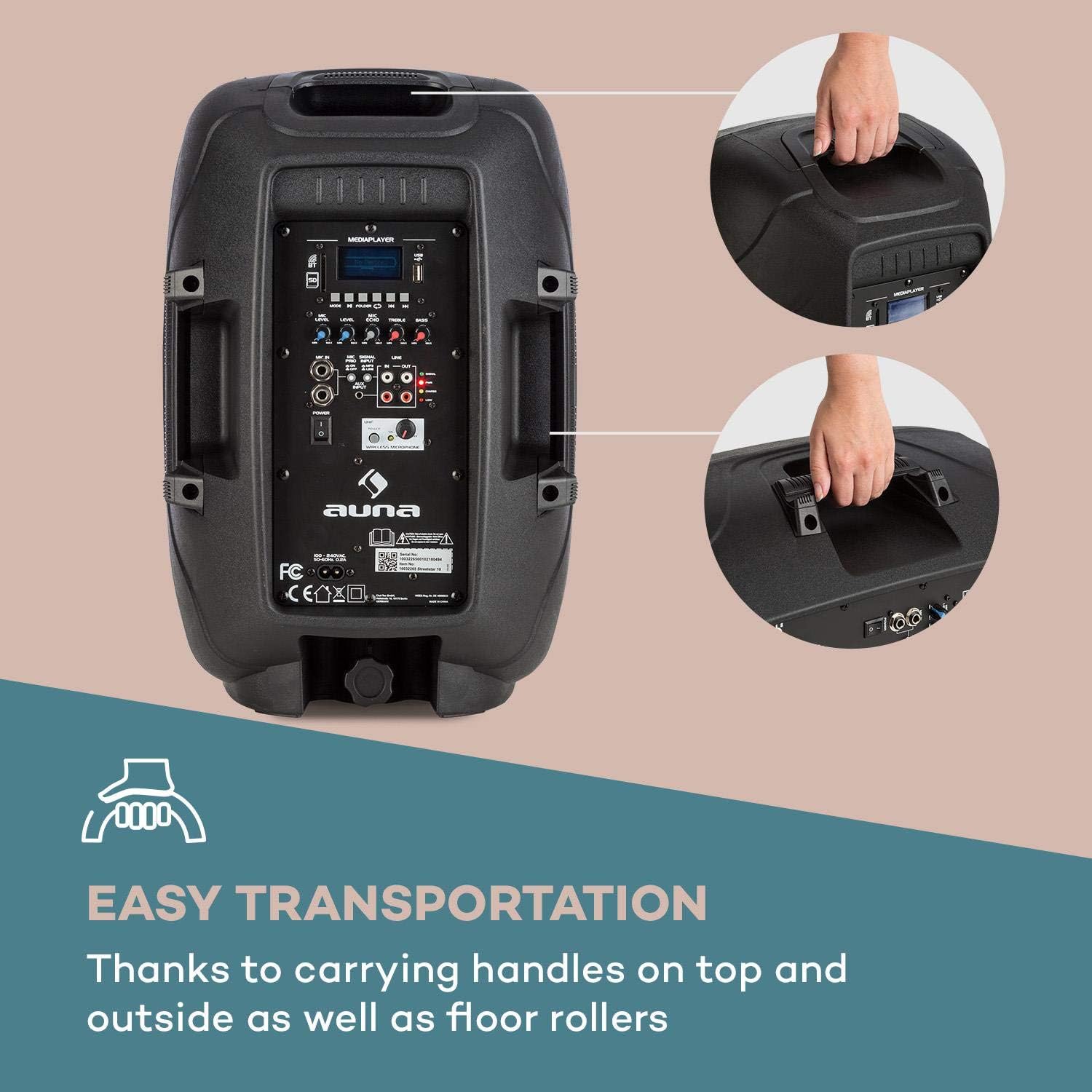
Image: The integrated carrying handles on top and side, along with floor rollers, facilitate easy transportation of the unit.
Konfigurazioa
- Despaketatzea: Carefully remove the PA system and all accessories from the packaging. Retain the packaging for future transport or storage.
- Potentzia-konexioa: Connect the supplied power cable to the AC IN port on the unit and then to a suitable 220V AC power outlet. The unit can operate on AC power and simultaneously charge its internal battery.
- Hasierako karga: For first use, it is recommended to fully charge the internal battery. The CHARGE indicator will illuminate during charging and turn off when fully charged.
- Lekua: Place the PA system on a stable, flat surface. It can be used upright or on its side as a stagmonitore.
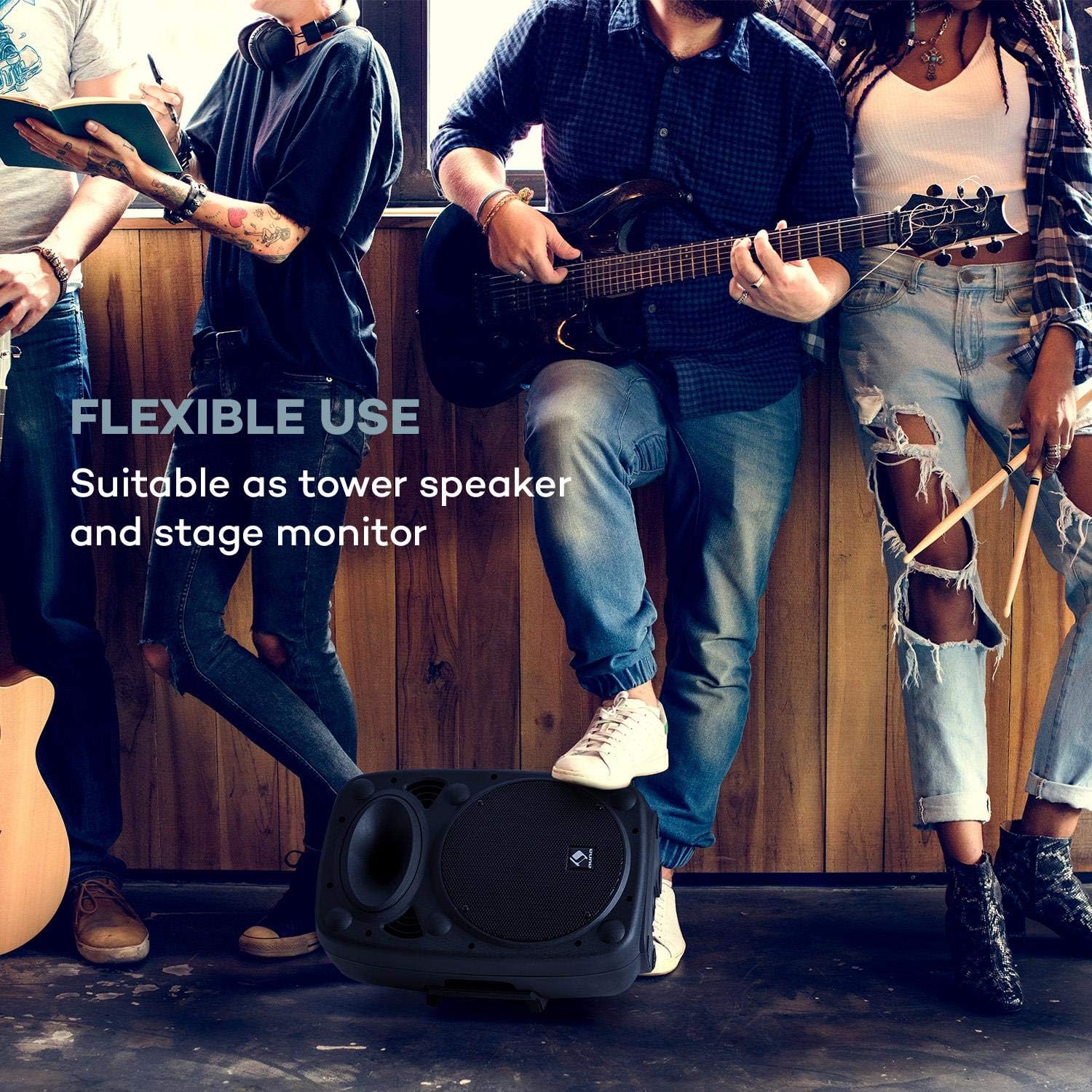
Image: The PA system positioned on its side, demonstrating its flexible use as a stagmonitore.
- Mikrofonoak konektatzea:
- Haririk gabeko mikrofonoa: Ensure the wireless microphone has fresh batteries. Turn on the microphone. The PA system will automatically connect to the included wireless microphone. Adjust its volume using the UHF MICROPHONE knob.
- Hari bidezko mikrofonoak: Connect wired microphones to the MIC IN 6.3mm jack inputs. Adjust their volume using the MIC LEVEL knob.

Image: A user engaging with the wireless microphone, highlighting the system's karaoke and vocal performance capabilities.
- Connecting External Audio Devices: Use the AUX INPUT (RCA L/R) to connect devices like CD players, laptops, or other audio sources.
- Expanding the System: To connect multiple auna Streetstar PA systems, use the LINE OUT of one unit and connect it to the LINE IN of another unit using RCA cables.

Image: An illustration demonstrating how multiple PA systems can be linked together via line input/output for an expanded audio setup.
Funtzionamendu-argibideak
Piztu/Itzali:
Flip the POWER switch to the "ON" position to turn on the unit. The PWR indicator will light up. Flip to "OFF" to power down.
Modu aukeraketa:
Press the MODE button on the control panel or remote control to cycle through available input modes: Bluetooth, USB, SD, FM Radio, and AUX.

Image: The PA system alongside its remote control, illustrating convenient wireless operation.
Bluetooth bidezko lotura
- Select Bluetooth mode using the MODE button. The display will show "BT" and flash, indicating it's ready for pairing.
- On your smartphone or other Bluetooth device, enable Bluetooth and search for "auna Streetstar".
- Select "auna Streetstar" to pair. Once connected, the "BT" indicator will stop flashing.
- You can now play audio from your device wirelessly through the PA system.
USB/SD erreprodukzioa:
- Insert a USB flash drive into the USB port or an SD card into the SD slot.
- The system will automatically switch to USB or SD mode and begin playing compatible audio files (MP3).
- Use the media player controls (Play/Pause, Next/Previous, Folder) on the unit or remote to navigate and control playback. The display supports ID3 tag information for artist, song or album.
FM irratia:
- Select FM mode using the MODE button.
- Press the Play/Pause button to initiate an automatic station scan. The system will scan and save available FM stations.
- Use the Next/Previous buttons to switch between saved stations.
Audio doikuntza:
- Bolumena: Use the main volume knob to adjust the overall output volume.
- Mikrofonoaren bolumena: Adjust MIC LEVEL for wired microphones and UHF MICROPHONE for the wireless microphone.
- Oihartzun efektua: Use the MIC ECHO knob to add or remove echo from microphone inputs.
- Tonuen kontrola: Adjust the TREBLE and BASS knobs to fine-tune the sound output to your preference.
Mantentzea
- Garbiketa: Always unplug the unit before cleaning. Use a soft, dry cloth to wipe the exterior. Do not use liquid cleaners or aerosols.
- Biltegiratzea: Denbora luzez erabiltzen ez baduzu, gorde gailua leku fresko eta lehor batean, hobe jatorrizko ontzian.
- Bateria zaintzea: If the unit is not used regularly, charge the battery at least once every three months to prolong its lifespan. Avoid storing the unit with a completely depleted battery.
- Babesa: The sturdy ABS casing provides good protection, but avoid dropping or subjecting the unit to strong impacts.

Irudia: Gertutik view of the speaker's horn and the robust ABS casing, emphasizing its durable construction.
Arazoak konpontzea
| Arazoa | Kausa posiblea | Irtenbidea |
|---|---|---|
| Botererik ez | Power cable not connected; Unit not switched on; Battery depleted. | Ensure power cable is securely connected and plugged into a live outlet. Flip POWER switch to ON. Charge the battery. |
| Ez dago soinu irteerarik | Volume too low; Incorrect input mode selected; Audio source not playing or connected incorrectly. | Increase main volume. Press MODE to select the correct input. Check audio source connection and playback. |
| Bluetootha ez da parekatzen | PA system not in pairing mode; Device too far; Bluetooth disabled on source device. | Ensure PA system is in BT mode and flashing. Move source device closer. Enable Bluetooth on your device. |
| Mikrofonoa ez dabil | Microphone volume too low; Microphone not switched on; Batteries dead (wireless mic). | Increase MIC LEVEL or UHF MICROPHONE volume. Ensure microphone is switched on. Replace batteries in wireless microphone. |
| Distorted sound / High-frequency noise | Volume too high; Input signal too strong; Interference. | Reduce volume. Check input signal level. Move unit away from other electronic devices that may cause interference. |
Zehaztapenak
Key technical specifications for the auna Streetstar 2.0 15 Mobile PA System:
- Modelo zenbakia: Sky2-90400-asmg
- Irteera Wattage: 400 watt (gehienez)
- Bozgorailuaren tamaina: 10" (25.5 cm)
- Energia iturria: Corded Electric (220 Volts) / Internal Battery
- Konektibitatea: Bluetooth, USB, SD, AUX (RCA), MIC IN (6.3mm), LINE IN/OUT (RCA)
- Kanalak: 2
- Elementuaren pisua: 6 kg
- Produktuaren neurriak (L x W x H): 26 x 33.5 x 49.5 cm
- Muntatze mota: Zutikako eserlekua
- Casing Materiala: ABS
- Gailu bateragarriak: Ordenagailu eramangarria, Smartphone

Irudia: Xehetasun zehatza view of the 10-inch active PA speaker, highlighting its powerful design and XMR Bass Technology.
Bermea eta Laguntza
This auna product comes with a standard manufacturer's warranty. Please refer to the warranty card included in your package for specific terms and conditions, including warranty period and coverage details.
For technical support, service, or spare parts, please contact your retailer or the official AUNA customer service. Keep your purchase receipt as proof of purchase for warranty claims.
Fabrikatzailea: auna
Lehen eskuragarri dagoen data: 23eko abenduaren 2018
Ask a question about this manual
Ask about setup, troubleshooting, compatibility, parts, safety, or missing instructions. Manuals+ will review the question and use this page’s manual context to help answer it.