
Sarrera
Thank you for choosing the MARVO KG925G Mechanical Gaming Keyboard. This manual provides essential information for setting up, operating, maintaining, and troubleshooting your new keyboard. Please read this manual carefully before use to ensure optimal performance and longevity of your device.
Paketearen edukia
Egiaztatu elementu guztiak paketean daudela:
- MARVO KG925G Mechanical Gaming Keyboard
- Erabiltzailearen eskuliburua (dokumentu hau)
Konfigurazioa
Sistemaren eskakizunak
- Sistema eragilea: Windows 8 edo berriagoa
- USB 2.0 ataka eskuragarri
Teklatua konektatzea
- Bilatu zure ordenagailuan USB 2.0 ataka libre bat.
- Plug the USB connector of the MARVO KG925G keyboard into the USB port.
- Sistema eragileak automatikoki detektatu eta instalatuko ditu beharrezko kontrolatzaileak. Prozesu honek minutu batzuk iraun ditzake.
- Once the drivers are installed, the keyboard's backlighting will illuminate, indicating it is ready for use.
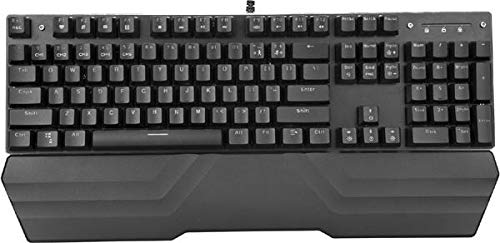
Image: The MARVO KG925G Mechanical Gaming Keyboard with its USB cable connected, ready for use. The keyboard features a wrist rest and illuminated keys.
Funtzionamendu-argibideak
Oinarrizko teklatuaren funtzioak
The MARVO KG925G functions as a standard QWERTY keyboard for typing and general computer use.
Multimedia gakoak
The keyboard includes dedicated multimedia functions, typically accessed via the Fn key combined with the F-keys (F1-F12). Refer to the keycap legends for specific functions such as volume control, media playback, and launching applications.
- Fn + F1-F12: Access various multimedia and system functions.
Atzeko argiztapenaren kontrola
The MARVO KG925G features customizable backlighting. Specific key combinations are used to change lighting modes, brightness, and speed. Consult the keyboard's keycap legends or the manufacturer's website for detailed instructions on advanced lighting customization.
- Argiztapen moduak: Typically cycled using a dedicated key or Fn + a specific key (e.g., Scroll Lock, Pause Break, or a dedicated lighting key).
- Distira doitzea: Often controlled by Fn + Up/Down arrow keys.
Mantentzea eta zaintzea
Mantentze egokiak zure teklatuaren iraupena eta errendimendua bermatzen ditu.
- Garbiketa: Use a soft, dry cloth to wipe the keyboard surface. For deeper cleaning, use a can of compressed air to remove dust and debris from between the keycaps. Avoid using harsh chemicals or abrasive materials.
- Isurketak: In case of liquid spills, immediately unplug the keyboard from your computer. Turn it upside down to drain any liquid and allow it to dry completely for at least 24-48 hours before reconnecting. Do not attempt to use the keyboard while it is wet.
- Biltegiratzea: Gorde teklatua leku fresko eta lehor batean, eguzki-argitik eta muturreko tenperaturetatik babestuta.
Arazoak konpontzea
If you encounter issues with your MARVO KG925G keyboard, refer to the following common solutions:
| Arazoa | Irtenbide posiblea |
|---|---|
| Teklatuak ez du erantzuten. |
|
| Backlighting is not working. |
|
| Keys are not registering correctly. |
|
Zehaztapenak
- Eredua: KG925G
- Marka: MARVO
- Konektibitatea: USB 2.0
- Teklatu mota: Joko Teklatu Mekanikoa
- Ezaugarriak: Illumination, Wrist Rest, Multimedia Keys
- OS bateragarria: Windows 8 eta gehiago
- Neurriak: Gutxi gorabehera 47.5 x 18.7 x 8.4 cm (18.7 x 7.4 x 3.3 hazbete)
Bermea eta Laguntza
Bermeari buruzko informazioa eta laguntza teknikoa lortzeko, kontsultatu zure produktuarekin batera datorren berme-txartela edo bisitatu MARVOren webgune ofiziala. webgunea. Gorde erosketaren egiaztagiria bermearen erreklamazioetarako.