
Sarrera
This manual provides instructions for the setup, operation, and maintenance of your Zelotes T20 Ergonomic Vertical Mouse. Please read this manual thoroughly before using the product to ensure proper function and longevity.
Produktua amaituview
The Zelotes T20 is an ergonomic vertical mouse designed to promote a natural hand and wrist posture, reducing strain during extended use. It features adjustable DPI settings and multiple programmable buttons for enhanced control.

Figure 1: Zelotes T20 Ergonomic Vertical Mouse. This image displays the overall design of the mouse, highlighting its vertical orientation and LED lighting.
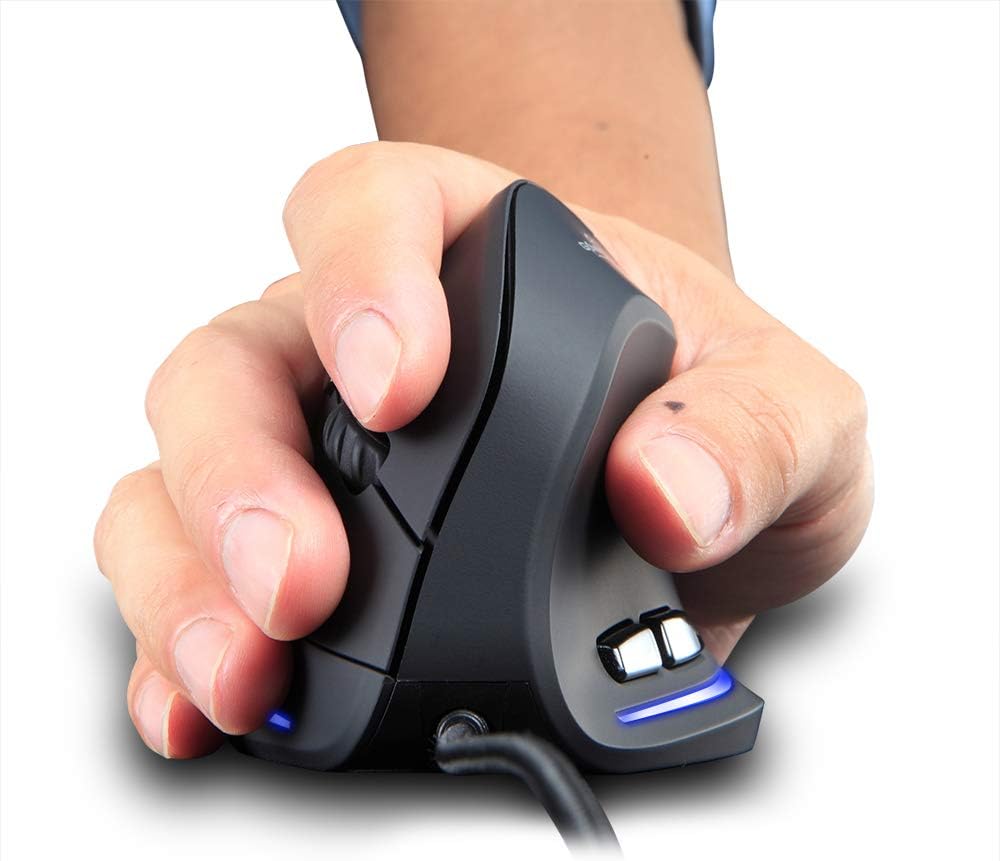
Figure 2: Proper hand placement on the Zelotes T20 mouse. This image illustrates how the vertical design allows for a natural handshake grip, intended to reduce wrist strain.

Figure 3: Ergonomic comparison. This diagram contrasts the natural wrist posture with a vertical mouse against the twisted posture often associated with traditional horizontal mice, emphasizing fatigue reduction.
Paketearen edukia
Egiaztatu elementu guztiak paketean daudela:
- 1 x Zelotes Ergonomic Vertical Mouse
- 1 x Argibide eskuliburua (dokumentu hau)
Konfigurazioa
- Konektatu sagua: Plug the USB cable of the Zelotes T20 mouse into an available USB port on your computer.
- Gidariaren instalazioa: The mouse is plug-and-play. Your operating system should automatically detect and install the necessary drivers. No additional software installation is typically required.
- Kendu film babeslea: Before use, locate and remove the protective film from the "Bigfoot pads" on the underside of the mouse for optimal gliding performance.

Figure 4: Underside of the mouse. This image shows the Teflon material pads and indicates the location of the protective film that should be removed before initial use.
Funtzionamendu-argibideak
Botoiaren funtzioak
The Zelotes T20 mouse features 6 buttons for various functions:
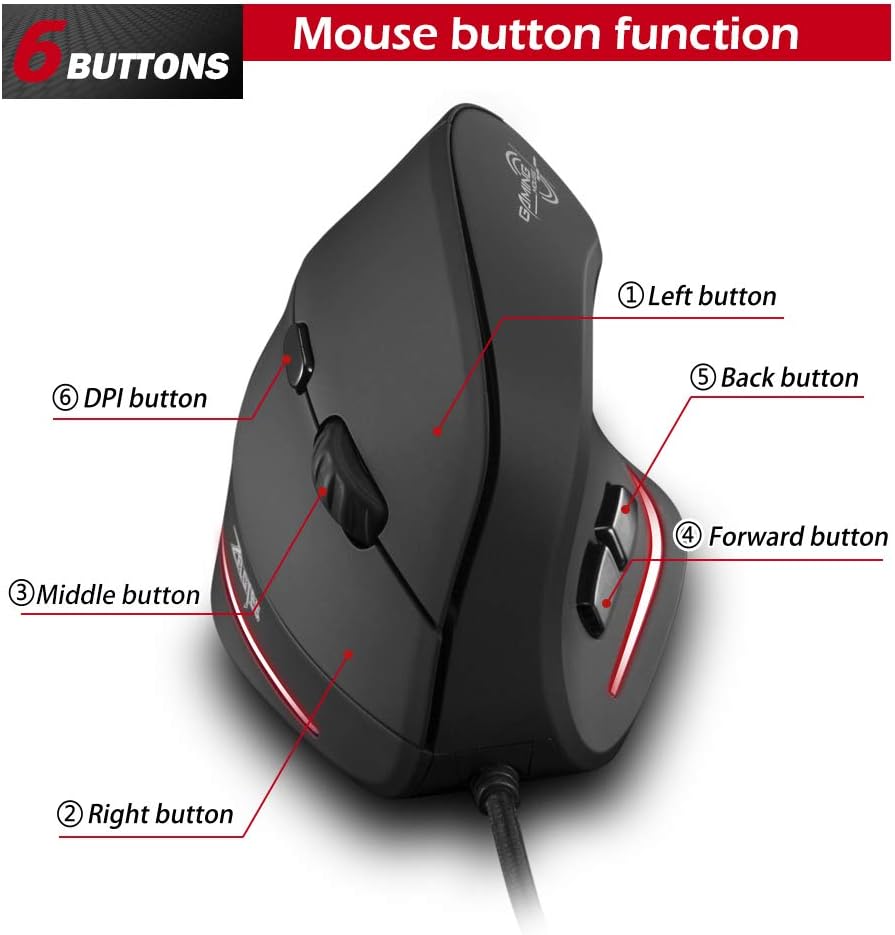
Figure 5: Mouse button layout. This diagram labels each of the six buttons: Left, Right, Middle (scroll wheel click), Forward, Back, and DPI adjustment button.
- Ezkerreko botoia: Ezkerreko klik funtzio estandarra.
- Eskuineko botoia: Eskuineko botoiarekin klik egiteko funtzio estandarra.
- Middle Button (Scroll Wheel): Clickable scroll wheel for middle-click functions.
- Aurrera egiteko botoia: Aurrera nabigatzen du web nabigatzaileak edo file esploratzaileak.
- Atzera botoia: Atzeraka nabigatzen du web nabigatzaileak edo file esploratzaileak.
- DPI botoia: Saguaren sentikortasuna (DPI) doitzen du.
DPI doitzea (Sentsibilitatea)
The mouse offers four adjustable DPI settings to suit different tasks and preferences. Press the DPI button (Button 6 in Figure 5) to cycle through the settings. Each DPI level is indicated by a specific LED light color:
- 1200 DPI: Blue light hint
- 1600 DPI: Dark purple light hint
- 2400 DPI: Red light hint
- 3200 DPI: Light purple light hint
The light will stay on for approximately 3 seconds when switching DPI settings to indicate the current level.

Figure 6: DPI adjustment and LED indicators. This image illustrates the DPI button and the color coding for each of the four sensitivity settings.
Using Forward/Back Keys
The dedicated Forward and Back buttons (Buttons 4 and 5 in Figure 5) provide quick navigation. These buttons are designed to streamline browsing through web pages or folders, reducing the need for on-screen clicks.

Figure 7: Forward and Back navigation buttons. This image highlights the placement of the forward and back buttons, designed for convenient web eta file nabigazioa.
Mantentzea
- Garbiketa: Erabili zapi leun eta lehor bat saguaren gainazala garbitzeko. Zikinkeria egoskorra bada, garbitu pixka bat.amp oihal bat erabil daiteke, likidorik saguaren barruan sartzen ez dela ziurtatuz.
- Sentsoreen mantentze-lanak: Jarraipen zehatza bermatzeko, mantendu saguaren azpialdeko sentsore optikoa garbi eta hautsik edo hondakinik gabe.
- Kableen zainketa: Kalteak ekiditeko, saihestu USB kablea estutzea edo gehiegi tiratzea.

Figure 8: Mouse surface texture. This image provides a close-up view of the mouse's surface, described as smooth for comfortable handling.
Arazoak konpontzea
- Saguak ez du erantzuten:
- Ziurtatu USB kablea ondo konektatuta dagoela ordenagailuko USB ataka funtzional batean.
- Saiatu sagua beste USB ataka batera konektatzen.
- Berrabiarazi ordenagailua.
- Jarraipen zehaztugabea:
- Garbitu saguaren azpialdeko sentsore optikoa.
- Ensure you are using the mouse on a suitable surface (e.g., a mouse pad). Highly reflective or transparent surfaces may cause issues.
- Doitu DPI ezarpena DPI botoia erabiliz.
- Botoiak ez dute behar bezala funtzionatzen:
- Egiaztatu sagua behar bezala konektatuta dagoela.
- Probatu sagua beste ordenagailu batean arazoa saguarekin edo ordenagailuaren ezarpenekin den zehazteko.
Zehaztapenak
| Ezaugarri | Xehetasuna |
|---|---|
| Eredua | T20 |
| Botoi zenbakia | 6 botoi |
| Jarraipen Sistema | Optikoa |
| USB kablearen luzera | 1.8 m |
| Lan bolumenatage / Oraingoa | 5V/100mA |
| Button Life | 5 milioi aldiz |
| Roller Life | 1.2 million turns |
| Produktuaren neurriak (L x W x H) | 110 x 72 x 75 mm (4.33 x 2.83 x 2.95 hazbete) |
| Produktuaren pisua | 160 ± 5g (5.6 ounces) |
| Bereizmena (DPI) | 1200-1600-2400-3200 |
| Itzulera-tasa (bozketa-tasa) | 125Hz |
| Bateragarritasuna | Windows 2000/ME/XP (x64)/Vista/7/8/10, Mac OS X (over V10.4), Linux |

Figure 9: Product dimensions. This image provides detailed measurements of the mouse from various angles.
Bermea eta Laguntza
Bermeari buruzko informazioa edo laguntza teknikoa lortzeko, jo fabrikatzailearen webgune ofizialera. webwebgunera edo jarri harremanetan bezeroarentzako arreta-zerbitzuarekin. Gorde erosketa-agiria erosketaren frogagiri gisa.