Sarrera
This manual provides detailed instructions for the installation, operation, and maintenance of the Gree XK-60 Wired Programmable Controller. This controller is designed to interface with Gree U-Match air conditioning systems, offering precise control over your indoor climate. Please read this manual thoroughly before installation and operation to ensure proper use and optimal performance.
Produktua amaituview
The Gree XK-60 is a wired, programmable controller featuring a backlit LCD display and intuitive button controls. It allows users to manage various functions of their U-Match system, including operating modes, temperature settings, fan speeds, and programmable timers.
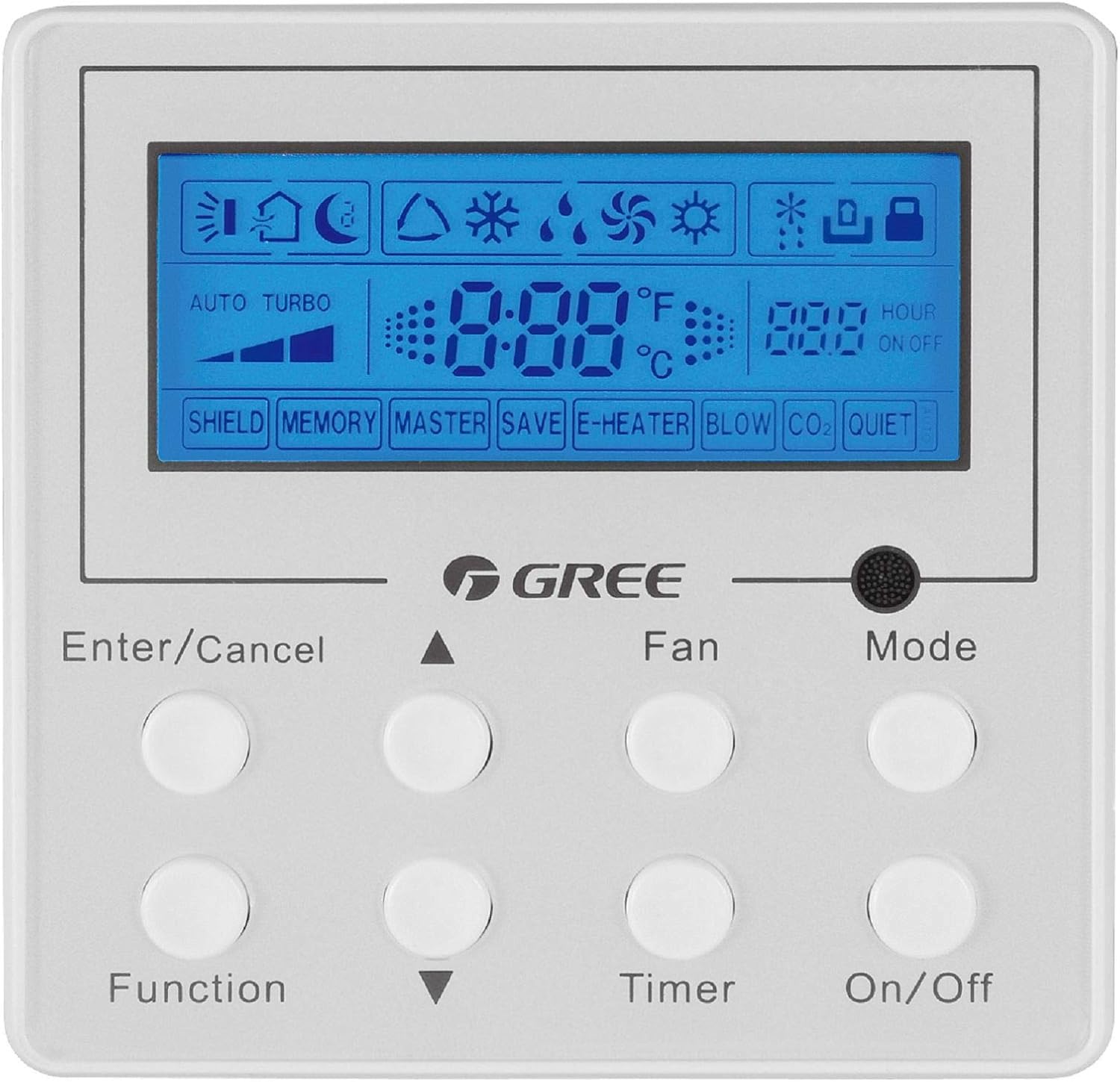
Image Description: A front view of the Gree XK-60 wired programmable controller. The controller is white with a blue backlit LCD screen at the top. Below the screen are eight circular white buttons arranged in two rows of four. Text labels are printed below each button or pair of buttons. The GREE logo is centered between the screen and the buttons. The screen displays various icons for operating modes, fan speed, temperature, and timer settings.
Segurtasun Informazioa
- Installation must be performed by a qualified and licensed HVAC technician.
- Disconnect all power to the indoor and outdoor units before performing any wiring or maintenance.
- Ziurtatu kableatu-konexio guztiak tokiko eta estatuko arau elektrikoen araberakoak direla.
- Ez saiatu kontrolatzailea zeuk konpontzen edo aldatzen. Jarri harremanetan zerbitzu-langile kualifikatuekin.
- Keep the controller away from water and excessive humidity.
Instalazioa eta konfigurazioa
Kontrolagailua muntatzea
The XK-60 controller is designed for wall mounting. Choose a location that is easily accessible, away from direct sunlight, heat sources, and drafts, which could affect temperature readings.
Kableatzeko jarraibideak
The controller connects to the indoor unit via a wired connection.
- Turn off the main power supply to the U-Match system.
- Open the wiring cover on the indoor unit and locate the control terminal block.
- Connect the communication wires from the XK-60 controller to the designated terminals on the indoor unit's control board. Refer to the U-Match system's indoor unit installation manual for specific wiring diagrams.
- Ziurtatu konexio guztiak ondo lotuta daudela eta behar bezala polarizatuta daudela.
- Close the wiring cover and restore power to the system.
Oharra: Incorrect wiring can damage the controller or the U-Match system. If you are unsure, consult a professional technician.
Funtzionamendu-argibideak
The Gree XK-60 controller features an LCD display and eight control buttons.
Botoiaren funtzioak
- Sartu/Utzi: Hautaketak berresten ditu edo uneko eragiketak bertan behera uzten ditu.
- Gora gezia (▲): Increases temperature, fan speed, or navigates menu options upwards.
- Beheko gezia (▼): Decreases temperature, fan speed, or navigates menu options downwards.
- Funtzioa: Accesses advanced settings or special functions.
- fan: Haizagailuaren abiadura doitzen du (Automatikoa, Baxua, Ertaina, Altua).
- Tenporizadorea: Sets the On/Off timer.
- Modua: Funtzionamendu moduen artean txandakatzen da (Automatikoa, Hoztea, Lehortzea, Berotzea, Haizagailua).
- Aktibatu/Desaktibatuta: Unitatea pizten edo itzaltzen du.
LCD pantailako adierazleak
- Tenperatura bistaratzea: Shows the current room temperature or set temperature in °F or °C.
- Operating Mode Icons:
- Sun (Heat)
- Snowflake (Cool)
- Water Drop (Dry)
- Fan Blade (Fan Only)
- Auto (Automatic mode)
- Fan abiaduraren adierazlea: Bar graph or specific icon showing current fan speed.
- Tenporizadorearen adierazlea: "HOUR ON OFF" with numerical display for programmed times.
- Special Function Indicators: "SHIELD", "MEMORY", "MASTER", "SAVE", "E-HEATER", "BLOW", "CO2", "QUIET" indicate active special features.
Oinarrizko Funtzionamendua
- Piztu/Itzali: Sakatu Piztu/Desaktibatu botoia sistema pizteko edo itzaltzeko.
- Aukeratu modua: Sakatu Modua button repeatedly to cycle through available operating modes (Auto, Cool, Dry, Heat, Fan).
- Ezarri Tenperatura: Hozte edo Berotze moduan, erabili Gora gezia (▲) or Beheko gezia (▼) nahi duzun tenperatura doitzeko botoiak.
- Doitu haizagailuaren abiadura: Sakatu Fan button repeatedly to select the desired fan speed (Auto, Low, Medium, High).
- Ezarri tenporizadorea: Sakatu Tenporizadorea button to enter timer setting mode. Use the Gora gezia (▲) or Beheko gezia (▼) buttons to set the desired ON or OFF time, then press Sartu/Utzi baieztatzeko.
Funtzio aurreratuak
To access advanced functions like "SHIELD" or "QUIET" mode, press the Funtzioa button. Use the arrow buttons to navigate through options and Sartu/Utzi to select or confirm. Refer to the U-Match system's specific feature documentation for detailed explanations of each advanced function.
Mantentzea
Kontroladorea garbitzea
- Wipe the surface of the controller with a soft, dry cloth.
- Ez erabili garbitzaile urratzailerik, disolbatzailerik edo spray kimikorik, hauek plastikozko eta osagai elektronikoak kaltetu baititzakete.
- Ensure no liquid enters the controller casing.
System Filter Maintenance
While the controller itself does not require filter maintenance, regular cleaning or replacement of the U-Match indoor unit's air filters is crucial for optimal system performance and air quality. Refer to your U-Match indoor unit manual for filter maintenance instructions.
Arazoak konpontzea
If you encounter issues with your Gree XK-60 controller, refer to the following common problems and solutions.
| Arazoa | Kausa posiblea | Irtenbidea |
|---|---|---|
| Kontrolatzailearen pantaila hutsik dago. | No power to the unit or controller. | Check the main power supply to the U-Match system. Ensure wiring connections are secure. |
| Kontrolagailuak ez du erantzuten botoi sakatzean. | Temporary software glitch or communication error. | Turn off power to the system for a few minutes, then restore power. If the issue persists, check wiring. |
| Tenperatura irakurketa okerra. | Controller located near a heat source or draft. | Relocate the controller if possible, or ensure no external factors are influencing the sensor. |
| System not operating in selected mode. | Communication error with indoor unit or system fault. | Check for error codes on the indoor unit. Consult a qualified technician if the problem persists. |
For complex issues or error codes not listed, contact a qualified HVAC technician or Gree customer support.
Zehaztapenak
- Eredua: Gree XK-60
- Kontrol mota: Kabledun kontroladore programagarria
- Bateragarritasuna: Gree U-Match Systems
- liburukiatage: 230 Volt
- Ezaugarri berezia: Programmable, Backlight
- Kontrol-metodoa: Botoien Kontrola
- Paketearen neurriak: 13.62 x 1.54 x 0.98 hazbete inguru
- Elementuaren pisua: 6.7 ontza gutxi gorabehera
Bermea eta Laguntza
For warranty information and technical support, please refer to the documentation provided with your Gree U-Match system or contact Gree customer service directly. Keep your purchase receipt as proof of purchase for warranty claims.
Gree Customer Support: Visit the official Gree website or contact your local distributor for support.


