
Apexel APL-22XB105
Apexel Phone Lens Kit APL-22XB105 Instruction Manual
Model: APL-22XB105 | Brand: Apexel
1. Sarrera
Thank you for choosing the Apexel Phone Lens Kit APL-22XB105. This versatile 4-in-1 kit is designed to elevate your mobile photography, offering a range of lenses to capture diverse scenes from distant subjects to intricate close-ups. This manual provides essential information on setting up, operating, maintaining, and troubleshooting your lens kit to ensure optimal performance and enjoyment.

Figure 1: Apexel Phone Lens Kit APL-22XB105 Overview
2. Paketearen edukia
Mesedez, egiaztatu ondorengo elementu guztiak zure paketean sartuta daudela:
- 1 x 22x Telephoto Lens
- 1 x 205° Fisheye Lens
- 1 x 120° Super Wide-Angle Lens (screwed with Macro Lens)
- 1 x 20x Macro Lens (screwed with Wide-Angle Lens)
- 1 x Flexible Phone Clip
- 1 x Metal Tripod
- 1 x Bluetooth Urruneko Obturagailua
- 1 x Mikrozuntz garbitzeko zapi
- 1 x Zippered Pouch for storage
- Lens Caps for all lenses
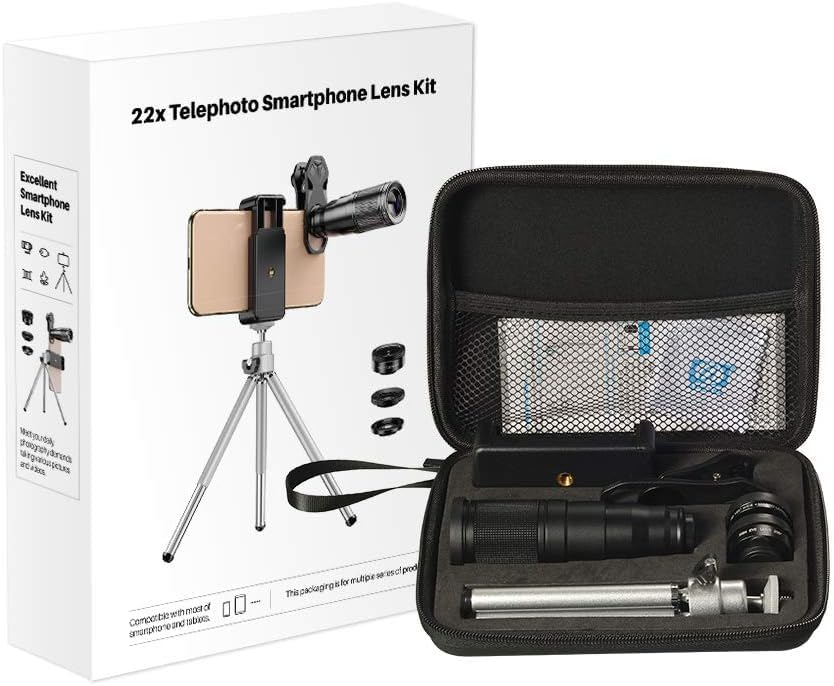
Figure 2: Kit Contents and Packaging
3. Konfiguratzeko argibideak
3.1 Attaching Lenses to Your Phone
- Unscrew the desired lens from its protective caps.
- Screw the chosen lens onto the flexible phone clip.
- Attach the phone clip to your smartphone, ensuring the lens is perfectly aligned with your phone's main camera. For multi-lens phones, slide the clip to align with the primary camera.
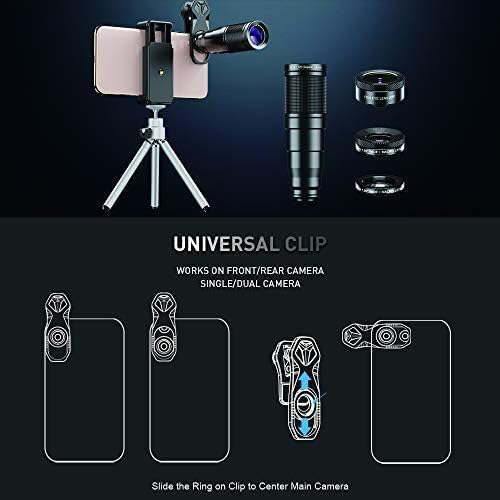
Figure 3: Universal Clip Attachment Guide
3.2 Separating Wide-Angle and Macro Lenses
The 120° Wide-Angle Lens and 20x Macro Lens are screwed together upon receipt. To use the Macro Lens independently, gently twist the two lenses apart. To use the Wide-Angle Lens, ensure the Macro Lens is screwed onto it.

Figure 4: Wide-Angle and Macro Lens Separation
3.3 Pairing the Bluetooth Remote Shutter
- Turn on the Bluetooth remote shutter.
- Zure telefonoan, joan Bluetooth ezarpenetara eta bilatu eskuragarri dauden gailuak.
- Select the remote shutter (usually named
Ask a question about this manual
Ask about setup, troubleshooting, compatibility, parts, safety, or missing instructions. Manuals+ will review the question and use this page’s manual context to help answer it.