
1. Produktua amaitu daview
The TSL LTCMIP7863W-SZ is a 6MP high-definition Platinum Varifocal Motorized Dome IP Camera designed for advanced surveillance applications. It features a 2.8-12mm varifocal motorized lens with smart focus, providing clear images up to 3072x2048 resolution at 20 frames per second. Equipped with Matrix IR 2.0 technology, it offers an infrared range of up to 100 feet for effective night vision. The camera supports H.265, H.265+, H.264, and H.264+ compression standards, True WDR 120dB, and is rated IP67 for weather resistance and IK10 for vandal resistance. It includes a MicroSD slot for local storage up to 128GB, audio I/O, alarm I/O, and can be powered by DC 12V or Power over Ethernet (PoE). A built-in junction box simplifies installation.
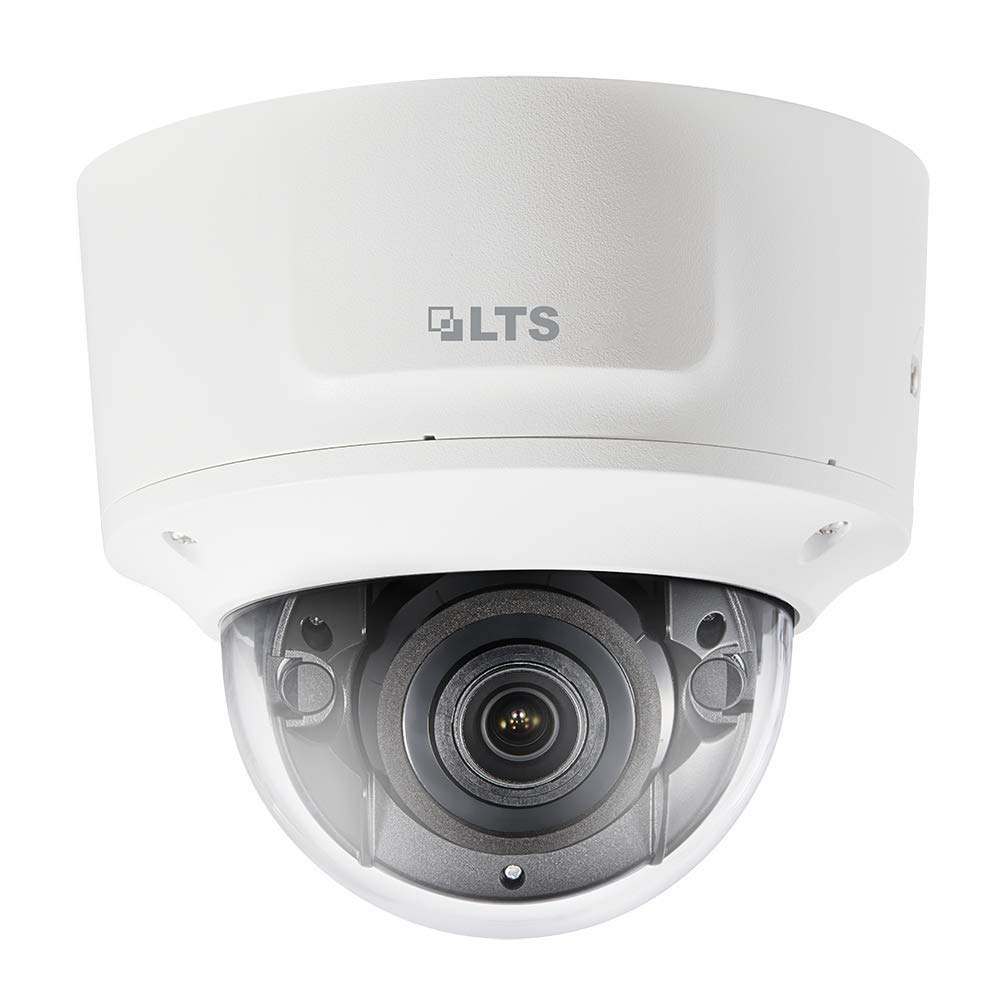
1. irudia: Aurrealdea view of the TSL LTCMIP7863W-SZ Dome IP Camera. This image illustrates the compact dome design and the lens area.
2. Konfigurazioa eta instalazioa
2.1 Paketearen edukia
Before installation, verify that all components are present:
- TSL LTCMIP7863W-SZ Dome IP Camera
- Muntatzeko txantiloia
- Muntatzeko torlojuak eta hormako takoak
- Iragazgaitza den konektore-kit
- Hasierako gida azkarra
2.2 Kamera muntatzea
The camera is designed for wall or ceiling mount. Ensure the mounting surface can support the camera's weight.
- Prestatu Muntatzeko Azalera: Use the provided mounting template to mark the drill holes for the camera base.
- Zulatzeko zuloak: Drill pilot holes according to the template. Insert wall plugs if mounting on drywall or masonry.
- Ziurtatu oinarria: Lotu kameraren oinarria muntatzeko gainazalera emandako torlojuak erabiliz.
- Kable konexioa: Route the necessary cables (Ethernet, power if not using PoE, alarm I/O, audio I/O) through the cable entry point in the base. Utilize the built-in junction box for organized wiring.
- Kameraren gorputza lotu: Secure the camera body to the mounted base. Ensure all connections are firm and waterproofed using the provided kit.
2.3 Energia eta sare konexioa
The camera supports Power over Ethernet (PoE) or a 12V DC power supply.
- PoE konexioa: Connect an Ethernet cable from a PoE-enabled switch or NVR to the camera's RJ45 port. This provides both power and data.
- 12V-ko korronte zuzeneko konexioa: If PoE is not available, connect a 12V DC power adapter (sold separately) to the camera's power input port. Then, connect an Ethernet cable for data transmission.
- Sarearen konfigurazioa: After physical connection, the camera will obtain an IP address via DHCP by default. Use the manufacturer's IP search tool to locate the camera on your network and configure its IP address if needed.
3. Funtzionamendu-argibideak
3.1 Initial Access and Login
Kameraren sarbidea web interfaze bat erabiliz web nabigatzailea (adibidez, Chrome, Firefox).
- Ireki a web browser and enter the camera's IP address in the address bar.
- Enter the default username (e.g., "admin") and password (refer to the Quick Start Guide or manufacturer's documentation for default credentials). Segurtasun arrazoiengatik, oso gomendagarria da lehenetsitako pasahitza lehen aldiz saioa hasi ondoren aldatzea.
3.2 Bizi View eta Erreprodukzioa
Behin saioa hasita, egin dezakezu view the live feed and access recorded footage.
- Zuzenean View: The main interface typically displays the live video stream.
- Erreprodukzioa: Navigate to the "Playback" section to review recordings stored on the MicroSD card or connected NVR.
3.3 Varifocal Motorized Lens Adjustment
The camera features a motorized varifocal lens for remote adjustment of zoom and focus.
- Kameraren sarbidea web interface or client software.
- Locate the "Lens" or "Image Adjustment" settings.
- Use the zoom controls to adjust the focal length (2.8-12mm) and the focus controls to achieve a clear image. The "Smart Focus" feature assists in optimizing clarity.
3.4 Grabaketa eta biltegiratzea
The camera supports local storage via a MicroSD card (up to 128GB) and network storage (NVR).
- MicroSD txartelaren instalazioa: Power off the camera. Open the dome cover carefully. Insert a compatible MicroSD card into the slot. Close the cover securely.
- Grabaketa Egutegia: Configure recording schedules (continuous, motion-triggered, alarm-triggered) in the camera's settings.
- Biltegiratze kudeaketa: Format the MicroSD card through the web interface before first use. Configure overwrite settings for continuous recording.
3.5 Mugimenduaren detekzioa eta alertak
Configure motion detection zones and sensitivity to trigger recordings or alarms.
- Navigate to "Event" or "Alarm" settings in the web interfazea.
- Define motion detection areas and adjust sensitivity levels.
- Configure alarm actions, such as sending email notifications, uploading images to an FTP server, or triggering external alarm devices via the alarm I/O.
4. Mantentzea
4.1 Kamera garbitzea
Regular cleaning ensures optimal image quality.
- Lentea: Gently wipe the lens with a soft, clean, lint-free cloth. For stubborn dirt, use a lens cleaning solution specifically designed for optical surfaces. Avoid abrasive materials.
- Kupula estalkia: Clean the transparent dome cover with a soft cloth and mild soap solution if necessary. Rinse with clean water and dry thoroughly. Do not use strong chemical cleaners.
- Kameraren gorputza: Wipe the exterior of the camera body with a damp oihal.
4.2 Firmware eguneraketak
Aldian-aldian egiaztatu fabrikatzailearen website for firmware updates. Firmware updates can provide new features, improve performance, and enhance security.
- Deskargatu azken firmwarea file from the official TSL support webgunea.
- Kameraren sarbidea web interface and navigate to the "System" or "Maintenance" section.
- Follow the on-screen instructions to upload and install the firmware. Do not power off the camera during the update process.
4.3 Biltegiratze kudeaketa
Ensure the MicroSD card has sufficient space and is functioning correctly.
- Regularly check the status of the MicroSD card through the camera's web interfazea.
- If configured for overwrite, older recordings will be automatically deleted. If not, manually delete old footage espazioa askatzeko.
- Consider backing up important footage to an NVR or other storage device.
5. Arazoak
| Arazoa | Kausa posiblea | Irtenbidea |
|---|---|---|
| Kamerari ez zaio energiarik ematen |
|
|
| Ez dago bideo-jariorik |
|
|
| Irudi kalitate eskasa |
|
|
| Ezin da sartu web interfazea |
|
|
6. Zehaztapen Teknikoak
| Ezaugarri | Xehetasuna |
|---|---|
| Eredua | LTCMIP7863W-SZ |
| Bideo Harrapaketa Ebazpena | 6 MP (3072x2048) |
| Fotograma-tasa | 20 fps @ 3072x2048 |
| Lentea | 2.8-12mm Varifocal Motorized Lens with Smart Focus |
| Gaueko Ikusmenaren barrutia | Up to 100 Feet (Matrix IR 2.0) |
| Argi gutxiko teknologia | 0.018 Lux @ F1.6 (Day/Night) |
| Eremu dinamiko zabala (WDR) | Benetako WDR 120dB |
| Bideo-konpresioa | H.265, H.265+, H.264, H.264+ |
| Biltegiratzea | MicroSD Slot (up to 128GB) |
| Audio I/O | Bai |
| Alarma I/O | Bai |
| Elikatze Hornidura | DC 12V, PoE (802.3af) |
| Sarrera babesteko balorazioa | IP67 |
| Bandalismoaren aurkako erresistentzia balorazioa | IK10 |
| Forma-faktorea | Kupula |
| Konektibitate-protokoloa | Wi-Fi |
| Fabrikatzailea | LTS |
| UPC | 745558709424 |
7. Bermea eta Laguntza
7.1 Berme mugatua
TSL products are covered by a limited warranty from the date of purchase. The specific terms and duration of the warranty may vary by region and product. Please refer to the official TSL website or your purchase documentation for detailed warranty information. This warranty typically covers defects in materials and workmanship under normal use.
Oharra: The warranty does not cover damage caused by improper installation, misuse, unauthorized modification, natural disasters, or power surges.
7.2 Laguntza Teknikoa
For technical assistance, product inquiries, or troubleshooting beyond the scope of this manual, please contact TSL customer support.
- Webgunea: Visit the official TSL support webMaiz egiten diren galderen, deskargen eta harremanetarako informazioaren gunea.
- Posta elektronikoa: Refer to the support section of the TSL website for email contact details.
- Telefonoa: Contact numbers for technical support are usually available on the TSL webgunea.
When contacting support, please have your product model number (LTCMIP7863W-SZ) and purchase information readily available.