
Amazon Kindle Oasis 10th Generation
Kindle Oasis erabiltzailearen eskuliburua
International Version – With 7” display and page turn buttons - 32 GB, Graphite - Free 4G LTE + Wi-Fi
Sarrera
Welcome to the user manual for your new Kindle Oasis. This guide provides essential information on setting up, operating, maintaining, and troubleshooting your device. The Kindle Oasis is designed for an optimal reading experience, featuring a high-resolution display, adjustable warm light, and a waterproof design.

Image: Kindle Oasis in a bathtub, highlighting its sleek design and page turn buttons, demonstrating its waterproof capability.
Konfigurazioa
1. Hasierako karga
Before first use, fully charge your Kindle Oasis. Connect the included USB 2.0 charging cable to the device and a 5W power adapter or a computer's USB port. A full charge takes approximately 3 hours.
2. Piztu
Press and hold the power button located on the top edge of the device until the screen illuminates.
3. Language and Wi-Fi Setup
Follow the on-screen prompts to select your preferred language. The device will then guide you through connecting to a Wi-Fi network. The Kindle Oasis supports 802.11b, g, or n standards with WEP, WPA, and WPA2 security.
4. Register Your Device
Register your Kindle Oasis to your Amazon account to access your content library and the Kindle Store. If you do not have an Amazon account, you will be prompted to create one.
Zure Kindle Oasis erabiltzea
Irakurketa
To open a book, tap its cover on the home screen. Use the physical page turn buttons on the side of the device or tap the left/right side of the screen to navigate through pages.
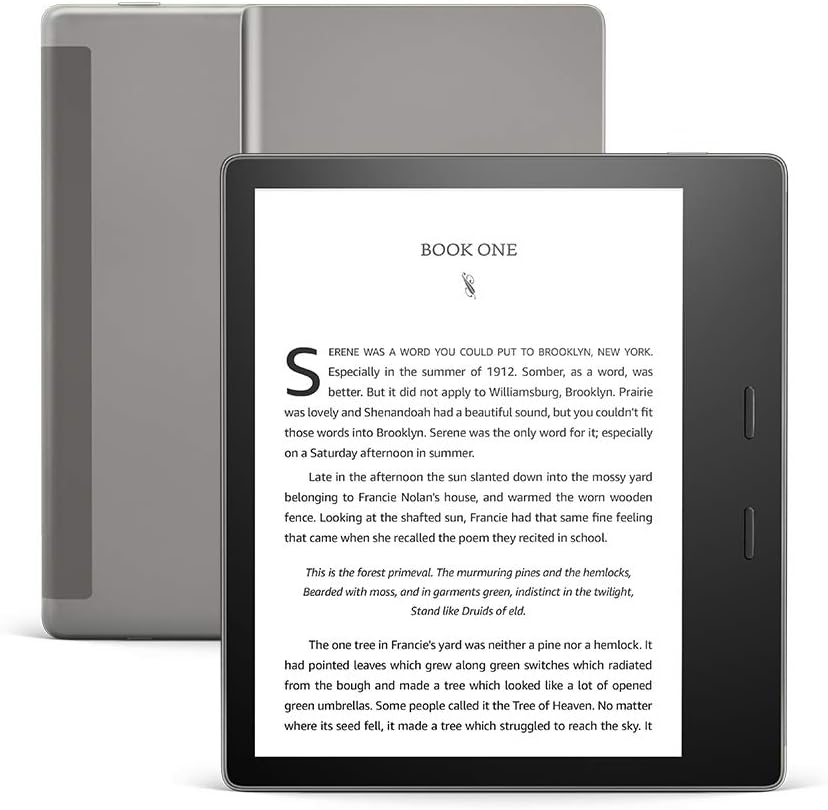
Irudia: Aurrealdea view of the Kindle Oasis displaying a book, with its gray cover visible behind it.
Pantailaren ezarpenak doitzea
Tap the top of the screen to bring up the toolbar. From here, you can adjust:
- Distira: Drag the slider to increase or decrease screen illumination.
- Berotasuna: Adjust the warm light to shift the screen shade from white to amber, reducing eye strain, especially in low light.
- Font Size and Style: Select from various font sizes and styles to customize your reading experience.

Image: Close-up of the Kindle Oasis screen demonstrating the adjustable warm light feature, showing a warmer tone.
Iragazgaiztasuna (IPX8)
The Kindle Oasis is waterproof (IPX8 rated), meaning it can withstand accidental immersion in 2 meters of fresh water for up to 60 minutes. This allows for reading in environments like the bath or by the pool.

Image: A woman reading her Kindle Oasis while relaxing by a swimming pool, illustrating the device's waterproof capability.
Integrazio entzumengarria
Your Kindle Oasis supports Audible audiobooks. Connect Bluetooth headphones or speakers to listen to audiobooks. You can seamlessly switch between reading and listening to a book.

Image: A man wearing headphones and a backpack on a beach, presumably listening to an Audible audiobook on his Kindle Oasis, demonstrating the seamless switch between reading and listening.
Mantentzea
Zure gailua garbitzea
Use a soft, lint-free cloth to clean the screen and body of your Kindle Oasis. Do not use abrasive cleaners or solvents.
Bateria zaintzea
To maximize battery life, avoid exposing the device to extreme temperatures. A single charge can last up to six weeks with wireless and Bluetooth off and light setting at 13. Frequent wireless usage and Audible streaming will reduce battery life.
Software eguneraketak
Your Kindle Oasis receives automatic software security updates. Ensure your device is connected to Wi-Fi periodically to receive these updates, which improve performance and add new features.
Arazoak konpontzea
Gailuak ez du erantzuten
If your Kindle Oasis is unresponsive, try a forced restart. Press and hold the power button for 40 seconds until the device restarts.
Ezin da Wi-Fira konektatu
- Ziurtatu zure Wi-Fi sarea aktibo dagoela eta irismen-eremuan dagoela.
- Egiaztatu Wi-Fi pasahitza.
- Berrabiarazi zure Wi-Fi bideratzailea.
- Restart your Kindle Oasis.
Bateria azkar husten da
- Reduce screen brightness and warmth settings.
- Itzali Wi-Fia eta Bluetooth erabiltzen ez dituzunean.
- Avoid streaming Audible audiobooks for extended periods without charging.
- Ziurtatu atzeko planoan dauden prozesuek ez dutela gehiegizko energia kontsumitzen.
Pantailaren arazoak
If you notice persistent lines or artifacts on the screen, try restarting the device. If the issue persists, contact customer support.
Zehaztapenak
| Ezaugarri | Xehetasuna |
|---|---|
| Bistaratzea | Amazonen 7 hazbeteko Paperwhite pantaila-teknologia, hurrengo belaunaldiko e-paperarekin eta barneko argiarekin, 300 ppp, letra-tipo optimizatuaren teknologia, 16 mailako gris-eskala. |
| Tamaina | 6.3” x 5.6” x 0.13-33” (159 x 141 x 3.4-8.4 mm). |
| Pisua | 6.6 oz (188 g). |
| Gailuan biltegiratzea | 32 GB (holds thousands of books or over 160 Audible audiobooks). |
| Bateriaren iraupena | Up to six (6) weeks (based on 30 mins reading/day, wireless/Bluetooth off, light at 13). |
| Kargatzeko Denbora | Approx. 3 hours from 5W power adapter via USB cable. |
| Wi-Fi konexioa | 802.11b, g, or n standards with WEP, WPA and WPA2 security. |
| Iragazgaitza | IPX8 (2 metro ur gezako distantziara 60 minutuz). |
| Onartutako eduki formatuak | Kindle 8 formatua (AZW3), Kindle (AZW), TXT, PDF, babestu gabeko MOBI, PRC natiboan; HTML DOC, DOCX, JPEG, GIF, PNG, PMP bihurketaren bidez; Audible audio formatua (AAX). |
| Belaunaldia | Kindle Oasis 10. belaunaldia - 2019ko kaleratzea. |
Bermea eta Laguntza
Bermearen informazioa
Your Kindle Oasis comes with a 1-year limited warranty and service. Optional extended warranties may be available for purchase in some regions.
Bezeroarentzako Arreta
Laguntza gehiago lortzeko, bisitatu Amazonen laguntza ofiziala website or contact Amazon customer service. You can find more information about Kindle devices and user guides on the Amazon webgunea.
Kindle-ren erabilera Amazonen Erabilera Baldintzen menpe dago.
Ask a question about this manual
Ask about setup, troubleshooting, compatibility, parts, safety, or missing instructions. Manuals+ will review the question and use this page’s manual context to help answer it.