
1. Sarrera
The Zeblaze Vibe 4 Hybrid Smartwatch (Model SI-BW03) combines traditional watch aesthetics with smart features to help you monitor your daily activities and health. This manual provides detailed instructions on how to set up, operate, and maintain your device.
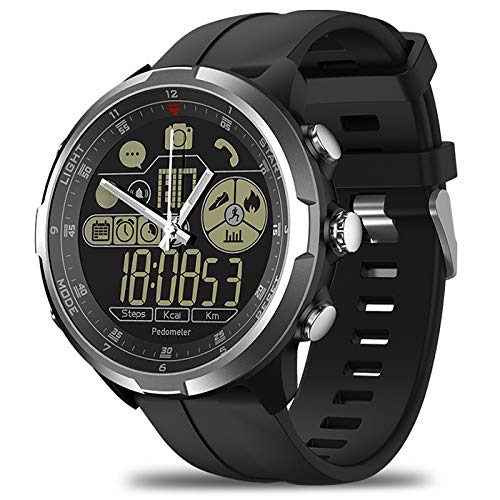
1.1. irudia: Aurrealdea view of the Zeblaze Vibe 4 Hybrid Smartwatch.
2. Produktua amaitu daview
The Zeblaze Vibe 4 Hybrid Smartwatch features a 1.24-inch FSTN high-resolution display and is equipped with a 610mAh button cell battery. Key functionalities include:
- Osasunaren jarraipena: Pedometer, Heart Rate Monitor, Sleep Monitor, Sedentary Reminder, Drinking Reminder.
- Jardueren jarraipena: Displays time, date, steps, distance, and calories burned.
- Jakinarazpen adimendunak: Alarm reminders, message notifications (e.g., WeChat), anti-lost alerts.
- Urruneko kontrola: Remote camera function for your smartphone.

2.1. irudia: Aldea view of the smartwatch showing the control buttons.
3. Konfigurazioa
3.1 Hasierako piztea
Your smartwatch is powered by a button cell battery. To activate, ensure the battery is correctly installed. Refer to the battery compartment on the back of the watch.
3.2 Zure telefonoarekin parekatzea
- Ziurtatu Bluetootha gaituta dagoela zure telefonoan.
- Download and install the companion application for the Zeblaze Vibe 4 Hybrid Smartwatch from your phone's app store.
- Open the application and follow the on-screen instructions to search for and connect to your smartwatch. The watch will vibrate upon successful pairing.
- Once paired, the watch will synchronize time and date with your phone.

3.1. irudia: Atzealdea view of the smartwatch, displaying the sensor and model details.
4. Funtzionamendu-argibideak
4.1 Oinarrizko nabigazioa
Use the physical buttons on the side of the watch to navigate through different functions and menus. Specific button functions are detailed within the companion app.
4.2 Activity Tracking (Pedometer, Distance, Calories)
The smartwatch automatically tracks your steps, distance traveled, and calories burned throughout the day. This data can be viewed directly on the watch display and in more detail within the connected smartphone application.
4.3 Bihotz-taupadak kontrolatzea
The built-in HRM heart rate monitor provides real-time feedback on your heart rate. To get an accurate reading, ensure the watch is worn snugly on your wrist. Access this feature via the watch's menu or the companion app.
4.4 Loaren jarraipena
Wear the smartwatch while sleeping to monitor your sleep patterns and quality. Detailed sleep analysis is available in the smartphone application.
4.5 Reminders (Sedentary, Drinking, Alarm)
- Sedentarioaren abisua: The watch will vibrate to remind you to move if you have been inactive for a preset duration. Configure this setting in the app.
- Edateko abisua: Set reminders to drink water at regular intervals through the companion app.
- Alarma abisua: Set alarms via your smartphone application. The watch will vibrate at the set time.
4.6 Jakinarazpen adimendunak
When connected to your smartphone, the watch can display notifications for incoming messages (e.g., WeChat) and calls. Ensure notification permissions are granted in your phone's settings and the companion app.
4.7 Kameraren urrutiko kontrola
Use your smartwatch to remotely trigger your smartphone's camera shutter. Activate this feature through the watch's menu or the companion app.
4.8 Anti-Lost Function
If your paired smartphone moves more than 10 meters away from the smartwatch, the watch will beep to alert you, helping prevent loss of your phone.
5. Mantentzea
5.1 Garbiketa
Wipe the watch and strap regularly with a soft, dry cloth. For stubborn dirt, a slightly damp oihal bat erabil daiteke, eta ondoren lehortu. Saihestu produktu kimiko gogorrak edo material urratzaileak erabiltzea.
5.2 Urarekiko erresistentzia
The Zeblaze Vibe 4 Hybrid Smartwatch has a degree of water resistance. However, it is not suitable for swimming or showering. Avoid prolonged exposure to water and do not press buttons underwater.
5.3 Bateria ordezkatzea
The watch uses a button cell battery. When the battery is low, replace it with a new one of the same type (610mAh button cell). Consult a professional if you are unsure how to replace the battery.
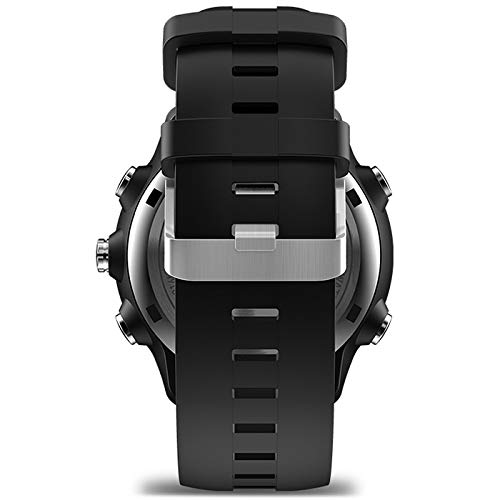
5.1. irudia: Aldea view of the smartwatch, highlighting the strap design.
6. Arazoak
- Erlojua ez da telefonora konektatzen: Ensure Bluetooth is enabled on both devices. Restart both the watch and your phone. Check if the companion app is running and has necessary permissions.
- Osasun-datu okerrak: Ensure the watch is worn correctly, snugly on the wrist, and the sensor is clean. Avoid excessive movement during heart rate measurements.
- Jakinarazpenik ez: Verify that notification permissions are granted for the companion app and the specific apps you want notifications from, both in the app and your phone's system settings.
- Bateriaren iraupen laburra: Ensure the battery is fully charged or replaced if it's a button cell. Reduce the frequency of certain features if possible.
7. Zehaztapenak
| Marka | Zeblaze (Manufacturer: SHANG TONG) |
| Eredua | SI-BW03 |
| Bistaratzea | 1.24 inch FSTN high-resolution display |
| Konektibitatea | Bluetooth 4.0 |
| Bateria | 610mAh Button Cell |
| Gailu bateragarriak | Smartphone |
| Ezaugarri bereziak | Pedometer, Heart Rate Monitor, Sleep Monitor, Sedentary Reminder, Drinking Reminder, Remote Camera, Anti-lost, Message Reminder, Distance Tracker |
| Gailu Interfazea | Botoiak |
| GPSa | GPSrik ez |
8. Bermea eta Laguntza
Bermeari buruzko informazioa eta bezeroarentzako laguntza lortzeko, kontsultatu erosketarekin batera emandako dokumentazioa edo jarri harremanetan saltzailearekin. Gorde erosketaren frogagiria bermearen erreklamazioetarako.