
Itek ITMC30V201FHD
iTek GGC 30-inch Curved Monitor User Manual
Model: ITMC30V201FHD
Ongi etorri
Thank you for choosing the iTek GGC 30-inch Curved Monitor. This manual provides essential information for setting up, operating, and maintaining your new monitor. Please read it thoroughly before use to ensure optimal performance and safety.
Segurtasun-argibide garrantzitsuak
Kalteak saihesteko eta funtzionamendu segurua bermatzeko, jarraitu neurri hauek:
- Ez jarri monitoreari euriari, hezetasunari edo muturreko tenperaturei.
- Ziurtatu monitorearen inguruan behar bezala aireztatuta dagoela. Ez blokeatu aireztapen-irekidurak.
- Erabili monitorearekin batera datorren korronte-egokitzailea soilik.
- Ez jarri objektu astunak korronte-kablean.
- Deskonektatu entxufea entxufetik monitoreak denbora luzez erabiliko ez badu.
- Ez saiatu monitorearen konponketa zeuk egiten. Konponketa guztiak langile kualifikatuei eskatu.
- Garbitu monitorearen pantaila eta casinGarbitu zapi leun eta lehor batekin. Saihestu garbitzaile edo disolbatzaile urratzaileak erabiltzea.
Paketearen edukia
Mesedez, egiaztatu paketea elementu hauek dituen:
- iTek GGC 30-inch Curved Monitor
- Monitorearen euskarria (oinarria eta lepoa)
- Korronte egokitzailea eta kablea
- DisplayPort kablea
- HDMI kablea
- Erabiltzailearen eskuliburua
- Euskarri muntaketarako torlojuak
Produktua amaituview
The iTek GGC 30-inch Curved Monitor is designed for an immersive viewing experience, ideal for gaming and professional use. It features a WFHD (2560x1080) resolution, a high 200Hz refresh rate, and a rapid 1ms MPRT response time.

Key Performance Highlights
- 200Hz Refresh Rate & AMD FreeSync Technology: Experience ultra-smooth visuals and tear-free gaming with a high refresh rate and adaptive sync technology.

Figure 2: 200Hz Refresh Rate and AMD FreeSync Technology in action. - Flicker-Free & Low Blue Light: Designed to reduce eye strain during prolonged use, providing a more comfortable viewesperientzia.

Figure 3: Flicker-Free and Low Blue Light features for eye comfort. - 1 ms MPRT erantzun denbora: Minimizes motion blur and ghosting, crucial for fast-paced games and action sequences.

Figure 4: Rapid Refresh Rate and Response Time for smooth visuals. - 1800R pantaila kurbatua: The immersive curvature brings the edges of the screen closer to your field of view, enhancing depth perception and reducing distortion.

Figure 5: 1800R Curved Display for an immersive experience.
Konfigurazioa
Stand-a muntatzen
- Kontu handiz atera monitorearen eta euskarriaren osagaiak paketetik.
- Attach the stand neck to the monitor panel using the provided screws. Ensure it clicks securely into place or is fastened tightly.
- Attach the stand base to the stand neck, securing it with the thumb screw or screws from underneath.
- Jarri muntatutako monitorea gainazal egonkor eta lau batean.
Zure monitorea konektatzen
The iTek GGC monitor offers multiple connectivity options for various devices:
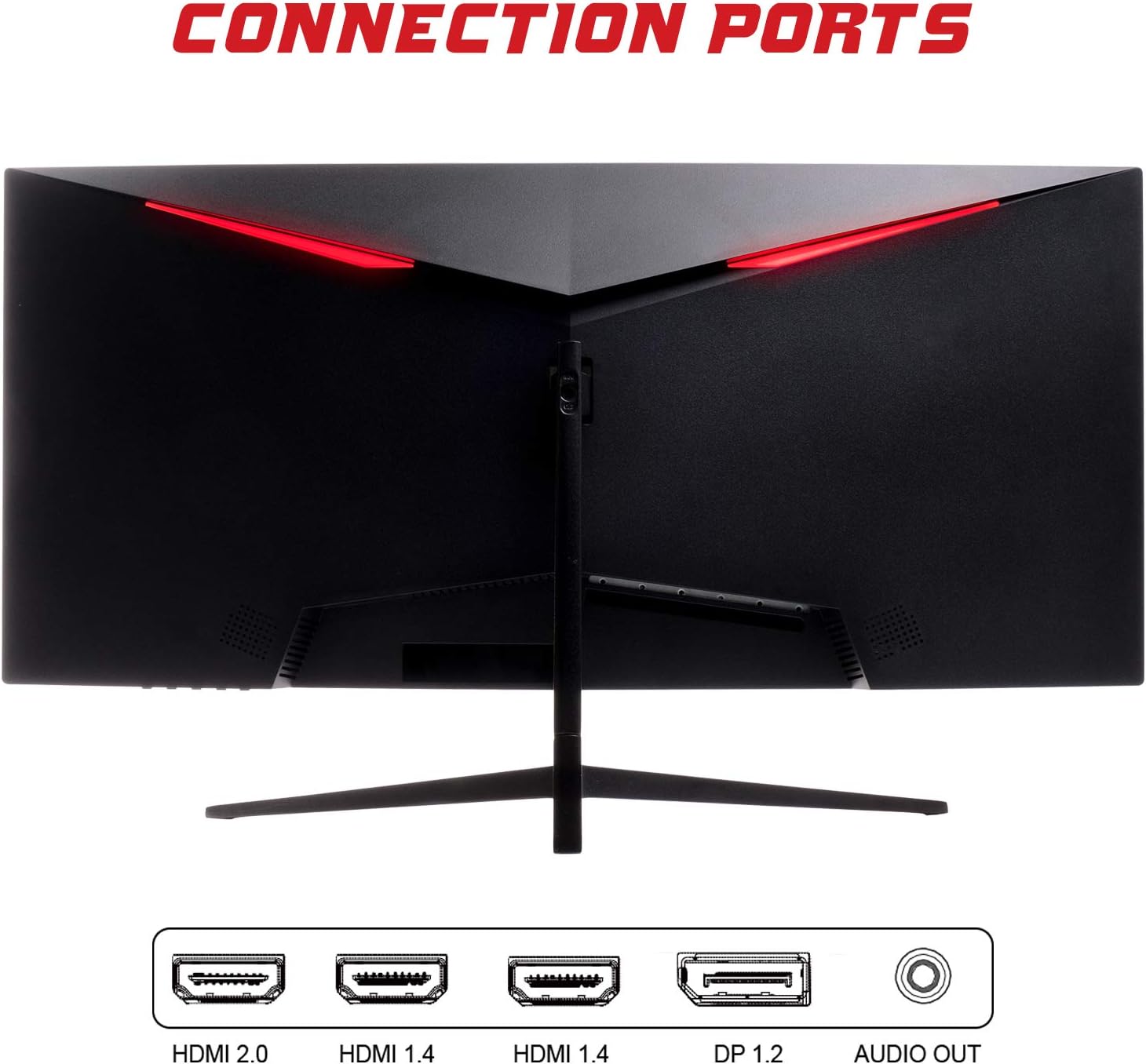
- DisplayPort (DP 1.2): For high-resolution and high-refresh-rate connections to your PC.
- HDMI (HDMI 2.0, HDMI 1.4 x2): Connect to PCs, gaming consoles, and other multimedia devices. HDMI 2.0 supports higher refresh rates at certain resolutions.
- Audio irteera: Konektatu kanpoko bozgorailuak edo entzungailuak.
Bideo-kablea konektatu ondoren, konektatu korronte-egokitzailea monitoreari eta gero korronte-entxufe batera.
Monitorea funtzionatzen
Piztu/Itzali
Press the power button, usually located on the bottom or back of the monitor, to turn it on or off. The power indicator light will illuminate when the monitor is on.
Pantailako pantailan (OSD) menua
The OSD menu allows you to adjust various monitor settings. Use the buttons on the monitor (typically on the back or bottom right) to navigate the menu.
- Irudiaren ezarpenak: Adjust brightness, contrast, sharpness, and gamma.
- Kolore ezarpenak: Aldatu kolore-tenperatura, ñabardura eta saturazioa.
- Sarrera hautatzea: Manually switch between DisplayPort and HDMI inputs.
- Audioa: Doitu audio irteeraren bolumena.
- Sistemaren ezarpenak: Access language, OSD timeout, and reset options.
- Jokoen Ezaugarriak: Enable/disable FreeSync, adjust response time overdrive, and activate crosshair overlays if available.
Mantentzea
Proper care ensures the longevity of your monitor:
- Itzali beti monitoreari eta deskonektatu korronte-kablea garbitu aurretik.
- Erabili zapi leun eta pelurik gabeko bat pantaila astiro-astiro garbitzeko. Orba egoskorrak badira, garbitu pixka bat.ampGarbitu oihal bat urarekin edo pantaila-garbitzaile leun eta ez-urratzaile batekin.
- Garbitu monitore c.asinoihal leun eta lehor batekin garbitu.
- Avoid spraying liquids directly onto the screen or casing.
- Do not use benzene, thinner, ammonia-based cleaners, or abrasive materials.
Arazoak konpontzea
If you encounter issues with your monitor, please refer to the following table for common problems and solutions:
| Arazoa | Irtenbide posiblea |
|---|---|
| Botererik ez | Ensure the power cable is securely connected to the monitor and the power outlet. Check if the power outlet is working. |
| Seinalerik ez / Pantaila hutsa | Verify the video cable (DisplayPort or HDMI) is firmly connected to both the monitor and your computer. Select the correct input source via the OSD menu. Ensure your computer is powered on and not in sleep mode. |
| Irudia keinuka edo ezegonkorra | Check the video cable connection. Try a different cable or port. Ensure your graphics card drivers are up to date. Adjust the refresh rate in your computer's display settings. |
| Poor image quality (blurry, distorted colors) | Adjust brightness, contrast, and color settings in the OSD menu. Ensure the display resolution on your computer matches the monitor's native resolution (2560x1080). |
| No sound from audio out | Check the audio cable connection to your speakers/headphones. Verify the volume setting in the OSD menu and on your computer. Ensure the correct audio output device is selected in your computer's sound settings. |
Zehaztapen Teknikoak
| Ezaugarri | Zehaztapena |
|---|---|
| Marka | Itek |
| Eredua | ITMC30V201FHD |
| Pantailaren tamaina | 30 hazbete |
| Panel mota | VA |
| Kurbadura | R1800 |
| Ebazpena | 2560 x 1080 (WFHD) |
| Aspektu-erlazioa | 21:9 |
| Freskatze tasa | 200 Hz |
| Erantzun Denbora | 1 ms MPRT |
| Distira | 350 cd/m² |
| Kontraste-erlazioa | 3000:1 |
| Viewangelua | 178° (Horizontala/Bertikala) |
| Konektibitatea | 1x DisplayPort 1.2, 1x HDMI 2.0, 2x HDMI 1.4, Audio Out |
| Ezaugarri bereziak | HDR Ready, FreeSync, Low Blue Light, Flicker Free, VESA Mountable |
| Produktuaren neurriak (euskarriarekin) | 70.68 x 40.89 x 18.48 cm |
| Pisua | 6.9 kg |
Energia Eraginkortasuna

For detailed energy consumption information and product registration, please refer to the official EPREL database:
Bermea eta Laguntza
Your iTek GGC monitor is backed by a manufacturer's warranty. Please retain your proof of purchase for warranty claims.
- Guaranteed Product Support: This product is guaranteed to have support available until at least January 1, 2031.
- For technical support, warranty inquiries, or service requests, please contact iTek customer service through their official webwebgunea edo zure erosketarekin emandako harremanetarako informazioa.
Ask a question about this manual
Ask about setup, troubleshooting, compatibility, parts, safety, or missing instructions. Manuals+ will review the question and use this page’s manual context to help answer it.