
Samsung LC49RG90SSNXZA
Samsung 49-Inch Odyssey CRG Series Curved Gaming Monitor User Manual
Model: LC49RG90SSNXZA
1. Sarrera
The Samsung 49-Inch Odyssey CRG Series Curved Gaming Monitor (LC49RG90SSNXZA) is a high-performance display designed for immersive gaming and efficient multitasking. Recognized with the 2019 CES Innovation Award, it features a super ultra-wide aspect ratio, QLED technology, HDR1000, and a 120Hz refresh rate for a superior visual experience.
Ezaugarri nagusiak:
- DUAL QHD RESOLUTION: The 5120 x 1440 super ultra-wide aspect ratio lets you view content in superfine detail.
- HDR1000 & QLED: Has a brightness rating of 1,000 nits and DCI-P3 95%, so colors are pure, bright, and true to life.
- IMMERSIVE CURVE: With a Super Ultra-Wide 32:9 ratio, the CRG9 curves around your field of view to immerse you in all the onscreen gaming action.
- AMD RADEON FREESYNC2: Effortlessly Smooth Gameplay; Supports HDR content, reduces input latency, and has low framerate compensation.
- BUILT FOR SPEED: The 120Hz settings minimize image lag and motion blur; The 60Hz settings let you optimize performance.
- OPTIMIZED FOR GAMING: Turn on Game Mode to instantly adjust contrast & color settings for virtually any game genre; Switch to Low Input Lag Mode for even faster response times and target your enemies more accurately w/ Virtual Aim Point onscreen crosshairs.
- MULTI-TASKER'S DREAM: With Picture-by-Picture you can connect and view multiple input sources without degrading the original image quality; For example, you can watch a movie and do a web search while playing your favorite game.
- PLAY ON...AND ON: Eye Saver Mode reduces fatigue-inducing blue light emissions and Flicker Free technology suppresses distracting screen flicker.
- ADJUSTS FOR COMFORT: The swivel/tilt and height-adjustable stand offers all the flexibility you need to position screen for maximum comfort; The panel’s VESA Standard mount also offers the option of mounting on VESA-compatible arms.
2. Konfigurazioa
This section provides general guidance for setting up your Samsung Odyssey CRG9 monitor. For detailed, step-by-step instructions, please refer to the official Installation Manual PDF linked in the Support section.
2.1 Desontziratzea eta hasierako kokapena
Carefully remove the monitor and all components from the packaging. Due to its size and weight (approximately 33 pounds), it is recommended to have assistance during unpacking and placement. Ensure your desk or mounting surface is sturdy enough to support the monitor's dimensions (5.94 x 18.65 x 8.14 inches) and weight.
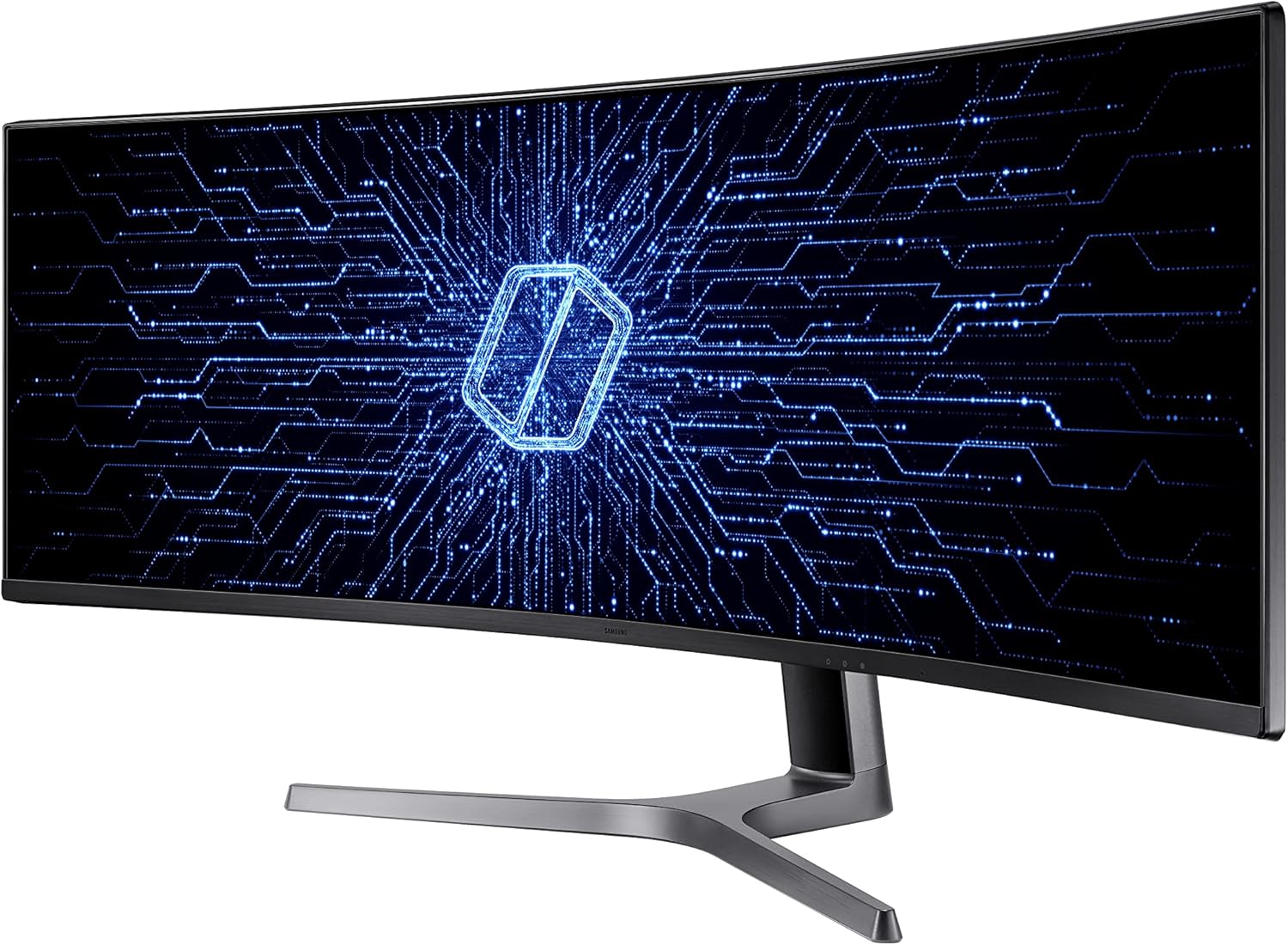
Aurrealdea view of the Samsung 49-inch Odyssey CRG Series Curved Gaming Monitor.

Monitor dimensions: 47.2 inches wide, 13.8 inches high, 20.6 inches deep with stand.
2.2 Konektatzeko kableak
The monitor supports various input sources. Connect your PC or other devices using the provided HDMI or DisplayPort cables. The monitor also features 4 USB ports for peripheral connectivity.

Atzekoa view of the monitor displaying HDMI, DisplayPort, and USB connections.
Ensure all cables are securely connected to prevent signal loss or flickering. The monitor comes with HDMI and DisplayPort cables, along with a quick setup guide and power cable.
2.3 Euskarria doitzea
The monitor's stand offers swivel, tilt, and height adjustment for optimal viewing comfort. Adjust the screen to your preferred ergonomic position. The monitor is also VESA Standard mount compatible for alternative mounting solutions.

Adjustable stand features for ergonomic positioning.
3. Monitorea funtzionatzea
Your Samsung Odyssey CRG9 monitor offers various features to enhance your gaming and productivity experience.
3.1 Piztu/Itzaltzea
Locate the power button, typically on the bottom center or right side of the monitor. Press it to power on or off the display.
3.2 Pantailan bistaratze (OSD) nabigazioa
Use the joystick or buttons located on the monitor to navigate the On-Screen Display (OSD) menu. This allows you to adjust settings such as brightness, contrast, color, input source, and various gaming features.
3.3 Jokoen Ezaugarriak
- Joko modua: Instantly adjusts contrast and color settings for various game genres.
- Low Input Lag Mode: Provides faster response times for competitive gaming.
- Helburu Puntu Birtuala: Onscreen crosshairs for improved targeting accuracy.
- 120 Hz freskatze-abiadura: Minimizes image lag and motion blur for smoother gameplay. A 60Hz setting is also available for optimized performance in certain scenarios.
- AMD FreeSync 2 HDR: Ensures effortlessly smooth gameplay by supporting HDR content, reducing input latency, and providing low framerate compensation.

Optimized for Gaming features.
3.4 Multitasking with Picture-by-Picture (PBP)
The Picture-by-Picture (PBP) function allows you to connect and view multiple input sources simultaneously without degrading the original image quality. This is ideal for productivity, enabling you to work on different applications from various devices side-by-side.

Picture-by-Picture (PBP) functionality for multitasking.
4. Mantentzea
Mantentze egokiak zure monitorearen iraupena eta errendimendu optimoa bermatzen ditu.
4.1 Monitorea garbitzea
- Always power off the monitor and unplug it before cleaning.
- Erabili lipurrik gabeko zapi leun bat dampUrarekin edo pantaila-garbitzaile espezializatu batekin garbitu.
- Do not spray liquid directly onto the screen or frame.
- Saihestu garbitzaile urratzaileak, disolbatzaileak edo amoniakoa duten produktuak erabiltzea.
4.2 Begien Zainketaren Ezaugarriak
Monitoreak erabilera luzean begi-nekea murrizteko diseinatutako funtzioak ditu:
- Begi aurrezteko modua: Reduces blue light emissions.
- Flicker Free Technology: Suppresses distracting screen flicker.

Eye care features for extended use.
5. Arazoak
Atal honek zure monitorearekin izan ditzakezun arazo ohikoenei buruzko informazioa ematen du.
5.1 Common Display Issues
- Pantailarik ez/Pantaila beltza:
- Ziurtatu elikatze-kablea ondo konektatuta dagoela bai monitorera bai entxufearekin.
- Verify that the video input cable (HDMI/DisplayPort) is firmly connected to both the monitor and your computer/device.
- Egiaztatu sarrera-iturri zuzena hautatuta dagoen monitorearen OSD menuan.
- Irudi keinukaria edo distortsionatua:
- Ensure video cables are properly connected and not damaged.
- Adjust the refresh rate in your computer's display settings to 120Hz or 60Hz.
- Enable Flicker Free technology in the monitor's OSD.
- If using AMD FreeSync, ensure your graphics card drivers are up to date.
- Irudi lausoa:
- Ensure the monitor's resolution is set to its native DUAL QHD (5120 x 1440) in your computer's display settings.
- Adjust sharpness settings in the monitor's OSD.
- HDR Issues (Hazy Look):
- Some users report a "hazy look" with HDR on Windows 10 when not viewing HDR content. This may be a software-related issue.
- Ensure HDR is properly configured in your operating system and application settings.
- Pixel hilak:
- A single dead pixel may appear over time. While often not covered by warranty unless multiple pixels are affected, it typically does not significantly impact overall viewesperientzia.
5.2 Errendimendu arazoak
- Jokoen errendimendua:
- For optimal gaming performance at 5120x1440 resolution, a powerful graphics card is recommended.
- Adjust in-game settings (e.g., resolution scaling, ray tracing) to balance visual quality and frame rate.
- Bero sortzea:
- The monitor may generate heat, especially in smaller rooms. Ensure adequate ventilation around the device.
6. Zehaztapenak
| Ezaugarri | Zehaztapena |
|---|---|
| Marka | Samsung |
| Modelo zenbakia | LC49RG90SSNXZA |
| Pantailaren tamaina | 49 hazbete |
| Ebazpena | 5120x1440 Pixels (Dual QHD) |
| Aspektu-erlazioa | 32:9 |
| Pantailaren gainazalaren deskribapena | Kurbatua |
| Irudiaren distira | 1000 cd/m² (HDR1000) |
| Freskatze tasa | 120Hz |
| USB portuak guztira | 4 |
| Elementuaren pisua | 33 kilo |
| Produktuaren neurriak | 5.94 x 18.65 x 8.14 hazbete |
| Eskuragarri dagoen lehen data | 20ko maiatzaren 2019a |
7. Bermea eta Laguntza
For comprehensive support, including warranty information, detailed installation guides, and further troubleshooting, please refer to the official Samsung resources.
- Instalazio Eskuliburu Ofiziala (PDF): Deskargatu PDFa
- Samsung Brand Store: Bisitatu Samsung denda Amazonen