
1. Sarrera
Thank you for choosing the iggual QR Barcode Scanner. This device is designed for efficient and reliable scanning of both 1D and 2D barcodes, offering both manual and automatic scanning modes. It features an ergonomic design for comfortable use and broad compatibility with various operating systems. This manual provides essential information for setting up, operating, and maintaining your scanner.
Ezaugarri nagusiak:
- Ergonomic design with a comfortable trigger button.
- Detects all common 1D and 2D barcodes, including QR codes.
- Supports manual and automatic scanning modes.
- Wired USB connectivity for reliable data transmission.
- Compatible with Windows XP/7/8/10, macOS, Linux, and Android.
2. Paketearen edukia
Mesedez, egiaztatu paketearen edukia elementu guztiak daudela ziurtatzeko:
- iggual QR Barcode Scanner (Model IGG315651)
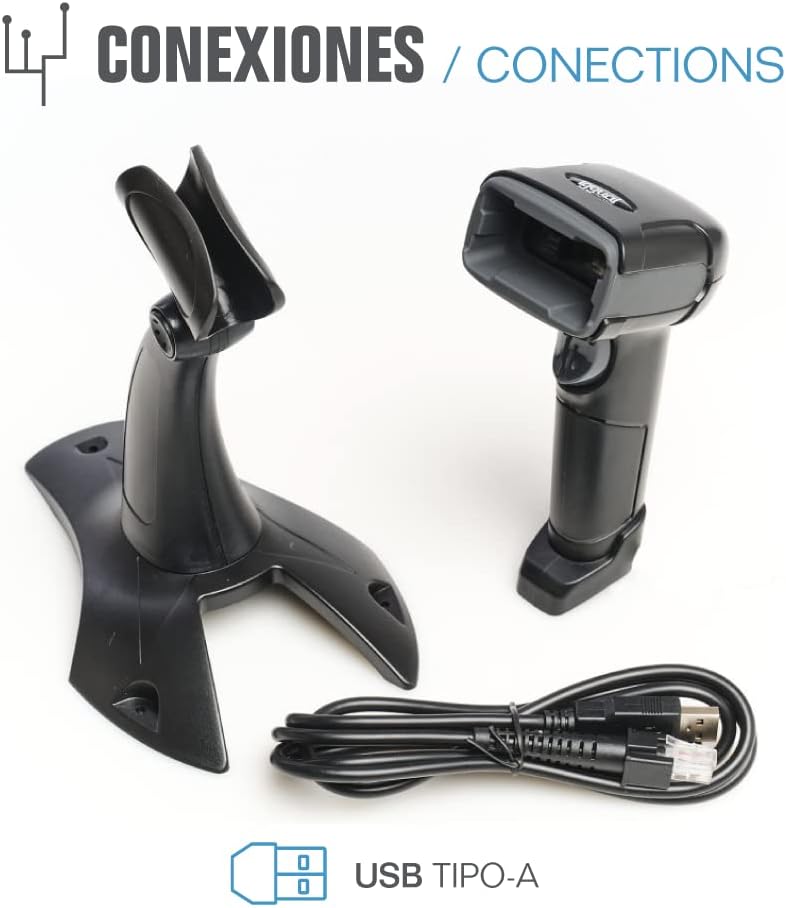
- USB Cable (Type-A)
- Scanner Stand (Optional, depending on package)

2.1. irudia: Package contents including the scanner, stand, and USB Type-A cable.
3. Produktua amaitu daview
Familiarize yourself with the main components of your iggual barcode scanner:
- Eskaneatze leihoa: Area where barcodes are read.
- Aktibatzeko botoia: Activates scanning in manual mode.
- USB ataka: For connecting the scanner to your computer.
- LED adierazlea: Provides visual feedback on scanning status.
- Beeper: Provides audible feedback on scanning status.

3.1. irudia: The iggual barcode scanner with its optional stand, highlighting the LED indicator and beeper functionality.
4. Konfigurazioa
4.1 Eskanerra konektatzea
- Connect the USB cable to the USB port on the scanner.
- Konektatu USB kablearen beste muturra zure ordenagailuko edo ostalari gailuko USB ataka eskuragarri batean.
- The scanner will typically be recognized automatically by your operating system as a standard HID keyboard device. No special drivers are usually required.
4.2 Sistemaren bateragarritasuna
The iggual QR Barcode Scanner is compatible with a wide range of operating systems:
- Windows XP / 7 / 8 / 10
- macOS
- Linux
- Android

4.1. irudia: Operating system compatibility for the iggual barcode scanner.
5. Funtzionamendu-argibideak
5.1 Eskaneatze moduak
Eskanerrak bi eskaneatze modu nagusi onartzen ditu:
- Eskuzko modua: Press the trigger button to activate the scanner and read a barcode. Release the button after a successful scan.
- Modu automatikoa: The scanner continuously emits a scanning beam, reading barcodes as they are presented within its field of view without needing to press the trigger. Refer to the full product manual (if available from iggual.com) for instructions on switching between modes, usually done by scanning specific configuration barcodes.
5.2 Onartutako barra-kode motak
This scanner is capable of reading a wide range of 1D and 2D barcode symbologies, including:
- 2D kodeak: QR Code, Maxi Code, MicroPDF, PDF417
- 1D kodeak: Code 128, EAN-13, EAN-8, Code 39, UPC-A, UPC-E, Code 93, Interleaved 2 of 5, Codabar, MSI, RSS, etc.

5.1. irudia: Scanner capabilities including 200 scans/second, 2D scanning, and supported code types.
5.3 Scanning Procedure
- Ensure the scanner is properly connected to your host device.
- Open an application where you want the scanned data to appear (e.g., a text editor, spreadsheet, or POS software).
- Point the scanning window at the barcode you wish to read.
- If in manual mode, press and hold the trigger button. If in automatic mode, simply present the barcode.
- A successful scan will be indicated by a short beep and/or a flash of the LED indicator. The scanned data will appear in your active application.
- If the barcode is not read, adjust the distance and angle of the scanner relative to the barcode.
6. Mantentzea
6.1 Garbiketa
- Eskanerraren kanpoaldea garbitzeko, erabili zapi leun eta lehor batamp oihal.
- For the scanning window, use a lint-free cloth and a mild glass cleaner. Avoid abrasive materials or harsh chemicals that could scratch the surface.
- Ensure no liquid enters the scanner's housing.
6.2 Biltegiratzea
Erabiltzen ez duzunean, gorde eskanerra leku fresko eta lehor batean, eguzki-argitik eta muturreko tenperaturetatik urrun.
7. Arazoak
| Arazoa | Kausa posiblea | Irtenbidea |
|---|---|---|
| Ordenagailuak ez du eskanerra ezagutzen. | Loose USB connection, faulty USB port, or cable issue. | Ensure USB cable is securely connected. Try a different USB port or cable. Restart the computer. |
| Eskanerrak ez ditu barra-kodeak irakurtzen. | Barcode damaged, incorrect scanning angle/distance, scanner in wrong mode, or dirty scanning window. | Check barcode integrity. Adjust scanning angle and distance. Ensure scanner is in the correct mode (manual/automatic). Clean the scanning window. |
| Eskaneatutako datuak gaizki agertzen dira. | Keyboard layout mismatch or corrupted data. | Ensure your computer's keyboard layout matches the scanner's default output (usually US English). If issues persist, consult the full product manual for advanced configuration. |
8. Zehaztapenak
| Ezaugarri | Xehetasuna |
|---|---|
| Eredua | IGG315651 |
| Neurriak (L x W x H) | 160 x 80 x 100 mm (6.3 x 3.15 x 3.94 hazbete) |
| Pisua | 120 g (0.26 lb) |
| Eskaneatzeko abiadura | 200 eskaneatu/segundo |
| Irudi-sentsorea | 640(H) x 480(V), 256 Grayscale |
| Konektibitatea | Wired USB (Type-A) |
| Energia iturria | Kable bidezko elektrikoa (USB bidez elikatzen da) |
| Sistema Eragileak | Windows XP/7/8/10, macOS, Linux, Android |
| Onartutako barra-kodeak | 1D & 2D (QR, Maxi Code, MicroPDF, Code, PDF417, RSS, etc.) |
8.1. irudia: Physical dimensions of the iggual barcode scanner.
9. Bermea eta Laguntza
For warranty information, technical support, or to download the complete product manual with advanced configuration options, please visit the official iggual webgunearekin edo jarri harremanetan zure tokiko banatzailearekin.
Ofiziala Webgunea: www.iggual.com