
Sarrera
This manual provides essential information for the safe and effective use of your Canon PowerShot SX740 HS Digital Camera. Please read it thoroughly before operating the camera to ensure proper handling and to maximize its features. The Canon PowerShot SX740 HS is a compact digital camera featuring a 20.3-megapixel CMOS sensor, 40x optical zoom, 4K video recording capabilities, and built-in Wi-Fi and Bluetooth connectivity.

1. irudia: Aurrealdea view of the Canon PowerShot SX740 HS Digital Camera with the lens retracted.
Kutxan dagoena
Egiaztatu elementu hauek guztiak zure paketean sartuta daudela:
- Canon PowerShot SX740 HS kamera digitala
- NB-13L Lithium-Ion Battery Pack
- CB-2LH Battery Charger
- Eskumuturreko uhala
- HDMI kablea
- Tripodea
- SanDisk 64GB SDHC Memory Card
- Premium Camera Case
- Abiadura handiko USB txartel irakurgailua
Konfigurazioa
1. Bateria kargatzea eta instalatzea
- Insert the NB-13L battery into the CB-2LH charger.
- Plug the charger into a power outlet. The charging indicator light will show the charging status.
- Guztiz kargatuta dagoenean, kendu bateria kargagailutik.
- Ireki kameraren behealdean dagoen bateriaren konpartimentuaren estalkia.
- Sartu kargatutako bateria konpartimentuan, orientazio zuzena ziurtatuz. Itxi estalkia ondo itxita.
2. Memoria txartela sartzea
- Ireki memoria txartelaren zirrikituaren estalkia, normalean bateriaren konpartimentuaren ondoan dagoena.
- Insert the SDHC memory card with the label facing the front of the camera until it clicks into place.
- Itxi memoria txartelaren zirrikituaren estalkia.
3. Hasierako piztea eta oinarrizko ezarpenak
- Sakatu pizteko botoia kamera pizteko.
- Jarraitu pantailan agertzen diren argibideei data, ordua eta hizkuntza ezartzeko.
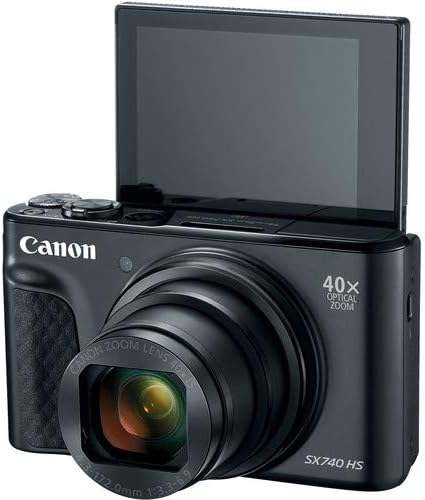
2. irudia: Aurrealdea view of the camera with the LCD screen tilted upwards, ready for use.
Kameraren funtzionamendua
1. Piztu/Itzali
Sakatu BOTEREA kameraren goialdean dagoen botoia piztu edo itzaltzeko.
2. Filmatzeko moduak
The camera offers various shooting modes. Use the mode dial or menu options to select:
- Modu automatikoa: For simple point-and-shoot operation, where the camera automatically adjusts settings.
- Programa (P) Modua: Kamerak esposizioa ezartzen duen bitartean ezarpenen gaineko kontrol gehiago ematen du.
- Eszena moduak: Optimized settings for specific scenarios like portraits, landscapes, or night scenes.
- Feature Assistant: Provides on-screen explanations to help you understand and use various camera features.
3. Zoomaren funtzionamendua
The camera features a 40x optical zoom lens. Use the zoom lever around the shutter button to zoom in (telephoto) or out (wide-angle). Digital zoom can extend the range further, but may reduce image quality.

3. irudia: Aurrealdea view of the camera with the lens extended for zooming.
4. Enfokatzea
The camera primarily uses autofocus. Point the camera at your subject and half-press the shutter button to focus. The focus frame will appear on the LCD screen. For specific situations, manual focus options may be available in the menu.
5. Bideo Grabaketa
To record videos, switch to video mode (if available via a dedicated button or mode dial) or press the dedicated movie recording button. The camera supports 4K video capture. Press the button again to stop recording.
6. Using the Tilting LCD Screen
The 3.0-inch LCD screen can tilt 180 degrees, allowing for easy framing of selfies or shots from various angles. Adjust the screen to your desired position.

4. irudia: Atzealdea view kameraren, LCD pantaila eta kontrolen diseinua bistaratuz.
7. Wi-Fi eta Bluetooth konexioa
The camera features built-in Wi-Fi and Bluetooth for connecting to compatible mobile devices. Download the Canon Camera Connect app to your smartphone or tablet to transfer images, remotely control the camera, and share photos.
- Enable Wi-Fi or Bluetooth in the camera's menu.
- Open the Canon Camera Connect app on your mobile device and follow the pairing instructions.
Mantentzea
1. Kamera garbitzea
- Lentea: Use a soft, lint-free cloth or a lens brush to gently remove dust. For smudges, use a specialized lens cleaning solution and cloth. Avoid touching the lens directly with your fingers.
- LCD pantaila: Wipe gently with a soft, dry cloth. Do not use harsh chemicals.
- Kameraren gorputza: Use a soft, dry cloth to wipe away dust and dirt.
2. Bateria zaintzea
- Gorde bateriak leku fresko eta lehor batean erabiltzen ez dituzunean.
- Saihestu bateria maiz erabat deskargatzea, haren iraupena luzatzeko.
- Remove the battery from the camera if it will not be used for an extended period.
3. Biltegiratzea
When storing the camera for long periods, ensure it is clean, dry, and stored in a protective case to prevent dust and damage. Remove the battery and memory card.
Arazoak konpontzea
Kamerarekin arazoak badituzu, jo ezazu honako ohiko irtenbide hauetara:
- Kamera ez da pizten: Ensure the battery is fully charged and correctly inserted. Try a different charged battery if available.
- Memoria txartelaren errorea: Check if the memory card is inserted correctly. Format the card (this will erase all data) if the error persists, or try a different compatible SDHC card.
- Irudiak lausoak dira: Ensure the lens is clean. Check your focus settings and make sure the camera has successfully focused on your subject before taking the shot. Use optical image stabilization for handheld shots.
- Wi-Fi/Bluetooth konexio arazoak: Ensure Wi-Fi/Bluetooth is enabled on both the camera and your mobile device. Restart both devices and try pairing again. Confirm the Canon Camera Connect app is up to date.
- Flasha ez da pizten: Check the flash mode settings. Ensure the flash is popped up if it's a manual pop-up type.
For more complex issues or persistent problems, please consult the official Canon support webwebgunean edo jarri harremanetan bezeroarentzako zerbitzuarekin.
Zehaztapenak
| Ezaugarri | Zehaztapena |
|---|---|
| Ereduaren izena | PowerShot SX740 HS |
| Argazki sentsorearen bereizmena | 20.3 megapixelekoa |
| Zoom optikoa | 40x |
| Bideo Harrapaketa formatua | 4K |
| Irudi prozesadorea | Canon DIGIC 8 |
| Konektibitatea | Bluetooth, HDMI, USB, Wi-Fi |
| Bistaratzeko mota | LCD inklinagarria |
| Irudi Egonkortzea | Optikoa |
| Bateria mota | Litio ioia (NB-13L) |
| Compatible Memory | SDHC (up to 64 GB) |
| Etengabeko filmaketa | 10 fotograma segundoko |
| Onartua File Formatua | JPEG, RAW |
Bermea eta Laguntza
Your Canon PowerShot SX740 HS Digital Camera is covered by a manufacturer's warranty. Please refer to the warranty card included with your product for specific terms and conditions. For technical support, service, or additional information, please visit the official Canon website or contact Canon customer service directly. Keep your purchase receipt as proof of purchase for warranty claims.
Sareko baliabideak: Canon USA Official Webgunea


