
Sarrera
The Tyler TKS2-WH is a versatile under-cabinet music system designed to bring wireless audio and convenience to your kitchen or any suitable space. This unit features Bluetooth connectivity for streaming music from your smart devices, an FM radio with station memory, a digital clock, and a hands-free speakerphone function. Additionally, it includes integrated LED lighting to illuminate your work surface. This manual provides detailed instructions for setup, operation, and maintenance of your new music system.
Paketearen edukia
Mesedez, markatu laukitxoa elementu hauetarako:
- Tyler TKS2-WH Under Cabinet Music System
- Elikatze kablea
- Urruneko Kontrola
- Under-Cabinet Mounting Kit
Produktua amaituview
Familiarize yourself with the components and controls of your Tyler TKS2-WH music system.
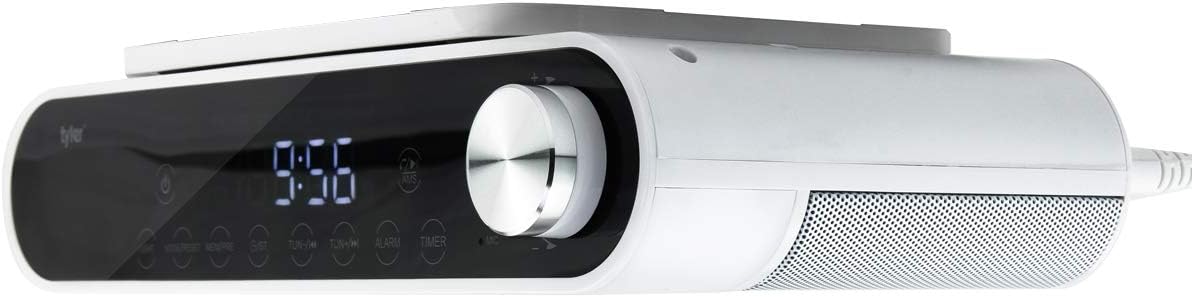
1. irudia: Aurrealdea view of the Tyler TKS2-WH Under Cabinet Music System. This image shows the overall design of the Tyler TKS2-WH, a white under-cabinet music system with a sleek black front panel, a large digital clock display, and a prominent silver control knob on the right. The speaker grille is visible on the right side.
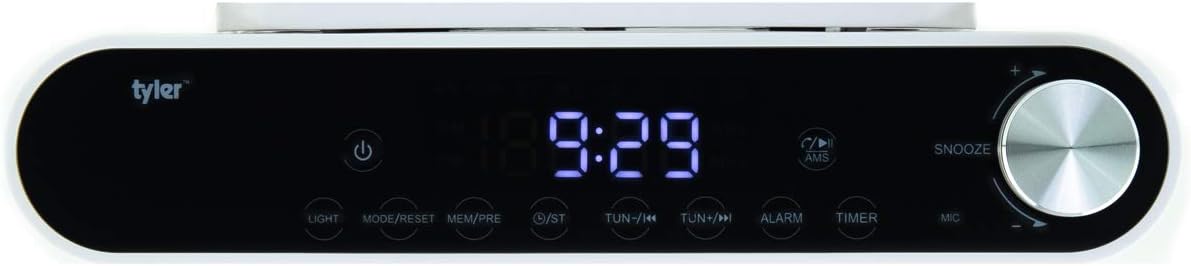
2. irudia: Xehetasuna view of the control panel. A detailed view of the control panel, highlighting the touch-sensitive buttons for various functions such as power, light, mode/reset, memory/preset, tuning, alarm, and timer. The digital display shows '9:26'.

Figure 3: LED Work Surface Lighting in operation. This image demonstrates the integrated LED lighting feature, showing a bright strip of light emanating from the bottom of the unit, designed to illuminate the counter space below.

Figure 4: All-in-One Kitchen Station features. An infographic highlighting the key functionalities of the system: Bluetooth connectivity, FM radio with 20 presets, hands-free speakerphone capability, easy mounting design, and integrated LED lights.
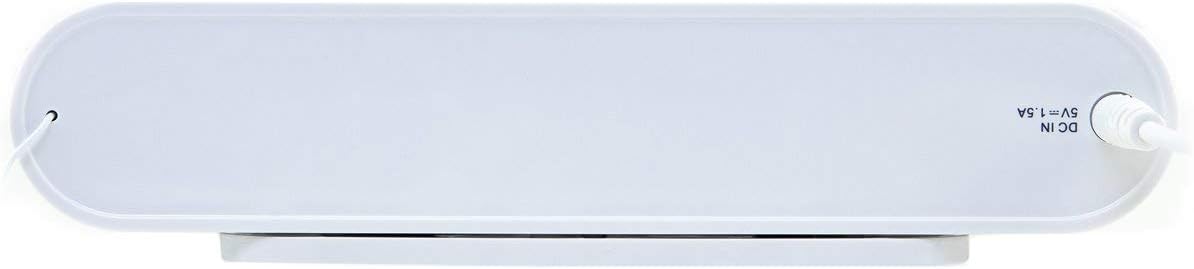
5. Irudia: Atzealdea view with power input. The back of the unit, displaying the DC IN 5V=1.5A power input port and the attached power cord, indicating where the device receives its power.
Konfigurazioa
Unitatea muntatzea
The Tyler TKS2-WH is designed for under-cabinet installation. Use the provided mounting kit to securely attach the unit to the underside of a kitchen cabinet or similar flat surface. Ensure the mounting location allows for easy access to controls and proper ventilation.
- Identify a suitable flat surface under a cabinet for mounting.
- Using the mounting template (if provided) or the unit itself, mark the screw positions.
- Drill pilot holes if necessary, ensuring not to drill through the cabinet.
- Secure the mounting plate (if separate) or the unit directly using the provided screws.
- Ensure the unit is firmly attached and stable before proceeding.
Potentzia-konexioa
Connect the provided power cord to the DC IN port on the back of the unit (refer to Figure 5) and then plug it into a standard electrical outlet.
Funtzionamendu-argibideak
Piztu/Itzali
- Sakatu Boterea button (⑂) on the front panel to turn the unit on or off.
Erlojua ezartzea
To set the digital clock:
- Ensure the unit is in standby mode (off).
- Eduki sakatuta MODUA/RESET botoia sakatu orduko digituak keinuka hasi arte.
- Erabili TUN-/◀◀ or TUN+/▶▶ ordua doitzeko botoiak.
- Sakatu MODUA/RESET botoia berriro sakatu minutuen doikuntzara aldatzeko.
- Erabili TUN-/◀◀ or TUN+/▶▶ minutuak doitzeko botoiak.
- Sakatu MODUA/RESET one more time to confirm and exit clock setting mode.
FM Irratiaren funtzionamendua
The unit features an FM tuner with 20 station memory presets.
- sintonia: Sakatu TUN-/◀◀ or TUN+/▶▶ buttons to manually tune the frequency. Press and hold for automatic scanning to the next strong station.
- Aurrez ezarritako ezarpenak: Sintonizatu nahi duzun irratia. Sakatu eta eutsi botoiari MEM/PRE button until the preset number flashes. Use the TUN-/◀◀ or TUN+/▶▶ Sakatu botoiak aurrezarritako zenbaki bat (1-20) hautatzeko. MEM/PRE berriro gordetzeko.
- Aurrezarpenak gogoratzen: In FM mode, short press the MEM/PRE botoia gordetako estazioen artean aldatzeko.
Bluetooth parekatzea
Stream music wirelessly from your smartphone or tablet.
- Sakatu MODUA/RESET button to switch to Bluetooth mode. The display will show 'BT' and flash, indicating it's ready for pairing.
- On your Bluetooth-enabled device, search for available devices.
- Select 'Tyler TKS2-WH' from the list.
- Once paired, the 'BT' indicator will stop flashing and remain solid. You can now play audio from your device.
Esku libreko deiak
The unit features a built-in microphone for hands-free calls.
- Bluetooth bidez konektatuta zauden bitartean dei bat sartzen denean, musika pausatu egingo da.
- Sakatu Erreproduzitu / Pausatu / Deitu button (often integrated with the Mode button or a dedicated call button) to answer the call.
- Speak into the unit's microphone.
- Sakatu Erreproduzitu / Pausatu / Deitu botoia berriro deia amaitzeko.
LED Work Surface Lighting
- Sakatu ARGIA button on the front panel to turn the LED work surface light on or off.
Alarm, Timer, and Snooze Functions
The unit includes a dual alarm, sleep timer, and snooze function.
- Alarma: Sakatu ALARMA button to set or activate alarms. Follow on-screen prompts to set alarm time and source (e.g., FM radio or buzzer).
- Tenporizadorea: Sakatu tenporizadorea button to set a sleep timer, which will automatically turn off the unit after a set duration.
- Atzeratu: Alarma jotzen duenean, sakatu SNOOZE button (often the main control knob) to temporarily silence the alarm for a few minutes.
Mantentzea
To ensure the longevity and optimal performance of your Tyler TKS2-WH music system, follow these simple maintenance guidelines:
- Garbiketa: Wipe the unit with a soft, dry cloth. For stubborn marks, a slightly damp cloth can be used, but ensure the unit is unplugged and completely dry before reconnecting power. Avoid using abrasive cleaners or solvents.
- Lekua: Ensure the unit is installed in a location with adequate ventilation to prevent overheating.
- Potentzia: Deskonektatu unitatea tximista-ekaitzetan edo denbora luzez erabiltzen ez duzunean.
Arazoak konpontzea
If you encounter issues with your Tyler TKS2-WH, refer to the following common problems and solutions:
| Arazoa | Irtenbide posiblea |
|---|---|
| Unitatea ez da pizten. | Ziurtatu kablea ondo konektatuta dagoela bai unitatean bai funtzionatzen duen entxufe elektriko batean. Probatu entxufea beste gailu batekin. |
| FM irratiaren harrera eskasa. | Extend and adjust the FM antenna wire for better signal reception. Try repositioning the unit slightly. |
| Bluetooth gailua ezin da parekatu. | Ensure the unit is in Bluetooth pairing mode ('BT' flashing). Make sure your device's Bluetooth is enabled and within range. Forget previous pairings on your device and try again. |
| Soinurik ez edo bolumen baxua. | Adjust the volume knob on the unit and check the volume on your connected Bluetooth device. Ensure the correct mode (FM/Bluetooth) is selected. |
| Buttons are difficult to see/unresponsive. | Ensure adequate lighting in the area. The buttons are touch-sensitive; ensure direct contact. If unresponsive, try a power cycle (unplug and replug). |
| Clock resets when power is lost. | This unit may not have a battery backup for clock settings. The clock will need to be reset after a power outage. |
Zehaztapenak
- Marka: Tyler
- Eredua: TKS2-WH (Item model number: 8541745665)
- Kolorea: Zuria
- Konektibitate Teknologia: Bluetootha
- Tuner Teknologia: FM
- Onartutako irrati-taldeak: FM
- FM Station Presets: 20
- Ezaugarri bereziak: Alarm, Radio, Snooze, Timer, Hands-Free Speakerphone, LED Work Surface Lighting
- Energia iturria: AC (Power Cord included)
- Audio irteera: 2Wx2
- Elementuaren pisua: 1.65 kilo (gutxi gorabehera 26.38 ontza)
- Paketearen neurriak: 10.2 x 7.13 x 2.56 hazbete
Bermea eta Laguntza
This product is typically covered by a manufacturer's warranty. Please refer to the warranty card included in your package or visit the official Tyler website for detailed warranty information and customer support. For technical assistance or further inquiries, please contact Tyler customer service.
Oharra: Produktuaren zehaztapenak eta ezaugarriak alda daitezke aldez aurretik jakinarazi gabe.