
1. Sarrera
This manual provides essential instructions for setting up, operating, and maintaining your LG X Power 3 LM-X510WM smartphone. Please read this guide thoroughly to ensure proper use and to maximize the device's capabilities.
The LG X Power 3 is a 4G LTE smartphone featuring a 5.5-inch display, 16GB of internal storage, and running on Android 8.1. It is designed for reliable communication and multimedia use.
2. Gailua amaitu daview
Familiarize yourself with the physical components of your LG X Power 3 smartphone.

2.1. irudia: Aurretik eta atzetik view of the LG X Power 3 smartphone. The front shows the display with time and date, while the back displays the camera, fingerprint sensor, and LG logo.
2.1 Aurrealdea View
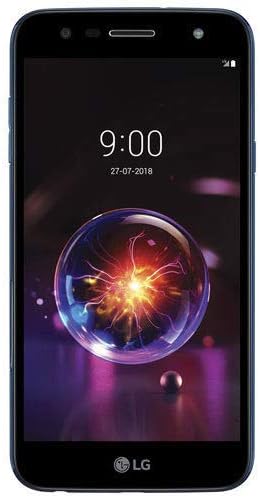
2.2. irudia: Aurrealdea view of the LG X Power 3. Key features include the earpiece, front camera, ambient light sensor, and the 5.5-inch touchscreen display.
- Entzungailua: Used for listening during calls.
- Aurrealdeko kamera: Selfieetarako eta bideo-deietarako.
- Giro-argiaren sentsorea: Pantailaren distira automatikoki doitzen du.
- Ukipen-pantailako pantaila: 5.5-inch LCD for interaction.
2.2 Itzuli View

2.3. irudia: Itzuli view of the LG X Power 3. Features include the main camera, LED flash, fingerprint sensor, and speaker grille.
- Kamera nagusia: Argazkiak eta bideoak ateratzeko.
- LED Flash: Argi gutxiko argazkietarako argiztapena ematen du.
- Hatz-marka sentsorea: Desblokeatzeko eta autentifikatzeko modu segurua.
- Hizlaria: Audio irteerarako.
3. Konfigurazioa
3.1 SIM txartela eta microSD txartela sartzea
- Bilatu SIM/microSD txartelaren erretilua gailuaren alboan.
- Insert the SIM ejection tool (or a small paperclip) into the small hole next to the tray to eject it.
- Place your Nano-SIM card into the designated slot with the gold contacts facing down. If using a microSD card for expanded storage, place it in the appropriate slot.
- Kontu handiz sartu erretilua telefonoan berriro, bere lekuan klik egin arte.
3.2 Hasierako piztea eta konfigurazioa
- Press and hold the Power/Lock key until the LG logo appears.
- Follow the on-screen prompts to select your language, connect to a Wi-Fi network, set up your Google account, and configure security options.
- Your phone will guide you through the initial setup process.
4. Zure gailua funtzionatzea
4.1 Oinarrizko nabigazioa
- Sakatu: Hautatu elementuak edo aktibatu funtzioak.
- Eduki sakatuta: Sartu testuinguru-menuetara edo mugitu elementuak.
- Pasatu hatza: Nabigatu pantailetan edo zerrendetan zehar.
- Pixka bat: Irudiak handitu edo txikitu eta web orrialdeak.
4.2 Deiak egitea eta mezuak bidaltzea
- Dei bat egiteko: Ireki Telefonoa aplikazioa, idatzi zenbakia eta sakatu deitzeko ikonoa.
- Mezu bat bidaltzeko: Open the Messages app, tap the new message icon, enter the recipient and your message, then tap send.
4.3 Sareetara konektatzea
- Wi-Fi: Joan Ezarpenak > Sarea eta internet > Wi-Fi atalera. Aktibatu Wi-Fia eta hautatu konektatzeko sare bat.
- Bluetootha: Go to Settings > Connected devices > Bluetooth. Turn Bluetooth on and pair with available devices.
- Datu mugikorrak: Ziurtatu SIM txartela aktibo dagoela eta datu mugikorrak gaituta daudela Ezarpenak > Sarea eta internet > Sare mugikorra atalean.
4.4 Kameraren erabilera
- Ireki Kamera aplikazioa hasierako pantailatik edo aplikazioen tiradertik.
- Sakatu obturadorearen botoia argazkia ateratzeko.
- Sakatu bideoaren ikonoa bideoa grabatzeko modura aldatzeko.
- Use the settings icon to adjust camera options like flash, timer, and resolution.
5. Mantentzea
5.1 Gailua garbitzea
Use a soft, lint-free cloth to clean the screen and body of your phone. Avoid using harsh chemicals or abrasive materials, which can damage the device.
5.2 Software eguneraketak
Regularly check for software updates to ensure your device has the latest features and security enhancements. Go to Settings > System > About phone > Software update.
5.3 Bateria zaintzea
To prolong battery life, avoid extreme temperatures. Charge your phone using only approved chargers and cables. Do not leave the phone charging for extended periods after it reaches 100%.
6. Arazoak
This section addresses common issues you might encounter with your LG X Power 3.
- Telefonoa ez da pizten: Ziurtatu bateria kargatuta dagoela. Konektatu kargagailu batera eta itxaron minutu batzuk berriro pizten saiatu aurretik.
- Aplikazioak huts egiten edo blokeatzen: Try restarting the app. If the issue persists, clear the app's cache (Settings > Apps & notifications > [App Name] > Storage > Clear cache).
- Sare seinale eskasa: Check your location for network coverage. Restart the phone or toggle Airplane Mode on and off.
- Bateria azkar agortzen da: Murriztu pantailaren distira, itxi erabiltzen ez diren aplikazioak eta desgaitu beharrezkoak ez diren funtzioak, hala nola GPSa edo Bluetooth, erabiltzen ez dituzunean.
- Ezin da Wi-Fira konektatu: Ensure Wi-Fi is enabled and you have the correct password. Restart your router and phone.
If problems persist, consider performing a factory data reset (Settings > System > Reset options > Erase all data (factory reset)). Abisua: Honek telefonoko datu guztiak ezabatuko ditu. Jarraitu aurretik, egin datu garrantzitsuen babeskopia.
7. Zehaztapenak
Key technical specifications for the LG X Power 3 LM-X510WM.
| Ezaugarri | Zehaztapena |
|---|---|
| Ereduaren izena | X Power 3 (LM-X510WM) |
| Sistema eragilea | Android 8.1 |
| Bistaratzea | 5.5 Inches LCD, 720 x 1280 Resolution |
| Prozesadorea | Qualcomm Snapdragon |
| RAM | 2 GB |
| Barne Biltegiratzea | 16 GB |
| Bateria | Litio ioia (barne) |
| Teknologia Zelularra | 4G LTE |
| Konektibitatea | Bluetooth, USB, Wi-Fi |
| Forma-faktorea | Smartphone |
8. Segurtasun informazioa
Please observe the following safety guidelines to prevent injury or damage to your device:
- Ez jarri gailua tenperatura altuen, eguzki-argiaren eraginpean edo hezetasun gehiegizkoaren eraginpean.
- Erabili LG-k onartutako kargagailuak eta osagarriak soilik.
- Saihestu gailua erortzea edo kolpe gogorren eraginpean jartzea.
- Ez saiatu gailua desmuntatzen edo aldatzen.
- Mantendu gailua gailu medikoetatik urrun interferentziak saihesteko.
- Dispose of batteries and the device responsibly according to local regulations.
9. Bermea eta Laguntza
Bermeari buruzko informazioa lortzeko, kontsultatu zure produktuarekin batera datorren berme-txartela edo bisitatu LGren webgune ofiziala. website. Technical support may be available through LG's customer service channels.
Laguntza gehiago behar baduzu, bisitatu LGren laguntza ofiziala. webgunea: LG Kanadako laguntza