
1. Sarrera
Thank you for choosing the ILIFE V7s Plus Hybrid Robot Vacuum Cleaner. This manual provides essential information for the safe operation, maintenance, and troubleshooting of your device. Please read it thoroughly before using the robot and keep it for future reference.
The ILIFE V7s Plus is designed to provide efficient cleaning for various floor types, offering both vacuuming and mopping functionalities to keep your home spotless.
2. Segurtasun-argibideak
Lesio edo kalteen arriskua murrizteko, jarraitu segurtasun neurri hauek:
- Read all instructions before operating the robot.
- Ez utzi haurrei robotarekin jolasten. Zaindu haurrak eta maskotak robota funtzionatzen ari den bitartean.
- Use only the original power adapter and charging dock provided by ILIFE.
- Do not operate the robot in wet environments or near flammable materials.
- Ensure the robot is turned off and unplugged before performing any maintenance.
- Avoid using the robot on high-pile carpets or uneven surfaces.
- Mantendu ilea, arropa solteak, atzamarrak eta gorputz atal guztiak irekiguneetatik eta atal mugikorretatik urrun.
3. Produktua amaitu daview
The ILIFE V7s Plus is equipped with advanced features for comprehensive cleaning.
3.1 Ezaugarri nagusiak
- i-Dropping Technology: The water tank sprinkles water only when the V7s Plus is moving, minimizing water consumption for thorough wet cleaning. It stops dispensing water when the robot stops, preventing floor damage and mechanical overload.
- Smart Dustbin Detector: This technology alerts you if the dustbin is not installed correctly, preventing the robot from sucking dirt in and causing mechanical damage.
- Bi garbiketa modu: The V7s Plus offers both vacuuming and mopping. Dirt and dust are extracted by a combination of brush and suction into the dustbin, while stains are removed by the microfiber mop cloth.
- Sentsore adimendunak: Equipped with intelligent sensors and a slim profile, the V7s Plus can clean under most furniture and effectively prevent falls from stairs or ledges.
- RoadRover Wheels: Designed to easily climb a 15-degree slope and navigate over most obstacles.
3.2 Osagaiak

3.2.1. irudia: The ILIFE V7s Plus robot vacuum, demonstrating its i-Dropping Technology with the water tank and microfiber mop cloth.

3.2.2. irudia: A hand inserting the dustbin into the ILIFE V7s Plus, highlighting the smart dustbin detector feature.
3.2.3. irudia: The underside of the ILIFE V7s Plus, illustrating its two cleaning modes with the main brush, side brushes, dustbin, and water tank.

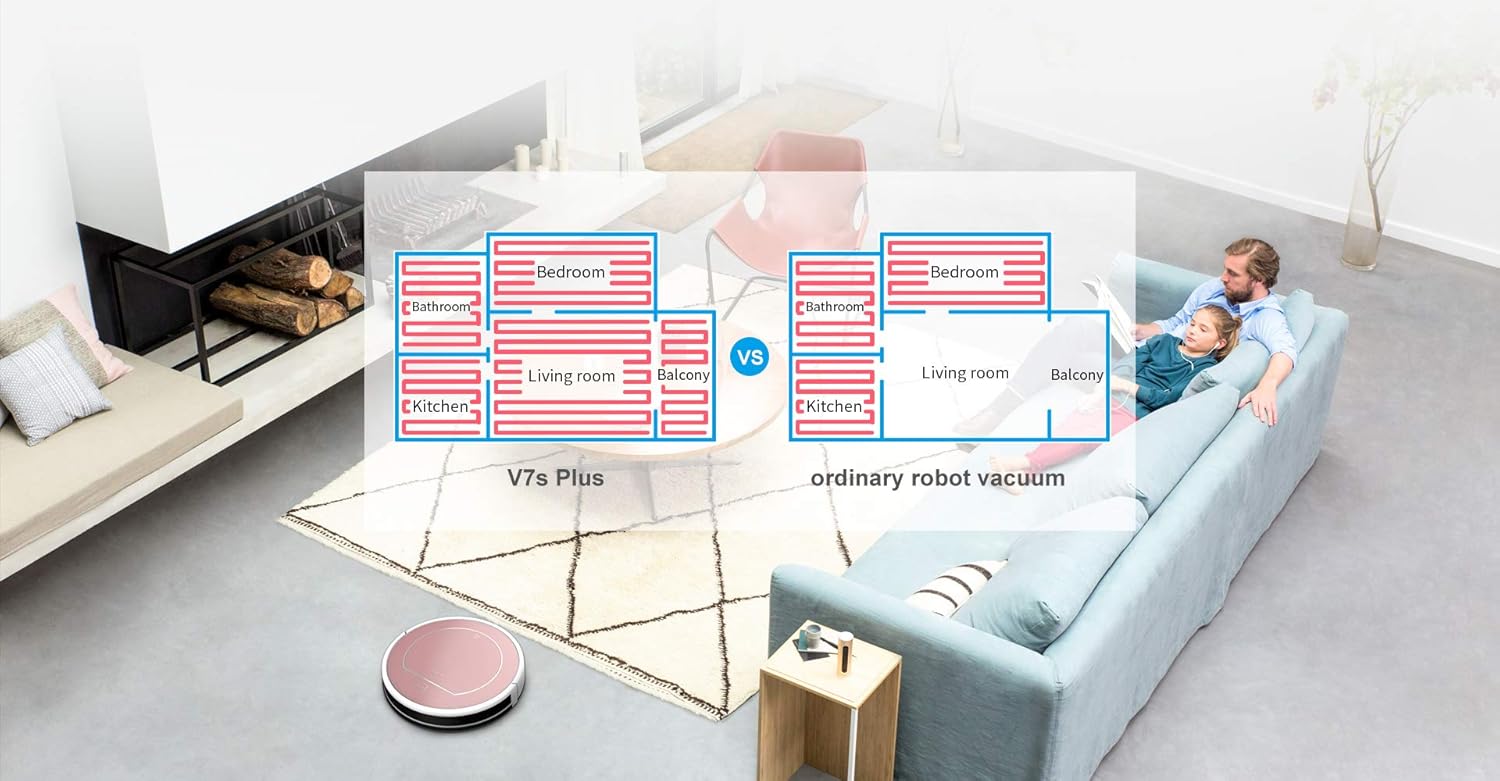
3.2.4. irudia: The ILIFE V7s Plus navigating around furniture and avoiding stairs, showcasing its smart sensor capabilities.

3.2.5. irudia: Xehetasun bat view of the ILIFE V7s Plus underside, highlighting the RoadRover wheels and the microfiber mop cloth for enhanced performance.
4. Konfigurazioa
4.1 Paketatzea
- Kontu handiz kendu osagai guztiak ontzitik.
- Remove any protective films or stickers from the robot and charging dock.
- Ensure all accessories are present: robot, charging dock, power adapter, remote control, cleaning tool, side brushes, dustbin, water tank, mop cloth.
4.2 Robota kargatzea
- Jarri kargatzeko oinarria horma baten kontra gune ireki batean, ziurtatu alboetan metro 1eko erradioan eta aurrean 2 metroko erradioan oztoporik ez dagoela.
- Connect the power adapter to the charging dock and plug it into a power outlet. The indicator light on the dock will illuminate.
- Place the robot onto the charging dock, ensuring the charging contacts align. The robot will emit a sound, and the indicator light on the robot will flash, indicating it is charging.
- Fully charge the robot for at least 5-6 hours before first use.
4.3 Alboko eskuilak instalatzea
Sakatu alboko eskuilak robotaren behealdeko zutabeen kontra, klik egin arte.
4.4 Garbiketarako prestatzea
- Aspiratzeko: Ensure the dustbin is properly installed.
- For Mopping: Fill the water tank with clean water. Attach the mop cloth to the water tank. Insert the water tank assembly into the robot.
5. Funtzionamendu-argibideak
5.1 Garbiketa abiaraztea/gelditzea
- Hasteko: Press the 'CLEAN' button on the robot or the remote control. The robot will begin cleaning in Auto mode.
- Pausatzeko: Press the 'CLEAN' button again or the 'Pause' button on the remote control.
- Gelditu: Press the 'CLEAN' button for 3 seconds or the 'Power' button on the remote control.
5.2 Garbiketa moduak
The V7s Plus offers multiple cleaning modes:
- Modu automatikoa: The robot automatically cleans the area, adjusting its path based on obstacles and dirt levels.
- Spot modua: The robot cleans a specific area in a spiral pattern, ideal for concentrated dirt.
- Ertz modua: Robotak hormak eta altzarien ertzak garbitzen ditu.
- Fregonatzeko modua: When the water tank is installed, the robot performs wet mopping.
5.3 Programazioa
The robot can be scheduled to clean at a specific time each day. Refer to the remote control instructions for setting the current time and scheduling cleaning tasks.
5.4 Urruneko kontrola
Use the remote control to start/stop cleaning, select cleaning modes, direct the robot manually, and set schedules.
6. Mantentzea
Regular maintenance ensures optimal performance and extends the lifespan of your ILIFE V7s Plus.
6.1 Zaborrontzia hustea
Empty the dustbin after each use. Press the release button to remove the dustbin, open its lid, and discard the collected debris.
6.2 Iragazkiak garbitzea
Remove the primary filter and high-efficiency filter from the dustbin. Tap them gently to remove dust. Rinse the primary filter with water if necessary, but ensure it is completely dry before reinstallation. Do not wash the high-efficiency filter.
6.3 Cleaning the Water Tank and Mop Cloth
After mopping, remove the water tank. Empty any remaining water. Detach the mop cloth and wash it by hand or machine. Allow the mop cloth and water tank to air dry completely before reassembling.
6.4 Garbiketa eskuilak
- Alboko eskuilak: Periodically remove and clean hair and debris wrapped around the side brushes. Replace them if they are worn or damaged.
- Eskuila nagusia: Remove the main brush cover and then the main brush. Use the cleaning tool to cut and remove hair and debris.
6.5 Sentsoreak garbitzea
Wipe the anti-drop sensors (located on the bottom of the robot) and the bumper sensors (on the front bumper) with a clean, dry cloth to ensure proper function.
7. Arazoak
If your ILIFE V7s Plus encounters an issue, refer to the following common problems and solutions:
- Robota ez da pizten: Ensure the battery is charged. Check if the power switch is in the 'ON' position.
- Robotak ez du kargatzen: Verify the charging dock is powered on and the robot's charging contacts are aligned with the dock's contacts. Clean contacts if dirty.
- Robota maiz trabatzen da: Clear obstacles from the cleaning path. Ensure the wheels are free of debris.
- Garbiketa-errendimendu eskasa: Empty the dustbin, clean filters, main brush, and side brushes. Ensure the water tank is filled for mopping.
- Robot falls down stairs: Garbitu robotaren behealdeko erorketen aurkako sentsoreak.
- Ezohiko zarata: Check if the main brush or side brushes are entangled with hair or debris.
Arazoak jarraitzen badu, jarri harremanetan bezeroarentzako laguntzarekin.
8. Zehaztapenak
Below are the technical specifications for the ILIFE V7s Plus:
| Marka | ILIFE |
| Eredua | V7s Plus |
| Azalera gomendioa | Hard floor, Carpet (thin) |
| Ezaugarri bereziak | Automatikoa, arina |
| Kolorea | Urre Arrosa |
| Kontrolagailu mota | Urruneko Kontrola |
| Autokargatzea | Bai |
| Programazioa | Bai |
| Anti-dropping off & Collision | Bai |
| Mopping Hezea | Bai |
| Garbiketa moduak | 4 modu |
| Dustbin Detection Technology | Bai |
| i-Dropping Technology | Bai |
| Lanaldia | 110-120 minutu |
| Floors Priority | Hardwood > Tile > Thin Carpet |
| Using Orientation | Xurgagailua eta garbiketa |

8.1. irudia: Feature comparison between ILIFE V7s and V7s Plus models.
9. Bermea eta Laguntza
For warranty information, please refer to the warranty card included in your product packaging or consult the retailer from whom you purchased the ILIFE V7s Plus. For technical support or service inquiries, please contact ILIFE customer service through their official webgunea edo zure produktuaren dokumentazioan emandako harremanetarako informazioa.