
1. Sarrera
This manual provides detailed instructions for the Redragon K503 Gaming Keyboard. Please read this guide thoroughly to ensure proper setup, operation, and maintenance of your device. The Redragon K503 is a multimedia gaming keyboard featuring RGB LED backlighting and a comfortable wrist rest, designed for use with Windows and MacOS PC systems.
2. Konfigurazioa
2.1 Paketearen edukia
- Redragon K503 Gaming Keyboard
- USB kablea (integratua)
2.2 Teklatua konektatzea
- Bilatu erabilgarri dagoen USB ataka zure ordenagailuan.
- Konektatu Redragon K503 teklatuaren USB konektorea USB atakan.
- Your operating system (Windows or MacOS) should automatically detect and install the necessary drivers. No additional software installation is typically required for basic functionality.
- The keyboard's RGB backlighting will illuminate upon successful connection.
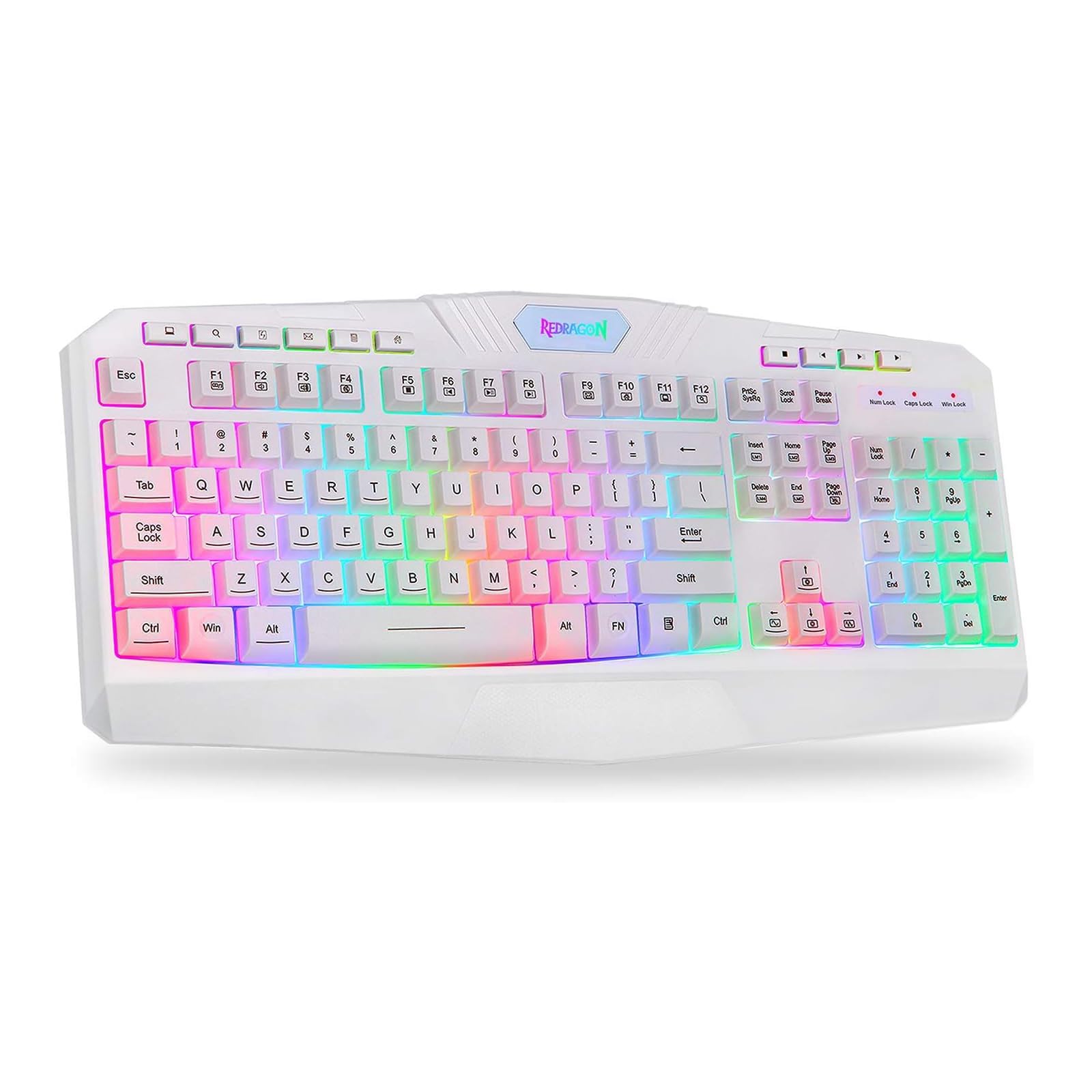
This image shows the Redragon K503 Gaming Keyboard, highlighting its full layout and white finish. The keys feature RGB backlighting, visible around the keycaps.
3. Funtzionamendu-argibideak
3.1 Oinarrizko funtzioak
The Redragon K503 functions as a standard QWERTY keyboard for typing and input. All standard keys operate as labeled.
3.2 Multimedia teklak
The keyboard includes dedicated multimedia keys for convenient control of media playback and system functions. These keys are typically located above the function keys (F1-F12) or integrated with them via the 'Fn' key. Common functions include:
- Bolumen kontrola: Increase, decrease, or mute audio.
- Multimedia erreprodukzioa: Play/pause, stop, previous track, next track.
- Web Arakatzailea: Launch default web arakatzailea.
- Posta elektronikoa: Launch default email client.
3.3 RGB LED Backlighting
The K503 features customizable RGB LED backlighting. The lighting modes and brightness can be adjusted directly on the keyboard using specific key combinations. Refer to the keycap legends for specific lighting control keys, often involving the 'Fn' key combined with other function keys (e.g., Fn + Scroll Lock, Fn + Home/End, or dedicated lighting keys).
- Argiztapen moduak aldatzea: Press the designated key combination to cycle through various lighting effects (e.g., static, breathing, wave).
- Distira doitzea: Use the specified key combination to increase or decrease the backlight intensity.
- Koloreak aldatzea: Some modes allow for color customization using specific key presses.
4. Mantentzea
4.1 Teklatua garbitzea
To maintain optimal performance and appearance, clean your keyboard regularly:
- Deskonektatu teklatua ordenagailutik garbitu aurretik.
- Erabili lipurrik gabeko zapi leun bat dampGarbitu urarekin edo garbiketa-soluzio leun batekin teklak eta gainazala garbitzeko.
- Teklen arteko hautsa eta hondakinak lortzeko, erabili aire konprimatua.
- Ez erabili produktu kimiko gogorrik, garbitzaile urratzailerik, eta ez murgildu teklatua likidoetan.
5. Arazoak
5.1 Teklatuak ez du erantzuten
- Ziurtatu USB kablea ondo konektatuta dagoela bai teklatuan bai ordenagailuan.
- Saiatu teklatua ordenagailuko beste USB ataka batera konektatzen.
- Probatu teklatua beste ordenagailu batean arazoa teklatuan edo ordenagailuaren USB atakan/kontrolatzaileetan den zehazteko.
- Berrabiarazi ordenagailua.
5.2 Atzeko argiztapena ez dabil edo okerra da
- Check if the backlighting has been turned off or set to the lowest brightness level using the keyboard's lighting control keys.
- Ziurtatu teklatua ordenagailura behar bezala konektatuta dagoela.
- If a specific key's backlight is not working, it may indicate a hardware issue.
5.3 Specific Keys Not Functioning
- Clean around and under the affected keycap to remove any debris that might be obstructing its movement.
- Arazoak jarraitzen badu, hardwarearen matxura baten adierazle izan daiteke.
6. Zehaztapenak
| Marka | Redragon |
| Modelo zenbakia | K503W-RGB |
| Konektibitate Teknologia | USBa |
| Gailu bateragarriak | PC (Windows, MacOS) |
| Teklatuaren deskribapena | Multimedia |
| Ezaugarri Berezia | Lighting (RGB LED Backlit) |
| Kolorea | Zuria |
| Produktuaren neurriak | 17.6"L x 7.9"Z x 1.2"A |
| Materiala | Akrilonitrila Butadiene estirioa |
| Dakarten osagaiak | USB kablea |
7. Bermearen informazioa
Redragon products are typically covered by a limited manufacturer's warranty. The specific terms and duration of the warranty may vary by region and retailer. Please retain your proof of purchase for warranty claims. For detailed warranty information, refer to the warranty card included with your product or visit the official Redragon webgunea.
8. Bezeroarentzako arreta
If you encounter any issues not covered in this manual or require further assistance, please contact Redragon customer support. Contact information can usually be found on the official Redragon website or on the product packaging. When contacting support, please have your product model number (K503) and proof of purchase ready.