
Sarrera
This manual provides essential instructions for the safe and efficient operation of your KINGONE K9 Super Bass Portable Bluetooth Speaker. Please read this manual thoroughly before using the device and retain it for future reference.
The KINGONE K9 is a portable Bluetooth speaker featuring powerful stereo sound, multiple input options including Bluetooth, MicroSD, and AUX, and convenient touch controls. It also supports hands-free calling and NFC for easy pairing.
Paketearen edukia
Ziurtatu elementu guztiak paketean daudela:
- KINGONE K9 Super Bass Portable Bluetooth Speaker
- Mikro USB kargatzeko kablea
- 3.5mm Audio Cable (AUX)
- Erabiltzailearen eskuliburua (dokumentu hau)
Produktua amaituview
The KINGONE K9 speaker is designed for portability and high-quality audio. Below is an image illustrating the speaker and its packaging.
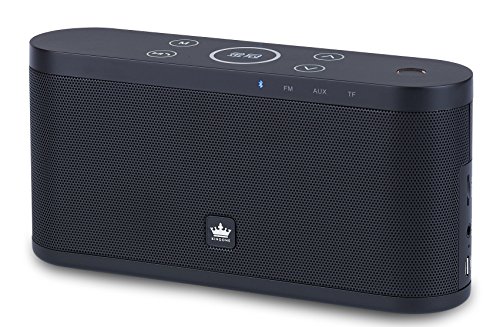
Image: The KINGONE K9 Super Bass Portable Bluetooth Speaker (left) shown next to its metallic-finish packaging (right).
Ezaugarri nagusiak:
- Bluetooth 4.0 konexioa: Supports A2DP, AVRCP, HFP, HSP profiles for stable wireless audio streaming.
- NFC laguntza: For quick and easy pairing with compatible devices.
- Erreprodukzio modu anitz: Bluetooth, MicroSD card, and AUX input.
- Esku libreko deiak: Built-in microphone for answering phone calls.
- Ukipen-kontrolak: Intuitive touch-sensitive buttons for volume, track navigation, and play/pause.
- Soinu estereo indartsua: 2 x 5W output for a rich audio experience.
- Diseinu eramangarria: Compact dimensions and a 2200mAh battery for extended use.
Kontrolak eta Funtzioak
The speaker features touch-sensitive controls located on the top panel. Familiarize yourself with these controls for optimal use:
- Pizteko botoia: Eduki sakatuta 3 segundoz pizteko/itzaltzeko.
- Erreproduzitu/Pausatu botoia: Tap to play or pause audio. During a call, tap to answer/end.
- Bolumena igo (+): Sakatu bolumena igotzeko.
- Bolumena jaitsi (-): Sakatu bolumena jaisteko.
- Next Track (>>): Sakatu hurrengo pistara joateko.
- Previous Track (<<): Ukitu aurreko pistara joateko.
- Modu botoia (M): Tap to switch between Bluetooth, MicroSD, and AUX input modes.
Konfigurazioa
1. Bozgorailua kargatzea
- Connect the Micro USB charging cable to the speaker's charging port.
- Connect the other end of the USB cable to a DC 5V USB power source (e.g., computer USB port, USB wall adapter).
- Kargatzeko adierazlearen argia piztuko da.
- Charging typically takes 4-5 hours for a full charge. The indicator light will change or turn off once fully charged.
2. Piztu/Itzaltzea
- To power on, press and hold the Power button for approximately 3 seconds until you hear an audible prompt.
- To power off, press and hold the Power button for approximately 3 seconds until you hear an audible prompt.
3. Bluetooth parekatzea
- Ensure the speaker is powered on and in Bluetooth mode (indicated by a flashing blue LED). If not, press the 'M' (Mode) button to switch to Bluetooth mode.
- Gaitu Bluetooth-a zure gailu mugikorrean (telefono adimenduna, tableta, ordenagailu eramangarria).
- Bilatu available Bluetooth devices. You should see "KINGONE K9" in the list.
- Select "KINGONE K9" to pair. Once paired, the speaker will emit an audible confirmation, and the blue LED will stop flashing and remain solid.
- Bozgorailuak automatikoki konektatuko da azken parekatutako gailura piztean, gailuaren Bluetooth-a aktibo badago eta haren irismen-eremuan badago.
4. NFC Pairing (for compatible devices)
- Ensure NFC is enabled on your compatible smartphone or tablet.
- Power on the KINGONE K9 speaker.
- Gently tap your NFC-enabled device against the NFC area on the speaker (refer to the speaker's diagram for exact location, usually marked with an NFC logo).
- Your device will prompt you to confirm the pairing. Accept the connection.
5. AUX Input Connection
- Konektatu 3.5 mm-ko audio kablearen mutur bat bozgorailuaren AUX atakara.
- Connect the other end of the 3.5mm audio cable to the headphone jack or audio output port of your external audio device.
- Press the 'M' (Mode) button on the speaker to switch to AUX mode.
- Audioa orain bozgorailutik erreproduzituko da konektatutako gailutik. Kontrolatu erreprodukzioa eta bolumena kanpoko gailutik.
6. MicroSD txartelaren erreprodukzioa
- Sartu MP3 audioa duen MicroSD (TF) txartel bat filebozgorailuaren MicroSD txartelaren zirrikituan sartu.
- Press the 'M' (Mode) button to switch to MicroSD card mode.
- Bozgorailuak automatikoki hasiko da audioa erreproduzitzen filetxarteletik.
- Use the speaker's touch controls for play/pause, next track, and previous track.
Funtzionamendu-argibideak
Bolumen kontrola
- Tap the 'Volume Up (+)' button to increase the volume.
- Tap the 'Volume Down (-)' button to decrease the volume.
Track Navigation (Bluetooth/MicroSD modes)
- Tap the 'Next Track (>>)' button to skip to the next song.
- Tap the 'Previous Track (<<)' button to go back to the beginning of the current song or to the previous song.
Esku libreko deiak
- Bluetooth bidez konektatuta zauden bitartean dei bat sartzen denean, bozgorailuak jo egingo du.
- Tap the 'Play/Pause' button to answer the incoming call.
- Tap the 'Play/Pause' button again to end the call.
- To reject an incoming call, press and hold the 'Play/Pause' button for a few seconds.
Mantentzea
- Mantendu bozgorailua uretatik, hezetasunetik eta muturreko tenperaturetatik urrun.
- Garbitu bozgorailua zapi leun eta lehor batekin. Ez erabili garbitzaile edo disolbatzaile urratzailerik.
- Saihestu bozgorailua erortzea edo kolpe gogorren eraginpean jartzea.
- Denbora luzez erabiltzen ez baduzu, gorde bozgorailua leku fresko eta lehor batean eta kargatu aldian-aldian bateriaren osasuna mantentzeko.
Arazoak konpontzea
- Potentziarik gabe:
- Ziurtatu bozgorailua guztiz kargatuta dagoela.
- Kargatzeko kablea eta korronte egokitzailea kaltetuta dauden egiaztatu.
- Soinurik ez:
- Igo bolumena bai bozgorailuan bai konektatutako gailuan.
- Ensure the speaker is in the correct input mode (Bluetooth, AUX, MicroSD).
- If using Bluetooth, ensure the device is properly paired and within the 10-meter operating range.
- If using AUX, ensure the 3.5mm cable is securely connected to both devices.
- Bluetooth deskonexioa:
- Hurbildu gailua bozgorailura.
- Ziurtatu bozgorailuen eta gailuaren artean oztoporik ez dagoela.
- Turn off and on Bluetooth on your device, then try re-pairing.
- Kontrolek ez dute erantzuten:
- Ziurtatu bozgorailua piztuta dagoela.
- Try restarting the speaker.
Zehaztapenak
| Eredua | K9 |
| Bluetooth bertsioa | 4.0 |
| Bluetooth Profiles | A2DP, AVRCP, HFP, HSP |
| Eragiketa-eremua | Gehienez 10 metro (33 oin) |
| Irteera Potentzia | 2 x 5W (Guztira 10W) |
| Kanalaren konfigurazioa | 2.0 Estereoa |
| Sarrera aukerak | Bluetooth, MicroSD (TF Card), AUX (3.5mm) |
| Bateria Edukiera | 2200mAh |
| Kargatzeko sarrera | 5V korronte zuzena (mikro USB) |
| Kargatzeko Denbora | 4-5 ordu |
| Neurriak (L x W x H) | 22 cm x 12 cm x 15 cm (gutxi gorabehera) |
| Pisua | 1.5 kg (gutxi gorabehera) |
| Kontrol-metodoa | Ukitu |
| Ezaugarri bereziak | NFC, Hands-free Calling, Portable |
Segurtasun Informazioa
- Do not expose the speaker to direct sunlight, heat sources, or open flames.
- Do not disassemble, repair, or modify the device yourself. This may void the warranty and cause damage.
- Mantendu haurren eskura.
- Tokiko araudien arabera bota produktua eta bateria arduraz.
- Entzumen-kalteak saihesteko, saihestu denbora luzez bolumen altuan entzutea.
Bermea eta Laguntza
For warranty information or technical support, please refer to the documentation provided at the time of purchase or contact your retailer. Keep your proof of purchase for warranty claims.