
Sonew Fixed Wireless Terminal
Sonew Fixed Wireless Terminal User Manual
Model: Fixed Wireless Terminal (US Plug)
1. Sarrera
The Sonew Fixed Wireless Terminal (FWT) is a device designed to connect a standard telephone to a GSM mobile network. It allows you to make and receive calls using a SIM card, similar to a mobile phone, but through a traditional landline telephone set. This terminal supports Quad-Band GSM frequencies (850/900/1800/1900MHz), making it compatible with various networks globally. It is ideal for homes or offices where a landline connection is not available or preferred, offering a cost-effective and flexible communication solution.
This manual provides detailed instructions on how to set up, operate, and maintain your Fixed Wireless Terminal, ensuring optimal performance and longevity.
2. Paketearen edukia
Mesedez, egiaztatu behean zerrendatutako elementu guztiak zure paketean sartuta daudela:
- 1 x Fixed Terminal Main Unit
- 1 x Power Supply (US Plug)
- 1 x Special Antenna
- 1 x Telephone Line
- 1 x Erabiltzailearen eskuliburua (dokumentu hau)

2.1. irudia: Contents of the Sonew Fixed Wireless Terminal package.
This image displays the main terminal unit, the power adapter, the external antenna, and the telephone line, which are all included in the product package.
3. Konfigurazioa eta instalazioa
Follow these steps to set up your Fixed Wireless Terminal:
3.1. SIM txartelaren instalazioa
- Ensure the terminal is powered off and unplugged.
- Locate the SIM card slot on the bottom of the main unit.
- Carefully insert your GSM SIM card into the slot. Ensure the SIM card is oriented correctly according to the diagram near the slot. Push the SIM card gently until it clicks into place and is securely seated. If the SIM card does not lock, you may need to apply slight pressure or ensure it is fully inserted.
- Close any protective flap or cover over the SIM card slot, if present.

3.1. irudia: SIM card slot location on the bottom of the unit.
This image shows the underside of the terminal, highlighting the compartment where the GSM SIM card is to be inserted.
3.2. Antena konexioa
- Locate the antenna port on the side of the terminal, labeled "ANT".
- Screw the provided special antenna clockwise onto the antenna port until it is finger-tight. Do not overtighten.
3.3. Telephone Connection
- Connect one end of the provided telephone line to the RJ11 port on your telephone set.
- Connect the other end of the telephone line to either the "PHONE1" or "PHONE2" RJ11 port on the Fixed Wireless Terminal.
3.4. Energia-konexioa
- Connect the power adapter to the "DC 5V" power input port on the terminal.
- Plug the power adapter into a standard electrical outlet (100-240V AC).
- Flip the ON/OFF switch to the 'ON' position. The terminal will power on, and the LED indicators will illuminate.

3.2. irudia: Connection ports on the Fixed Wireless Terminal.
This image illustrates the various connection points on the side of the terminal, including the power input, telephone line ports (PHONE1, PHONE2), USB port, reset button, and antenna connector.
4. Funtzionamendua
4.1. LED adierazleak
The terminal features several LED indicators on its top panel to display its operational status:
- POTENTZIA: Gailua piztuta dagoela adierazten du.
- INUSE: Lights up when a call is active.
- HITZ EGIN: Indicates an ongoing conversation.
- MODULUA: Indicates the GSM module is active.
- SIM: Indicates SIM card detection and status.
- Signal Strength Bars: Displays the strength of the GSM network signal. More bars indicate a stronger signal.
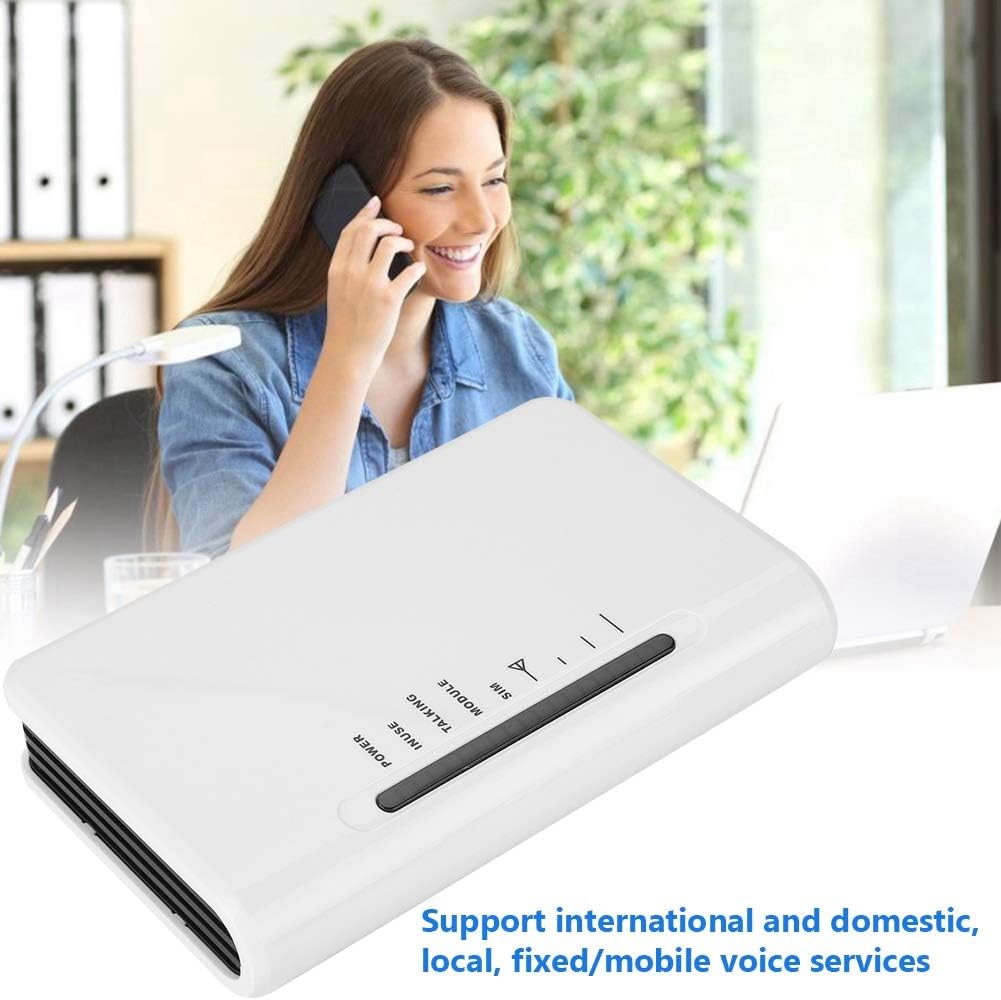
4.1. irudia: LED indicators on the terminal.
This image highlights the LED lights on the top surface of the terminal, which provide visual feedback on the device's status, including signal strength and call activity.
4.2. Deiak egitea
- Pick up the handset of your connected telephone. You should hear a dial tone.
- Markatu nahi duzun telefono zenbakia.
- The call will be routed through the GSM network via your SIM card.
4.3. Deiak jasotzea
- When an incoming call is received, your connected telephone will ring.
- Hartu telefonoa deiari erantzuteko.
4.4. Automatic IP Function
The terminal supports automatic insertion of IP prefixes for long-distance calls (e.g., 17951, 17911, 193). This feature can be configured to automatically add the prefix when dialing long-distance numbers, simplifying the dialing process.
4.5. Local Area Number Settings
You can preset local area numbers, local segments, and forbidden dialing numbers or segments. This allows for customized dialing rules and restrictions based on your preferences or network requirements.
5. Ezaugarri nagusiak
- Instalazio erraza: No need for traditional ground wire lines. Simply insert a GSM mobile phone SIM card to activate voice services.
- Versatile Voice Services: Supports international, domestic, local, fixed, and mobile voice services, maintaining the familiar dialing habits of ordinary telephone landlines.
- Alderantzizko polaritate funtzioa: Equipped with a reverse polarity feature, allowing access to a meter or use with computer metering systems.
- Built-in Watchdog Circuit: Automatically detects the equipment's operating status and performs an automatic restart in case of failure, ensuring continuous operation.
- Komunikazio Estandarra Voltage: Compatible with user switches (PABX) due to its standard communication voltage.
- Automatic IP Function: Offers multiple IP settings and fixed long-distance automatic insertion of calling IP prefixes (e.g., 17951, 17911, 193).
- Customizable Dialing Settings: Allows presetting of local area numbers, local segments, and forbidden dialing numbers or segments for enhanced control.
- Egoeraren Adierazleak: LED lights clearly display information such as signal strength, standby status, and working status.
6. Zehaztapen Teknikoak
| Ezaugarri | Zehaztapena |
|---|---|
| Kolorea | Zuria |
| Deitzailearen IDa | Bai |
| Interfaze formularioa | RJ11 |
| Onartutako Sarea | GSM: 1900/1800/900/850MHz |
| Visual Function | Bat ere ez |
| Aplikazio-esparrua | Access, Security |
| Number Storage Function | Bai |
| Grabaketa Funtzioa | Bat ere ez |
| Sentikortasuna | <-104DBM |
| Potentzia transmititzea | <2W |
| Antena Power | > 1.5 db |
| Elikatze Hornidura | 5V 1A |
| RJ11 Working Voltage | DC 8 ~ 12V |
| RJ11 Standby Voltage | DC 40 ~ 48V |
| RJ11 Dial-up Audio Frequency | 450 HZ |
| RJ11 Feed Current | 20mA ~ 40mA |
| RJ11 Reverse Polarity | Laguntza |
| RJ11 Caller | DTMF |
| Lan-ingurunearen tenperatura | -20 ~ 50 ℃ |
| Hezetasun erlatiboa | % 10 ~ % 90 |
| Elementuaren pisua | 13.4 ontza (gutxi gorabehera 380 g) |
| Produktuaren neurriak (LxWxH) | 0.39 x 0.39 x 0.39 hazbete (gutxi gorabehera 1 x 1 x 1 cm) |
7. Mantentzea
To ensure the longevity and proper functioning of your Fixed Wireless Terminal, follow these maintenance guidelines:
- Garbiketa: Use a soft, dry cloth to clean the exterior of the unit. Do not use liquid cleaners, aerosols, or harsh chemicals, as they may damage the device.
- Ingurumena: Place the terminal in a dry, well-ventilated area, away from direct sunlight, heat sources, and excessive dust. Avoid exposing the device to extreme temperatures or humidity.
- Manipulazioa: Handle the unit with care. Avoid dropping or subjecting it to strong vibrations.
- Itzali erabiltzen ez denean: If the device will not be used for an extended period, it is advisable to power it off and unplug it from the power outlet.
8. Arazoak
If you encounter issues with your Fixed Wireless Terminal, refer to the following common problems and their solutions:
- Markatze-tonurik ez:
- Ensure the terminal is powered on and the POWER LED is lit.
- Check if the telephone line is securely connected to both the terminal and your telephone set.
- Verify that the SIM card is correctly inserted and activated. Reinsert the SIM card if necessary, ensuring it clicks into place.
- Check the signal strength LED indicators. If the signal is weak or absent, try relocating the terminal to an area with better GSM coverage.
- Ezin ditut deiak egin/jaso:
- Confirm that your SIM card has active service and sufficient balance (if prepaid).
- Check the signal strength. Poor signal can prevent calls.
- Ensure the correct phone number is being dialed.
- Restart the terminal by powering it off, waiting a few seconds, and then powering it back on.
- If using a PABX, ensure it is configured correctly for the terminal's communication voltage.
- Poor Call Quality/Intermittent Connection:
- This is often due to weak GSM signal. Try repositioning the terminal or its antenna for better reception.
- Ziurtatu antena ondo konektatuta dagoela.
- Gutxitu beste gailu elektronikoen interferentziak.
- Terminal Not Powering On:
- Verify that the power adapter is correctly plugged into both the terminal and a working electrical outlet.
- Egiaztatu ON/OFF etengailuaren posizioa.
- Saiatu beste entxufe batekin egungoarekin arazorik dagoen baztertzeko.
9. Bermea eta Laguntza
For warranty information or technical support regarding your Sonew Fixed Wireless Terminal, please refer to the documentation provided at the time of purchase or contact Sonew customer service directly. Contact details can typically be found on the product packaging or the official Sonew webgunea.
Ask a question about this manual
Ask about setup, troubleshooting, compatibility, parts, safety, or missing instructions. Manuals+ will review the question and use this page’s manual context to help answer it.