
1. Sarrera
This manual provides instructions for the installation, operation, and maintenance of the Cisco CP-68KEM-3PCC Expansion Module. This module is designed to enhance the functionality of your Cisco IP Phone 6851 by providing additional programmable keys.
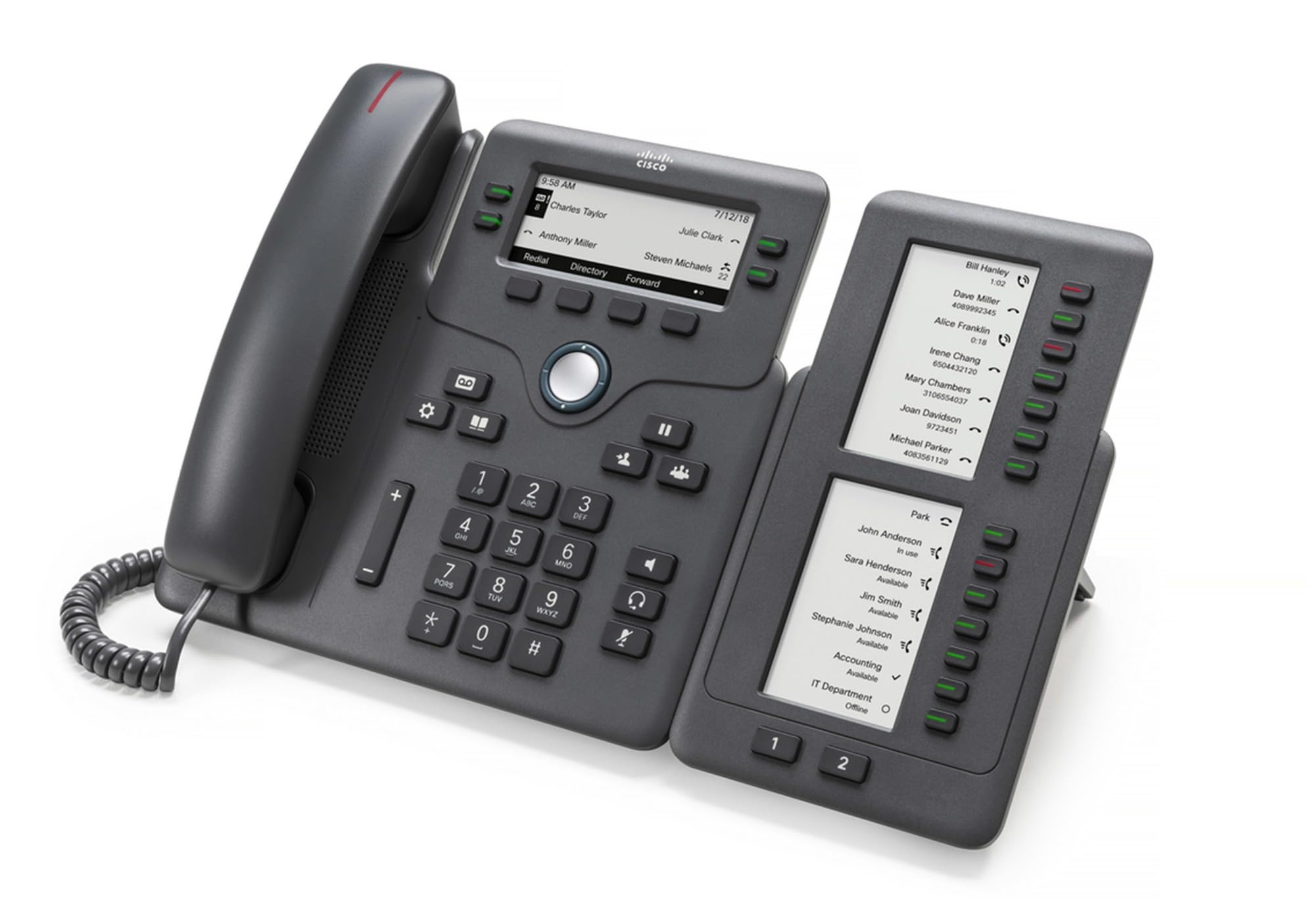
Figure 1: Cisco CP-68KEM-3PCC Expansion Module. This image shows the front view of the expansion module with its grayscale LCD screen and programmable keys.
The Cisco CP-68KEM-3PCC Expansion Module adds 14-line keys and 2-page keys, totaling 28 additional keys, with an easy-to-read grayscale LCD screen. It is ideal for monitoring and managing call status, directory numbers, and speed dial functions.
2. Zer dago kutxan
Kontu handiz deskonprimitu kutxa eta ziurtatu elementu guztiak bertan daudela:
- Cisco CP-68KEM-3PCC Phone Expansion Module
- Connecting Cable (typically included for linking to the phone)
- Dokumentazioa (erabiltzaile eskuliburu hau, segurtasun informazioa)
If any items are missing or damaged, please contact your vendor or Cisco support immediately.
3. Konfiguratzeko argibideak
Follow these steps to connect your Cisco CP-68KEM-3PCC Expansion Module to your Cisco IP Phone 6851.
- Prepare the IP Phone: Ensure your Cisco IP Phone 6851 is powered off and disconnected from the network.
- Connect the Expansion Module: Locate the expansion port on the back or side of your Cisco IP Phone 6851. Connect the provided connecting cable from the expansion module to this port.
- Seguru konexioa: Ziurtatu kablea ondo lotuta dagoela ustekabean deskonektatzea saihesteko.
- Piztu: Reconnect your Cisco IP Phone 6851 to the network and power it on. The expansion module should be detected automatically.
- Egiaztatu funtzionaltasuna: Once the phone has booted, check the expansion module's display and keys to ensure they are responsive.
For detailed visual instructions, refer to the official Cisco documentation or support webgunea.
4. Operating the Expansion Module
The expansion module provides additional keys for various functions, enhancing your call management capabilities.
4.1 tekla programagarriak
The 28 programmable keys (14 keys across 2 pages) can be configured for:
- Directory Numbers (DNs): Assign specific phone lines or extensions.
- Markaketa bizkorra: Program frequently called numbers for quick access.
- Feature Keys: Assign functions like call transfer, conference, or call park.
- Call Status Monitoring: Monitor the status of other lines (e.g., busy, ringing).
4.2 Page Navigation
Use the dedicated page keys (usually located near the display) to switch between the two pages of programmable keys. The grayscale LCD screen will update to show the labels for the currently active page.
4.3 Konfigurazioa
Configuration of the programmable keys is typically managed through your organization's phone system administrator or via the web interface of the Cisco IP Phone 6851. Consult your IT department for specific configuration instructions.
5. Mantentzea
To ensure the longevity and optimal performance of your Cisco CP-68KEM-3PCC Expansion Module, follow these maintenance guidelines:
- Garbiketa: Erabili zapi leun, lehor eta lihorik gabeko bat kanpoko gainazalak garbitzeko. Orban egoskorrak izanez gero, garbitu apur batampGarbitu zapi urarekin. Saihestu produktu kimiko gogorrak, garbitzaile urratzaileak edo disolbatzaileak erabiltzea, hauek akabera eta osagai elektronikoak kaltetu baititzakete.
- Ingurumena: Modulua leku garbi eta lehor batean gorde, eguzki-argitik, bero gehiegitik eta hezetasunetik urrun.
- Manipulazioa: Kontuz ibili modulua maneiatzen. Saihestu erortzea edo kolpe bortitzak jasatea.
- Kableen kudeaketa: Ensure connecting cables are not kinked, pinched, or under strain.
There are no user-serviceable parts inside the expansion module. Do not attempt to open or repair the device yourself.
6. Arazoak
If you encounter issues with your expansion module, try the following troubleshooting steps:
| Arazoa | Kausa posiblea | Irtenbidea |
|---|---|---|
| Telefonoak ez du modulua ezagutzen | Loose cable connection, phone not restarted, incompatible phone model. |
|
| Giltzek ez dute erantzuten | Software glitch, configuration issue. |
|
| Pantaila hutsik dago edo keinuka ari da | Energia arazoa, barne akatsa. |
|
If these steps do not resolve the issue, please contact Cisco technical support or your authorized reseller.
7. Zehaztapenak
| Ezaugarri | Xehetasuna |
|---|---|
| Modelo zenbakia | CP-68KEM-3PCC |
| Marka | Cisco |
| Gailu bateragarriak | Cisco IP Telefonoa 6851 |
| Kolorea | Beltza |
| Materiala | Metala |
| Elementuaren neurriak (LxWxH) | 5.1 x 10.2 x 20.3 cm |
| Energia iturria | Corded (powered via host IP Phone) |
| Gako kopurua | 28 (14 keys across 2 pages) |
| Bistaratzea | Grayscale LCD |
| GTIN/UPC | 889728068383 |
8. Bermearen informazioa
The Cisco CP-68KEM-3PCC Expansion Module comes with a 2 urteko produktuaren bermea from the date of purchase. This warranty covers defects in materials and workmanship under normal use. It does not cover damage caused by misuse, accidents, unauthorized modifications, or external causes.
For warranty claims or detailed terms and conditions, please refer to the official Cisco warranty policy available on their webgunea edo jarri harremanetan zure erosketa-puntua erabiliz.
9. Laguntza
For technical assistance, product information, or to report issues, please contact Cisco support:
- Cisco laguntza Webgunea: Bisitatu ofiziala Cisco laguntza webgunea for documentation, downloads, and contact options.
- Baimendutako birsaltzailea: Contact the reseller from whom you purchased the product.
When contacting support, please have your product model (CP-68KEM-3PCC) and serial number ready.