
1. Sarrera
Eskerrik asko erosketagatik.asing the Infocus 24-inch 720p LED TV, model IM24ED800. This manual provides essential information for setting up, operating, and maintaining your television. Please read this manual thoroughly before using the product and retain it for future reference.
Segurtasun Informazioa
- Ez jarri telebista euri edo hezetasunera.
- Ez blokeatu aireztapen baoak.
- Ziurtatu elikadura-hornidura egokiatage.
- Babestu korronte-kablea ibiltzeko edo atximur ez dadin.
- Jarri zerbitzu-zerbitzu guztiak zerbitzu-pertsonal kualifikatuari.
- Mantendu telebista eguzki-argitik, bero-iturrietatik eta eremu magnetiko indartsuetatik urrun.
2. Paketearen edukia
Mesedez, markatu laukitxoa elementu hauetarako:
- Infocus 24-inch 720p LED TV (IM24ED800)
- Urrutiko agintea (pilekin, baldin badago)
- Elikatze kablea
- Telebista-euskarria (2 pieza)
- Telebista-euskarrirako torlojuak
- Erabiltzailearen eskuliburua (dokumentu hau)
3. Konfigurazioa
3.1 Telebistaren euskarria muntatzea
To attach the stand to your Infocus TV:
- Kontu handiz jarri telebistaren pantaila beherantz gainazal leun eta garbi batean, marradurak saihesteko.
- Lerrokatu euskarri pieza bakoitza telebistaren behealdeko zirrikituekin.
- Lotu euskarri bakoitza emandako torlojuak erabiliz. Ziurtatu ondo estututa daudela.
- Kontu handiz altxatu telebista eta jarri gainazal egonkor eta mailakatu batean.
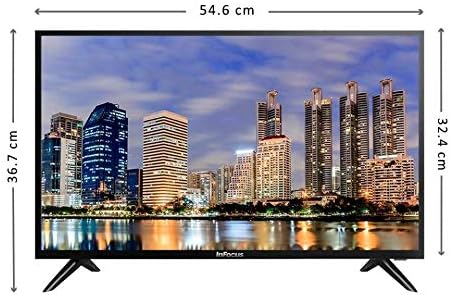
Irudia: Aurrealdea view of the Infocus 24-inch LED TV with dimensions indicated. The TV measures approximately 54.6 cm in width and 36.7 cm in height with the stand.
3.2 Gailuak konektatzea
Your Infocus TV features multiple input ports for connecting external devices.

Irudia: Atzealdea view of the Infocus 24-inch LED TV, highlighting the location of various input ports including HDMI and USB.
- HDMI konexioak: Connect Blu-ray players, game consoles, or cable/satellite boxes to the HDMI ports. The TV has 2 HDMI inputs.
- USB konexioak: Connect USB flash drives for media playback to the USB ports. The TV has 2 USB inputs.
- Antena/Kablea: Connect an antenna or cable TV signal to the RF input (if available, not explicitly listed but standard for TVs).
- Potentzia: Konektatu elikatze-kablea telebistaren elikatze-sarrerara eta gero hormako entxufe batera.
3.3 Hasierako piztea
Beharrezko kable guztiak konektatu ondoren:
- Ensure the power cord is securely plugged into both the TV and a power outlet.
- Sakatu urrutiko agintean edo telebistan bertan pizteko botoia.
- Follow the on-screen instructions for initial setup, which may include language selection, time zone, and channel scanning.
4. Zure telebista funtzionatzea
4.1 Urruneko kontrola baino gehiagoview
The remote control allows you to access all TV functions. While specific button layouts may vary, common functions include:
- Potentzia: Telebista pizten edo itzaltzen du.
- Sarrera/Iturria: Sarrera iturria hautatzen du (HDMI 1, HDMI 2, USB, TV).
- Bolumena igo/behera: Soinu maila doitzen du.
- Kanal gora/behera: Telebistako kateak aldatzen ditu.
- Ezkutatu: Telebistaren audioa isilarazten du.
- Menua: Ezarpenak doitzeko menu nagusia irekitzen du.
- Nabigazio botoiak (Gora/Behera/Ezkerra/Eskuina/Ados): Menuetan nabigatzeko eta aukeraketak berresteko erabiltzen da.
- Irteera/Atzera: Aurreko pantailara itzultzen da edo menutik irteten da.
4.2 Oinarrizko funtzioak
- Sarrera-iturria aldatzea: Sakatu Sarrera or Iturria button on your remote control. Use the navigation buttons to select the desired input (e.g., HDMI 1, USB) and press OK.
- Bolumena doitzea: Erabili Bolumena igo (+) or Bolumena jaitsi (-) botoiak.
- Kanalak aldatzea: Erabili Channel Up (CH+) or Channel Down (CH-) botoiak.
4.3 USB multimedia erreprodukzioa
Multimedia erreproduzitzeko files from a USB flash drive:
- Insert a USB flash drive into one of the TV's USB ports.
- Sakatu Sarrera or Iturria botoia urrutiko agintean eta hautatu USBa.
- The TV's media browser should appear. Navigate through your files (photos, music, videos) using the remote control.
- Hautatu a file eta sakatu OK jolasteko.
5. Mantentzea
5.1 Pantaila garbitzea
- Turn off the TV and unplug the power cord before cleaning.
- Use a soft, lint-free cloth (e.g., microfiber cloth) to gently wipe the screen.
- Marka egoskorretarako, arinki garbituampGarbitu zapi bat urarekin edo pantaila-garbitzaile espezializatu batekin. Ez ihinztatu inoiz garbitzailea zuzenean pantailan.
- Saihestu garbitzaile urratzaileak, alkohola, bentzenoa edo mehetzaileak erabiltzea, hauek pantaila kaltetu baitezakete.
5.2 Arreta orokorra
- Keep the TV in a well-ventilated area.
- Saihestu objektu astunak telebistaren gainean jartzea.
- Deskonektatu telebista tximista-ekaitzetan edo denbora luzez erabili gabe egongo denean.
6. Arazoak
Telebistarekin arazoak badituzu, jo ezazu honako arazo eta irtenbide ohikoenei:
| Arazoa | Kausa posiblea | Irtenbidea |
|---|---|---|
| Botererik ez | Kable elektrikoa ez dago konektatuta; arazoa entxufearekin | Ziurtatu kablea ondo konektatuta dagoela. Probatu entxufea beste gailu batekin. |
| Ez dago irudirik, baina soinua badago | Incorrect input source selected; loose video cable | Sakatu Sarrera/Iturria button to select the correct input. Check video cable connections. |
| Soinurik ez, baina irudia badago | Volume muted or too low; audio cable issue | Sakatu Isildu botoia sakatu edo bolumena igo. Egiaztatu audio kablearen konexioak. |
| Urruneko kontrola ez dabil | Batteries depleted; obstruction; remote sensor blocked | Replace batteries. Remove any obstructions between the remote and TV. Ensure the TV's remote sensor is clear. |
| "Seinalerik ez" mezua | Incorrect input source; device not powered on; cable issue | Verify the correct input source is selected. Ensure the connected device is powered on. Check all cable connections. |
7. Zehaztapenak
The following are the technical specifications for the Infocus 24-inch 720p LED TV model IM24ED800:
| Ezaugarri | Xehetasuna |
|---|---|
| Modelo zenbakia | IM24ED800 |
| Pantailaren tamaina | 24 hazbete (61 cm) |
| Bistaratzeko Teknologia | LED |
| Ebazpena | 1366 x 768 (720p HD) |
| Freskatze tasa | 60 Hz |
| HDMI sarrerak | 2 |
| USB sarrerak | 2 |
| Konektibitatea | HDMI, USB |
| Muntatze Mota | Mahai-postua |
| Paketearen neurriak | 60.8 x 37.8 x 12 cm |
| Paketearen pisua | 5 kg |
8. Bermea eta Laguntza
This Infocus TV is sold as a renewed product, which typically comes with a limited warranty provided by the seller or refurbisher. Please refer to your purchase documentation or contact your retailer for specific warranty terms and conditions.
For technical support or service inquiries, please contact the customer support channel provided by your retailer or the Infocus support webgunea.