
Sarrera
The Xiaomi Mi Home Cam MJSXJ05CM is an indoor wireless surveillance camera designed for home security and monitoring. It features intelligent detection, Full HD 1080p resolution, a 130° ultra-wide-angle lens, and 10m infrared night vision. The camera supports two-way voice communication and offers zoning classification for smart detection. This manual provides essential information for setting up, operating, maintaining, and troubleshooting your device.
Paketearen edukia
Mesedez, egiaztatu elementu guztiak paketean daudela:
- Xiaomi MI Home Camera
- Kargatzeko kablea
- Elikatze-moldagailua
- Erabiltzailearen Gida
- Muntatzeko Hardwarea
Produktua amaituview
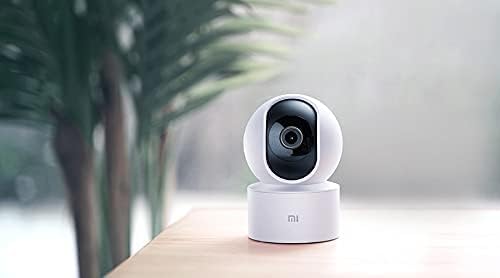
The Xiaomi Mi Home Cam MJSXJ05CM offers a comprehensive view of your indoor space with its 360-degree panoramic rotation and 1080p resolution. It includes an integrated microphone and speaker for two-way dialogue, allowing remote communication. The camera is equipped with advanced person detection and instant alerts.

1. irudia: Aurrealdea view of the Xiaomi Mi Home Cam MJSXJ05CM, showing the camera lens and status indicator light.

2. irudia: Itzuli view of the Xiaomi Mi Home Cam MJSXJ05CM, highlighting the speaker grille and micro-USB power port.
Konfigurazioa
- Piztu: Connect the camera to a power outlet using the provided charging cable and power adapter. The camera will power on automatically.
- Deskargatu Mi Home aplikazioa: Download the Mi Home app from your device's app store. The app is compatible with Android 4.0 and above, and iOS 7.0 and above.
- Kontua sortu/hasi saioa: Open the Mi Home app and create a new account or log in with an existing one.
- Gehitu gailua: In the app, tap the '+' icon to add a new device. Select the Xiaomi Mi Home Cam from the list of available devices.
- Konektatu wifira: Follow the on-screen instructions in the app to connect the camera to your home Wi-Fi network. Ensure your Wi-Fi signal is strong in the camera's intended location.
- Parekatzea: The app will guide you through the pairing process, which may involve scanning a QR code displayed on your phone with the camera.
- Lekua: Place the camera on a flat surface or mount it using the provided hardware. Ensure it has a clear field of view.
3. irudia: A smartphone displaying the live video feed from the Mi Home Cam, demonstrating remote monitoring capabilities.
Funtzionamendu-argibideak
- Zuzenean View: Open the Mi Home app and select your camera to view zuzeneko jarioa.
- Pan/Tilt kontrola: Use the controls within the app to remotely rotate the camera horizontally (pan) and vertically (tilt) to achieve a 360-degree panoramic view.
- Bi norabideko audioa: Tap the microphone icon in the app to speak through the camera's speaker, and listen to audio from the camera's microphone.
- Gaueko ikuspegia: The camera automatically switches to infrared night vision in low-light conditions, providing clear black and white images up to 10 meters.
- Mugimendu-detekzioa eta alertak: Enable motion detection in the app settings. You will receive instant alerts on your smartphone when motion is detected. You can configure detection zones and sensitivity.
- Grabaketa eta biltegiratzea: The camera supports local storage via a microSD card (up to 128GB, not included). Recordings can also be accessed and managed through the Mi Home app.

4. irudia: A smartphone displaying a list of motion detection alerts and recorded events from the Mi Home Cam.
Mantentzea
- Garbiketa: Garbitu kameraren lentea eta gorputza oihal leun eta lehor batekin. Ez erabili garbitzaile likidorik edo material urratzailerik.
- Software eguneraketak: Regularly check the Mi Home app for firmware updates. Keeping your camera's software up-to-date ensures optimal performance and security.
- Potentzia-zikloa: Kamerak arazoak baditu, saiatu korronte-iturritik deskonektatzen segundo batzuetan eta gero berriro konektatzen.
Arazoak konpontzea
- Kamera ez da Wi-Fi-ra konektatzen:
- Ensure your Wi-Fi network is 2.4GHz (5GHz is not supported by all models). Check that the Wi-Fi signal strength is adequate at the camera's location. Try restarting your router. Some users have reported success by temporarily disabling 'Dark Mode' on their smartphone during the setup process if encountering network issues.
- Camera frequently disconnects:
- This often indicates a weak Wi-Fi signal. Try moving the camera closer to your Wi-Fi router or using a Wi-Fi extender. Ensure there are no major obstructions between the camera and the router.
- No image or black screen:
- Check the power connection. Restart the camera by unplugging and replugging it. Ensure the lens is clean and unobstructed.
- Kamera berrezartzea:
- Locate the reset button (often a small pinhole on the back or bottom of the camera, visible in Figure 2). Use a pin or paperclip to press and hold the reset button for approximately 5-10 seconds until the indicator light changes or you hear a voice prompt. This will restore factory settings.
Zehaztapenak
| Marka | XIAOMI |
| Ereduaren izena | MJSXJ05CM |
| Konektibitate Teknologia | Haririk gabekoa |
| Ezaugarri Berezia | HD bereizmena, gaueko ikusmena |
| Barruan/Kanpoan erabilera | Barruan |
| Gailu bateragarriak | Ordenagailua, Smartphonea, Tableta |
| Energia iturria | AC potentzia |
| Kontrol-metodoa | Remote Control (via app) |
| Bideo Ebazpen eraginkorra | 1080p |
| Viewangelua | 360 gradu |
| Zoom optikoa | 3x |
| Installed Flash Memory Size | 128 GB (MicroSD card slot) |
| Elementuaren neurriak (L x W x H) | 25.4 x 25.4 x 25.4 cm |
| Elementuaren pisua | 99.99 grams (3.53 Ounces) |
| Gaueko Ikusmena | Color Night Vision (Infrared) |
| Alerta mota | Mugimendua bakarrik |
| Kolorea | Zuria |
Bermearen informazioa
The Xiaomi Mi Home Cam MJSXJ05CM comes with a manufacturer's warranty of 1 year. Please retain your proof of purchase for warranty claims. For specific terms and conditions, refer to the warranty card included in your product packaging or visit the official Xiaomi webgunea.
Laguntza
For further assistance, technical support, or to report issues not covered in this manual, please visit the official Xiaomi support website or contact their customer service. You can usually find contact information on the Xiaomi website or in the Mi Home app's 'Help & Feedback' section.