
1. Sarrera
Eskerrik asko erosketagatik.asing the Myra TouYinGer X20 LED Projector. This manual provides essential information for setting up, operating, and maintaining your projector. Please read it thoroughly before use to ensure proper operation and to extend the lifespan of your device.
2. Segurtasun informazioa
- Use the projector in a dark and cool environment for optimal performance and extended product life.
- Avoid using the projector in dusty or humid conditions.
- Ez blokeatu proiektorearen aireztapen-zuloak.
- Ez begiratu zuzenean proiektorearen lenteari l dagoenean.amp piztuta dago.
- This projector is not recommended for office presentations or educational use.
- Ensure the power supply matches the projector's requirements (AC110V~240V 50Hz/60Hz).
3. Paketearen edukia
Kontu handiz deskonprimitu kutxa eta ziurtatu behean zerrendatutako elementu guztiak daudela eta egoera onean daudela. Elementuren bat falta bada edo hondatuta badago, jarri harremanetan bezeroarentzako arreta-zerbitzuarekin.
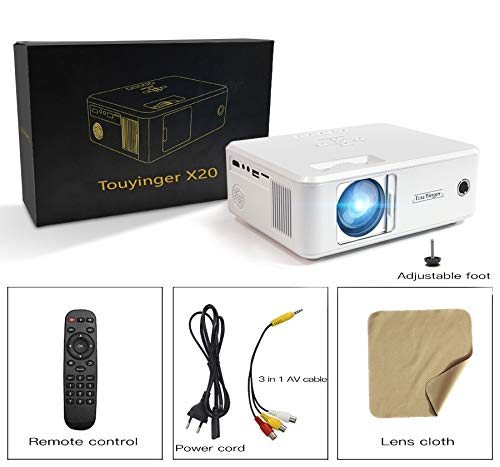
Image: The Myra TouYinGer X20 Projector shown with its packaging box and included accessories: remote control, power cord, 3-in-1 AV cable, and a lens cleaning cloth.
- Myra TouYinGer X20 LED Projector
- Urruneko Kontrola
- Elikatze kablea
- 3-en-1 AV kablea
- Lenteak garbitzeko zapia
- Erabiltzailearen eskuliburua (dokumentu hau)
4. Produktua amaitu daview
4.1 Dimentsioak eta osagaiak
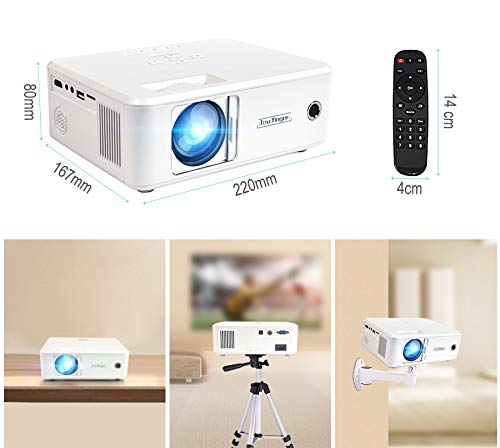
Irudia: Goian view of the Myra TouYinGer X20 Projector showing its dimensions (220mm length, 167mm width, 80mm height). Also shown are the remote control dimensions (14cm length, 4cm width) and examples of projector placement: tabletop, tripod mount, and wall mount.
The projector features a compact design with various ports for connectivity. Key components include the lens, focus ring, keystone correction, input ports (HDMI, USB, VGA, AV, SD card slot), and power input.
4.2 Interfazeak
- HDMI: For connecting to devices like laptops, gaming consoles, and Blu-ray players.
- USBa: USB flash unitateak konektatzeko multimedia erreproduzitzeko files. (Note: Supports Pendrive only, not hard disks or phones).
- VGA: Ordenagailuetara konektatzeko.
- OF: For connecting to older devices using the included 3-in-1 AV cable.
- SD txartelaren zirrikitua: Multimedia erreproduzitzeko filezuzenean SD txarteletik.
- 3.5 mm-ko audio ataka: Kanpoko bozgorailuak edo entzungailuak konektatzeko.
5. Konfigurazioa
5.1 Jartzea
Position the projector on a stable, flat surface or mount it using a compatible tripod or ceiling mount. Ensure there is adequate ventilation around the projector. The projection distance ranges from 1.2 to 3.8 meters, yielding a screen size of 37 to 130 inches. For best results, use in a dark environment.
5.2 Energia-konexioa
- Konektatu elikatze-kablea proiektorearen elikatze-sarrerara.
- Plug the other end of the power cord into a suitable electrical outlet (AC110V~240V, 50Hz/60Hz).
- Proiektorearen pizte-adierazlearen argia piztuko da.
5.3 Sarrera iturriak konektatzea
Connect your desired media source (e.g., laptop, USB drive, DVD player) to the corresponding port on the projector.
- HDMI: Connect an HDMI cable from your device to the projector's HDMI port.
- USB/SD: Sartu USB flash unitate bat edo SD txartel bat dagokion zirrikituan.
- VGA: Konektatu VGA kable bat ordenagailutik proiektorearen VGA atakara.
- OF: Use the provided 3-in-1 AV cable to connect to devices with RCA outputs.
5.4 Fokua eta Keystone doikuntza
- Fokua: Biratu proiektorearen lentearen fokatze-eraztuna proiektorearen irudia garbi eta zorrotz egon arte.
- Keystone zuzenketa: Use the keystone adjustment dial (±12 vertical) to correct trapezoidal distortion if the projector is not perfectly perpendicular to the screen.
6. Funtzionamendu-argibideak
6.1 Piztu/Itzali
- Piztu: Press the power button on the projector or the remote control. The LED lamp piztuko da.
- Itzali: Press the power button again. Allow the projector to cool down before unplugging it.
6.2 Iturria hautatzea
Use the 'Source' button on the remote control or projector to cycle through available input sources (HDMI, USB, VGA, AV, SD).
6.3 Media Playback (USB/SD)
When a USB drive or SD card is inserted, navigate the on-screen menu using the remote control to select the desired media type (Video, Music, Photo, Text) and then browse for your files.
- Onartutako audio formatuak: MP3, WMA, AAC
- Onartutako bideo formatuak: MPEG1, MPEG2, MPEG4, H264, RM, RMVB, MOV, MJPEG, VC1, DIVX, FLV (Note: AC3 audio is not supported).
- Onartutako irudi formatuak: JPEG, BMP, PNG
6.4 3D funtzionalitatea
The projector supports Red & Blue 3D format. To view 3D content, you will need compatible Red & Blue 3D glasses (not included).
7. Mantentzea
7.1 Lenteen garbiketa
Use the provided lens cleaning cloth or a soft, lint-free cloth to gently wipe the projector lens. Avoid using abrasive cleaners or excessive force.
7.2 Hautsaren aurkako babesa
The projector features an embedded lens cover for better lens and dust protection. Always replace the lens cover when the projector is not in use. Regularly clean the projector's exterior with a soft, dry cloth.
7.3 lamp Bizitza
LED lamp has an estimated lifespan of 20,000 hours. Proper ventilation and operating conditions will help maximize lamp bizitza.
8. Arazoak
Zure proiektorearekin arazoak badituzu, jo ezazu honako arazo eta irtenbide ohikoenei:
| Arazoa | Kausa posiblea | Irtenbidea |
|---|---|---|
| Ez dago irudirik pantailan | Incorrect input source selected; Loose cable connection; Power issue | Select the correct input source; Check all cable connections; Ensure projector is powered on. |
| Irudia lausoa da | Focus not adjusted; Projector too far/close to screen | Adjust the focus ring; Adjust projection distance. |
| Irudia trapezoidala da | Proiektorea ez dago pantailarekiko perpendikularra | Adjust keystone correction dial. |
| Soinurik ez | Volume too low; Audio format not supported; External speakers not connected | Increase volume; Check if audio format is supported (AC3 not supported); Connect external speakers if needed. |
| USB drive not recognized | Unsupported device; Corrupted files | Ensure it's a USB Pendrive (hard disks/phones not supported); Check file system and integrity. |
9. Zehaztapenak
| Ezaugarri | Zehaztapena |
|---|---|
| Eredua | X20 |
| Bistaratzeko Teknologia | TFT-LCD panel bakarra + LED Teknologia |
| Berezko Ebazpena | 800 x 600 dpi (Supports 720p, 1080p) |
| Distira | 2200 lumen |
| Kontraste-erlazioa | 1500:1 |
| Lamp Mota | LED Lamp |
| Lamp Bizitza | 20,000 ordu |
| Bistaratzeko Koloreak | 16.7K |
| Lentea | F=126 mm (Manual focusing) |
| Keystone zuzenketa | ±12° Vertical (Manual) |
| Proiekzio pantailaren tamaina | 37-130 zentimetro |
| Proiekzio Distantzia | 1.2-3.8 metro |
| Aspektu-erlazioa | 16:9 Native, 4:3 Compatible |
| Multimedia interfazea | 1*VGA, 1*USB, 1*SD, 1*HDMI, 1*3.5mm Audio port, 1*AV, 1*TV |
| Elikatze Hornidura | AC110V~240V 50Hz/60Hz |
| Neurriak | 212 mm x 150 mm x 78 mm |
| Pisua | 1.5 kg |
| Ezaugarri bereziak | Portable, Red & Blue 3D Support |
10. Bermea eta Laguntza
The Myra TouYinGer X20 LED Projector comes with a 1 Urteko Bermea erosketa-datatik aurrera.
For warranty claims, technical support, or any inquiries, please contact Myra customer service:
- Telefonoa: 8955589977
- Posta elektronikoa: myrakhmshop@gmail.com
Please have your product model (X20) and purchase details ready when contacting support.