
LocknCharge 10237
LocknCharge Joey 30 Safe, Secure, Charging Cart User Manual
Eredua: 10237
Sarrera
The LocknCharge Joey 30 Charging Cart is designed for safe, secure, and efficient charging and storage of up to 30 devices, including most tablets, Chromebooks, and laptops. Its innovative design prioritizes ease of use, accessibility, and device protection, making it an ideal solution for educational and professional environments.
Ezaugarri nagusiak
- Baskets by LocknCharge: Includes removable baskets for faster, safer, and more efficient device deployment and collection.
- Top-Loading Design: Features fold-away doors that provide unrestricted access to devices, simplifying loading and unloading.
- Tool Box Design: A new tool box design stores power bricks in a removable tray, offering ultra-easy access to bricks, cords, and cables for organized management.
- Bateragarritasun zabala: Compatible with a wide range of tablets, Chromebooks, and laptops.
- External Charging Status Display: Equipped with an external display to easily monitor the charging status of your devices at a glance.
Konfigurazioa
Kutxatik ateratzea eta hasierako kokapena
Upon receiving your Joey 30 Cart, carefully remove it from its packaging. Ensure all components are present. Position the cart on a flat, stable surface near a power outlet. The cart comes pre-assembled with four wheels for easy maneuverability.

Image: The LocknCharge Joey 30 Charging Cart, a grey mobile cart with black handles and wheels, designed for storing and charging multiple devices.
Loading Devices and Cable Management
The Joey 30 features a top-loading design with fold-away doors for easy access. Utilize the included Baskets by LocknCharge to organize and deploy devices. Place each device into a slot within the baskets. The removable tool box tray provides convenient access for managing power bricks and cables.
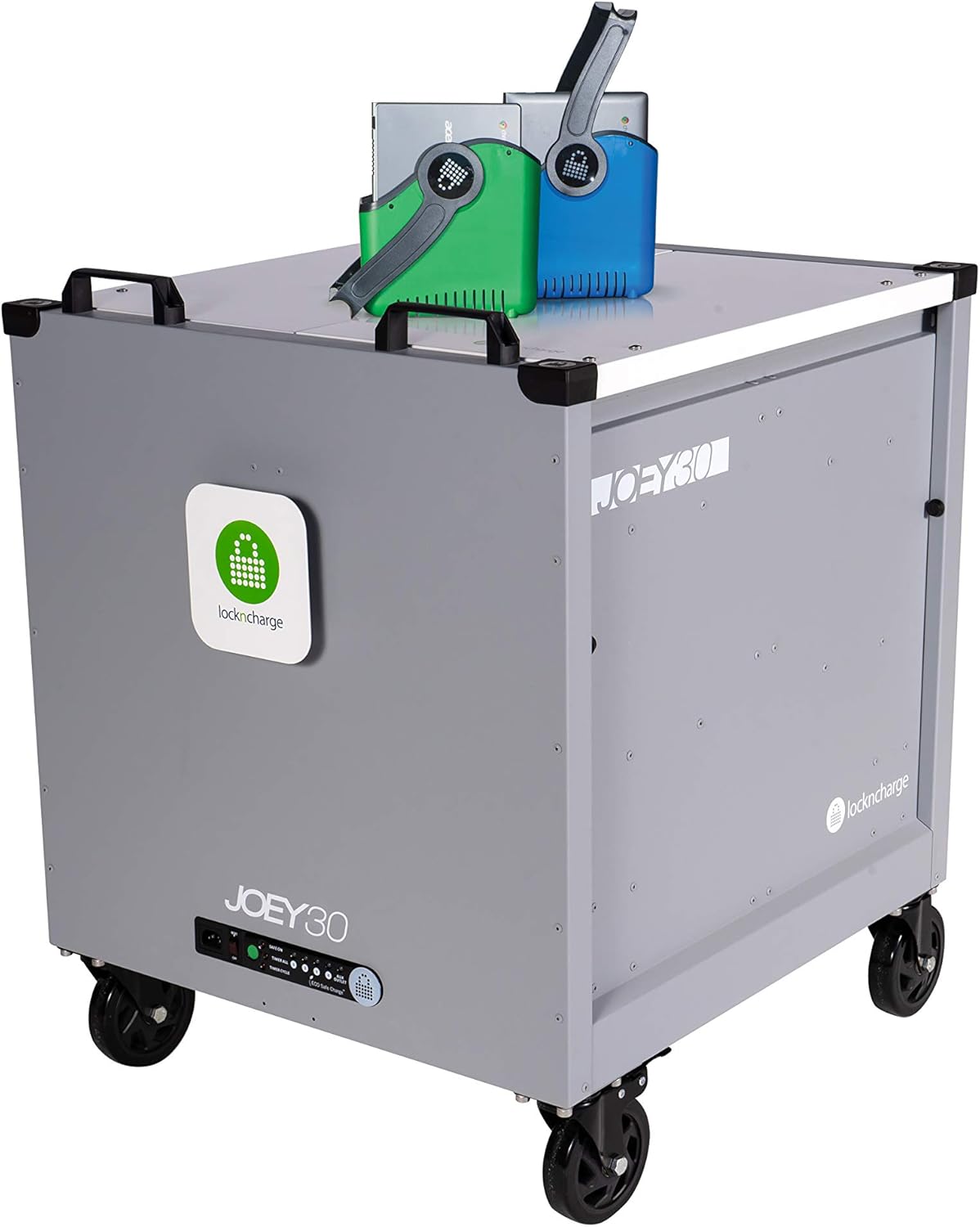
Image: The Joey 30 Cart with its top open, showing colorful baskets and devices neatly arranged inside, ready for charging.

Irudia: Goiko planoa view looking into the Joey 30 Cart, revealing rows of laptops and tablets stored vertically in the charging slots.

Image: A close-up shot inside the Joey 30 Cart, showing the organized cable management system and devices plugged in for charging.

Irudia: Beste barrualde bat view of the Joey 30 Cart, highlighting the colorful baskets and the efficient use of space for multiple devices.
Potentziara konektatzen
Once devices are loaded and cables are connected internally, plug the main power cord of the Joey 30 Cart into a standard wall outlet. The cart's intelligent charging system will begin to distribute power to the connected devices.

Irudia: Xehetasun zehatza view of the Joey 30 Cart's external power input and control panel, showing various indicator lights and power switch.
Konfigurazio erakustaldi bideoa
Video: An official LocknCharge video demonstrating the setup and use of the Joey 30 and 40 Carts, including loading devices and securing the cart.
Operating the Cart
Kargatzeko gailuak
Once the cart is plugged in and devices are connected, the intelligent charging system will automatically manage power delivery to optimize charging times and protect device batteries. The external charging status display provides visual feedback on the charging progress.
Segurtasun Ezaugarriak
The Joey 30 Cart is designed with security in mind. After loading devices, close the top lid and secure it using a padlock (not included) through the designated locking points. This helps protect your valuable equipment from theft.
Mantentzea
- Garbiketa: Regularly wipe down the exterior surfaces of the cart with a soft, damp oihal. Saihestu garbitzaile edo disolbatzaile urratzaileak.
- Kableen kudeaketa: Periodically check and re-organize internal cables to prevent tangles and ensure proper airflow. Utilize the cable management features provided within the cart.
- Gurpilen ikuskapena: Inspect the casters periodically for any debris or wear. Clean as necessary to ensure smooth movement.
Arazoak konpontzea
- Gailuak ez kargatzen:
- Ensure the cart's main power cord is securely plugged into a live wall outlet.
- Verify that the power switch on the cart's control panel is in the 'ON' position.
- Check that each device's power adapter is correctly plugged into the cart's internal outlets and into the device itself.
- Confirm that the external charging status display indicates power flow.
- Cart Not Moving Smoothly:
- Inspect the wheels for any obstructions like tangled hair or debris.
- Ensure the wheel brakes are disengaged before attempting to move the cart.
- Estalkia ez da behar bezala ixten:
- Check for any devices or cables obstructing the lid's closing path.
- Ensure devices are placed correctly within their slots and not protruding.
Zehaztapenak
| Atributua | Xehetasuna |
|---|---|
| Marka | LocknCharge |
| Modelo zenbakia | 10237 |
| Produktuaren neurriak | 28 x 25.5 x 32.6 hazbete |
| Elementuaren pisua | 90 kilo |
| Onartutako gailu kopurua | 30 |
| Muntaia Beharrezkoa | Ez |
| Caster mota | Birakaria |
| Ezaugarri Berezia | Ken daitezkeen saskiak |
Bermea eta Laguntza
For detailed warranty information and technical support, please refer to the official LocknCharge webwebgunera edo jarri harremanetan bezeroarentzako arreta-zerbitzuarekin. Gorde erosketa-agiria erosketaren frogagiri gisa, berme-erreklamazioetarako.
LocknCharge Customer Support: Visit LocknCharge Support Page
Ask a question about this manual
Ask about setup, troubleshooting, compatibility, parts, safety, or missing instructions. Manuals+ will review the question and use this page’s manual context to help answer it.