
1. Segurtasun-argibideak
Please read these safety instructions carefully before using the Bonsaii L409-A laminator to ensure safe and proper operation. Keep this manual for future reference.
- Do not laminate empty film pouches.
- Always insert the closed end of the film pouch into the machine first.
- Insert the film pouch straight and horizontally.
- Ensure the document is centered within the film pouch, leaving a margin on all four sides.
- Do not connect multiple film pouches together.
- Do not cut the film pouch before lamination.
- Do not use deformed film pouches.
- Do not laminate two film pouches simultaneously.
- Erabili ondoren, itzali beti etengailua.
- Allow the machine to rest for 30 minutes after 2 hours of continuous use to prevent overheating.
- Keep out of reach of children. Adult supervision is recommended if children are present during operation.

Image: Safety warnings illustrating common mistakes such as laminating empty pouches, inserting film incorrectly, or using damaged pouches.
2. Konfigurazioa
Follow these steps to set up your Bonsaii L409-A laminator:
- Despaketatzea: Carefully remove the laminator from its packaging. Ensure all packing materials are removed.
- Lekua: Place the laminator on a stable, flat surface with adequate ventilation. Ensure there is enough space around the machine for proper air circulation and for documents to pass through.
- Potentzia-konexioa: Entxufatu korronte-kablea entxufe elektriko estandar batean.
- Piztu: Locate the main power switch (usually on the side or back) and switch it to the "ON" position.

Image: Close-up of the laminator showing the power switch in the "ON" position and the "Ready" lamp.
- Beroketa: Boterea lamp will illuminate (often red) to indicate the machine is warming up. The warm-up time is approximately 3 minutes and 30 seconds at a room temperature of 25°C. Wait until the "Ready" lamp illuminates (often green) before proceeding with lamination.
3. Funtzionamendua
Once the laminator is set up and warmed up, follow these steps to laminate your documents:
- Dokumentua prestatu: Place your document inside a laminating pouch. Ensure the document is centered and there is an even margin of film around all edges. The Bonsaii L409-A supports A4 size and smaller, including business cards and card-sized materials.
- Txertatu poltsa: With the "Ready" lamp illuminated, carefully insert the closed end of the laminating pouch into the laminator's entry slot. Insert it straight and horizontally.
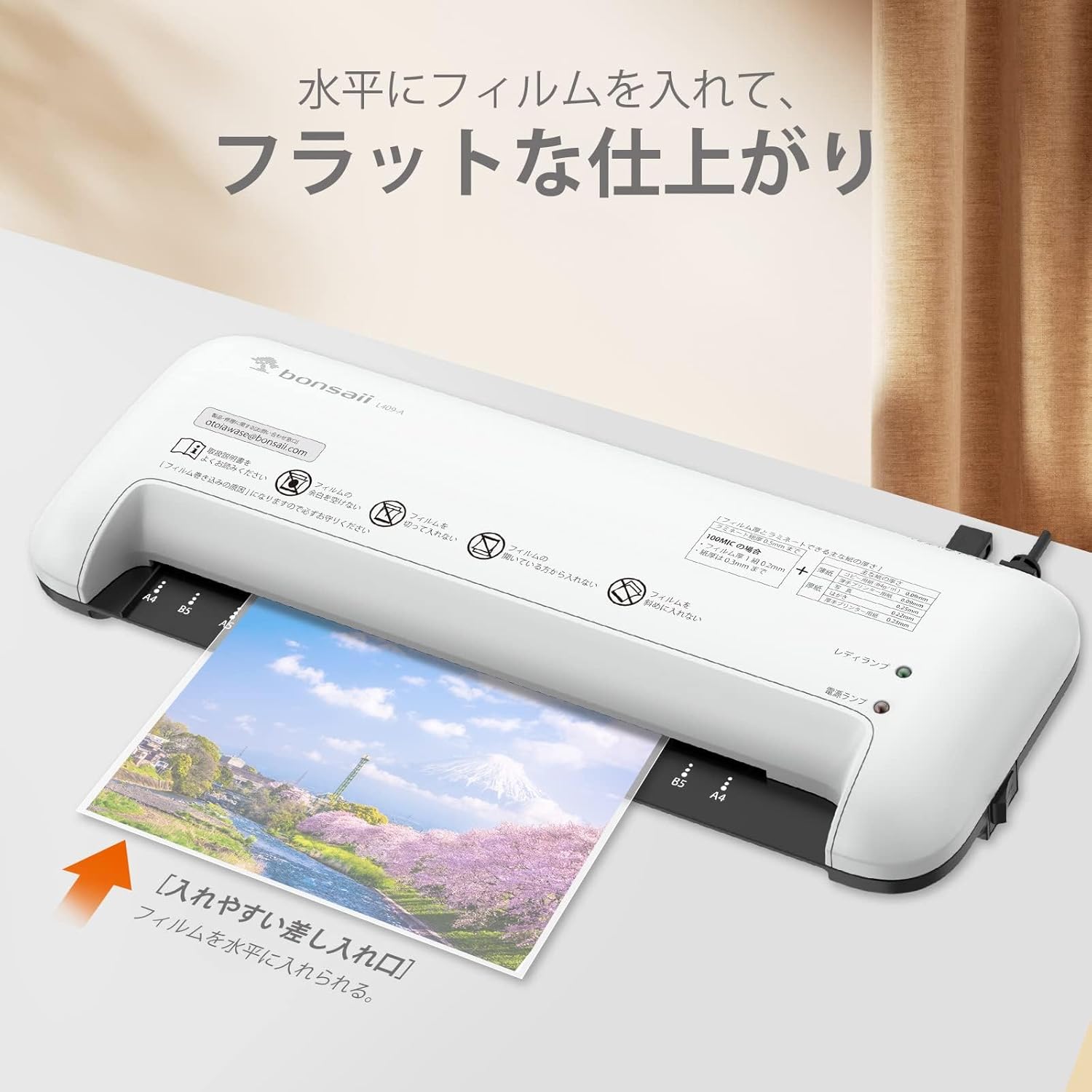
Image: A document being inserted into the laminator's entry slot, demonstrating correct horizontal insertion.
- Laminazio prozesua: The machine will automatically feed the pouch through. Do not pull or push the pouch during lamination. The lamination speed is approximately 400mm per minute.
- Berreskuratu dokumentu laminatua: Once the pouch exits the machine, the lamination process is complete. Allow the laminated document to cool on a flat surface for a few moments to ensure optimal results.
- Itzali: After completing your lamination tasks, switch the main power button to the "OFF" position and unplug the machine from the power outlet.
Stopping Lamination / Jam Release
If you need to stop lamination midway or if a film pouch gets jammed, press the "Laminate Stop Button" (often a lever or button on the side/back). While holding this button, gently pull the film pouch out of the machine.

Image: A hand pressing the laminate stop button to release a jammed film pouch.
4. Mantentzea
Proper maintenance ensures the longevity and optimal performance of your laminator:
- Garbiketa: Ziurtatu laminatze-makina deskonektatuta dagoela eta guztiz hozten dela garbitu aurretik. Garbitu kanpoaldea zapi leun eta lehor batekin. Ez erabili garbitzaile edo disolbatzaile urratzailerik.
- Arrabolen garbiketa: Periodically run a laminator cleaning sheet (not included) through the machine to remove any adhesive residue from the rollers.
- Biltegiratzea: Store the laminator in a dry, dust-free environment when not in use. Its compact design (approx. W360 x D147 x H58mm) allows for easy storage.

Image: The compact Bonsaii L409-A laminator stored neatly on a shelf, highlighting its small footprint.
- Hozte-aldia: After approximately 2 hours of continuous operation, allow the laminator to rest for at least 30 minutes to prevent overheating and extend its lifespan.
5. Arazoak
Atal honek aurki ditzakezun arazo ohikoenak jorratzen ditu:
| Arazoa | Kausa posiblea | Irtenbidea |
|---|---|---|
| Laminagailua ez da pizten. | No power, power switch off. | Check power cord connection. Ensure power switch is "ON". |
| "Ready" lamp ez da pizten. | Still warming up, machine malfunction. | Wait for approximately 3 minutes 30 seconds. If it still doesn't light up, contact support. |
| Film pouch jams. | Incorrect insertion, deformed pouch, multiple pouches. | Press the "Laminate Stop Button" and gently pull out the pouch. Ensure correct insertion and use proper pouches. |
| Lamination has bubbles or waves. | Incorrect film thickness, uneven insertion, old film. | Ensure film is 100μm. Insert pouch straight. Use fresh, high-quality film. |
| Laminated document is cloudy. | Rollers are dirty. | Clean the rollers using a laminator cleaning sheet. |
6. Zehaztapenak
- Eredua: L409-A
- Marka: Bonsaiak
- Beroketa-denbora: Approximately 3 minutes 30 seconds (at 25°C room temperature)
- Compatible Film Thickness: 100μm
- Maximum Lamination Thickness: 0.5mm (total of film and paper)
- Maximum Lamination Width: Approximately 240mm (A4 compatible)
- Laminazio abiadura: Approximately 400mm/minute (50/60Hz)
- Arrabol kopurua: 2
- Neurriak (W x D x H): Gutxi gorabehera 360 mm x 147 mm x 58 mm
- Elikatze-iturria: AC 100V, 50/60Hz (PSE certified)
- Continuous Use Recommendation: 2 hours continuous use, then 30 minutes rest.
- GTIN (UPC): 765756170024
7. Bermea eta Laguntza
The Bonsaii L409-A laminator comes with a 1 urteko bermea from the date of purchase. If any malfunction occurs during the warranty period, please contact our customer support.
Bezeroarentzako Arreta
Bonsaii offers reliable customer support with Japanese language assistance and domestic repair services. For inquiries or issues, please contact our dedicated staff.
- Laguntza-harremana: Refer to the contact information provided in your product packaging or on the official Bonsaii webgunea.
- Konponketa Zerbitzua: In case of a defect, our domestic service center will promptly handle repairs or replacements.

Image: A customer support representative wearing a headset, symbolizing available assistance.