
1. Bukatu daview
The Apple iPad Mini (2019) is a compact and powerful tablet designed for portability and performance. It features a 7.9-inch Retina Display with True Tone technology, providing vibrant colors and comfortable viewing. Powered by the A12 Bionic chip, it offers fast and efficient performance for various tasks, from browsing to gaming.
Ezaugarri nagusiak hauek dira:
- 7.9-inch Retina Display with True Tone and wide Color
- A12 Bionic chip with Neural Engine
- Touch ID fingerprint sensor for secure authentication
- 8MP back camera and 7MP FaceTime HD front camera
- Stereo speakers for immersive audio
- 802.11ac Wi-Fi connectivity
- Gehienez 10 orduko bateriaren iraupena
- Lightning connector for charging and accessories
- Support for Apple Pencil (1st Generation)
- iPadOS 14 for enhanced tablet experience

Image 1.1: The Apple iPad Mini (2019) in Space Gray, showcasinbere diseinu trinkoa eta pantaila g.
2. Zer dago kutxan
Upon opening your iPad Mini package, ensure all the following items are present:
- iPad mini (2019)
- Lightning USB kablera
- USB Power egokitzailea
3. Konfigurazioa
3.1. Hasierako karga
Before first use, it is recommended to fully charge your iPad Mini. Connect the Lightning to USB Cable to the iPad's Lightning port and the USB Power Adapter, then plug the adapter into a power outlet.
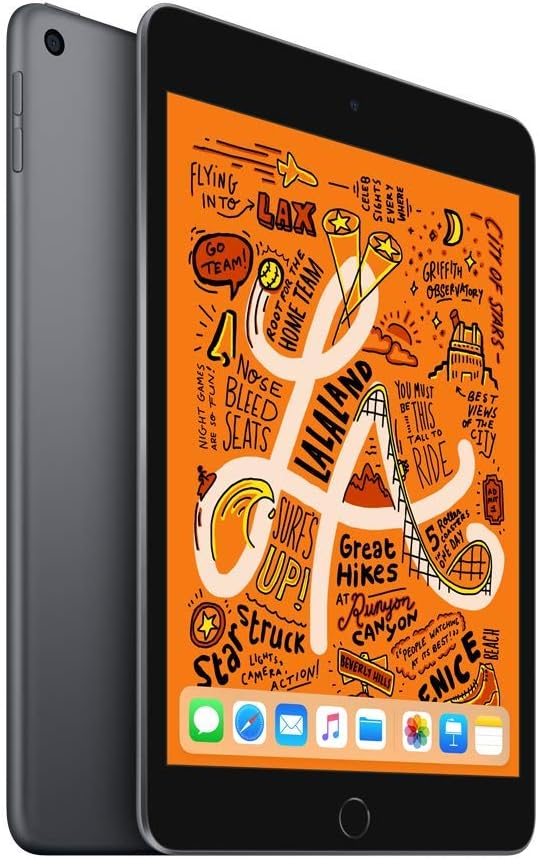
3.1. irudia: Aurrealdea view of the iPad Mini, ready for initial setup.
3.2. Piztea eta oinarrizko konfigurazioa
- Eduki sakatuta Goiko botoia Appleren logotipoa agertu arte.
- Jarraitu pantailako argibideei zure hizkuntza eta eskualdea hautatzeko.
- Konektatu Wi-Fi sare batera.
- Konfiguratu Ukitu ID by following the prompts to register your fingerprint.
- Create a passcode.
- Restore from an iCloud or computer backup, or set up as a new iPad.
- Hasi saioa zure Apple IDarekin edo sortu berri bat.
- Enable or disable location services, Siri, and other features as desired.
4. Operating Your iPad Mini
4.1. Oinarrizko nabigazioa
- Hasierako botoia: Sakatu behin hasierako pantailara itzultzeko. Sakatu bi aldiz aplikazioen aldatzailea irekitzeko. Sakatu eta eutsi Siri aktibatzeko.
- Keinuak: Swipe down from the top-right corner for Control Center. Swipe down from the middle of the screen for Search. Swipe up from the bottom to go home (if using gestures instead of Home button).

Image 4.1: The iPad Mini display showing a vibrant interface.
4.2. Wi-Fira konektatzen
- Joan zaitez Ezarpenak > Wi-Fi.
- Aktibatu Wi-Fi.
- Hautatu nahi duzun sarea zerrendatik.
- Eskatzen bazaizu, idatzi pasahitza eta, ondoren, sakatu Sartu.
4.3. Kamera erabiliz
Ireki Kamera app from the Home screen. Tap the shutter button to take a photo. Swipe left or right to switch between photo, video, panorama, and other modes. Tap the camera icon to switch between the front and back cameras.
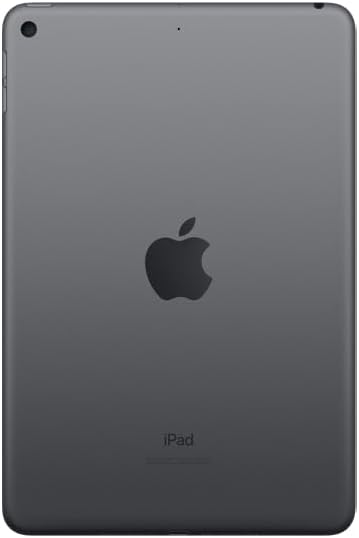
4.2. irudia: Atzekoa view of the iPad Mini, highlighting the back camera.
4.4. Apple Pencil (1st Generation)
The iPad Mini (2019) supports the first-generation Apple Pencil. To pair, remove the cap from your Apple Pencil and plug it into the Lightning connector on your iPad. Tap Bikoteka when the Bluetooth Pairing Request appears. Once paired, you can use it for drawing, note-taking, and more.
5. Mantentzea
5.1. Cleaning Your iPad Mini
To clean your iPad Mini, use a soft, lint-free cloth. Avoid abrasive cloths, towels, paper towels, or similar items that could scratch the screen. Do not use aerosol sprays, solvents, or abrasives. Unplug all cables and power off the device before cleaning.
5.2. Software eguneraketak
Keep your iPad Mini's software up to date to ensure optimal performance and security. Go to Ezarpenak > Orokorra > Software eguneratzea. If an update is available, follow the on-screen instructions to download and install it.
5.3. Bateria zaintzea
To maximize battery lifespan, avoid exposing your iPad to extreme temperatures. For long-term storage, charge the device to about 50% and power it off. Recharge it to 50% every six months.
5.4. Biltegiratze kudeaketa
To check and manage your storage, go to Ezarpenak > Orokorra > iPad biltegiratzea. You can offload unused apps, delete large files, or move photos and videos to iCloud to free up space.
6. Arazoak
6.1. Gailuak ez du erantzuten
If your iPad Mini is unresponsive, try a force restart:
- Eduki sakatuta biak Goiko botoia eta du Hasierako botoia aldi berean.
- Continue holding until you see the Apple logo.
- Release both buttons and allow the iPad to restart.
6.2. Wi-Fi konexio arazoak
If you are experiencing Wi-Fi connectivity problems:
- Ziurtatu Wi-Fia gaituta dagoela Ezarpenak > Wi-Fi.
- Berrabiarazi zure Wi-Fi bideratzailea.
- Ahaztu sarea eta konektatu berriro: Joan honera Ezarpenak > Wi-Fi, sakatu informazioaren ikonoa next to your network, then tap Ahaztu Sare hau. Sarera itzuli.
- Sarearen ezarpenak berrezarri: Joan honera Ezarpenak > Orokorra > iPada transferitu edo berrezarri > Berrezarri > Berrezarri sareko ezarpenakHonek sareko ezarpen guztiak berrezarriko ditu, Wi-Fi pasahitzak barne.
6.3. Aplikazioa kraskatzea edo izoztea
Aplikazio batek behar bezala funtzionatzen ez badu:
- Force quit the app: Double-press the Home button to open the App Switcher, then swipe up on the app's preview to close it. Reopen the app.
- Update the app: Check the App Store for updates to the problematic app.
- Reinstall the app: Delete the app from your iPad and then download it again from the App Store.
7. Zehaztapenak
| Ereduaren izena | iPad mini |
| Elementuaren eredu-zenbakia | MUQW2LL/A |
| Bistaratzea | 7.9-inch Retina display with True Tone |
| Bistaratzeko ebazpena | 2048 x 1536 pixel |
| Txipa | A12 Bionic chip with Neural Engine |
| Biltegiratze Ahalmena | 64 GB |
| Atzeko kamera | 8MP with HDR and 1080p HD video |
| Aurrealdeko kamera | 7MP FaceTime HD with Auto HDR |
| Bateriaren iraupena | Up to 10 hours (Wi-Fi browsing) |
| Konektorea | Tximista |
| Neurriak (H x W x D) | 8 x 5.3 x 0.24 hazbete (203.2 x 134.8 x 6.1 mm) |
| Pisua | 0.66 pound (300.5 grams) Wi-Fi model |
| Argitaratze data | 18ko martxoaren 2019a |
8. Bermea eta Laguntza
8.1. Bermearen informazioa
Your Apple iPad Mini (2019) is covered by Apple's standard limited warranty, which typically covers manufacturing defects for one year from the original purchase date. For detailed warranty terms and conditions, please refer to the official Apple warranty documentation included with your product or visit the Apple webgunea.
8.2. Bezeroarentzako arreta
For further assistance, technical support, or service, please visit the official Apple Support webgunea:
You can find articles, troubleshooting guides, and contact options for Apple support specialists on their webgunea.