
Sarrera
The Rapoo 1680 Silent Wireless Mouse offers a comfortable and quiet computing experience. Featuring a reliable 2.4GHz wireless connection, 1000 DPI optical tracking, and a silent click design, it is suitable for various environments, including offices and libraries. Its ergonomic and ambidextrous design ensures comfortable use for extended periods, and a long battery life provides convenience.

Image: The Rapoo 1680 Silent Wireless Mouse, showcasing its sleek, ambidextrous design in white.
Kutxan dagoena
Mesedez, egiaztatu elementu guztiak paketean daudela:
- 1 x Wireless Mouse (Rapoo 1680)
- 1 x USB hargailua
- 1 x AA bateria
- 1 x Argibide eskuliburua

Image: The underside of the Rapoo 1680 mouse with the battery compartment open, showing the included AA battery and the USB nano receiver.
Konfigurazio Argibideak
- Sartu bateria: Open the battery compartment located on the underside of the mouse. Insert the provided AA battery, ensuring correct polarity. Close the compartment securely.
- Sartu USB hargailua: Locate the USB nano receiver, typically stored within the battery compartment or packaged separately. Plug the USB receiver into an available USB port on your computer (PC, laptop, or tablet).
- Piztu sagua: Slide the ON/OFF switch on the bottom of the mouse to the "ON" position. The mouse should now be powered on and ready for use.
- Konexio automatikoa: The mouse is designed for plug-and-play functionality. Your computer should automatically detect and connect to the mouse within a few seconds. No additional drivers are typically required.
The Rapoo 1680 mouse is compatible with various operating systems, including Windows, Mac OS, Linux, and Chrome OS.
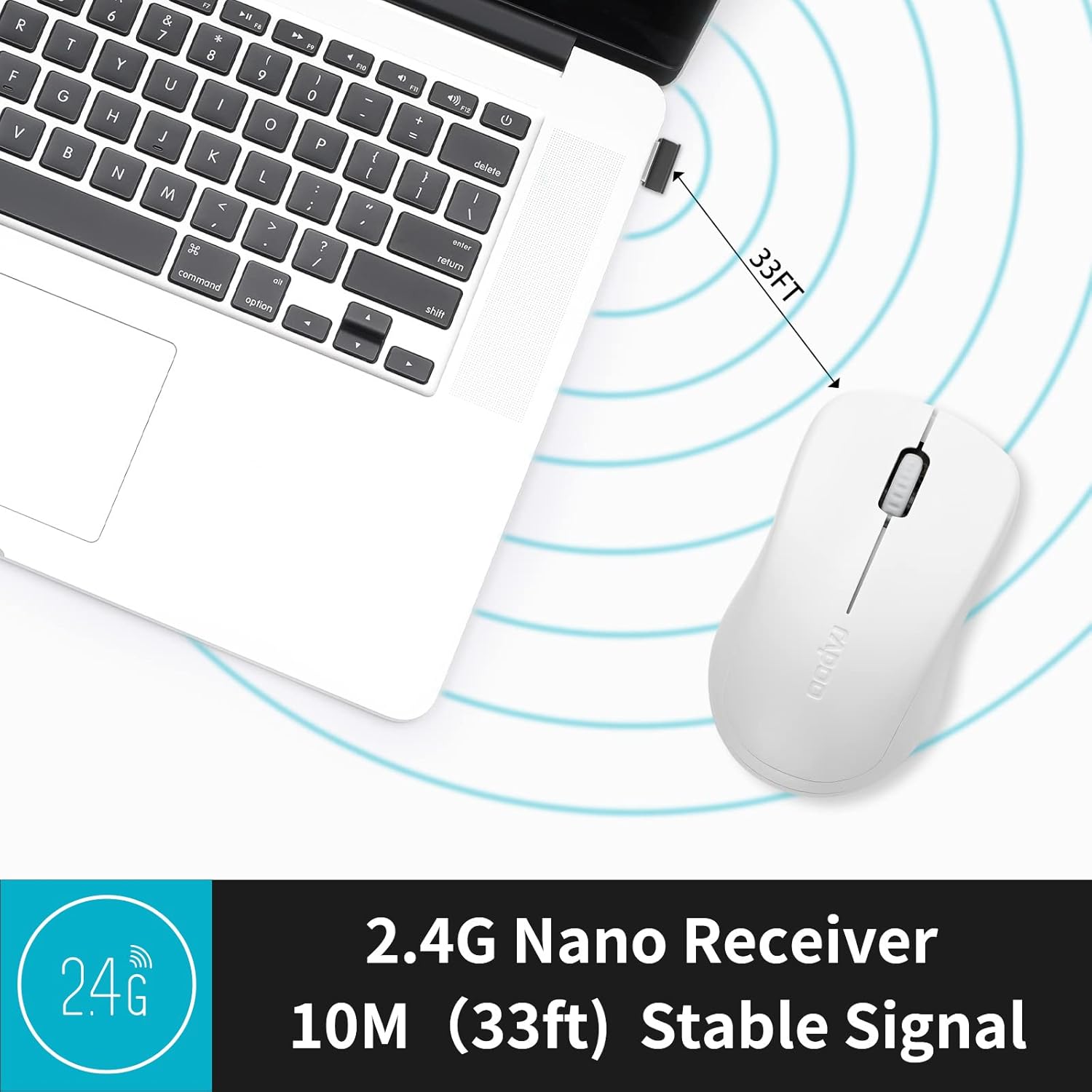
Image: A close-up of the 2.4G Nano Receiver plugged into a laptop, demonstrating the 10-meter (33ft) stable wireless signal range.

Image: The Rapoo 1680 mouse highlighting its wide compatibility with Windows, Mac OS, Linux, and Chrome operating systems.
Funtzionamendu-argibideak
The Rapoo 1680 mouse features a standard 3-button layout for intuitive control.
- Ezkerreko klik: Elementuak hautatzeko, irekitzeko botoia nagusia files, eta softwarearekin elkarreraginean.
- Egin klik eskuineko botoiarekin: Bigarren mailako botoia testuinguru-menuetara eta aukera gehigarrietara sartzeko.
- Korritzeko gurpila: Dokumentuetan zehar nabigatzeko erabiltzen da eta web orrialdeak. Gurpilak erdiko klik egiteko botoia ere balio du.
Klik isilaren diseinua: This mouse is engineered to reduce click sounds by up to 90%, providing a quiet environment without compromising the tactile click feel. This feature is particularly beneficial in quiet settings such as libraries or shared workspaces.
1000 DPI Optical Tracking: The high-definition 1000 DPI optical tracking engine ensures responsive and smooth cursor control on most surfaces.

Image: The Rapoo 1680 mouse demonstrating its silent click feature, ideal for quiet environments.

Image: A user operating the Rapoo 1680 mouse in a library, emphasizing its quiet operation for undisturbed work.
Mantentzea
- Bateria ordezkatzea: When the mouse performance degrades or stops responding, it may be time to replace the AA battery. Open the battery compartment, remove the old battery, and insert a new AA battery with the correct polarity.
- Garbiketa: Erabili zapi leun eta lehor bat saguaren kanpoaldea garbitzeko. Sentsore optikorako, erabili kotoi-zapi bat arinki garbituta.ampened with rubbing alcohol, ensuring no liquid enters the mouse's internal components.
- Biltegiratzea: When not in use for an extended period, slide the ON/OFF switch to the "OFF" position to conserve battery life. The USB receiver can be stored inside the mouse's battery compartment for safekeeping.
Arazoak konpontzea
- Saguak ez du erantzuten:
- Ensure the mouse is switched "ON" using the ON/OFF switch on the bottom.
- Check if the AA battery is correctly inserted and has sufficient charge. Replace if necessary.
- Egiaztatu USB hargailua ondo konektatuta dagoela ordenagailuko USB ataka funtzional batean. Saiatu beste USB ataka batekin.
- Kurtsorearen mugimendu irregularra:
- Garbitu saguaren beheko aldean dagoen sentsore optikoa.
- Ziurtatu sagua gainazal egoki batean erabiltzen ari zarela. Saihestu gainazal oso islatzaileak edo gardenak.
- Konexio-arazoak:
- Remove and re-insert the USB receiver.
- Move the mouse closer to the USB receiver to rule out range issues (maximum 10 meters).
Zehaztapenak
| Ezaugarri | Xehetasuna |
|---|---|
| Marka | Rapoo |
| Ereduaren izena | 1680 |
| Konektibitate Teknologia | USB (2.4GHz Wireless) |
| Mugimenduak detektatzeko teknologia | Optikoa |
| Mouse Maximum Sensitivity | 1000 DPI |
| Botoi kopurua | 3 |
| Eskuen Orientazioa | Anbidistroa |
| Energia iturria | Bateriaz elikatua (AA bateria 1 barne) |
| Bateriaren batez besteko bizitza | Gehienez 12 hilabete |
| Wireless Range | 10 metro (33 oin) |
| Elementuaren pisua | 58 gramo |
| Elementuaren neurriak (L x W) | 4.33 cm-ko luzera x 2.56 cm-ko zabalera |
| Gailu bateragarriak | Ordenagailu pertsonala |
| Sistema eragilea | Windows, Mac OS, Linux, Chrome OS |
| Itxituraren Materiala | Plastikoa |
| Amaitu | Matea |

Image: Detailed dimensions of the Rapoo 1680 mouse, showing its length and width.
Produktuaren bideo ofiziala
Video: An official product video from RAPOO showcasing the features and benefits of the Rapoo 1680 Silent Wireless Mouse, including its silent clicks, ergonomic design, and ease of use.
Bermea eta Laguntza
The Rapoo 1680 Silent Wireless Mouse comes with a 1 urteko bermea from the date of purchase. This warranty covers manufacturing defects and ensures reliable performance under normal use conditions.
For technical support, warranty claims, or any product-related inquiries, please contact Rapoo customer service. Refer to the Rapoo official webgunean edo produktuaren ontzian kontsultatu harremanetarako informazio eguneratuena lortzeko.
RAPOO is committed to providing high-performance and high-quality peripheral products. If you have any questions or require assistance, please do not hesitate to reach out to their support team.