
1. Sarrera
This manual provides comprehensive instructions for the setup, operation, maintenance, and troubleshooting of your Canyon CNS-SW71SS Smartwatch. Please read this manual carefully before using your device to ensure proper function and longevity.
The Canyon CNS-SW71SS Smartwatch is designed to help you monitor your fitness activities and stay connected. It features a 1.22-inch color screen, multi-sport modes, heart rate monitoring, sleep tracking, and notification alerts. Its IP68 water resistance makes it suitable for various environments.
2. Produktua amaitu daview
2.1 Ezaugarri nagusiak
- 1.22-inch color touch screen display.
- Multi-sport mode for tracking various activities.
- Daily activity monitoring: calories, steps, heart rate, and sleep.
- Notifications for incoming calls, SMS, emails, calendar events, and social media.
- Music control and remote camera function.
- Smart alarm and weather data display.
- Gehienez 7 eguneko bateria.
- IP68 water resistance (submersible up to 1 meter for 30 minutes).
- Bluetooth 4.0 konexioa.
- Compatible with iOS and Android operating systems.
- Comes with two interchangeable wristbands: metal and TPU.
2.2 Osagaiak
The Canyon CNS-SW71SS Smartwatch consists of the main watch unit, interchangeable wristbands, and a charging cable.

1. irudia: Aurrealdea view of the Canyon CNS-SW71SS Smartwatch, showing the display with steps, distance, calories, and heart rate data.

2. irudia: Angeludun view of the Canyon CNS-SW71SS Smartwatch, featuring a silver metal mesh strap and a round display.
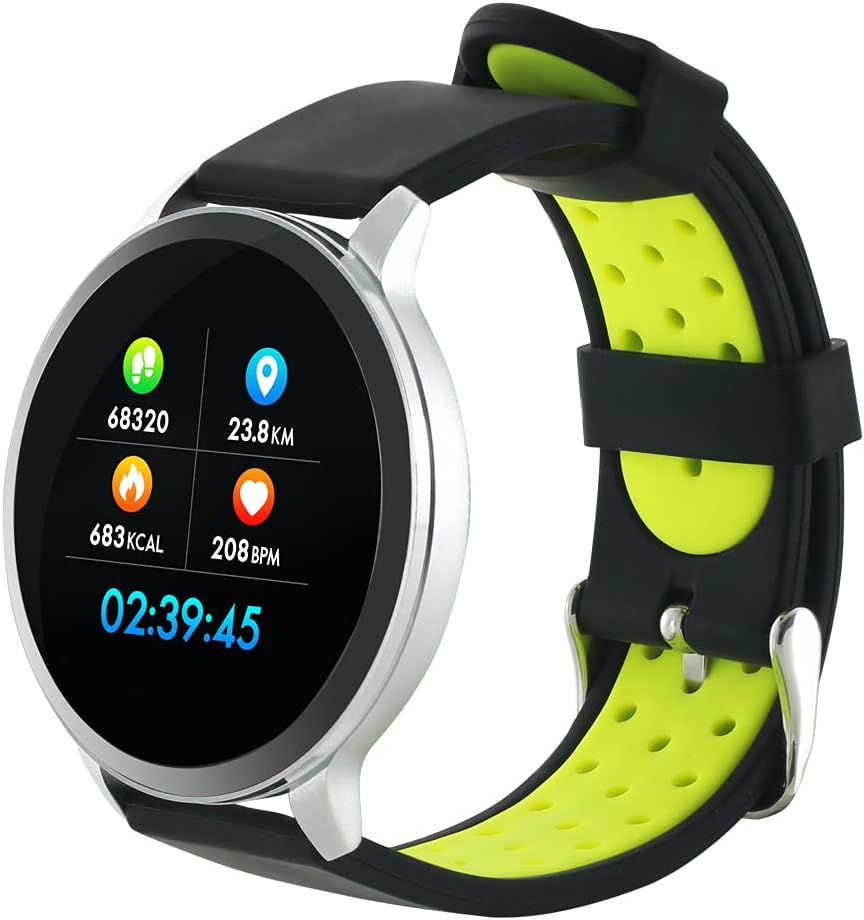
Figure 3: The Canyon CNS-SW71SS Smartwatch shown with an alternative black and lime green TPU strap, highlighting its interchangeable design.

4. Irudia: Atzealdea view of the Canyon CNS-SW71SS Smartwatch, displaying the optical heart rate sensor and magnetic charging contacts.

Figure 5: The retail packaging for the Canyon CNS-SW71SS Smartwatch, illustrating key features and the included two straps.
3. Konfigurazioa
3.1 Erloju adimenduna kargatzea
- Konektatu kargatzeko kablea USB egokitzaile batera (ez dago barne) edo ordenagailuaren USB atakara.
- Align the magnetic charging pins of the cable with the charging contacts on the back of the smartwatch. The watch will vibrate and display a charging icon.
- Allow approximately 2-3 hours for a full charge. A full charge provides up to 7 days of usage.
3.2 Installing the Canyon Fit Application
- Scan the QR code provided in the packaging or search for "Canyon Fit" in your smartphone's app store (Google Play Store for Android, Apple App Store for iOS).
- Deskargatu eta instalatu aplikazioa.
- Open the Canyon Fit app and follow the on-screen instructions to create an account and set up your profile.
3.3 Zure telefonoarekin parekatzea
- Ziurtatu zure erloju adimenduna kargatuta eta piztuta dagoela.
- Gaitu Bluetootha zure telefonoan.
- Open the Canyon Fit application.
- Navigate to the device pairing section within the app (usually found under 'Device' or 'Profile').
- Select your smartwatch (e.g., "CNS-SW71SS") from the list of available devices.
- Eskatzen bazaizu, berretsi parekatze eskaera zure telefonoan eta erloju adimendunean.
3.4 Attaching/Changing Wristbands
The smartwatch comes with two wristbands (metal and TPU) that can be interchanged. To attach or change a wristband, locate the quick-release pins on the underside of the strap. Slide the pin to detach the current strap and then align and slide the pin of the new strap into the corresponding holes on the watch body until it clicks into place.
4. Funtzionamendu-argibideak
4.1 Oinarrizko nabigazioa
- Ukipen-pantaila: Swipe left/right to navigate through different functions and menus. Swipe up/down to view jakinarazpenak edo ezarpen azkarrak.
- Alboko botoia: Press the side button to return to the main watch face or to wake up the screen. A long press may access power options or specific features depending on the context.
4.2 Fitness Jarraipena
- Kirol anitzeko modua: Access the 'Workout' or 'Sport' menu on your watch. Select your desired activity (e.g., running, cycling, walking) to start tracking. The watch will record duration, distance, calories burned, and heart rate.
- Eguneroko jarduera: The watch automatically tracks your steps, distance, and calories burned throughout the day. View these statistics on the watch face or in the Canyon Fit app.
- Bihotz taupadaren jarraipena: The watch continuously monitors your heart rate. You can also manually initiate a heart rate measurement from the heart rate interface.
- Loaren jarraipena: Wear the smartwatch to bed, and it will automatically track your sleep patterns, including deep sleep, light sleep, and wake times. View detailed sleep analysis in the Canyon Fit app.
4.3 Jakinarazpenak
Once paired with your smartphone and with notification permissions granted in the Canyon Fit app, your smartwatch will display alerts for:
- Sarrerako deiak
- SMS mezuak
- Posta elektronikoak
- Egutegiko Gertaerak
- Social Media Apps (e.g., WhatsApp, Facebook, InstagRAM)
Irristatu gora erlojuaren aurpegian view recent notifications. You can dismiss notifications from the watch.
4.4 Funtzio osagarriak
- Musika kontrola: While music is playing on your phone, you can use the watch to play/pause, skip tracks, and adjust volume.
- Urruneko kamera: Open the camera function in the Canyon Fit app. Use your smartwatch as a remote shutter button to take photos on your phone.
- Alarma adimenduna: Set alarms through the Canyon Fit app. The watch will vibrate to wake you up gently.
- Eguraldiaren datuak: Once connected to your phone, the watch will display current weather conditions and forecasts for your location.
5. Mantentzea
5.1 Garbiketa
- Garbitu erlojuaren pantaila eta gorputza oihal leun batekin,amp oihal.
- For the metal strap, use a soft brush to gently clean any debris. For the TPU strap, wash with mild soap and water.
- Kargatu aurretik, ziurtatu kargatzeko kontaktuak garbi eta lehor daudela.
- Ez erabili produktu kimiko gogorrak edo material urratzaileak garbitzeko.
5.2 Urarekiko erresistentzia (IP68)
The Canyon CNS-SW71SS Smartwatch is IP68 rated, meaning it is resistant to dust and can be immersed in water up to 1 meter deep for a maximum of 30 minutes. While it can withstand splashes, rain, and brief immersion, it is not recommended for hot showers, saunas, or diving, as steam and high water pressure can compromise the seals.
- Do not press any buttons while the watch is submerged.
- Lehortu ondo erlojua urarekin kontaktuan egon ondoren.
5.3 Bateria zaintzea
- Saihestu bateria maiz erabat deskargatzea.
- Kargatu gailua aldizka, erabiltzen ez bada ere, bateriaren osasuna mantentzeko.
- Gorde erlojua leku fresko eta lehor batean denbora luzez erabiltzen ez duzunean.
6. Arazoak
- Erlojua ez da pizten: Ziurtatu erlojua guztiz kargatuta dagoela. Konektatu kargagailura gutxienez 30 minutuz.
- Ezin da telefonoarekin parekatu:
- Ziurtatu Bluetooth telefonoan gaituta dagoela.
- Ensure the Canyon Fit app has necessary permissions.
- Berrabiarazi telefonoa eta erloju adimenduna.
- Saiatu gailua aplikazioaren bidez desparekatzen eta berriro parekatzen.
- Ez dira agertzen jakinarazpenak:
- Check notification settings in the Canyon Fit app and your phone's system settings.
- Ziurtatu erlojua Bluetooth bidez konektatuta dagoela.
- Inaccurate heart rate/activity data:
- Ziurtatu erlojua eskumuturrean ondo eramaten duzula, ez gehiegi estutzen ez gehiegi soltetzen.
- Garbitu erlojuaren atzealdeko sentsorea.
- Environmental factors or certain movements can affect accuracy.
- Pantailak ez du erantzuten: Try restarting the smartwatch by holding down the side button. If unresponsive, allow the battery to fully drain and then recharge.
7. Zehaztapenak
| Ereduaren izena | CNS-SW71SS |
| Marka | ARROKA |
| Bistaratzeko tamaina | 1.22 hazbetekoa |
| Sistema eragileen bateragarritasuna | Android, iOS |
| Konektibitate Teknologia | Bluetooth 4.0 |
| Uraren Erresistentzia Balorazioa | IP68 |
| Ezaugarri bereziak | Wireless Charging (implied by product data), Multi-Sport Mode, Heart Rate Monitor, Sleep Tracker, Notifications |
| Gailu bateragarriak | Smartphone |
| Bateria | Rechargeable (1 included) |
| Kolore Aukerak | Black, Lime Green, Silver |
8. Bermea eta Laguntza
For warranty information and technical support, please refer to the documentation included with your purchase or visit the official Canyon website. You can also contact Canyon customer service for assistance with product issues or inquiries.
Lineako laguntza: https://canyon.eu/support/ (Adibample link, please verify official support page)